Введение
Thank you for choosing the Minoston MT10W WiFi Timer Switch. This smart countdown timer switch allows you to control lights, fans, and heaters with preset countdown times and remote access via a smartphone application. It integrates seamlessly with Amazon Alexa and Google Assistant for voice control. This manual provides detailed instructions for installation, operation, and maintenance to ensure optimal performance and safety.

Изображение: Спереди view of the Minoston MT10W WiFi Timer Switch and its retail packaging, highlighting key features and certifications.
Важная информация по безопасности
- РИСК ПОЖАРА, ПОРАЖЕНИЯ ЭЛЕКТРИЧЕСКИМ ТОКОМ ИЛИ ТРАВМЫ.
- Это устройство предназначено для установки в соответствии с Национальными правилами по эксплуатации электрооборудования и местными нормативами.
- Если вы не уверены в каком-либо пункте этих инструкций, обратитесь к квалифицированному электрику.
- Always turn off power at the circuit breaker or fuse box before installation or servicing.
- NEUTRAL WIRE REQUIRED. Ensure your electrical box has a neutral wire.
- Do not use with dimmable fixtures or 3-way switches.
- Рабочая температура: от 32°F до 104°F (от 0°C до 40°C).
- Только для использования внутри помещений.
Содержимое упаковки
- Minoston MT10W WiFi Timer Switch
- Руководство по эксплуатации
- Крепежные винты
- Проволочные гайки
Технические характеристики
| Номер модели | MT10W |
| Власть | 120VAC, 60Hz |
| Нагрузка на лампу накаливания | 960W (1200W Tungsten) |
| Нагрузка двигателя | 1 / 2 HP |
| Резистивная нагрузка | 1800 Вт |
| Частота Wi-Fi | 2.4ГГц |
| Рабочая температура | 32 ° F ~ 104 ° F (0 ° C ~ 40 ° C) |
| Влажность | 95% относительной влажности, без конденсации |
| Сертификаты | ЭТЛ, ФКС |
| Размеры | 4.5 x 3 x 10.49 см (1.77 x 1.18 x 4.13 дюймов) |

Image: Diagram showing the physical dimensions of the Minoston MT10W WiFi Timer Switch, including depth reduction for easier installation.
Руководство по установке
Схема электропроводки
The Minoston MT10W requires a neutral wire for proper operation. Please follow the diagram below carefully.
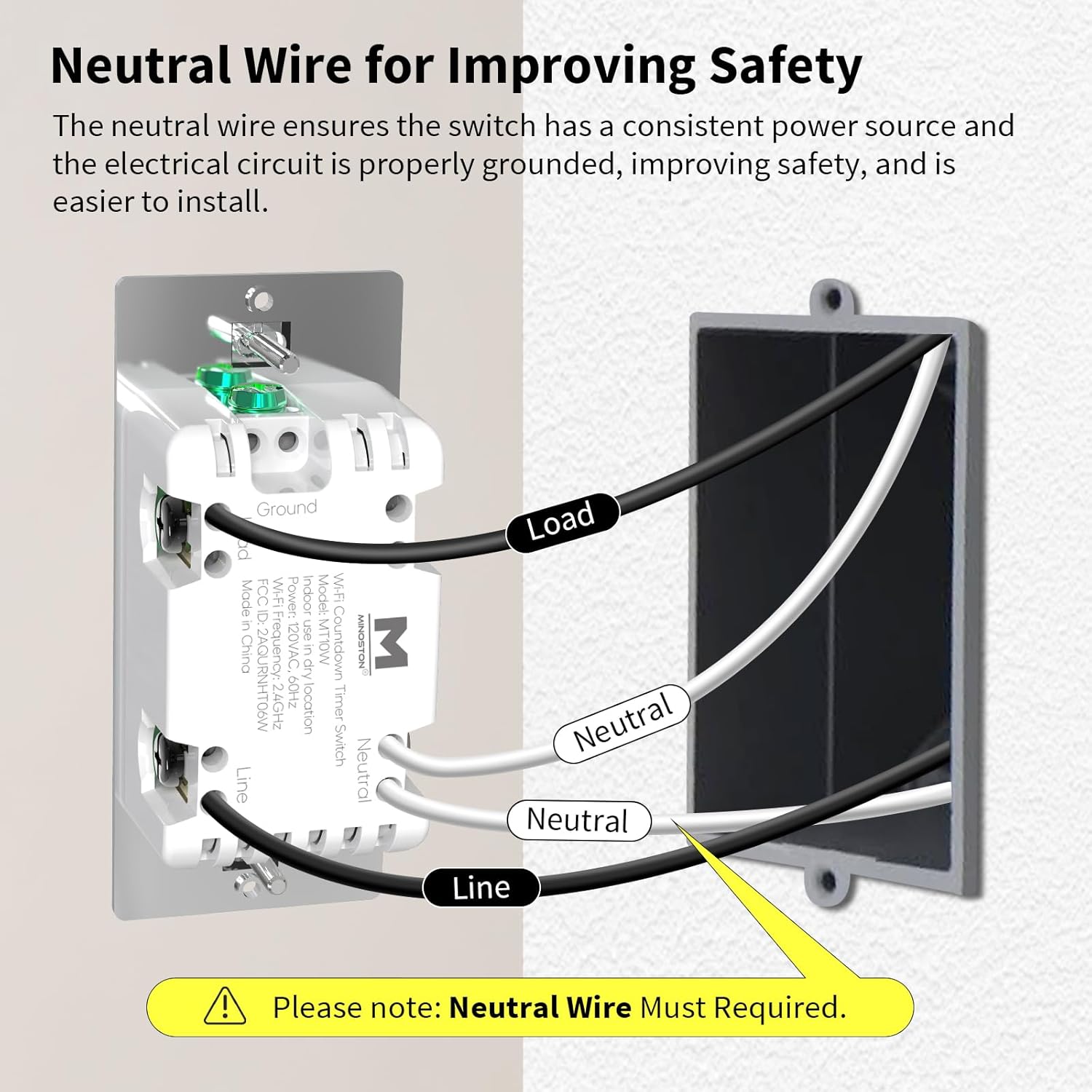
Image: Detailed wiring diagram for the Minoston MT10W WiFi Timer Switch, showing connections for Line, Load, Neutral, and Ground wires. A note emphasizes the requirement for a neutral wire.
Этапы установки
- Отключить питание: Before beginning, turn off the power to the switch location at the circuit breaker or fuse box.
- Remove old switch: Аккуратно снимите имеющуюся настенную панель и выключатель с электрической коробки.
- Определите провода: Identify the Line (hot), Load, Neutral, and Ground wires. A neutral wire is typically white. If you do not have a neutral wire, this switch is not compatible.
- Подключите провода:
- Connect the Line wire from the wall box to the Line terminal on the MT10W switch.
- Connect the Load wire from the wall box to the Load terminal on the MT10W switch.
- Connect the Neutral wire from the wall box to the Neutral terminal on the MT10W switch.
- Connect the Ground wire from the wall box to the Ground terminal on the MT10W switch.
- Переключатель крепления: Аккуратно вставьте проводной выключатель в монтажную коробку. Закрепите его прилагаемыми винтами.
- Установите настенную панель: Прикрепите новую или существующую настенную панель.
- Восстановите электроснабжение: Снова включите питание с помощью автоматического выключателя.
Wi-Fi and App Setup
The Minoston MT10W can be controlled via the Smart Life or Minoston APP. Ensure your Wi-Fi network is 2.4GHz.
- Скачать приложение: Download the "Smart Life" or "Minoston" app from the App Store (iOS) or Google Play Store (Android).
- Регистрация/Войти: Откройте приложение и зарегистрируйте новую учетную запись или войдите в систему, если она у вас уже есть.
- Добавить устройство:
- Tap "+" or "Add Device" in the app.
- Select "Electrical" > "Switch (Wi-Fi)" or search for "MT10W".
- Follow the in-app instructions to put the switch into pairing mode. This usually involves holding the "30 Min" button for 5 seconds until the blue LED indicator flashes quickly.
- Введите название и пароль вашей сети Wi-Fi 2.4 ГГц.
- Wait for the device to connect. Once connected, you can rename the switch.

Image: Screenshot of the mobile application interface demonstrating remote control of the Minoston MT10W WiFi Timer Switch.
Voice Control Setup (Alexa/Google Assistant)
- Ensure your Minoston MT10W switch is successfully added to the Smart Life/Minoston app.
- Откройте приложение Amazon Alexa или Google Home.
- Перейдите в раздел «Навыки и игры» (Alexa) или «Работает с Google» (Google Home).
- Искать "Smart Life" (or "Minoston" if available) and enable the skill.
- Link your Smart Life/Minoston account with your Alexa/Google account.
- Discover devices. You can now control your switch using voice commands like "Alexa, turn on the timer for 30 minutes" or "Hey Google, turn off the fan."

Image: Illustration of a user interacting with an Amazon Echo device to control the Minoston MT10W WiFi Timer Switch via voice commands.
Инструкция по эксплуатации
Функции кнопок
The Minoston MT10W features an ON/OFF override button and six preset countdown buttons.

Image: Diagram illustrating the various buttons on the Minoston MT10W WiFi Timer Switch and their corresponding functions, including ON/OFF override, preset countdowns, and LED brightness adjustments.
- ON/OFF Override Button:
- Press to manually turn the connected device ON or OFF.
- Hold for 3 seconds to exit countdown mode. Press again to resume countdown mode.
- Preset Countdown Buttons (5 Min, 10 Min, 30 Min, 60 Min, 2 Hour, 4 Hour):
- Press any button to activate the corresponding countdown timer. The connected device will turn ON and automatically turn OFF after the selected duration.
- 5 Min Button (Hold for 3s): Turn off or resume the 6 LED indicators of the countdown.
- 10 Min Button (Hold for 3s): Dim the LED indicator (backlight) of the ON/OFF button.
- 2 Hour Button (Hold for 3s): Dim LED indicators of all 7 buttons to minimum brightness. All LED indicators flash on minimum brightness.
- 4 Hour Button (Hold for 3s): Brighten LED indicators of all 7 buttons to maximum brightness. All LED indicators flash on maximum brightness.
- 30 Min Button (Hold for 5s): Until blue LED indicator flashes quickly, Wi-Fi network configuration is displayed (for pairing mode).
Светодиодный индикатор
The amber LED indicator light provides soft illumination, making it easy to locate the switch in the dark.

Image: Close-up of the Minoston MT10W WiFi Timer Switch showing the amber LED indicator light, designed for visibility in low-light conditions.
Функции энергосбережения
Utilizing the countdown timer helps save electricity by ensuring devices like fans, ceiling lights, and other appliances automatically turn off after a set period, preventing unnecessary energy consumption.

Image: A Minoston MT10W WiFi Timer Switch installed in a bathroom setting, illustrating its use for energy saving by automatically turning off lights or exhaust fans.
Обслуживание
- Очистите поверхность выключателя мягкой тряпкой.amp ткань. Не используйте агрессивные химикаты или абразивные чистящие средства.
- Убедитесь, что выключатель не подвергается воздействию чрезмерной влаги или прямых брызг воды.
- Regularly check for any loose wiring connections during routine electrical inspections (by a qualified electrician).
Поиск неисправностей
| Проблема | Возможная причина | Решение |
|---|---|---|
| Переключатель не включается. | No power at the circuit breaker; incorrect wiring; neutral wire not connected. | Check circuit breaker. Verify wiring connections according to the diagram. Ensure neutral wire is connected. |
| Невозможно подключиться к Wi-Fi. | Incorrect Wi-Fi password; not 2.4GHz network; switch not in pairing mode; too far from router. | Verify Wi-Fi password. Ensure you are connecting to a 2.4GHz network. Put switch into pairing mode (hold 30 Min button for 5s). Move router closer or use a Wi-Fi extender. |
| Голосовое управление не работает. | Навык не активирован; учетная запись не связана; неверное имя устройства. | Ensure "Smart Life" skill is enabled and accounts are linked in Alexa/Google Home app. Check device name in app and use that name for voice commands. |
| Countdown not working. | Switch is in override mode. | Hold the ON/OFF button for 3 seconds to exit override mode and resume countdown functionality. |
Гарантия и поддержка
Minoston products come with a standard manufacturer's warranty. For specific warranty details, please refer to the warranty card included with your product or visit the official Minoston webсайт.
For technical support, troubleshooting assistance, or to inquire about replacement parts, please contact Minoston Customer Service:
- Webсайт: www.minoston.com
- Электронная почта: support@minoston.com
Please have your model number (MT10W) and purchase date ready when contacting support.


