1. Введение
This manual provides comprehensive instructions for the Naxa NDS-6501 Portable Dual 6.5-inch Bluetooth Speaker. Please read this manual thoroughly before operating the device to ensure proper use and to maximize your experience. Keep this manual for future reference.
2. Содержимое упаковки
Убедитесь, что все перечисленные ниже предметы включены в ваш пакет:
- Naxa NDS-6501 Portable Bluetooth Speaker
- Проводной микрофон
- USB-кабель для зарядки
- Руководство пользователя (этот документ)
3. Особенности продукта
The Naxa NDS-6501 speaker offers a range of functionalities designed for portable audio entertainment:
- Dual 6.5-inch full-frequency speakers for clear audio output.
- Bluetooth connectivity for wireless audio streaming from compatible devices.
- Integrated multi-color flame lights with various lighting effects.
- True Wireless Stereo (TWS) function for connecting two NDS-6501 speakers wirelessly.
- Wired microphone input for vocal use.
- Built-in FM radio tuner for local station access.
- USB port and MicroSD/TF card slot for playing audio files from external storage.
- Auxiliary (3.5mm) input for wired audio connections.
- Rechargeable battery providing up to 2 hours of playback time.
4. Органы управления и порты
The speaker features various controls and input/output ports. A typical layout includes a power button, volume controls, mode selection, playback controls (play/pause, skip tracks), microphone input, USB port, MicroSD card slot, auxiliary input, and a charging port. Refer to the diagram below for specific locations.
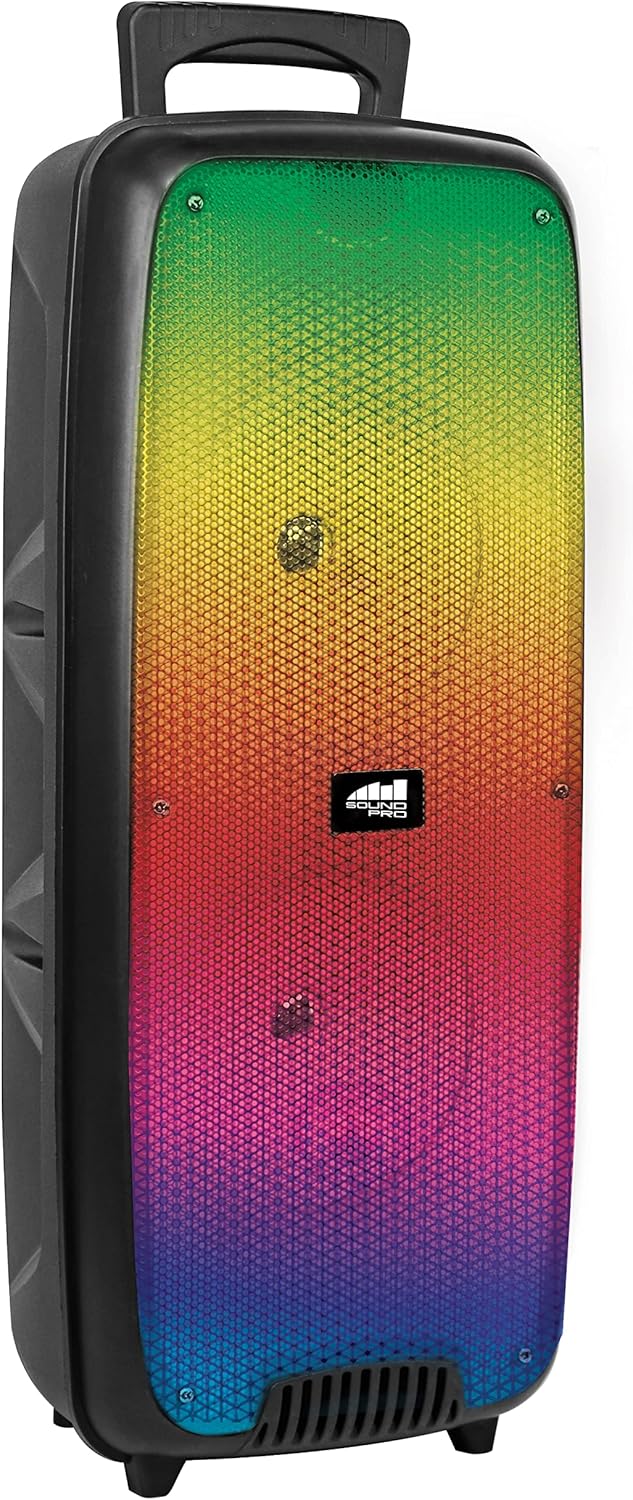
Рисунок 4.1: Передний view of the Naxa NDS-6501 speaker, showcasing the dual 6.5-inch drivers and multi-color flame lights.

Рисунок 4.2: Сторона view of the Naxa NDS-6501 speaker, illustrating its portable design with an integrated handle.
5. Настройка
5.1 Зарядка динамика
- Connect the supplied USB charging cable to the speaker's charging port.
- Подключите другой конец USB-кабеля к совместимому USB-адаптеру питания (не входит в комплект) или к USB-порту компьютера.
- Во время зарядки загорается индикатор зарядки, обычно красного цвета.
- Once fully charged, the indicator light will change color or turn off (refer to specific LED behavior in your product). A full charge provides approximately 2 hours of playback.
5.2 Включение/выключение питания
- To power on: Press and hold the Power button for a few seconds until the speaker activates.
- To power off: Press and hold the Power button again until the speaker shuts down.
6. Инструкция по эксплуатации
6.1 Сопряжение по Bluetooth
- Ensure the speaker is powered on and in Bluetooth mode. If not, press the Mode button to switch to Bluetooth. The speaker will indicate it is ready for pairing (e.g., a flashing LED or an audible prompt).
- На вашем устройстве с поддержкой Bluetooth (смартфоне, планшете и т. д.) перейдите в настройки Bluetooth.
- Искать available devices. You should see "NDS-6501" or a similar name in the list.
- Select "NDS-6501" to initiate pairing.
- Once successfully paired, the speaker will provide an audible confirmation, and the Bluetooth indicator light will become solid.
6.2 Сопряжение беспроводных стереонаушников (TWS)
The TWS function allows you to connect two NDS-6501 speakers for a stereo sound experience.

Рисунок 6.1: Illustration of the True Wireless Stereo (TWS) function, enabling two speakers to connect wirelessly from a single Bluetooth source.
- Ensure both NDS-6501 speakers are powered on and in Bluetooth mode, but not yet paired to any device.
- On one of the speakers (this will be the primary speaker), press and hold the TWS button (or a designated pairing button) for a few seconds.
- Основной динамик выполнит поиск дополнительного динамика. После подключения оба динамика издадут звуковой сигнал подтверждения.
- Now, pair your Bluetooth device to the primary speaker as described in Section 6.1. Audio will play through both speakers in stereo.
6.3 Работа FM-радио
- Нажмите кнопку Mode, чтобы переключиться в режим FM-радио.
- Нажмите кнопку «Воспроизведение/Пауза», чтобы автоматически сканировать и сохранять доступные FM-станции.
- Используйте кнопки «Предыдущий/Следующий трек» для переключения между сохраненными станциями.
6.4 Воспроизведение с USB/MicroSD
- Insert a USB flash drive or a MicroSD/TF card (with audio fileс) в соответствующий порт.
- The speaker should automatically switch to USB or MicroSD mode and begin playing audio. If not, press the Mode button to select the correct input.
- Use the playback controls (Play/Pause, Previous/Next) to manage your music.
6.5 Использование микрофона
- Connect the wired microphone to the microphone input jack on the speaker.
- Adjust the microphone volume control (if available) on the speaker to your desired level.
- The microphone audio will be mixed with any music playing through the speaker.
6.6 световых эффектов
- The speaker features integrated multi-color flame lights.
- Press the Light button (if available) to cycle through different lighting modes or to turn the lights on/off.
- The lights may synchronize with the music playback.
7. Техническое обслуживание
- Уборка: Для очистки корпуса динамика используйте мягкую сухую ткань. Не используйте абразивные чистящие средства, воск или растворители.
- Хранилище: Если динамик не используется в течение длительного времени, храните его в прохладном, сухом месте, вдали от прямых солнечных лучей и экстремальных температур.
- Уход батареи: Чтобы продлить срок службы аккумулятора, избегайте его частой полной разрядки. Регулярно заряжайте динамик, даже если он не используется.
- Воздействие воды: Данная колонка не является водонепроницаемой. Избегайте попадания воды или чрезмерной влаги на неё.
8. Поиск Неисправностей
| Проблема | Возможная причина | Решение |
|---|---|---|
| Динамик не включается. | Батарея разряжена. | Зарядите динамик с помощью прилагаемого USB-кабеля. |
| Нет звука из динамика. | Volume is too low; incorrect input mode; device not paired. | Увеличьте громкость; нажмите кнопку Mode для выбора нужного источника звука; повторно выполните сопряжение устройства Bluetooth. |
| Устройство Bluetooth не может обнаружить динамик. | Динамик не находится в режиме сопряжения; устройство слишком далеко; помехи. | Ensure speaker is in Bluetooth pairing mode; move device closer; avoid obstacles. |
| Сопряжение TWS не удалось. | Speakers already paired to a device; too far apart. | Ensure both speakers are unpaired from other devices; place speakers within 33 feet of each other. |
| Микрофон не работает. | Microphone not fully plugged in; microphone volume low. | Ensure microphone is securely connected; adjust microphone volume. |
9. Технические характеристики
| Особенность | Спецификация |
|---|---|
| Номер модели | НДС-6501 |
| Размер динамика | Двойные 6.5 дюймов |
| Технология связи | Bluetooth, USB, MicroSD, Aux (3.5mm) |
| Аудиовход | Проводной микрофон |
| Режим аудиовыхода | Стерео |
| Максимальная выходная мощность | 3 Вт |
| Спикер AmpТип лификации | Активный |
| Тип батареи | Lithium Ion (rechargeable, included) |
| Средний срок службы батареи | До 2 часов |
| Размеры продукта (Д x Ш x В) | 24.13 x 19.05 x 57.91 см (9.5 x 7.5 x 22.8 дюймов) |
| Вес товара | 2.81 кг (6.2 фунта) |
| Цвет | Черный |
| СКП | 840005017555 |
10. Гарантия и поддержка
Для получения информации о гарантии или технической поддержке обратитесь к гарантийному талону, прилагаемому к вашему изделию, или посетите официальный сайт Naxa Electronics. webСохраните чек о покупке в качестве подтверждения покупки на случай предъявления гарантийных претензий.


