
1. Заview
The NETVUE Birdfy AI Smart Bird Feeder with Camera offers an advanced way to observe and interact with backyard birds. Equipped with a 1080p HD camera and AI bird species identification, it provides real-time alerts and captures high-quality video and images of your feathered visitors. Its IP65 weatherproof design ensures durability in various outdoor conditions, making it suitable for year-round use.
Ключевые особенности включают в себя:
- 1080p HD Camera with Night Vision: Captures clear video day and night.
- AI Bird Species Identification: Automatically detects and identifies over 6000 bird species.
- 2.4GHz Wi-Fi & Bluetooth Connectivity: Ensures stable connection and easy setup.
- Защита от атмосферных воздействий IP65: Designed to withstand rain, snow, and sun.
- Manual Squirrel Control: Features flashing lights, warning sounds, and a microphone to deter squirrels.
- Безопасное облачное хранилище: Utilizes Amazon Web Services for encrypted data storage.
2. Что в коробке
Upon unboxing your NETVUE Birdfy AI Smart Bird Feeder, verify that all components are present:
- Birdfy AI Smart Bird Feeder unit
- Встроенная HD-камера 1080p
- Mounting bracket (for pole, tree, or wall installation)
- Монтажные винты и анкеры
- USB-кабель для зарядки
- Руководство пользователя (этот документ)
- Note: Solar panel is sold separately.
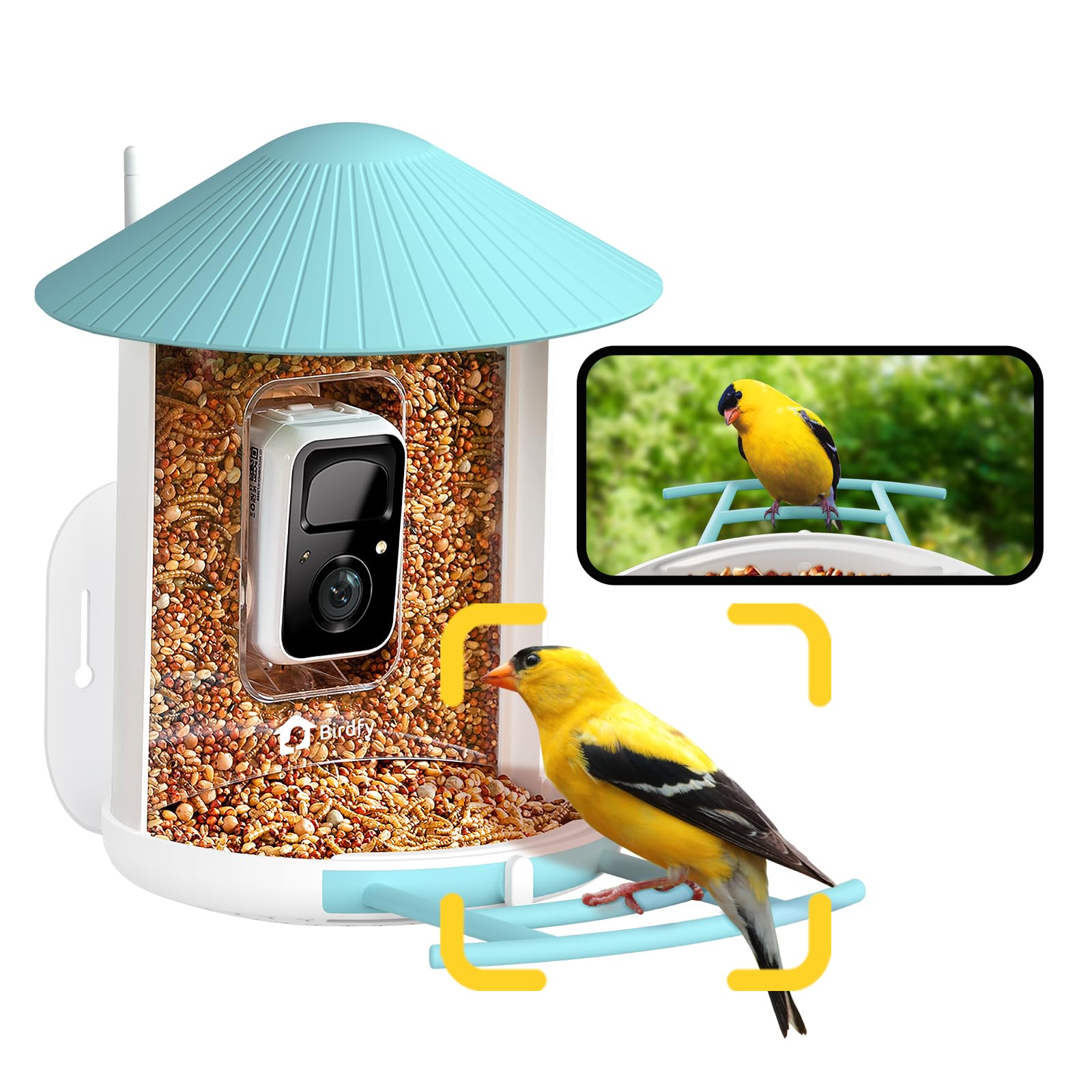
Image: The NETVUE Birdfy AI Smart Bird Feeder with its integrated camera.
3. Инструкции по настройке
3.1 Зарядка камеры
Before initial use, fully charge the camera's built-in battery using the provided USB cable. The charging port is typically located on the camera module itself, often protected by a rubber seal to maintain its weatherproof rating. A full charge can last several months depending on activity.
3.2 Установка и сопряжение приложения
- Загрузить Birdfy App из магазина приложений вашего смартфона (iOS или Android).
- Создайте учетную запись или войдите в систему, если она у вас уже есть.
- Follow the in-app instructions to add a new device. This typically involves scanning a QR code located on the camera module. You may need to temporarily remove the camera from the feeder housing to access the QR code.
- Connect the device to your 2.4GHz Wi-Fi network. Ensure your Wi-Fi signal is strong at the intended installation location.

Image: Visual guide for connecting the Birdfy feeder to the mobile application.
3.3 Монтаж питателя
The Birdfy feeder offers versatile mounting options:
- Настенный: Use the provided bracket, screws, and anchors to secure the feeder to a wall.
- Pole-Mounted: Attach the feeder to a pole using the appropriate bracket.
- Tree-Mounted: Secure the feeder to a tree trunk or sturdy branch.
Выберите место, которое обеспечивает четкий обзор. view of the feeder for the camera, is easily accessible for refilling and cleaning, and is away from potential squirrel jumping points. Ensure the camera's field of view (129° horizontal, 67° vertical) captures both the seed tray and the perch.

Image: Various installation methods for the Birdfy feeder.
4. Инструкция по эксплуатации
4.1 Наполнение кормушки
The feeder has a 1.5-liter capacity. To fill:
- Turn the antenna away from the top.
- Open the roof of the feeder.
- Pour bird seed into the main compartment until full.
- Close the roof securely.

Image: Instructions for refilling the Birdfy feeder.
4.2 Using the Birdfy App
The Birdfy app is your primary interface for the smart feeder:
- Жить View: Access real-time video streaming from the camera.
- AI Alerts: Receive instant notifications when a bird visits, with AI identifying the species.
- Воспроизведение событий: Review recorded videos and snapshots of bird activity.
- Ночное видение: The camera automatically switches to infrared night vision in low light conditions.
- Отпугивание белок: If a squirrel is detected, use the app to activate flashing lights, warning sounds, or speak through the two-way microphone.
- Поделиться: Share captured bird moments with friends and family through the app.

Изображение: Бывшийample of a smart alert notification on the Birdfy app.

Image: The Birdfy app allows users to capture and share bird videos and photos.
5. Техническое обслуживание
5.1 Очистка кормушки
Regular cleaning is essential to prevent the spread of disease among birds and to ensure the feeder functions correctly. The feeder is designed for easy cleaning:
- Remove the camera module from the feeder housing.
- Empty any remaining bird seed.
- Disassemble the feeder components (roof, seed tray, etc.) as needed.
- Wash all parts with warm, soapy water. Use a brush to remove stubborn debris.
- Rinse thoroughly and allow all parts to dry completely before reassembling and refilling.

Image: A visual representation of the cleaning process for the Birdfy feeder.
5.2 Управление аккумулятором
Monitor the battery level through the Birdfy app. Recharge the camera when the battery is low. If you have a compatible solar panel (sold separately), ensure it is positioned to receive adequate sunlight for continuous charging.
6. Поиск Неисправностей
- Нет подключения к Wi-Fi:
- Ensure the feeder is within range of your 2.4GHz Wi-Fi network.
- Перезагрузите ваш Wi-Fi-роутер.
- Повторно подключите камеру к приложению.
- Плохое качество видео:
- Проверьте уровень сигнала Wi-Fi.
- Очистите объектив камеры.
- Убедитесь, что перед объективом нет никаких препятствий.
- No Bird Detections/False Alarms:
- Настройте чувствительность обнаружения движения в приложении.
- Убедитесь, что поле зрения камеры view is correctly positioned to capture the feeder area.
- Check for moving objects like tree branches or shadows that might trigger false alarms.
- Короткое время работы от батареи:
- Reduce the frequency of recordings or live view сеансы.
- Убедитесь, что камера полностью заряжена.
- Рассмотрите возможность покупкиasing a compatible solar panel for continuous power.
7. Технические характеристики
| Особенность | Деталь |
|---|---|
| Бренд | НЕТВЮЕ |
| Модель | Birdfy AI |
| Разрешение камеры | 1080p HD |
| Ночное Видение | Инфракрасный |
| Связность | Wi-Fi 2.4 ГГц, Bluetooth |
| Всепогодный рейтинг | IP65 |
| Материал | Акрилонитрилбутадиенстирол (АБС), поликарбонат (ПК) |
| Емкость | 1.5 Liters (Bird Seed) |
| Размеры (Д x Ш x В) | 8"Д x 7"Ш x 11"В |
| Вес товара | 2.09 Килограмма |
| Источник питания | Rechargeable Battery (Solar Powered option available separately) |
8. Гарантия и поддержка
For warranty information, technical support, or customer service inquiries, please refer to the official NETVUE website or contact their customer support directly. Details are typically available in the product packaging or on the manufacturer's online resources.
NETVUE is committed to providing reliable products and support. If you encounter any issues, please reach out to their dedicated support team for assistance.