1. Введение
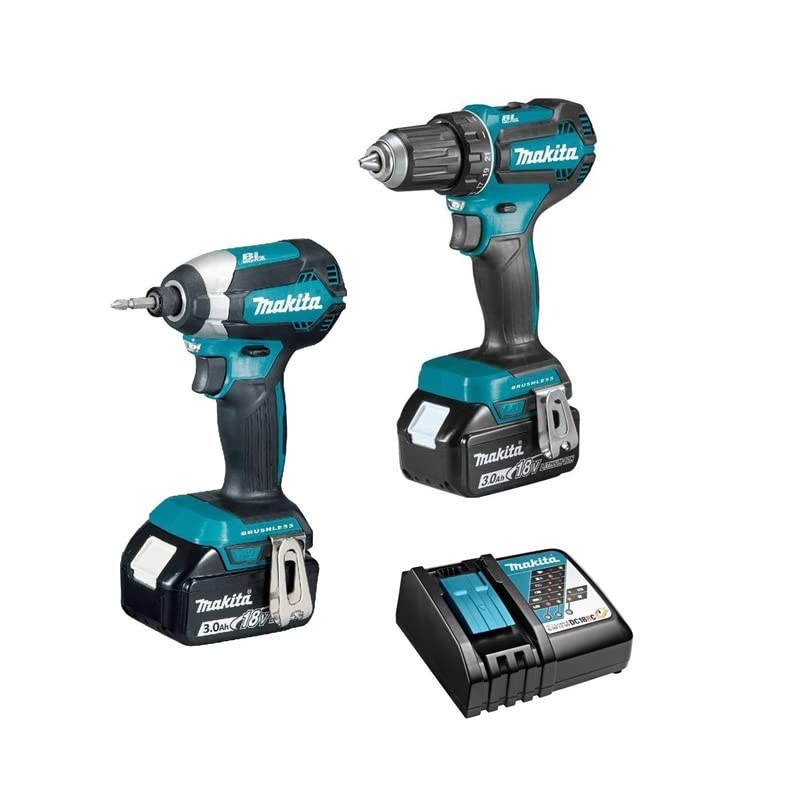
This manual provides essential instructions for the safe operation, maintenance, and troubleshooting of your Makita DLX2289 Cordless Combo Kit. This kit includes the DDF485 Cordless Drill Driver and the DTD153 Cordless Impact Driver, along with two 3.0Ah Lithium-ion batteries and a charger (charger not explicitly listed but implied for a cordless kit). Please read this manual thoroughly before using the tools to ensure proper and safe usage.
2. Общие правила техники безопасности.
ПРЕДУПРЕЖДЕНИЕ: Прочитайте все предупреждения по безопасности, инструкции, иллюстрации и спецификации, прилагаемые к этому электроинструменту. Несоблюдение всех инструкций, перечисленных ниже, может привести к поражению электрическим током, пожару и/или серьезным травмам.
2.1 Безопасность на рабочем месте
- Содержите рабочее место в чистоте и хорошем освещении. Загроможденные или темные места способствуют несчастным случаям.
- Не используйте электроинструменты во взрывоопасной атмосфере, например, в присутствии легковоспламеняющихся жидкостей, газов или пыли. Электроинструменты создают искры, которые могут воспламенить пыль или пары.
- Не допускайте детей и посторонних лиц к работе с электроинструментом. Отвлечение внимания может привести к потере контроля.
2.2 Электробезопасность
- Вилки электроинструментов должны соответствовать розетке. Никогда не модифицируйте вилку каким-либо образом.
- Не подвергайте электроинструменты воздействию дождя или влаги. Попадание воды в электроинструмент увеличит риск поражения электрическим током.
2.3 Личная безопасность
- Всегда надевайте защитные очки. Используйте защитные очки с боковыми щитками.
- Одевайтесь правильно. Не носите свободную одежду или украшения. Держите волосы и одежду подальше от движущихся частей.
- Будьте бдительны, следите за своими действиями и руководствуйтесь здравым смыслом при работе с электроинструментом.
3. Содержимое упаковки
Your Makita DLX2289 Combo Kit typically includes the following items:
- Makita DDF485 Cordless Drill Driver
- Makita DTD153 Cordless Impact Driver
- 2 x Makita 3.0Ah Lithium-ion Batteries
- Battery Charger (model may vary)
- Чехол для переноски
- Instruction Manuals for each tool
4. Настройка
4.1 Зарядка аккумулятора
- Подключите зарядное устройство к розетке.
- Вставьте аккумуляторную батарею в зарядное устройство до щелчка.
- The charging indicator light on the charger will show the charging status. Refer to the charger's specific manual for detailed indicator meanings.
- После полной зарядки извлеките аккумулятор из зарядного устройства.
4.2 Установка/снятие аккумулятора
- To install: Align the battery pack with the battery port on the tool and slide it in until it locks with a click.
- Для снятия: нажмите кнопку фиксатора на аккумуляторном блоке и выдвиньте его из инструмента.
4.3 Installing Drill Bits (DDF485 Drill Driver)
Изображение: Спереди view of the Makita DDF485 Cordless Drill Driver with battery attached. This image shows the chuck, clutch settings, and trigger.
- Убедитесь, что инструмент выключен и аккумулятор извлечен.
- Hold the rear sleeve of the chuck and turn the front sleeve counter-clockwise to open the chuck jaws.
- Insert the drill bit or accessory into the chuck as far as it will go.
- Turn the front sleeve clockwise to tighten the chuck jaws securely around the bit.
- Pull on the bit to ensure it is firmly seated.
4.4 Installing Impact Bits (DTD153 Impact Driver)
The DTD153 uses a 1/4" hex shank bit. Ensure the tool is switched off and the battery is removed.
- Pull the sleeve on the bit holder forward.
- Insert the hex shank bit into the holder.
- Release the sleeve to lock the bit in place. Pull on the bit to ensure it is firmly seated.
5. Инструкция по эксплуатации
5.1 DDF485 Cordless Drill Driver

Изображение: сбоку view of the Makita DDF485 Cordless Drill Driver, showing the model number label and battery.
- Действие переключателя: To start the tool, pull the trigger. To stop, release the trigger. The tool speed increases with increased trigger pressure.
- Реверсивный переключатель: The reversing switch changes the direction of rotation. Position it for forward (clockwise) or reverse (counter-clockwise) operation. Ensure the switch is fully engaged before operating.
- Выбор скорости: The DDF485 has two mechanical speed settings. Use the speed change lever on top of the tool. Position '1' is for low speed/high torque (e.g., driving screws), and '2' is for high speed/low torque (e.g., drilling).
- Настройки сцепления: The clutch ring allows you to select the desired torque setting for screw driving. The numbers correspond to increasing torque. The drill symbol bypasses the clutch for drilling applications.
- Светодиодный рабочий свет: The tool is equipped with an LED light that illuminates the work area when the trigger is pulled.
5.2 DTD153 Cordless Impact Driver
- Действие переключателя: Similar to the drill driver, pull the trigger to start and release to stop. Speed is variable based on trigger pressure.
- Реверсивный переключатель: Use the reversing switch to change the direction of rotation for tightening or loosening fasteners.
- Ударный механизм: The impact driver applies rotational impacts to fasteners, making it highly effective for driving long screws or bolts into dense materials.
- Светодиодный рабочий свет: The DTD153 also features an LED work light.
6. Техническое обслуживание
Регулярное техническое обслуживание обеспечивает оптимальную производительность и продлевает срок службы ваших инструментов.
- Уборка: Keep the tool's air vents clean to prevent overheating. Use a soft, damp cloth to wipe down the tool. Do not use harsh chemicals or solvents.
- Уход батареи: Храните аккумуляторы в прохладном, сухом месте, вдали от прямых солнечных лучей. Не храните полностью разряженные аккумуляторы в течение длительного времени. Периодически заряжайте их, если они не используются.
- Инспекция: Regularly inspect the power cord of the charger for damage. Check the tool for any loose screws or damaged parts.
- Смазка: These tools are generally maintenance-free regarding internal lubrication. Do not attempt to lubricate internal components.
- Услуга: For any repairs or internal maintenance, contact an authorized Makita service center.
7. Поиск Неисправностей
| Проблема | Возможная причина | Решение |
|---|---|---|
| Инструмент не запускается | Аккумулятор установлен неправильно Аккумулятор разряжен Неисправность инструмента | Переустановите аккумулятор Зарядить аккумулятор Обратитесь в сервисный центр |
| Уменьшенная мощность/скорость | Низкий заряд батареи Перегрузка Incorrect speed setting (DDF485) | Зарядить аккумулятор Reduce load or use appropriate tool Adjust speed setting |
| Bit slips in chuck (DDF485) | Патрон недостаточно затянут Damaged chuck jaws | Плотно затяните патрон Replace chuck (contact service) |
| Перегрев | Заблокированные вентиляционные отверстия Постоянное интенсивное использование | Чистые вентиляционные отверстия Дайте инструменту остыть. |
8. Технические характеристики
The following specifications are typical for the Makita DLX2289 Combo Kit components:
8.1 Makita DDF485 Cordless Drill Driver
- Томtage: 18В
- Двигатель: Бесщеточный
- Вместимость патрона: 1.5 - 13 мм
- No Load Speed (Low): 0 - 500 об/мин
- No Load Speed (High): 0 - 1,900 об/мин
- Максимальный крутящий момент затяжки: 50 Нм
8.2 Makita DTD153 Cordless Impact Driver
- Томtage: 18В
- Двигатель: Бесщеточный
- Hex Shank: 1/4 дюйма
- Скорость без нагрузки: 0 - 3,400 об/мин
- Impacts Per Minute: 0 - 3,600 ipm
- Максимальный крутящий момент затяжки: 170 Нм
8.3 Аккумулятор
- Тип: Литий-ионный
- Томtage: 18В
- Емкость: 3.0 Ач
9. Гарантия и поддержка
Makita products are manufactured under strict quality control standards. For information regarding warranty coverage, service, or spare parts, please refer to the warranty card included with your product or visit the official Makita webСайт для вашего региона. Сохраните чек о покупке в качестве подтверждения покупки для предъявления гарантийных претензий.
For technical assistance or further inquiries, please contact Makita customer support.


