1. Введение
This manual provides comprehensive instructions for the setup, operation, and maintenance of your Cherry MW 9100 Wireless Rechargeable Mouse. The MW 9100 is a compact, versatile mouse offering dual connectivity options (Bluetooth or 2.4 GHz USB receiver) and a convenient rechargeable battery.
Ключевые особенности включают в себя:
- Compact design with charging functionality.
- Flexible operation: use while charging via USB-C cable.
- Dual connectivity: Bluetooth or 2.4 GHz USB receiver.
- Magnetic storage for the USB receiver, ideal for travel.
- Adjustable DPI settings for varied usage.
2. Содержимое упаковки
Проверьте наличие всех предметов в упаковке:
- Cherry MW 9100 Wireless Rechargeable Mouse
- Зарядный кабель USB-C
- USB-приемник 2.4 ГГц
- Защитный чехол
- Руководство по эксплуатации (данный документ)
3. Настройка
3.1 Зарядка мыши
The Cherry MW 9100 mouse features a built-in rechargeable battery. Before initial use, or when the battery is low, connect the included USB-C cable to the mouse and to a USB power source (e.g., computer USB port, USB wall adapter). The mouse can be used normally while charging.

Изображение 3.1: Вершина view of the Cherry MW 9100 mouse, showing the charging indicator light.
3.2 Подключение мыши
The MW 9100 offers two connection methods: 2.4 GHz wireless via USB receiver or Bluetooth.
3.2.1 Беспроводное соединение 2.4 ГГц
- Locate the USB receiver. It is magnetically stored in a compartment on the underside of the mouse.
- Вставьте USB-приемник в свободный USB-порт вашего компьютера.
- On the underside of the mouse, slide the switch to the "RF" position.
- Мышь должна автоматически подключиться к вашему компьютеру.
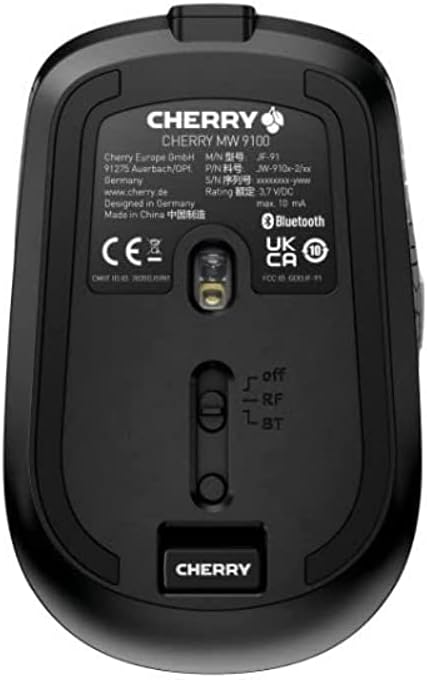
Изображение 3.2: Underside of the Cherry MW 9100 mouse, highlighting the USB receiver storage and the connection mode switch.
3.2.2 Bluetooth-соединение
- On the underside of the mouse, slide the switch to the "BT" (Bluetooth) position.
- Press and hold the small pairing button located near the connection switch on the underside of the mouse until the LED indicator on the mouse starts blinking, indicating pairing mode.
- На компьютере или устройстве откройте настройки Bluetooth и выполните поиск новых устройств.
- Select "Cherry MW 9100" from the list of available devices to complete the pairing process.
4. Инструкция по эксплуатации
4.1 Основные функции
The Cherry MW 9100 mouse features standard left and right click buttons, a scroll wheel (which also functions as a middle click button), and two side buttons for navigation (typically forward/back).
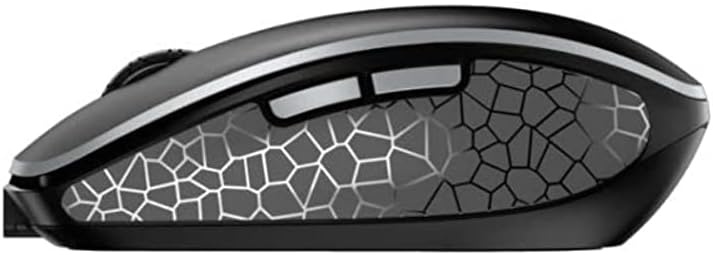
Изображение 4.1: Сторона view of the Cherry MW 9100 mouse, illustrating the ergonomic design and side buttons.
4.2 Настройка DPI
The mouse includes a DPI (Dots Per Inch) button, usually located near the scroll wheel, allowing you to adjust the cursor sensitivity. Press this button to cycle through different DPI settings to match your preference or task requirements.

Изображение 4.2: A hand demonstrating the comfortable grip on the Cherry MW 9100 mouse during use.
5. Техническое обслуживание
To ensure optimal performance and longevity of your Cherry MW 9100 mouse:
- Уборка: Для очистки поверхности мыши используйте мягкую сухую ткань. Для удаления стойких загрязнений слегка протрите поверхность сухой тканью.amp Можно использовать ткань, но следите за тем, чтобы влага не попадала внутрь устройства. Избегайте агрессивных химикатов или абразивных материалов.
- Хранилище: When not in use, especially during travel, store the mouse in the provided protective pouch to prevent scratches and damage.
- Уход батареи: Избегайте частой полной разрядки батареи. Заряжайте мышь, когда загорается индикатор низкого заряда батареи.
6. Поиск Неисправностей
| Проблема | Возможная причина | Решение |
|---|---|---|
| Мышь не отвечает | Low battery, incorrect connection mode, USB receiver not connected, Bluetooth not paired. |
|
| Intermittent connection (Bluetooth) | Interference, device driver issues, distance from device. |
|
| Движение курсора хаотичное или медленное | Dirty optical sensor, low battery, incorrect DPI setting. |
|
7. Технические характеристики
| Особенность | Деталь |
|---|---|
| Бренд | вишня |
| Номер модели | JW-9100US-2 |
| Технология связи | Bluetooth, USB 2.4 ГГц, беспроводная связь |
| Обнаружение движения | Оптический |
| Особые возможности | Легкий, портативный, перезаряжаемый |
| Размеры продукта | 4 x 3 x 2 дюйма |
| Вес товара | 6.4 унции |
| Цвет | Черный |
8. Гарантия и поддержка
For warranty information and technical support, please refer to the official Cherry website or contact Cherry customer service directly. Keep your proof of purchase for warranty claims.
Производитель: ВИШНЯ
Webсайт: www.cherry.de


