1. Введение
The Waveshare ESP32-S2 MCU WiFi Development Board is a compact and versatile module designed for Internet of Things (IoT) applications. It integrates a low-power Wi-Fi System-on-Chip (SoC) and mass memory, making it suitable for various embedded projects. This manual provides essential information for setting up, operating, and maintaining your development board.
2.Основные характеристики
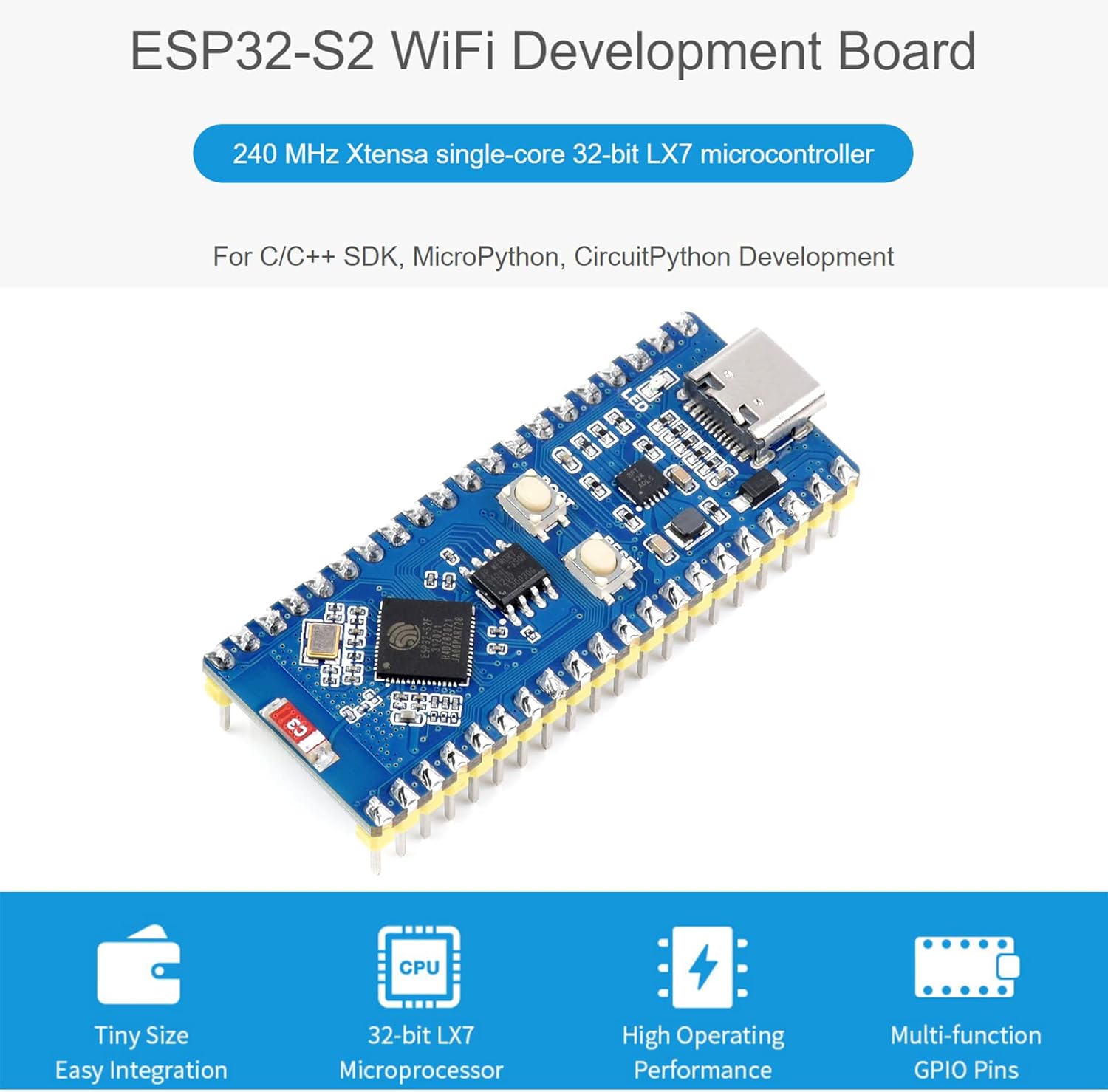
Изображение: Оверview of the ESP32-S2 WiFi Development Board highlighting its core features.
- 2.4 GHz WiFi Development Board: Supports Raspberry Pi Pico expansion board ecosystem for IoT application development.
- Микропроцессор: Based on single-core 32-bit LX7 microprocessor ESP32-S2FH4, with a clock frequency up to 240 MHz.
- Память: Integrated 320KB SRAM, 128KB ROM, 8MB PSRAM, and 4MB Flash memory.
- Беспроводное подключение: Supports IEEE802.11 b/g/n with an on-board 2.4 GHz WiFi ceramic antenna, offering up to 150 Mbps data transfer rate.
- Разъем USB-C: Features a USB-C connector for convenient connection and on-chip integrated full-speed USB OTG interface.
- Периферийные устройства: Includes LCD interface (8-bit serial RGB/8080/6800), TWAI controller (ISO11898-1 compatible), capacitive sensor GPIO, temperature sensor, and RMT (TX/RX).
- Поддержка разработки: Compatible with C/C++, MicroPython, and CircuitPython, with comprehensive SDK and development resources.
- Компактный дизайн: Small form factor with castellated module for direct soldering to user-designed carrier boards.
3. Аппаратное обеспечение большеview
This section details the main components and their functions on the ESP32-S2 Standard Version development board.
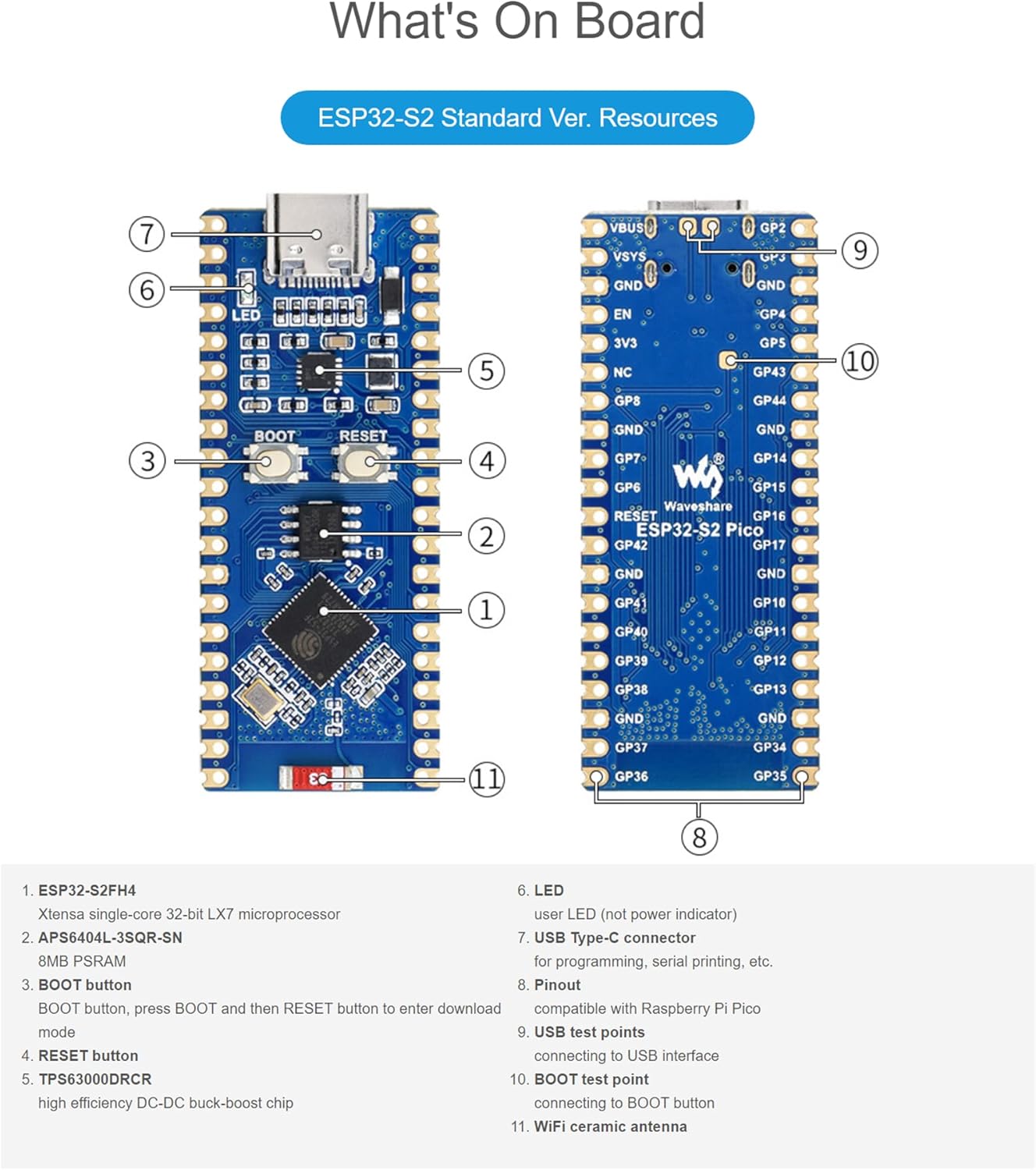
Image: Labeled diagram of the ESP32-S2 Standard Version board components.
- ESP32-S2FH4: Xtensa single-core 32-bit LX7 microprocessor.
- APS6404L-3SQR-SN: 8MB PSRAM.
- Кнопка BOOT: Button to enter download mode (press BOOT, then RESET).
- Кнопка сброса: Сбрасывает доску.
- TPS63000DRCR: Высокоэффективный DC-DC понижающе-повышающий преобразователь.
- ВЕЛ: Пользовательский светодиод (не индикатор питания).
- Разъем USB Type-C: For programming, serial printing, etc.
- Распиновка: Compatible with Raspberry Pi Pico.
- Контрольные точки USB: For connecting to USB interface.
- Точка проверки загрузки: For connecting to BOOT button.
- WiFi ceramic antenna: On-board antenna for wireless communication.
4. Схема распиновки
The ESP32-S2 development board features configurable pin functions, allowing flexible development and integration. Below are the pinout diagrams for the Standard Version and LCD Version.

Image: Pinout diagrams for the ESP32-S2 Standard Version and ESP32-S2 LCD Version, indicating various pin functions.
The pinout includes various interfaces such as Power, Ground, UART, GPIO, ADC, SPI, System Control, and I2C. Refer to the diagram for specific pin assignments and functions.
5. Технические характеристики
| Особенность | Спецификация |
|---|---|
| Микропроцессор | ESP32-S2FH4 (Single-core 32-bit LX7) |
| Частота часов | До 240 МГц |
| SRAM | 320КБ |
| ПЗУ | 128КБ |
| ПСРАМ | 8 МБ |
| Флэш-память | 4 МБ |
| Беспроводной стандарт | IEEE802.11 b/g/n (2.4 GHz) |
| Скорость передачи данных | До 150 Мбит/с |
| Интерфейс подключения | USB Type-C (OTG), GPIO, UART, SPI, I2C, ADC, LCD, TWAI |
| Размеры | 3.5 x 2.05 x 0.87 дюйма (упаковка) |
| Вес товара | 0.493 унции |
| Производитель | Waveshare |
6. Инструкции по настройке
To begin using your Waveshare ESP32-S2 development board, follow these basic setup steps:
- Источник питания: Connect the board to a computer or a suitable 5V power adapter using a USB Type-C cable. The board will draw power through the USB connection.
- Установка драйвера: Depending on your operating system, you may need to install USB-to-serial drivers (e.g., CP210x or CH340 drivers) if the board is not recognized automatically. Refer to the official ESP-IDF documentation or Waveshare's product page for specific driver links.
- Среда разработки: Install the necessary development tools. The ESP32-S2 supports the Espressif IoT Development Framework (ESP-IDF), Arduino IDE with ESP32 core, MicroPython, or CircuitPython. Choose the environment that best suits your project requirements.
- Первая программа: Once the development environment is set up, you can upload your first program (e.g., a "blink" example) to verify the board's functionality. Use the USB Type-C connection for programming.
7. Управление доской
The ESP32-S2 board is designed for flexible operation across various programming paradigms.
- Языки программирования: Develop applications using C/C++, MicroPython, or CircuitPython.
- SDK: Utilize the comprehensive SDKs provided by Espressif or community-driven libraries for specific functionalities.
- Управление GPIO: Access and control the various General Purpose Input/Output (GPIO) pins for connecting sensors, actuators, and other peripherals. Refer to the pinout diagram for available pins.
- Подключение к Wi-Fi: Implement Wi-Fi functionalities to connect to local networks, cloud services, or create access points for IoT applications.
- USB-OTG: Leverage the USB On-The-Go (OTG) interface for advanced USB functionalities, such as acting as a USB host or device.
Detailed programming guides and examples are available on the Waveshare wiki and Espressif documentation webсайты.
8. Техническое обслуживание и уход
Proper care ensures the longevity and reliable operation of your development board:
- Умение обращаться: Handle the board by its edges to avoid touching components, especially the pins, which can be sensitive to static electricity.
- Хранилище: Store the board in an anti-static bag when not in use, in a cool, dry environment away from direct sunlight and extreme temperatures.
- Уборка: При необходимости аккуратно очистите доску мягкой сухой щёткой или сжатым воздухом. Избегайте использования жидкостей и абразивных материалов.
- Источник питания: Always use a stable and appropriate 5V power supply. Over-voltagе может повредить доску.
- Обновления прошивки: Regularly check for and apply firmware updates for the ESP32-S2 chip and your chosen development environment to benefit from bug fixes and new features.
9. Поиск Неисправностей
If you encounter issues with your ESP32-S2 development board, consider the following common troubleshooting steps:
- Плата не обнаружена:
- Ensure the USB Type-C cable is securely connected to both the board and your computer.
- Verify that the correct USB-to-serial drivers are installed on your computer.
- Попробуйте использовать другой USB-порт или кабель.
- Failed to Upload Program:
- Check that the correct board and COM port are selected in your development environment.
- Ensure the board is in download mode. For the ESP32-S2, this typically involves pressing and holding the BOOT button, then pressing and releasing the RESET button, and finally releasing the BOOT button.
- Verify your code for syntax errors or compilation issues.
- Проблемы с подключением к Wi-Fi:
- Double-check your Wi-Fi credentials (SSID and password).
- Ensure the board is within range of the Wi-Fi access point.
- Verify that the Wi-Fi antenna is not obstructed or damaged.
- Неожиданное поведение:
- Review ваш код на предмет логических ошибок.
- Проверьте стабильность работы источника питания.
- Consult online forums and the Waveshare/Espressif community for similar issues and solutions.
10. Гарантия и поддержка
Specific warranty details for the Waveshare ESP32-S2 MCU WiFi Development Board are not provided within this manual. For warranty information, technical support, and additional resources, please refer to the official Waveshare website or contact their customer service directly. Online documentation, forums, and community support are also valuable resources for development assistance.
Официальный сайт Waveshare Webсайт: www.waveshare.com