1. Введение
This manual provides essential information for the safe and efficient use of your new Hyundai 43-inch 4K Ultra HD Smart LED TV, model UHDHY43WSR4BYI5. Please read these instructions thoroughly before operating the television and retain them for future reference. This guide covers setup, operation, maintenance, and troubleshooting to ensure you get the best experience from your device.

Image: Hyundai 43-inch 4K Smart LED TV front view с WebИнтерфейс ОС.
2. Информация по технике безопасности
Чтобы снизить риск поражения электрическим током, возгорания или повреждения телевизора, всегда соблюдайте следующие основные меры предосторожности:
- Источник питания: Подключайте телевизор только к розетке переменного тока с соответствующей громкостью.tage, как указано на этикетке продукта.
- Вентиляция: Ensure adequate ventilation around the TV. Do not block ventilation openings or place the TV on soft surfaces that may block airflow.
- Вода и влага: Не подвергайте телевизор воздействию дождя или влаги. Не ставьте на телевизор предметы, наполненные жидкостью, например, вазы.
- Уборка: Перед чисткой отключите телевизор от сети. Используйте мягкую сухую ткань. Не используйте жидкие или аэрозольные чистящие средства.
- Размещение: Установите телевизор на устойчивую ровную поверхность. Не подвергайте его воздействию прямых солнечных лучей и не размещайте вблизи источников тепла.
- Дети: Следите за детьми, чтобы они не забирались на телевизор или мебель, на которой он стоит.
3. Содержимое упаковки
Проверьте наличие всех предметов в упаковке:
- 1 x Hyundai 43-inch LED TV
- 1 x Remote Control (Magic Remote)
- 1 х Руководство пользователя
- 1 гарантийный талон
- 1 x Pair of Table Stand
- 1 комплекта настенного крепления
4. Физическая установка
4.1. Крепление телевизора
Your TV supports both table-top placement and wall mounting. Choose the method that best suits your environment.
Установка настольной подставки:
- Осторожно положите телевизор экраном вниз на мягкую чистую поверхность, чтобы не повредить экран.
- Attach the provided table stands to the designated slots on the bottom of the TV using the screws included in the kit. Ensure they are securely fastened.
- Установите телевизор на устойчивую ровную поверхность.
Установка настенного крепления:
Use the included wall mount kit. Follow the instructions provided with the wall mount kit for safe and secure installation. It is recommended to have professional assistance for wall mounting.

Image: Diagram illustrating the dimensions of the Hyundai 43-inch Smart LED TV, showing width, height, and depth with stand. Also indicates screen size and weights.
4.2. Соединительные кабели
Connect the power cord to the TV and then to a wall outlet. Connect your external devices (e.g., set-top box, gaming console, Blu-ray player) to the appropriate ports.
- HDMI: For high-definition audio and video. Your TV has multiple HDMI ports.
- USB: For connecting USB storage devices for media playback. Your TV has 2 USB ports.
- РФ ВХОД: Для подключения антенны или кабельного телевидения.
- Ethernet (RJ45): Для проводного подключения к Интернету.
- АВ ВХОД: Для подключения старых устройств с помощью композитных видео- и стереоаудиокабелей.
- Оптический: Для вывода цифрового звука на звуковую панель или систему домашнего кинотеатра.

Изображение: сзади view of the Hyundai 43-inch Smart LED TV, showing the mounting points and general layout of the back panel.
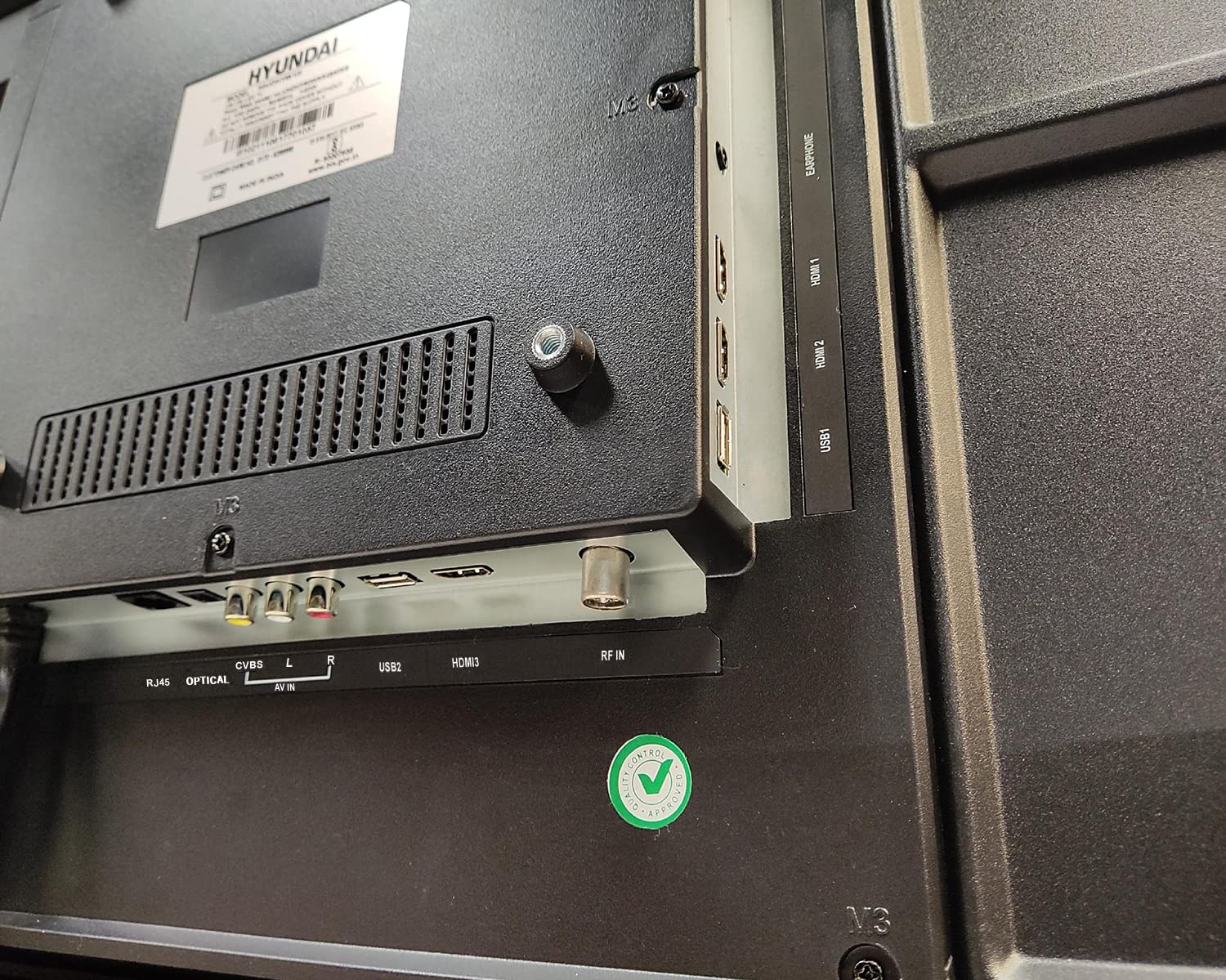
Изображение: Крупный план view of the connectivity ports on the rear of the Hyundai 43-inch Smart LED TV, including HDMI, USB, RF IN, AV IN, Optical, and RJ45 Ethernet.
5. Initial Power On & Basic Operation
5.1. Первоначальная настройка
After connecting the power, press the power button on the remote control or the TV. The TV will guide you through the initial setup process, which includes:
- Выбор языка
- Выбор страны/региона
- Сетевое подключение (Wi-Fi или Ethernet)
- Сканирование каналов (для антенного/кабельного телевидения)
- Принятие условий и положений
5.2. Использование пульта Magic Remote
Your Hyundai TV comes with a Magic Remote, offering intuitive control through pointing, clicking, scrolling, and voice commands.

Image: Diagram detailing the features of the Hyundai Magic Remote, including Air Mouse, Single Click Access, Scroll wheel, Voice Control, Universal Control, and Hot Keys for Netflix and Prime Video.
- Воздушная мышь: Наведите пульт на экран, чтобы переместить курсор.
- Колесо прокрутки: Use the wheel to scroll through menus and web pages, or zoom in/out.
- Голосовое управление: Press the microphone button and speak your commands to search for content or control the TV.
- Горячие клавиши: Dedicated buttons for popular streaming services like Netflix and Prime Video for quick access.
- Универсальный контроль: The Magic Remote can control compatible external devices such as set-top boxes and sound systems.

Image: Front and angled side view of the Hyundai Magic Remote, showcasinг его эргономичный дизайн и расположение кнопок.
6. Функции Smart TV (WebОС)
Your Hyundai TV is powered by WebOS, offering a user-friendly interface and access to a wide range of smart features.
6.1. Подключение к Интернету
For smart features, connect your TV to the internet:
- Wi-Fi: Go to Settings > Network > Wi-Fi Connection, select your network, and enter the password. The TV supports 5 GHz / 2.4 GHz Dual Band Wi-Fi.
- Ethernet: Connect an Ethernet cable from your router to the RJ45 port on the TV.
6.2. Навигация WebOS and Apps
The WebOS launcher bar provides quick access to installed applications, inputs, and settings. Use the Magic Remote to navigate.
- Предустановленные приложения: Enjoy popular streaming services like Netflix, Prime Video, Disney+ Hotstar, YouTube, ZEE5, SonyLIV, Voot, ALT Balaji, and Hungama.
- Content Store: Download additional applications from the WebOS Content Store.
- Тонкий искусственный интеллект (ThinQ AI): Utilize AI features for personalized recommendations and smart home integration.
- Волшебное мобильное соединение: Easily connect your smartphone to the TV for content sharing.
- Управление доступом: Делитесь контентом со своего мобильного устройства на телевизоре.
- Miracast: Wirelessly mirror your compatible device's screen to the TV.

Image: Hyundai 43-inch Smart TV displaying WebOS home screen with various smart features like ThinQ AI, 4K Upscaling, HDR10, Magic Remote, MEMC, Miracast, Bezel-less design, Dual Band Wi-Fi, Dolby Audio, Bluetooth 5.0, Real Cinema Experience, and Alexa.

Изображение: сверху вниз view of the Hyundai 43-inch Smart TV screen showing popular streaming app logos including Netflix, Disney+ Hotstar, Prime Video, ZEE5, SonyLIV, Voot, YouTube, ALT Balaji, and Hungama.
7. Техническое обслуживание
7.1. Чистка телевизора
Перед чисткой всегда отключайте телевизор от сети.
- Экран: Аккуратно протрите экран мягкой тканью без ворса. Для удаления стойких загрязнений слегка потрите.ampСмочите салфетку водой или специальным средством для чистки экранов (убедитесь, что оно подходит для светодиодных экранов) и аккуратно протрите. Не распыляйте жидкость непосредственно на экран.
- Тело: Wipe the TV frame and back panel with a soft, dry cloth. Avoid using abrasive cleaners or solvents.
7.2. Обновления программного обеспечения
Your TV may receive software updates to improve performance and add new features. It is recommended to keep your TV connected to the internet to receive these updates automatically or check for them manually in the settings menu.
8. Поиск Неисправностей
Если у вас возникли проблемы с телевизором, ознакомьтесь со следующими распространенными проблемами и решениями:
| Проблема | Возможное решение |
|---|---|
| Нет электричества | Check if the power cord is securely plugged into both the TV and the wall outlet. Ensure the outlet is working. Try a different power outlet. |
| Нет изображения или звука | Verify that the correct input source is selected. Check all cable connections (HDMI, AV, etc.). Ensure external devices are powered on. |
| Пульт дистанционного управления не работает | Check the batteries and replace them if necessary. Ensure there are no obstructions between the remote and the TV. Re-pair the Magic Remote if it has become disconnected. |
| Проблемы с подключением Wi-Fi | Restart your router and modem. Check the Wi-Fi password. Ensure the TV is within range of your Wi-Fi router. Try a wired Ethernet connection. |
| Интеллектуальные функции не реагируют | Check your internet connection. Restart the TV by unplugging it for a few minutes and plugging it back in. Ensure the TV's software is up to date. |
Если проблема сохраняется после применения этих решений, обратитесь в службу поддержки клиентов.
9. Технические характеристики
Key technical specifications for the Hyundai UHDHY43WSR4BYI5 TV:
- Модель: UHDHY43WSR4BYI5
- Размер экрана: 109 см (43 дюйма)
- Разрешение: 4K Ultra HD (3840 x 2160 пикселей)
- Технология отображения: Светодиодный дисплей, класс A+
- Операционная система: WebOS
- Процессор: ARM CA55 1.1 GHz Quad Core Processor
- БАРАН: 1.5 ГБ
- ПЗУ: 8 ГБ
- Частота обновления: 60 Гц
- Аудиовыход: 20 Watts Box Speakers, Dolby Ultra Surround
- Связь: Wi-Fi (Dual Band 5 GHz / 2.4 GHz), Bluetooth 5.0, HDMI (multiple), USB (2 ports), Ethernet (RJ45), Headphone, AV In, Optical
- Особые характеристики: Simplink (HDMI CEC), Magic Mobile Connection, Share Control, ThinQ AI, Magic Remote with Voice Control and Air Mouse, HDR10, 4K Upscaling, MEMC, Miracast, Bezel-less design, Alexa built-in.
- Размеры продукта (ДхШхВ): 96.2 x 56.7 x 9 см (без подставки)
- Вес товара: 6.7 kg (without stand), 6.8 kg (with table stand)
- Источник питания: Переменный ток 130 Вольт, 108 Ватт
- ViewУгол входа: 178 градусов
10. Гарантия и поддержка
Your Hyundai 43-inch 4K Ultra HD Smart LED TV comes with a Гарантия 1 год с даты покупки. Пожалуйста, сохраните чек и гарантийный талон для предъявления гарантийных претензий.
For technical support, service requests, or further assistance, please contact Goldenarch Consumer Electronics Pvt. Ltd., the manufacturer, at smiles@Hyundaice.in or call 0172 52-99-999.


