Введение
Спасибо за покупкуasing the Senicare Digital Alarm Clock. This alarm clock is designed to provide clear time display, customizable night lighting, and convenient charging options for your devices. Its large LED display ensures readability from a distance, making it suitable for all ages. This manual provides detailed instructions for setup, operation, and maintenance to ensure optimal performance and longevity of your device.

Figure 1: Senicare Digital Alarm Clock Overview
Содержимое упаковки
Пожалуйста, проверьте комплектность после распаковки, чтобы убедиться в наличии всех предметов:
- 1 x Senicare Digital Alarm Clock (Model: ZH027)
- 1 х Адаптер питания
- 1 x USB Power Cable (approx. 59.06 inches / 1.5 meters)
- 1 x Руководство пользователя (этот документ)

Рисунок 2: Комплект поставки
Настраивать
Follow these steps to set up your Senicare Digital Alarm Clock:
- Подключение питания: Connect the provided USB power cable to the "INPUT 5V===2A" port on the back of the alarm clock. Plug the other end into the power adapter, and then plug the adapter into a standard electrical outlet (100-240V AC). The display will light up.
- Резервный аккумулятор (опционально): For power failure memory, insert 2 x AAA batteries (not included) into the battery compartment on the bottom of the clock. This feature ensures that time and alarm settings are retained during a power outage, though the screen will go blank.
- Начальная установка времени:
- Нажмите УСТАНОВИТЬ ВРЕМЯ Нажмите кнопку на задней панели часов. Цифры, обозначающие часы, начнут мигать.
- Используйте ЧАС и МИН buttons on the top of the clock to adjust the hour and minute respectively.
- Нажимать УСТАНОВИТЬ ВРЕМЯ еще раз, чтобы подтвердить время.
- 12/24-часовой формат: Нажмите 12/24ч button on the back to switch between 12-hour (with AM/PM indicator) and 24-hour time formats.

Figure 3: Power Failure Memory Feature

Рисунок 4: Ключевые особенностиview
Инструкция по эксплуатации
Установка будильника
- Нажмите АЛЬ СЕТ button on the back of the clock. The alarm hour digits will flash.
- Используйте ЧАС и МИН buttons on the top to set your desired alarm time.
- Нажимать АЛЬ СЕТ Ещё раз, чтобы подтвердить время срабатывания будильника.
- Чтобы активировать или деактивировать сигнализацию, используйте кнопку БУДИЛЬНИК ВКЛ / ВЫКЛ slider switch on the back of the clock. When the alarm is active, an alarm icon will appear on the display.
Функция повтора
Когда зазвонит будильник, нажмите большую кнопку ДРЕМА СВЕТ button on the top of the clock to activate the snooze function. The alarm will pause for 9 minutes and then sound again. You can repeat this process multiple times.

Рисунок 5: Функция отложенного сигнала
Регулировка громкости сигнала
The alarm volume can be adjusted to High (HI), Medium (MI), or Low (LO) using the ОБЪЕМ slider switch located on the back of the clock.

Figure 6: Volume and Alarm Controls
Функция ночника
The clock features a 7-color soft night light. Tap the large ДРЕМА СВЕТ button on the top of the clock to cycle through the different colors or turn the night light off. This provides a gentle illumination for your room.

Figure 7: 7-Color Soft Night Light

Figure 8: Night Light Color Options
Автоматический диммер
The clock is equipped with a photosensitive sensor that automatically adjusts the display brightness (0-100%) to a comfortable level based on ambient light conditions, ensuring clear visibility day and night without being too bright in the dark.

Figure 9: Auto Dimmer Display Brightness

Рисунок 10: Автоматическая регулировка яркости
Двойные USB-порты зарядки
The back of the alarm clock features two 5V 1A USB charging ports (USB1, USB2) and one Type-C output port (5V 1A). These ports allow you to conveniently charge your smartphone, tablet, or other USB-powered devices directly from the alarm clock, eliminating the need for extra wall adapters.
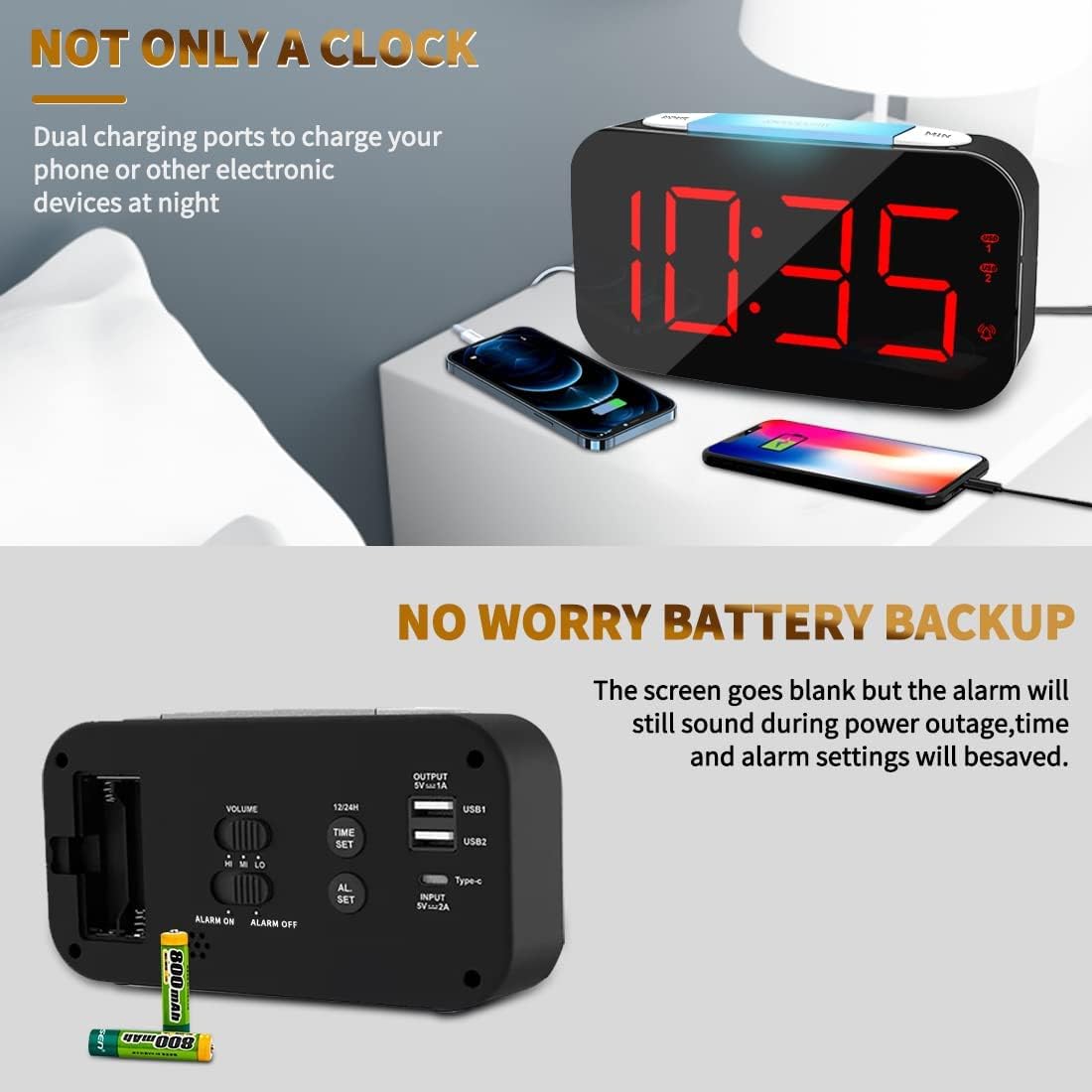
Figure 11: Dual USB Charging Ports in Use

Figure 12: USB and Type-C Output Ports
Обслуживание
To ensure the longevity and proper functioning of your Senicare Digital Alarm Clock, please follow these simple maintenance guidelines:
- Уборка: Use a soft, dry cloth to wipe the surface of the clock. Do not use abrasive cleaners, waxes, or solvents as they may damage the finish.
- Размещение: Разместите часы на устойчивой, ровной поверхности вдали от прямых солнечных лучей, источников тепла и избыточной влаги.
- Власть: Always use the original power adapter and cable provided with the device.
- Замена батареи: If using the battery backup feature, replace the AAA batteries annually or when the power failure memory function becomes unreliable.
Поиск неисправностей
Если у вас возникли какие-либо проблемы с будильником, пожалуйста, ознакомьтесь со следующими распространенными проблемами и способами их решения:
| Проблема | Возможная причина | Решение |
|---|---|---|
| Дисплей не отображается или не подсвечивается. | Отсутствует подключение к источнику питания или выходное напряжение.tage. | Ensure the power adapter is securely plugged into both the clock and a working electrical outlet. Check if there's a power outage in your area. If using battery backup, the display will be blank during an outage, but settings are saved. |
| Сигнализация не срабатывает. | Сигнализация не сработала, громкость слишком низкая или установлено неправильное время срабатывания. | Проверьте БУДИЛЬНИК ВКЛ / ВЫКЛ switch on the back to ensure it's in the "ON" position. Adjust the ОБЪЕМ slider to a higher setting. Verify that the alarm time is set correctly. |
| Display digits flicker or go blank partially. | Internal component issue or power fluctuation. | Try unplugging the clock for a few minutes and then plugging it back in. If the issue persists, contact customer support for assistance. |
| USB-порты для зарядки не работают. | Device not properly connected or power issue. | Ensure your device's USB cable is fully inserted into the clock's USB port. Verify the clock is powered on. Try a different USB port or cable. |
Технические характеристики
| Особенность | Деталь |
|---|---|
| Бренд | Сеникар |
| Номер модели | ZH027 |
| Цвет | Черный |
| Тип дисплея | Цифровой светодиод |
| Особые возможности | Adjustable Brightness, Charging Station, Large Display, Snooze, 7-Color Night Light |
| Размеры продукта | 6.65 дюймов в ширину x 3.35 дюймов в высоту (приблизительно 16.9 см в ширину x 8.5 см в высоту) |
| Источник питания | Проводной электроприбор (100-240 В переменного тока) |
| Резервная батарея | 2 x AAA Batteries (Not Included) for settings memory |
| USB-выход | Dual USB-A (5V 1A), One Type-C (5V 1A) |
| Материал | Пластик |
| Вес товара | 0.63 Pounds / 10.1 ounces (approx. 286g) |
Гарантия и поддержка
Senicare offers a hassle-free Гарантия 18 месяца for this Digital Alarm Clock. We are committed to providing high-quality products and excellent customer service.
For any questions, concerns, or warranty claims, please contact our friendly customer service team through the platform where you purchased the product. Please have your order number and product model (ZH027) ready for faster assistance.
We also offer an easy return policy. Refer to the retailer's return guidelines for more details.