1. Введение
Спасибо за покупкуasing the KEPLUG Sunrise Alarm Clock. This device is designed to enhance your waking and sleeping experience with its unique features, including sunrise and sunset simulations, dual alarms, FM radio, and various natural sounds. Please read this manual carefully to ensure proper use and optimal performance.
Содержимое упаковки:
- 1 x KEPLUG Sunrise Alarm Clock
- 1 х Micro USB-кабель
- 1 х настенный адаптер
- 1 х Руководство пользователя
2. Продукт закончилсяview
Familiarize yourself with the main components and controls of your KEPLUG Sunrise Alarm Clock.

Изображение 2.1: Передний view of the KEPLUG Sunrise Alarm Clock, showing the digital time display and the illuminated light panel. The clock face is round with a white base.
Кнопки управления и порты:
Refer to the diagram below for button identification (exact button layout may vary slightly by model, but functions are consistent).
- Кнопка установки времени: Используется для входа в режим установки времени.
- Кнопка тревоги 1: Used to set and activate Alarm 1.
- Кнопка тревоги 2: Used to set and activate Alarm 2.
- Кнопка FM-радио: Activates and controls FM radio functions.
- Кнопка включения света: Controls the light brightness and color modes.
- Кнопки регулировки громкости +/-: Регулирует громкость звука.
- Кнопки вверх / вниз: Осуществляет навигацию по меню и регулирует значения.
- Snooze/Sleep Aid Button: Activates snooze during an alarm or sleep aid function.
- USB-порт зарядки: Для зарядки внешних устройств.
- Micro USB Power Input: Подключается к адаптеру питания.
3. Настройка
3.1 Подключение питания
- Connect the micro USB cable to the power input port on the back of the alarm clock.
- Подключите сетевой адаптер к стандартной электрической розетке.
- Дисплей загорится, указывая на то, что устройство включено.
The clock includes a built-in backup battery to retain settings during power outagили отключения.
3.2 Установка времени
- Нажмите Кнопка установки времени (often represented by a clock icon). The hour display will start flashing.
- Используйте Кнопки вверх / вниз настроить час.
- Нажмите Кнопка установки времени again to confirm the hour and move to minute setting. The minute display will flash.
- Используйте Кнопки вверх / вниз для настройки минут.
- Нажмите Кнопка установки времени a third time to confirm the minutes.
- Чтобы переключиться между 12-часовым и 24-часовым форматом, нажмите кнопку Кнопки вверх / вниз while the time is flashing during setup, or refer to the specific instructions in your manual for a dedicated time format button.
3.3 Яркость отображения времени
The time display offers three brightness settings: High, Low, and Off. This can typically be adjusted by repeatedly pressing a dedicated display brightness button or by holding the Time Setting button. Refer to your specific model's instructions for exact control.
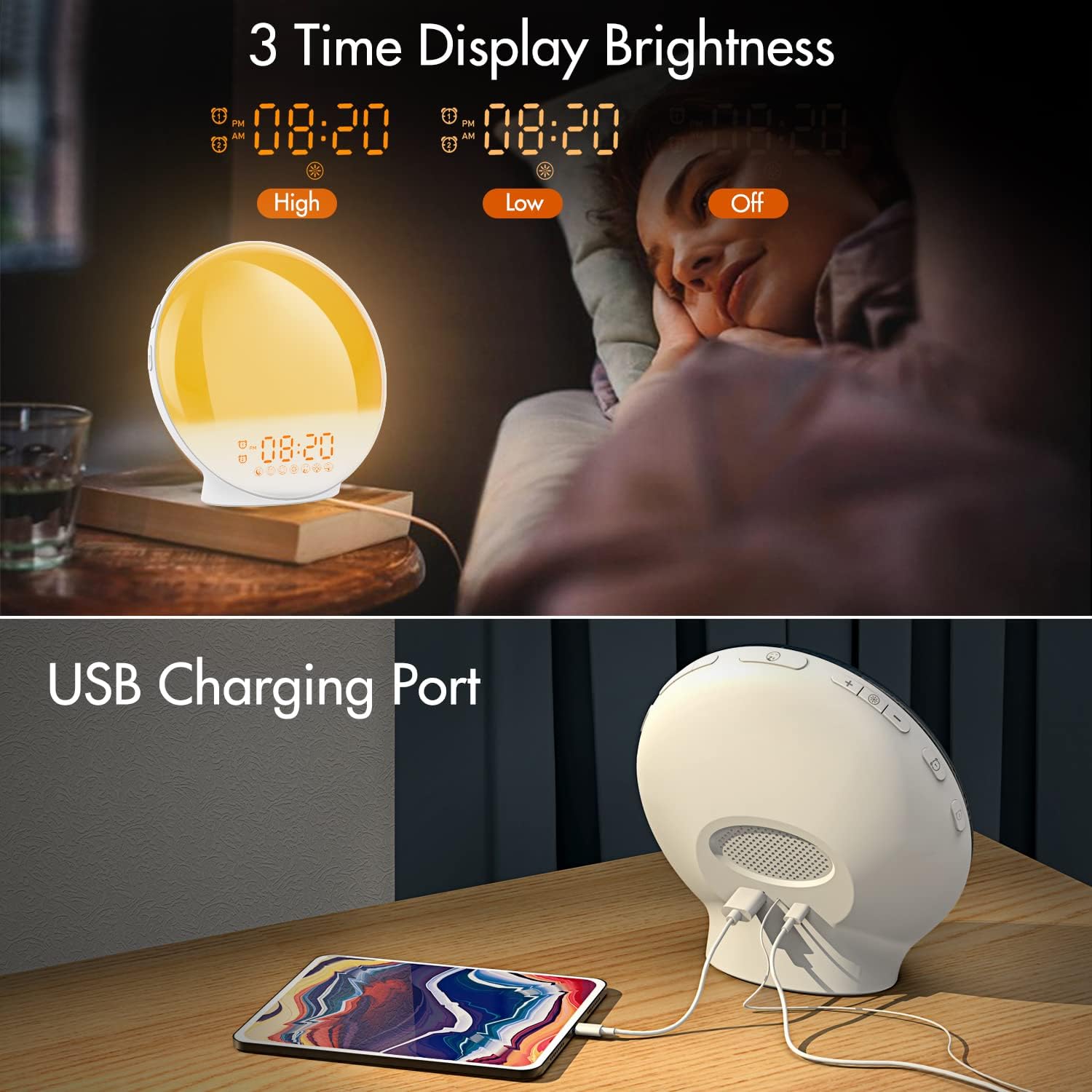
Изображение 3.1: Illustration of the three time display brightness options: High, Low, and Off, allowing users to customize visibility for different times of day or night.
4. Инструкция по эксплуатации
4.1 Настройка сигналов тревоги (сигнал тревоги 1 и сигнал тревоги 2)
The clock features two independent alarms, allowing for separate wake-up times (e.g., weekday and weekend).

Изображение 4.1: Depiction of the dual alarm functionality, allowing users to set different alarms for weekdays and weekends, along with the snooze feature.
- Нажмите Кнопка будильника 1 (или Кнопка будильника 2) to activate and enter alarm setting mode. The alarm time will flash.
- Используйте Кнопки вверх / вниз чтобы установить желаемый час будильника.
- Нажмите Тревожная кнопка again to confirm the hour and set the minutes.
- Используйте Кнопки вверх / вниз to set the desired alarm minutes.
- Нажмите Тревожная кнопка again to select the wake-up sound. Use Кнопки вверх / вниз to cycle through 7 nature sounds or FM radio.
- Нажмите Тревожная кнопка again to set the volume level (1-16) for the alarm sound. Use Кнопки вверх / вниз для настройки.
- Нажмите Тревожная кнопка one last time to confirm all settings and activate the alarm. An alarm icon will appear on the display.
4.2 Функция повтора
When an alarm sounds, tap the Кнопка повтора (often the large button on top or front) to pause the alarm for 9 minutes. This can be repeated up to 5 times.
4.3 Имитация восхода солнца
The sunrise simulation gradually brightens the light before your alarm time, mimicking a natural sunrise.

Изображение 4.2: Visual representation of the sunrise simulation feature, where the light intensifies gradually over a set period before the alarm, designed for a gentle wake-up.
- When setting an alarm, after selecting the sound and volume, you will typically be prompted to set the sunrise duration.
- Используйте Кнопки вверх / вниз to choose a duration between 10 to 60 minutes. The light will gradually increase from 0% to the set brightness level (0-20) during this period.
- The light color will transition from deep red to bright yellow, simulating a natural sunrise.
4.4 Sunset Simulation / Sleep Aid
The sunset simulation gradually dims the light and can play soothing sounds to help you fall asleep.

Изображение 4.3: Illustration of the sunset simulation, where the light gradually dims over a period of 10 to 120 minutes, accompanied by optional sleep sounds like rain, forest, river, or FM radio.
- Нажмите Snooze/Sleep Aid Button (or a dedicated Sleep Aid button) to activate the sleep aid function.
- Используйте Кнопки вверх / вниз to select a duration for the dimming process (10-120 minutes).
- You can also select a natural sound (Rain, Forest, River) or FM radio to play during this period.
- The light will gradually dim from 100% to 0% over the selected duration, and the sound will fade out.
4.5 FM-радио
The built-in FM radio allows you to listen to your favorite stations or use them as an alarm sound.

Изображение 4.4: Надview of the 7 available alarm sounds and the FM radio option, providing diverse choices for waking up.
- Нажмите Кнопка FM-радио для включения/выключения радио.
- Держите Кнопка FM-радио to automatically scan and save available stations.
- Используйте Кнопки вверх / вниз to manually tune to a specific frequency or cycle through saved stations.
- Отрегулируйте громкость с помощью Кнопки громкости +/-.
4.6 Night Light / Color Light
The clock can function as a night light with various color options and adjustable brightness.

Изображение 4.5: Display of the 7 color atmosphere light options and 20 brightness levels, highlighting the clock's versatility as a mood light or reading lamp.
- Нажмите Кнопка включения света чтобы включить свет.
- Нажмите Кнопка включения света repeatedly to cycle through 7 static colors (e.g., Red, Green, Blue, Yellow, Indigo, Purple, White) or an automatic color-changing mode.
- Используйте Кнопки вверх / вниз to adjust the brightness level (0-20) of the selected color or white light.
- Держите Кнопка включения света выключить свет.
4.7 USB-порт для зарядки
A 5V/2.4A USB port is located on the back of the device, allowing you to charge your smartphone or other small electronic devices.
Изображение 4.6: Задний view of the alarm clock showing the USB charging port in use, connected to a tablet for charging.
5. Техническое обслуживание
- Уборка: Протирайте устройство мягкой сухой тканью. Не используйте абразивные чистящие средства или растворители.
- Хранилище: Если устройство не используется в течение длительного времени, храните его в прохладном, сухом месте.
- Власть: Always use the provided power adapter to prevent damage.
6. Поиск Неисправностей
| Проблема | Возможная причина | Решение |
|---|---|---|
| Часы не включаются. | Адаптер питания не подключен или неисправен. | Ensure the power adapter is securely connected to both the clock and a working power outlet. Try a different outlet. |
| Сигнализация не срабатывает. | Сигнализация не сработала или громкость слишком низкая. | Check if the alarm icon is displayed. Re-set the alarm and ensure the volume is set to an audible level. |
| Имитация восхода солнца не работает. | Sunrise duration not set during alarm setup. | Ensure you have set a sunrise duration (10-60 minutes) when configuring the alarm. |
| Помехи в FM-радио или плохой прием. | Слабый сигнал или неправильное положение антенны. | Extend the antenna wire fully. Reposition the clock to improve reception. Perform an auto-scan for stations. |
| USB-зарядка не работает. | Устройство несовместимо или кабель неисправен. | Ensure the device you are charging is compatible with 5V/2.4A USB charging. Try a different USB cable. |
7. Технические характеристики
- Бренд: КЕПЛУГ
- Модель: B09FRY71NH
- Размеры продукта: 16 х 16 х 6.1 см
- Вес товара: 481 г
- Томtage: 5 Вольт
- Источник питания: Питание от батареи (с адаптером переменного тока)
- Тип дисплея: Цифровой
- Особые характеристики: Charging Port, Dimmable Light, Sunrise/Sunset Simulation, Dual Alarm, FM Radio, Nature Sounds
- Дата первой доступности: 12 ноября 2021 г.
8. Гарантия и поддержка
For warranty information or technical support, please refer to the contact details provided with your purchase documentation or visit the official KEPLUG webСохраните чек в качестве подтверждения покупки.