1. Введение
Thank you for choosing the Hama Digital Radio DR7 USB. This manual provides essential information for the safe and efficient operation of your new radio. Please read it thoroughly before use and keep it for future reference. This portable radio supports DAB/DAB+ digital radio and conventional FM reception, offering clear sound quality and portability.
2. Инструкции по технике безопасности
- Беречь изделие от грязи, влаги и перегрева. Использовать только в сухом помещении.
- Не роняйте изделие и не подвергайте его сильным ударам.
- Не открывайте продукт и не продолжайте использовать его, если он поврежден.
- Не пытайтесь обслуживать или ремонтировать изделие самостоятельно. Доверьте любые сервисные работы квалифицированным специалистам.
- Держите это изделие, как и все электрические изделия, в недоступном для детей месте.
- Упаковочный материал следует немедленно утилизировать в соответствии с действующими местными правилами.
- Батарейки необходимо вставлять, соблюдая правильную полярность.
- Remove batteries from the product if it is not to be used for an extended period.
3. Содержимое упаковки
- Hama Digital Radio DR7 USB
- 4 батарейки типа АА
- Инструкция по эксплуатации
4. Настройка
4.1 Источник питания
The Hama Digital Radio DR7 USB can be powered by either batteries or an external USB power source.
4.1.1 Установка аккумулятора
To use the radio with batteries, open the battery compartment cover located on the back of the device. Insert 4 AA alkaline batteries, ensuring correct polarity (+/-). Close the battery compartment cover securely.

Изображение: Назад view of the radio with the battery compartment open, showing battery insertion.
4.1.2 Подключение внешнего источника питания
For continuous operation, connect the radio to a USB power source using a compatible USB 2.0 cable. The DC IN port requires 5.0V-0.5A. The USB port is located on the back of the radio.
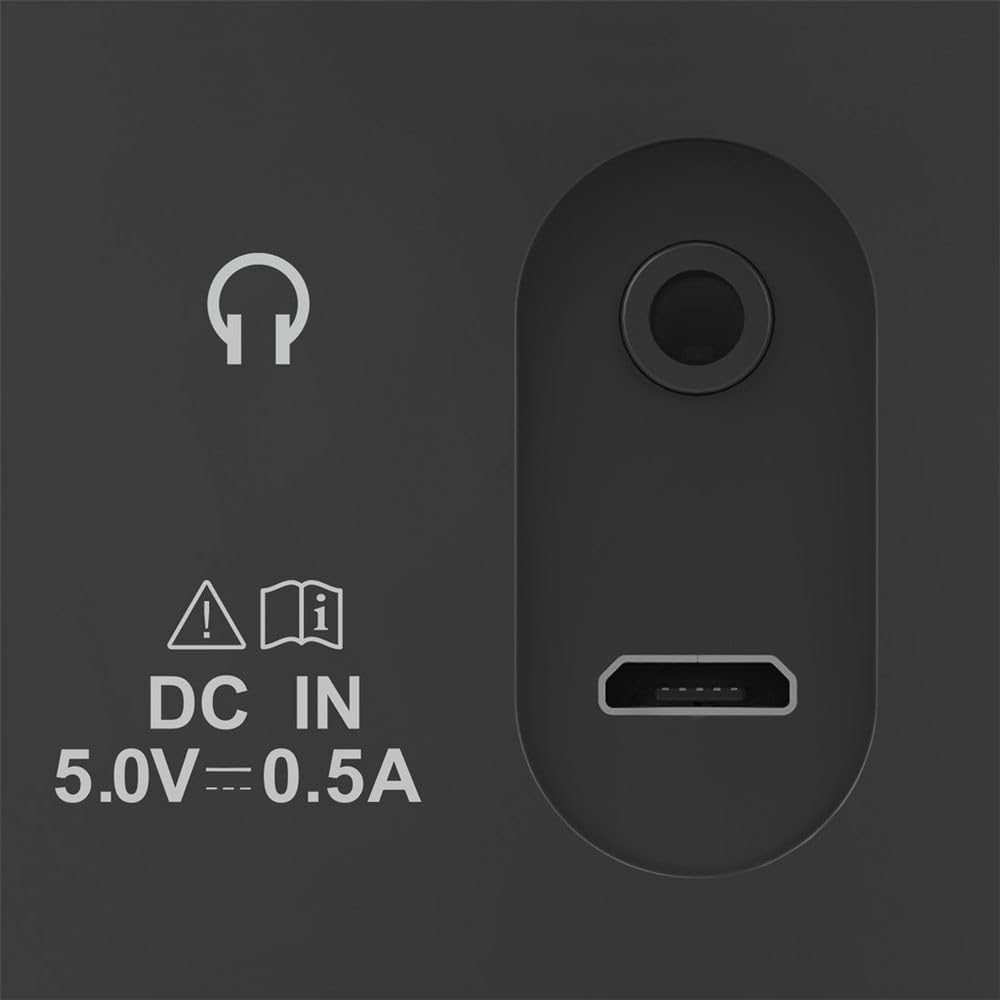
Image: Close-up of the radio's rear ports, including DC IN and USB.
4.2 Антенна
Extend the telescopic antenna fully for optimal radio reception. Adjust its position to improve signal strength if needed.

Изображение: Назад view of the radio with the antenna extended.
5. Инструкция по эксплуатации
5.1 Включение/выключение
Нажмите Власть Кнопка (обычно обозначенная кружком и вертикальной линией) для включения или выключения радио.
5.2 Mode Selection (DAB/DAB+ and FM)
Используйте Режим or Источник button to switch between DAB/DAB+ digital radio and FM radio modes.
5.3 Station Tuning
5.3.1 Automatic Scan (DAB/DAB+)
In DAB/DAB+ mode, press the Сканировать button to automatically search for available digital radio stations. The radio will store all found stations.
5.3.2 Ручная настройка (FM)
В режиме FM используйте Мелодия +/- buttons or the rotary knob (if available) to manually adjust the frequency. Press and hold the Мелодия +/- buttons for automatic station seeking.

Изображение: Спереди view of the radio, highlighting the display and controls.
5.4 предустановленных станций
The radio features two direct selection buttons and allows for storing up to 10 preset stations.
- Сохранить: Tune to the desired station. Press and hold a preset button (e.g., 1 or 2) or the Предустановленный button until the display confirms the station is saved.
- Перезвонить: Briefly press the corresponding preset button to quickly switch to a saved station.
5.5 Регулятор громкости
Отрегулируйте громкость с помощью Объем rotary knob or dedicated volume buttons.
5.6 Функция будильника
The radio includes an alarm clock feature. Refer to the detailed instructions in the printed manual for setting and managing alarms.
5.7 Использование наушников
Connect standard 3.5mm headphones to the headphone jack on the back of the radio for private listening. The internal speaker will mute automatically.
6. Техническое обслуживание
- Чистите это изделие только слегка damp, безворсовой тканью и не используйте агрессивные чистящие средства.
- Следите за тем, чтобы в изделие не попала вода.
- When replacing batteries, always replace all batteries at once.
- Если радиоприёмник не используется в течение длительного времени, храните его в прохладном, сухом месте.
7. Поиск Неисправностей
| Проблема | Возможная причина | Решение |
|---|---|---|
| Нет электричества | Batteries are depleted or incorrectly inserted; power cable is disconnected. | Replace batteries, check polarity; ensure power cable is securely connected. |
| Плохой прием или его отсутствие | Антенна не выдвинута; слабый сигнал; помехи. | Fully extend and adjust the telescopic antenna; try moving the radio to a different location; perform a new station scan. |
| Нет звука | Громкость слишком низкая; наушники подключены. | Increase volume; disconnect headphones if you want to use the speaker. |
8. Технические характеристики
- Модель: 00054242
- Размеры (Д x Ш x В): 16.5 х 5.5 х 10.5 см
- Масса: 448.54 г
- Технология тюнера: DAB, DAB+, FM
- Frequency (FM): 87.5 МГц
- Источник питания: 4 x AA Alkaline Batteries, USB 2.0 (DC IN 5.0V-0.5A)
- Материал: Пластик
- Особые характеристики: Alarm clock, 2 direct selection buttons, 10 preset stations
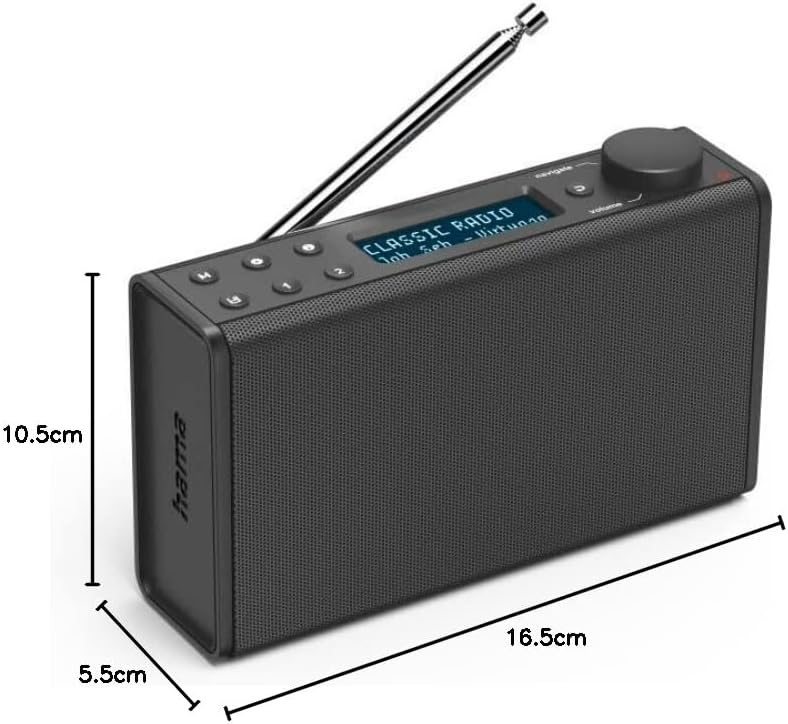
Image: Dimensions of the Hama Digital Radio DR7 USB.
9. Гарантия и поддержка
Hama GmbH & Co KG assumes no liability and provides no warranty for damage resulting from improper installation/mounting, improper use of the product, or from failure to observe the operating instructions and/or safety notes. For further support, please visit the official Hama webсайт или свяжитесь с их службой поддержки.


