1. Введение
The ABB AD1NO-R-15m is an analog time switch designed for daily scheduling with a 15-minute switching interval. This modular device features one normally open (NO) channel and includes a power reserve function to maintain timekeeping during power outages. It is suitable for various electrical scheduling applications.
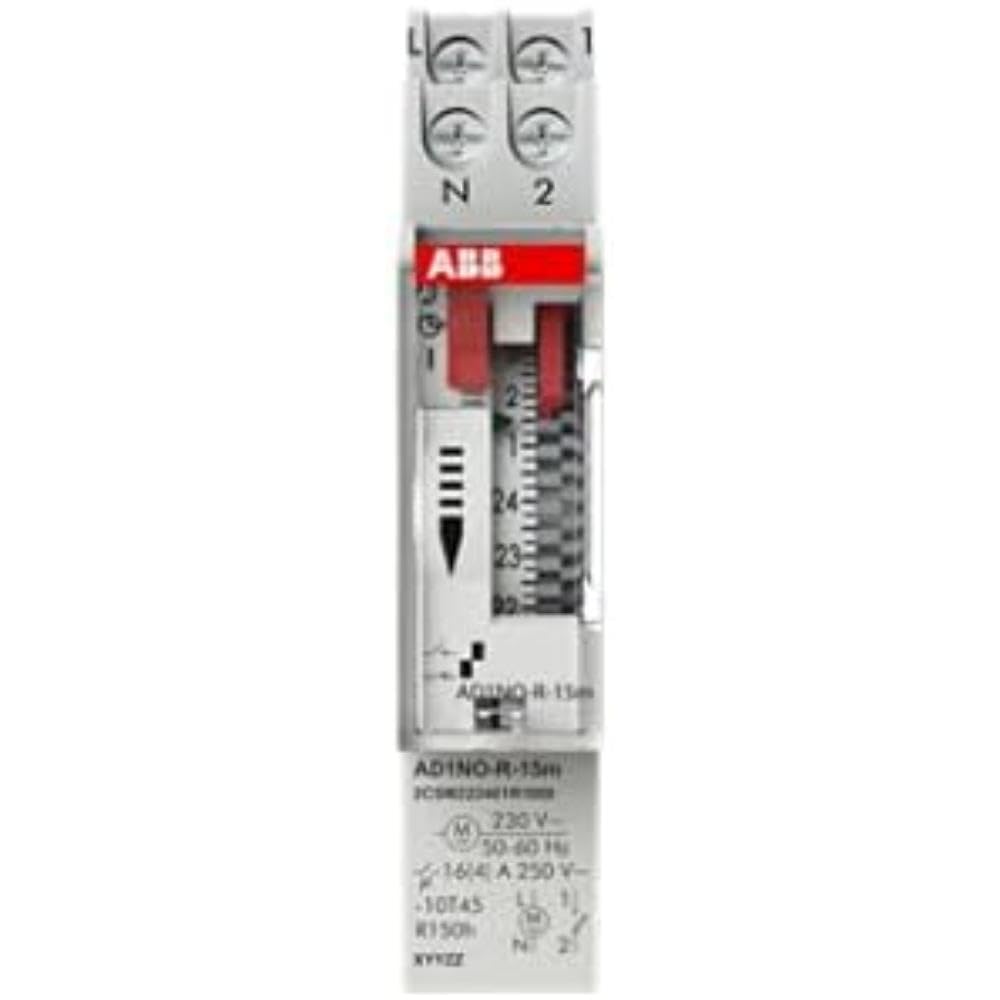
Рисунок 1: Передняя часть view of the ABB AD1NO-R-15m Modular Device Switch, highlighting its compact design and control interface.
2. Важные инструкции по технике безопасности
Please read and understand all safety instructions before installing, operating, or maintaining this device. Failure to follow these instructions may result in electric shock, fire, or serious injury.
- Установка и обслуживание должны выполняться только квалифицированным персоналом.
- Disconnect power before installation, maintenance, or servicing to prevent electric shock.
- Убедитесь, что вся электропроводка соответствует местным и национальным электротехническим нормам и правилам.
- Не эксплуатируйте устройство, если оно повреждено.
- Данное устройство предназначено для использования в сухих помещениях.
3. Продукт закончилсяview
The AD1NO-R-15m is an analog time switch with the following key features:
- Аналоговый циферблат: For setting daily schedules.
- 15-Minute Switching: Allows precise control over connected circuits with 15-minute intervals.
- 1 Normally Open (NO) Channel: Управляет одной электрической цепью.
- Запас хода: Maintains timekeeping for a specified duration during power interruptions.
- Модульная конструкция: Suitable for integration into standard electrical panels on a DIN rail.
Note: The power reserve ensures the timer continues to function accurately even if the main power supply is temporarily lost.
4. Настройка и установка
Follow these steps for proper installation of the AD1NO-R-15m Modular Device Switch:
- Отключение питания: Before beginning, ensure the main power supply to the installation area is completely disconnected at the circuit breaker or fuse box. Verify with a voltagе тестер.
- Монтаж: Mount the AD1NO-R-15m switch onto a standard DIN rail within an appropriate electrical enclosure. Ensure it is securely fastened.
- Проводка:
- Connect the incoming phase (L) and neutral (N) wires to the designated input terminals of the time switch.
- Connect the load wire from the output terminal of the time switch to the device you wish to control.
- Ensure all connections are tight and secure. Refer to the wiring diagram printed on the device for specific terminal identification.
- Восстановление мощности: Once all connections are verified and secure, close the electrical enclosure and restore power to the circuit.
Always consult a qualified electrician for installation if you are unsure or lack experience with electrical wiring.
5. Инструкция по эксплуатации
To set the time and program the switching schedule:
- Установить текущее время: Rotate the analog dial clockwise until the current time aligns precisely with the reference arrow or marker on the device's face.
- Program Switching Times: The dial features small segments around its perimeter. Push in the segments corresponding to the times you want the connected circuit to be ON. Pull out segments for OFF periods. Each segment typically represents a 15-minute interval.
- Operating Mode (if applicable): If your model includes a manual override switch (e.g., ON, AUTO, OFF), ensure it is set to "AUTO" for programmed operation.
The internal power reserve will automatically charge when the device is powered, ensuring continued accurate timekeeping during short power outagес.
6. Техническое обслуживание
The AD1NO-R-15m is designed for minimal maintenance. Follow these guidelines to ensure optimal performance:
- Уборка: Keep the device clean and free from dust. Use a dry, soft cloth for cleaning. Do not use liquid cleaners, abrasive materials, or solvents.
- Инспекция: Periodically inspect the wiring connections for tightness and any signs of wear, corrosion, or damage. Ensure all terminals are secure.
- Условия окружающей среды: Во избежание повреждений следите за тем, чтобы температура и влажность рабочей среды оставались в пределах указанных диапазонов.
There are no user-serviceable parts inside this device. Do not attempt to open the casinг, поскольку это аннулирует гарантию и может подвергнуть вас опасности поражения электрическим током.
7. Поиск Неисправностей
If you encounter issues with your AD1NO-R-15m switch, refer to the table below for common problems and solutions:
| Проблема | Возможная причина | Решение |
|---|---|---|
| Устройство не переключается | Нет питания | Check the circuit breaker or fuse. Ensure wiring connections are correct and secure. |
| Устройство не переключается | Неправильное программирование | Re-check the dial settings and ensure the correct segments are pushed in or pulled out for desired ON/OFF times. |
| Устройство не переключается | Manual override engaged | Set the operating mode switch to "AUTO" for programmed operation. |
| Время неверное после отключения питанияtage | Power reserve depleted or faulty | Allow the device to charge its power reserve by keeping it connected to power. If the issue persists, contact customer support. |
If the problem persists after attempting these solutions, please contact ABB customer support for further assistance.
8. Технические характеристики
- Модель: AD1NO-R-15m
- Номер детали: 2CSM222461R1000
- Производитель: РИС
- Тип: Аналоговый переключатель времени
- Switching Interval: 15 минуты
- Каналы: 1 нормально открытый (НЕТ)
- Запас хода: Да
- Вес товара: Примерно 2.82 унций (80 грамм)
- Размеры продукта: Примерно 3.54 x 0.69 x 2.6 дюйма (90 x 17.5 x 66 мм)
- Тип крепления: DIN Rail (Wall Mount)
- Включенные компоненты: Modular device switch
- Требуемые батареи: No (features internal power reserve)
- ASIN: B09BP4PFMF
- Первая доступная версия: 21 декабря 2024 г.
Примечание. Технические характеристики могут быть изменены без предварительного уведомления.
9. Гарантия и поддержка
Информация о гарантии
For detailed warranty terms and conditions, please refer to the official ABB warranty statement provided with your purchase or visit the official ABB webСохраните чек о покупке для предъявления гарантийных претензий.
Поддержка клиентов
For technical assistance, troubleshooting, or service inquiries, please contact ABB customer support through their official webсайт или контактную информацию, указанную на упаковке вашего продукта.
Официальный представитель ABB Webсайт: www.abb.com