Введение
The Vieta Pro Note True Wireless Earphones are designed to provide a high-quality audio experience with advanced features. These earphones utilize Bluetooth 5.1 for stable wireless connectivity, offer Active Noise Cancellation (ANC) up to -30dB, and include an integrated microphone for clear communication. With IPX4 water resistance, they are suitable for various activities. The charging case extends the total battery life to up to 20 hours.
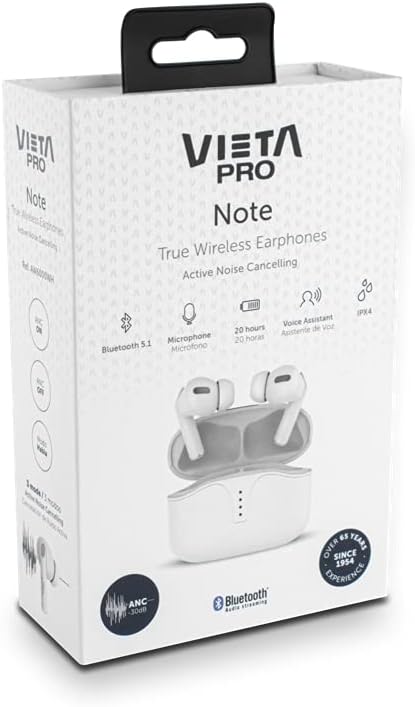
Image: Vieta Pro Note True Wireless Earphones in their retail packaging, highlighting key features like Bluetooth 5.1, microphone, 20 hours battery, Voice Assistant, and IPX4 rating.
Настраивать
1. Первоначальная зарядка
Before first use, fully charge the earphones and the charging case. Connect the provided USB Type-C cable to the charging port on the case and to a power source. The LED indicators on the case will show the charging status and remaining battery level.
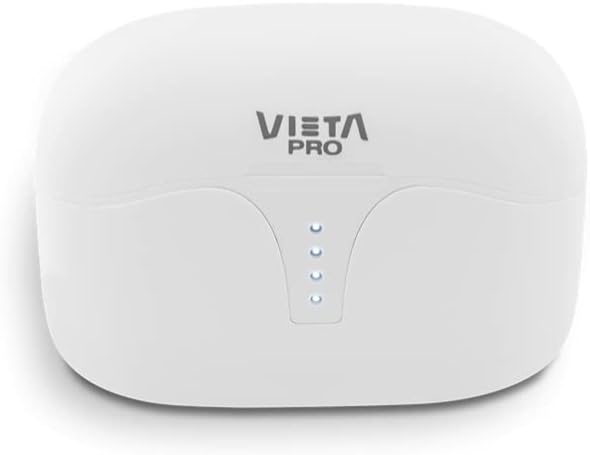
Изображение: сверху view of the Vieta Pro Note charging case, showing the four LED indicators that display battery status.
2. Сопряжение с устройством
- Убедитесь, что наушники заряжены и помещены в зарядный футляр.
- Откройте крышку зарядного кейса. Наушники автоматически перейдут в режим сопряжения.
- На смартфоне или устройстве с поддержкой Bluetooth перейдите в настройки Bluetooth.
- Select "Vieta Pro Note" from the list of available devices.
- После подключения раздастся подтверждающий звуковой сигнал, и наушники будут готовы к использованию.
The Vieta Pro Note earphones feature Технология двойного мастера, meaning both earbuds can function independently. You can use either the left or right earbud alone after initial pairing.
Image: The Vieta Pro Note True Wireless Earphones removed from their open charging case, ready for pairing or use.
Инструкция по эксплуатации
1. Включение/выключение питания
- Включение питания: Open the charging case lid, or take the earphones out of the case. They will automatically power on and attempt to connect to the last paired device.
- Выключение: Поместите наушники обратно в зарядный футляр и закройте крышку. Они автоматически выключатся и начнут заряжаться.
2. Сенсорное управление
The Vieta Pro Note earphones feature a touch control panel on each earbud for various functions:

Изображение: крупный план view of the left Vieta Pro Note earbud, showing the touch-sensitive area and microphone.
- Воспроизведение/Пауза: Нажмите один раз на любой наушник.
- Следующий трек: Дважды нажмите на правый наушник.
- Предыдущий трек: Дважды нажмите на левый наушник.
- Увеличить громкость: Трижды нажмите на правый наушник.
- Убавить звук: Трижды нажмите на левый наушник.
- Ответить/завершить вызов: Нажмите один раз на любой наушник.
- Отклонить вызов: Нажмите и удерживайте любой наушник в течение 2 секунд.
- Активировать голосового помощника: Нажмите и удерживайте любой наушник в течение 3 секунд.
3. Режимы активного шумоподавления (АНЧ)
The earphones offer three noise cancellation modes:
- Активное шумоподавление (ANC): Reduces ambient noise by up to -30dB, ideal for noisy environments.
- Talk Mode (Transparency Mode): Allows you to hear your surroundings and engage in conversations without removing the earphones.
- Деактивировано: Turns off noise cancellation for a standard listening experience.
To switch between ANC modes, press and hold the touch panel on the левый earbud for approximately 2 seconds until you hear a voice prompt indicating the mode change.
Обслуживание
1. Уборка
- Регулярно протирайте наушники и зарядный чехол мягкой, сухой тканью без ворса.
- Не используйте абразивные чистящие средства, растворители или аэрозольные распылители.
- Аккуратно удалите ушную серу или загрязнения с амбушюр и сетки динамика с помощью небольшой мягкой кисточки или ватного тампона.
2. Хранение
When not in use, store the earphones in their charging case to protect them from dust, damage, and to ensure they remain charged.
3. Водонепроницаемость (IPX4)
The Vieta Pro Note earphones are rated IPX4 for water resistance. This means they are resistant to splashing water from any direction. They are suitable for use during workouts or in light rain. However, they are нет designed for submersion in water or exposure to pressurized water jets. Do not use them in a shower or while swimming.
Поиск неисправностей
- Нет звука: Ensure earphones are charged, connected to your device, and volume is turned up on both the earphones and your device.
- Невозможно выполнить сопряжение: Make sure Bluetooth is enabled on your device and the earphones are in pairing mode. Try turning Bluetooth off and on again on your device. If issues persist, try resetting the earphones (refer to the full manual for specific reset instructions if available).
- Прерывистое соединение: Ensure there are no obstructions between the earphones and your device. Keep the device within the Bluetooth range (typically 10 meters/33 feet).
- Наушники не заряжаются: Check that the charging cable is securely connected and the charging case has power. Ensure the earbuds are correctly seated in the charging case.
Технические характеристики
| Номер модели | AW6000WH |
| Бренд | Виета Про |
| Связность | Блютус 5.1 |
| Шумоподавление | Активное шумоподавление (-30 дБ) |
| Микрофон | Интегрированный |
| Водостойкость | IPX4 |
| Срок службы батареи наушников | До 5 часов |
| Общее время работы батареи (с чехлом) | До 20 часов |
| Порт зарядки | USB-порт типа C |
| Тип управления | Сенсорное управление, регулировка громкости |
| Форм-фактор | Внутриканальные наушники |
| Материал | Пластик |
Гарантия и поддержка
For warranty information, technical support, or further assistance, please refer to the official Vieta Pro webили обратитесь в службу поддержки клиентов. Сохраните чек о покупке для предъявления гарантийных претензий.


