1. Введение
Thank you for choosing the AUKEY Sprint Wireless Power Bank PB-Y32. This device is designed to provide portable power for your mobile devices, featuring both wired and wireless fast charging capabilities. Please read this manual carefully before use to ensure optimal performance and safety.
2. Особенности продукта
- Емкость 10000 мАч: High-capacity battery to charge your devices multiple times.
- Поддержка быстрой зарядки: Supports Quick Charge 3.0 and Power Delivery for rapid charging of compatible devices.
- Беспроводная зарядка: Conveniently charge Qi-compatible devices at up to 10W.
- Несколько выходных портов: Equipped with USB-C and USB-A ports for versatile charging.
- Компактная и портативная конструкция: Удобен для переноски и использования в дороге.
- Функции безопасности: Built-in protections against overcharge, over-discharge, overcurrent, and short circuits.
3. Содержимое упаковки
- AUKEY Sprint Wireless Power Bank PB-Y32
- Кабель USB-A-C
- Руководство пользователя
4. Настройка и первоначальное использование
4.1 Зарядка Power Bank
Before first use, fully charge the power bank. It takes approximately 7 hours to fully charge the power bank using a compatible USB-C power adapter.
- Connect the included USB-A to C cable to the power bank's USB-C input port.
- Подключите другой конец кабеля к сетевому USB-зарядному устройству (не входит в комплект).
- The LED indicators will light up to show the charging status. All four LEDs will be solid when fully charged.
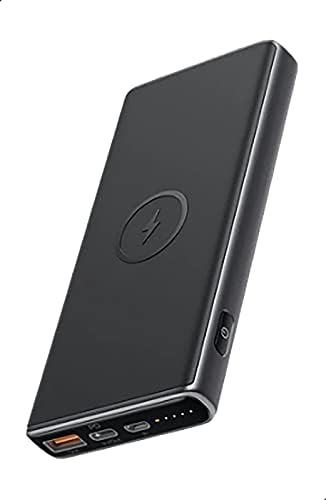
Image: The AUKEY Sprint Wireless Power Bank PB-Y32, showcasing его элегантный черный дизайн и расположение портов.
5. Инструкция по эксплуатации
5.1 Проводная зарядка
To charge your device using a cable:
- Подключите зарядный кабель вашего устройства к выходному порту USB-A или USB-C на внешнем аккумуляторе.
- Подключите другой конец кабеля к устройству.
- Внешний аккумулятор автоматически начнет заряжать ваше устройство.
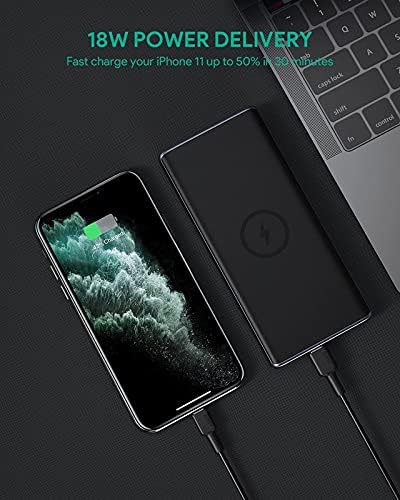
Image: The power bank connected via cable to a smartphone, demonstrating 18W Power Delivery fast charging.

Image: A smartphone connected to the power bank, illustrating Qualcomm Quick Charge 3.0 capabilities for rapid charging.
5.2 Беспроводная зарядка
To charge your Qi-compatible device wirelessly:
- Place your Qi-compatible device directly onto the wireless charging pad located on the top surface of the power bank. Ensure the device is centered on the charging symbol.
- The power bank will automatically detect your device and begin wireless charging.

Image: A smartphone placed on the power bank's surface, demonstrating the wireless charging feature.

Изображение: крупный план view of the power bank showing the silicone ring designed to keep the phone stable during wireless charging.
5.3 Режим зарядки низким током
This mode is ideal for charging low-power devices like wireless earbuds or smartwatches.
- Press and hold the power button for 2 seconds to enter low-current charging mode. The first LED indicator will blink green.
- Connect your low-power device or place it on the wireless charging pad.
- To exit low-current charging mode, press the power button once, or it will automatically exit after 2 hours.
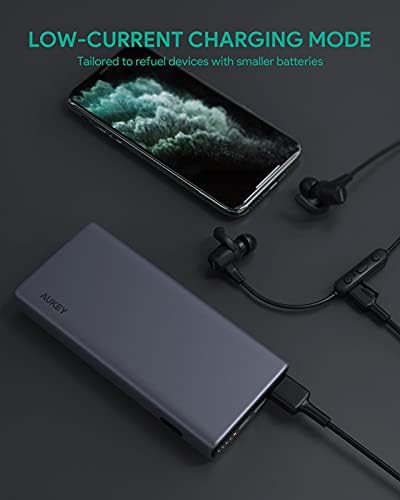
Image: The power bank connected to a smartphone and wireless earbuds, demonstrating its low-current charging mode for smaller devices.

Image: An illustration showing the power bank's broad compatibility with various devices, including smartphones, tablets, and gaming consoles.
6. Техническое обслуживание
- Keep the power bank away from liquids, extreme heat, and strong magnetic fields.
- Не роняйте и не подвергайте внешний аккумулятор сильным ударам.
- Clean the power bank with a dry, soft cloth. Do not use corrosive cleaners.
- Храните внешний аккумулятор в прохладном сухом месте, когда он не используется.
- Для поддержания работоспособности батареи заряжайте внешний аккумулятор не реже одного раза в 3 месяца.
7. Поиск Неисправностей
7.1 Внешний аккумулятор не заряжается
- Убедитесь, что зарядный кабель надежно подключен как к внешнему аккумулятору, так и к сетевому зарядному устройству.
- Попробуйте использовать другой кабель USB-C или зарядное устройство.
- Verify the wall charger's output meets the power bank's input requirements (DC 5V-3A / 9V-2A).
7.2 Устройство не заряжается от Power Bank
- Убедитесь, что внешний аккумулятор достаточно заряжен.
- Попробуйте использовать другой зарядный кабель для вашего устройства.
- For wireless charging, ensure your device is Qi-compatible and properly aligned on the charging pad. Remove any thick cases that might interfere.
- При зарядке маломощного устройства убедитесь, что активирован режим зарядки малым током.
7.3 Перегрев повербанка
- Небольшой нагрев внешнего аккумулятора во время зарядки или разрядки является нормальным явлением.
- If it becomes excessively hot, disconnect all devices and the charging cable immediately. Allow it to cool down before resuming use.
- Обеспечьте надлежащую вентиляцию и не накрывайте внешний аккумулятор во время использования.
8. Технические характеристики
| Особенность | Деталь |
|---|---|
| Название модели | Спринт |
| Номер модели | ПБ-Y32 |
| Емкость аккумулятора | 10000 мАч |
| Вход USB Type-C | 5В-3А постоянного тока / 9В-2А |
| Выход USB Type-C | 5В-3А постоянного тока / 9В-2А / 12В-1.5А |
| USB-выход типа A | 18 Вт |
| Максимальная выходная мощность | 18 Вт |
| Выход для беспроводной зарядки | 5 Вт, 7.5 Вт, 10 Вт |
| Размеры | 144 х 67 х 17 мм |
| Масса | 210 грамм |
| Состав аккумуляторной батареи | Литий-полимерный |
| Особые возможности | Short Circuit Protection, Wireless Charging |
| Цвет | Черный |
| Время зарядки аккумулятора | 7 часа |
9. Гарантия и поддержка
According to the product specifications, this product comes with Нет гарантии. For any product-related inquiries or support, please refer to the retailer or manufacturer's official webсайт для контактной информации.