1. Введение
Thank you for choosing the EMOS Select ES5001 Radio Weather Station. This device provides comprehensive weather information, including indoor and outdoor temperature, humidity, barometric pressure, and a weather forecast. It features a color touch screen for easy interaction and a wireless outdoor sensor with a range of up to 100 meters.
Содержимое упаковки
- EMOS Select ES5001 Weather Station (Main Unit)
- Беспроводной датчик наружного освещения
- Адаптер питания для основного блока
- Руководство пользователя (этот документ)
Примечание: 2x AAA batteries for the outdoor sensor and 3x AAA batteries for the main unit (backup) are not included and must be purchased separately.
2. Информация по технике безопасности
- Перед использованием внимательно прочтите все инструкции.
- Держите устройство подальше от воды и высокой влажности.
- Do not expose the main unit to direct sunlight or extreme temperatures.
- Используйте для подключения основного блока только прилагаемый адаптер питания.
- Не пытайтесь разбирать или ремонтировать устройство самостоятельно. Обратитесь к квалифицированному специалисту.
- Утилизируйте батареи ответственно, в соответствии с местными правилами.
- Храните батареи в недоступном для детей месте.
3. Настройка
3.1 Установка аккумулятора
Наружный датчик:
- Откройте крышку батарейного отсека на задней стороне наружного датчика.
- Вставьте 2 батарейки типа AAA, соблюдая полярность (+/-).
- Плотно закройте крышку батарейного отсека.
Main Unit (Backup Power):
- Откройте крышку батарейного отсека на задней панели основного блока.
- Вставьте 3 батарейки типа AAA, соблюдая полярность (+/-).
- Close the battery compartment cover securely. These batteries provide backup power in case of a power outage.
3.2 Подключение питания
Connect the provided power adapter to the main unit's power input port and then plug it into a standard electrical outlet. The display will illuminate.
3.3 Начальная синхронизация
Once both the main unit and the outdoor sensor have power, they will automatically attempt to synchronize. Place the outdoor sensor within close proximity to the main unit during the initial setup. The outdoor temperature and humidity readings should appear on the main unit's display within a few minutes. If synchronization fails, refer to the troubleshooting section.
3.4 Размещение наружных датчиков
For accurate readings, place the outdoor sensor in a shaded area, protected from direct sunlight and rain. Ensure it is within the 100-meter wireless range of the main unit and away from large metal objects or electrical interference sources. The sensor is water-resistant (IPX4) but should not be submerged.

Image: The outdoor sensor is designed to be water-resistant with an IPX4 rating, suitable for outdoor placement.

Image: The outdoor sensor offers a wireless range of up to 100 meters from the main unit, allowing flexible placement.
4. Операция
4.1 Отображение поверхview
The EMOS Select ES5001 features a clear, color touch screen display that presents various weather metrics and time information. The display is designed for readability from multiple angles.

Изображение: подробное view of the weather station's clear interface, highlighting different data sections such as outdoor/indoor temperature and humidity, pressure trend, time, date, and moon phase.
4.2 Сенсорный экран управления
The main unit is operated via touch-sensitive buttons located on the display. Specific icons correspond to different functions such as settings, alarm, and unit selection.

Image: A hand demonstrates interaction with the touch-sensitive buttons on the display, which offers a wide 160-degree viewугол наклона.
4.3 Основные настройки (Время, Дата, Единицы измерения)
The radio clock automatically sets the time and date via RF signal. Manual adjustments can be made through the settings menu if needed. To access settings, touch the gear icon on the display. You can typically adjust:
- Часовой пояс
- 12/24-часовой формат
- Date format (DD/MM or MM/DD)
- Единицы измерения температуры (°C/°F)
- Pressure units (hPa/inHg)
4.4 Прогноз погоды
The weather station features a self-learning weather forecast function. After approximately 14 days of continuous operation, the station will have collected enough data to provide a more accurate 24-hour weather forecast with up to 75% accuracy. The forecast is indicated by graphical icons on the display.

Image: Illustrates the 24-hour weather forecast feature, highlighting the self-learning capability that becomes active after 14 days, along with moon phase and barometer functions.
4.5 Функция будильника
The weather station includes an alarm clock function. To set the alarm, navigate to the alarm settings via the touch screen interface. You can set a specific alarm time and activate/deactivate it.
4.6 Индикатор фаз Луны
The display shows the current moon phase, providing additional astronomical information.
4.7 Barometric Pressure and Trend
The integrated barometer measures atmospheric pressure. The display shows the current pressure and a trend indicator, allowing you to observe changes in pressure over time, which can help in predicting weather changes.
5. Техническое обслуживание
5.1 Очистка
Протрите основной блок и наружный датчик мягкой тряпкой.amp Не используйте абразивные чистящие средства или растворители, так как они могут повредить поверхности или электронные компоненты.
5.2. Замена батареи
Replace batteries in the outdoor sensor when the low battery indicator appears on the main unit's display. For the main unit, replace backup batteries periodically or when the unit fails to retain settings during a power outage. Always use new batteries of the specified type (AAA) and ensure correct polarity.
6. Поиск Неисправностей
| Проблема | Возможная причина | Решение |
|---|---|---|
| На основном блоке нет изображения. | Power adapter not connected or faulty; backup batteries depleted. | Ensure power adapter is securely connected and plugged in. Check backup batteries and replace if necessary. |
| Outdoor readings not displayed | Outdoor sensor batteries depleted; sensor out of range; interference; synchronization failed. | Replace outdoor sensor batteries. Move sensor closer to the main unit. Avoid placing near large metal objects or electronics. Re-synchronize by removing and reinserting batteries in both units. |
| Неточный прогноз погоды | Learning phase not complete; local weather conditions vary significantly. | Allow 14 days for the self-learning function to optimize. Forecasts are general and may not always match hyper-local conditions. |
| Неверное время/дата | RF signal interference; incorrect time zone setting. | Move unit away from potential interference sources. Manually set the correct time zone in settings. |
| Сенсорный экран не реагирует | Временный сбой программного обеспечения. | Disconnect power adapter and remove backup batteries for a few minutes, then reconnect. |
7. Технические характеристики
- Модель: ES5001
- Тип дисплея: Цветной сенсорный экран
- Источник питания (основной блок): AC Adapter (included), 3x AAA batteries (backup, not included)
- Источник питания (наружный датчик): 2 батарейки типа ААА (не входят в комплект)
- Диапазон беспроводной связи: До 100 метров (на открытом воздухе)
- Точность температуры: ±1 °С
- Диапазон температур наружного воздуха: -50 °С до +70 °С
- Диапазон влажности: 1% до 99%
- Особые характеристики: Alarm, Clock, Wireless Connectivity, Barometer, Moon Phase, Weather Forecast
- Материал: Стекло, Пластик
- Цвет: Черный
- Размеры (основной блок): Approximately 192 mm (width) x 127 mm (height) x 65 mm (depth)
- Dimensions (Outdoor Sensor): Приблизительные размеры: 62 мм (ширина) x 100 мм (высота)
- Water Resistance (Outdoor Sensor): IPX4
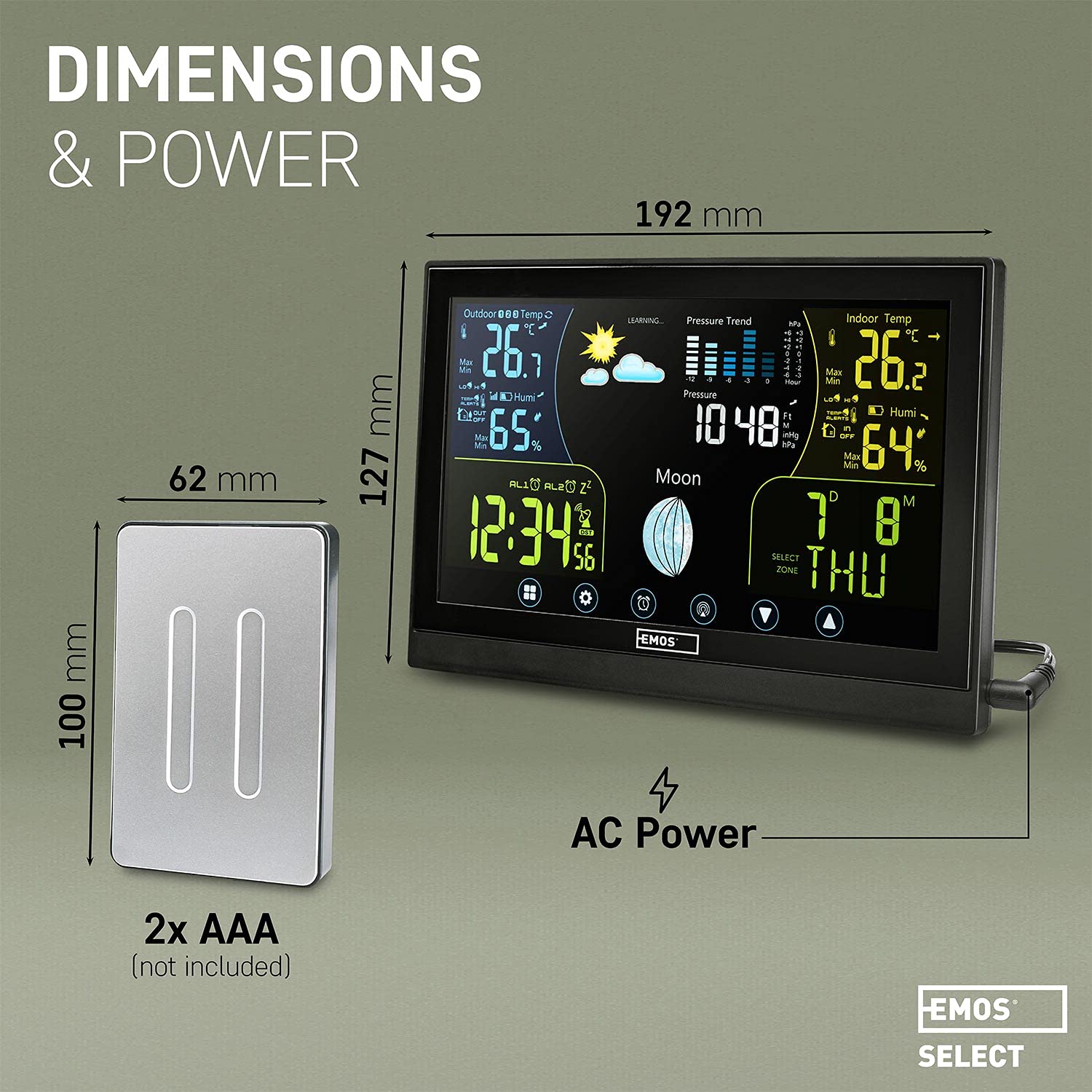
Image: Visual representation of the main unit and outdoor sensor dimensions, indicating power sources for each component.
8. Гарантия и поддержка
EMOS provides a standard manufacturer's warranty for this product. Please refer to the warranty card included in your package or visit the official EMOS website for detailed warranty terms and conditions. For technical support, troubleshooting assistance, or to inquire about spare parts, please contact EMOS customer service through their official channels.


