1. Введение
The Energizer Connect Smart WiFi Plug allows you to control your electronic devices remotely using a mobile application or voice commands. This smart plug connects directly to your home's 2.4GHz Wi-Fi network, eliminating the need for a separate hub. It is compatible with Amazon Alexa, Google Assistant, and Siri for convenient voice control. This manual provides detailed instructions for setting up, operating, maintaining, and troubleshooting your smart plug.
2. Информация по технике безопасности
Перед использованием данного изделия, пожалуйста, прочтите и усвойте все инструкции по технике безопасности. Несоблюдение этих инструкций может привести к поражению электрическим током, возгоранию или повреждению имущества.
- Только для использования внутри помещений.
- Не превышайте максимальную нагрузку 15 Amps (120 Volts).
- Do not immerse the plug in water or expose it to moisture.
- Не пытайтесь разбирать или модифицировать устройство.
- Хранить в недоступном для детей месте.
- Убедитесь, что вилка полностью вставлена в розетку.
- Перед чисткой отключите устройство от розетки.
3. Содержимое упаковки
- 1 x Energizer Connect Smart WiFi Plug
- 1 x Руководство пользователя (этот документ)
4. Продукт закончилсяview
The Energizer Connect Smart WiFi Plug features a compact design that allows access to the second outlet. It includes a power button and an LED indicator for status.

Изображение 4.1: The Energizer Connect Smart WiFi Plug shown with its retail packaging, highlighting key features like 15 Amps of power, grouping, voice control, and Wi-Fi connectivity. The plug itself is white and compact.

Изображение 4.2: Крупный план спереди view of the Energizer Connect Smart WiFi Plug, showing the standard Type B electrical outlet configuration (two vertical slots and a round ground hole).

Изображение 4.3: This image displays the compact dimensions of the Energizer Connect Smart WiFi Plug. The side view shows a depth of 1.0625 inches, and the front view indicates a diameter of 1.125 inches, illustrating its mini size.
4.1. Компоненты
- Кнопка питания: Press to manually turn the connected device on or off. Press and hold for 5 seconds to initiate pairing mode (LED will blink rapidly).
- Светодиодный индикатор:
- Сплошной синий: Устройство включено.
- Выключенный: Устройство выключено.
- Быстро мигающий синий: Режим сопряжения.
- Медленно мигает синим: Отключен от Wi-Fi.
5. Инструкции по настройке
Follow these steps to set up your Energizer Connect Smart WiFi Plug.
5.1. Системные требования
- A stable 2.4GHz Wi-Fi network (5GHz networks are not supported).
- A smartphone or tablet running iOS 10.0 or higher, or Android 6.0 or higher.
- Access to the Apple App Store or Google Play Store.
5.2. Загрузка и установка приложения
- Загрузить Energizer Connect App из Apple App Store или Google Play Store. Искать "Energizer Connect".
- Откройте приложение и следуйте инструкциям на экране, чтобы создать учетную запись или войти в систему.

Изображение 5.1: A smartphone displaying the Energizer Connect App interface, showing the smart plug in an "ON" state. The image also includes the physical smart plug and icons for downloading the app from the App Store and Google Play.
5.3. Pairing the Smart Plug
- Plug the Energizer Connect Smart WiFi Plug into a standard 120V wall outlet.
- The LED indicator on the plug should begin blinking rapidly, indicating it is in pairing mode. If not, press and hold the power button on the side of the plug for 5 seconds until it blinks rapidly.
- Open the Energizer Connect App.
- Нажмите значок «+» (или «Добавить устройство»), чтобы добавить новое устройство.
- В списке устройств выберите «Электрическая розетка» или «Умная розетка».
- Убедитесь, что индикатор в приложении быстро мигает.
- Enter your 2.4GHz Wi-Fi network name and password. Ensure your phone is connected to the same 2.4GHz network.
- The app will attempt to connect to the smart plug. This may take a few moments.
- Once successfully paired, the LED indicator on the plug will turn solid blue, and the app will confirm the connection.
- You can then rename your smart plug within the app for easier identification (e.g., "Living Room Lamp"Кофеварка").

Изображение 5.2: A visual guide showing the three easy steps for setting up the Energizer Connect Smart WiFi Plug: download the app, install the device, and set up and control via the app or voice assistants. The image also features the Energizer bunny mascot.
6. Инструкция по эксплуатации
Control your smart plug using the Energizer Connect App or compatible voice assistants.
6.1. Ручное управление
Нажмите кнопку питания на боковой стороне умной розетки, чтобы вручную включить или выключить подключенное устройство.
6.2. Управление приложениями
- Вкл/Выкл: Open the Energizer Connect App, select your smart plug, and tap the power icon to toggle its state.
- Расписание: Set custom schedules for your plug to turn on or off automatically at specific times or days. This is useful for lights, coffee makers, or other appliances.
- Таймеры: Set countdown timers for the plug to turn off after a set duration.
- Удаленный доступ: Control your smart plug from anywhere with an internet connection, even when you are away from home.
- Группировка: Group multiple Energizer Connect smart plugs together to control them simultaneously with a single command.
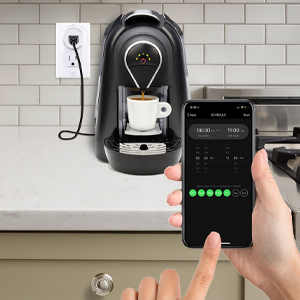
Изображение 6.1: A hand holding a smartphone displaying the Energizer Connect App's scheduling interface, set to turn on a coffee maker at a specific time. The smart plug is visible in the background, connected to the coffee machine.

Изображение 6.2: A person using a smartphone to remotely control a smart plug, demonstrating the ability to turn devices on or off from any location. The image shows a split view of the person and a living room with a lamp connected to a smart plug.
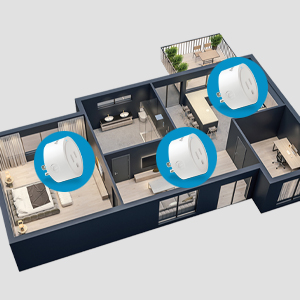
Изображение 6.3: An overhead diagram of a home showing multiple Energizer Connect Smart WiFi Plugs placed in different rooms, illustrating the concept of grouping and controlling several devices simultaneously.
6.3. Голосовое управление
The Energizer Connect Smart WiFi Plug is compatible with Amazon Alexa, Google Assistant, and Siri. To enable voice control:
- Ensure your smart plug is successfully paired with the Energizer Connect App.
- Open your Amazon Alexa, Google Home, or Apple Home app.
- Follow the app's instructions to link the "Energizer Connect" skill or service. You will need to log in with your Energizer Connect account credentials.
- После установления соединения вы сможете использовать голосовые команды, например:
- "Алекса, включи [Название плагина]."
- "Hey Google, turn off [Plug Name]."
- "Hey Siri, turn on [Plug Name]." (Requires setting up Siri Shortcuts in the Energizer Connect App)

Изображение 6.4: A living room scene demonstrating voice control capabilities. The image shows a smart plug connected to a fan, with icons for Google Assistant, Alexa, and Siri Shortcuts, indicating compatibility with these voice assistants.
7. Техническое обслуживание
Для обеспечения оптимальной производительности и долговечности вашей умной розетки:
- Уборка: Disconnect the smart plug from the power outlet before cleaning. Use a soft, dry cloth to wipe the surface. Do not use liquid cleaners or aerosols.
- Хранилище: When not in use, store the smart plug in a cool, dry place away from direct sunlight and moisture.
- Условия окружающей среды: Avoid exposing the plug to extreme temperatures or humidity.
8. Поиск Неисправностей
If you encounter issues with your Energizer Connect Smart WiFi Plug, refer to the following solutions:
| Проблема | Возможная причина | Решение |
|---|---|---|
| Plug not connecting to Wi-Fi / LED blinking slowly | Incorrect Wi-Fi password, 5GHz network selected, plug too far from router, network interference. |
|
| App cannot find the plug during pairing | Plug not in pairing mode, incorrect app used, network issues. |
|
| Голосовое управление не работает | Голосовой помощник не подключен, неверное имя устройства, проблемы с подключением к интернету. |
|
| Plug unresponsive | Мощность outagт.е. неисправность устройства. |
|
9. Технические характеристики
| Особенность | Деталь |
|---|---|
| Номер модели | B0929DFGZY |
| СКП | 805106871352 |
| Vol входtage | 120 Вольт |
| Максимальный ток нагрузки | 15 Amps |
| Частота Wi-Fi | 2.4 ГГц (IEEE 802.11 b/g/n) |
| Совместимость | Amazon Alexa, Google Assistant, Siri (via Shortcuts) |
| Сертификаты | FCC Certified, ETL Certified |
| Материал | Пластик, Резина |
| Цвет | Белый |
| Вес товара | 2.89 унции |
| Dimensions (Approx. Plug Body) | 1.125" (Diameter) x 1.0625" (Depth from outlet face) |
10. Гарантия и поддержка
For warranty information and technical support, please contact the manufacturer or seller directly. The manufacturer of this product is Jem Accessories, and the brand is Energizer Connect (distributed by XTREME DIGITAL LIFESTYLE ACCESSORIES).
Пожалуйста, сохраните документ, подтверждающий покупку, для претензий по гарантии.
For further assistance, visit the Energizer Connect webсайт или обратитесь к контактной информации, указанной на упаковке вашего продукта.


