Введение
This manual provides essential information for the proper setup, operation, and maintenance of your SPRT POS58 IVU Receipt Thermal Printer. Please read this manual thoroughly before using the printer to ensure optimal performance and longevity.
The SPRT POS58 IVU is a compact and efficient thermal receipt printer designed for various point-of-sale applications. It features USB connectivity and is compatible with 5.7 cm wide thermal paper.
Настраивать
1. Распаковка и осмотр
- Осторожно извлеките принтер и все принадлежности из упаковки.
- Verify that all components are present: printer unit, power adapter, USB cable.
- Inspect the printer for any visible damage. If damaged, contact your supplier immediately.
2. Подключение принтера
- Подключите питание: Insert the power adapter cable into the printer's power port and plug the other end into a suitable power outlet.
- Подключите USB: Подключите один конец USB-кабеля к USB-порту принтера, а другой конец — к свободному USB-порту вашего компьютера или POS-системы.
- Включение питания: Locate the power switch on the printer (typically on the side or front) and turn it to the 'ON' position.
3. Загрузка термобумаги
The SPRT POS58 IVU printer uses standard 5.7 cm wide thermal paper rolls.
- Open the paper cover by pressing the release button or lifting the latch (location may vary slightly).
- Insert the thermal paper roll with the printing surface facing the thermal head. Ensure the roll is seated correctly in the paper compartment.
- Вытяните небольшой кусочек бумаги за пределы резака.
- Плотно закройте бумажную обложку, пока она не защелкнется.
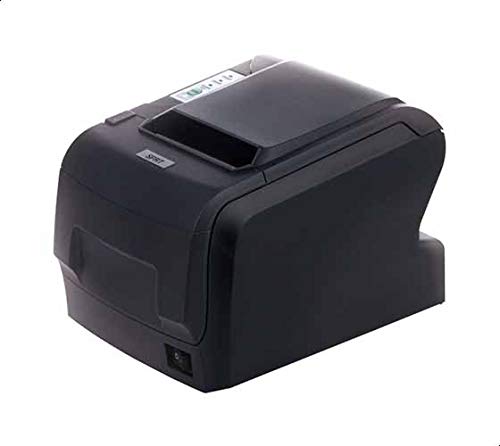
Figure 1: SPRT POS58 IVU Receipt Thermal Printer. This image displays the compact black thermal printer from an angled view, highlighting its paper output slot and the power switch located on the side.
Инструкция по эксплуатации
Базовая печать
- Ensure the printer is powered on and connected to your computer/POS system.
- Install the necessary printer drivers on your operating system if not already installed. Refer to the driver installation guide provided separately or available from the manufacturer's webсайт.
- From your application (e.g., POS software, word processor), select the SPRT POS58 IVU as your printer.
- Initiate the print command. The printer will automatically feed and print the receipt.
- Tear off the receipt against the serrated edge of the paper output slot.
Индикаторные лампы
The printer typically has indicator lights to show its status:
- Световой индикатор питания: Указывает на то, что принтер включен.
- Error Light: Illuminates or blinks to indicate an error condition (e.g., paper out, print head overheat).
- Paper Out Light: Indicates that the paper roll is empty or incorrectly loaded.
Обслуживание
Очистка термоголовки
Regular cleaning of the thermal head ensures clear print quality and extends printer life. Clean the thermal head after every 50-100 km of printing or if print quality degrades.
- Выключите принтер и отсоедините кабель питания.
- Откройте бумажную крышку.
- Wait a few minutes for the thermal head to cool down if the printer has been recently used.
- Gently wipe the thermal head surface with a cotton swab lightly moistened with absolute alcohol (ethanol).
- Allow the alcohol to evaporate completely before closing the cover and reconnecting power.
Чистка внешней части
Протрите внешнюю поверхность принтера мягкой тряпкой.amp ткань. Не используйте сильнодействующие растворители или абразивные чистящие средства.
Обработка бумаги
- Use only high-quality thermal paper to prevent damage to the thermal head and ensure optimal print quality.
- Store thermal paper in a cool, dry place away from direct sunlight and heat.
Поиск неисправностей
| Проблема | Возможная причина | Решение |
|---|---|---|
| Принтер не включается. | Power cable not connected; power outlet faulty; printer switch off. | Проверьте подключение кабеля питания; попробуйте другую розетку; убедитесь, что выключатель питания включен. |
| No printing / Blank output. | Paper loaded incorrectly (upside down); paper out; driver not installed/configured; printer not selected. | Reload paper correctly (printing side facing thermal head); replace paper roll; install/reinstall drivers; select printer in application. |
| Плохое качество печати. | Thermal head dirty; low-quality paper; paper stored improperly. | Clean thermal head; use recommended thermal paper; store paper correctly. |
| Замятие бумаги. | Paper not loaded straight; foreign object in paper path. | Open cover, remove jammed paper carefully, reload paper straight; inspect for obstructions. |
Технические характеристики
| Особенность | Деталь |
|---|---|
| Бренд | СПТ |
| Номер модели | POS58 IVU |
| Тип принтера | Чековый термопринтер |
| Технология связи | USB |
| Печатные СМИ | Labels (commonly used for receipts) |
| Ширина бумаги | 5.7 см |
| Цвет | Черный |
| Вес товара | 1.82 Килограмма |
| Размеры упаковки | 28 х 21.4 х 17.8 см |
Гарантия и поддержка
Specific warranty terms and detailed support contact information are not provided within the available product data. For warranty claims, technical support, or service inquiries, please refer to the documentation included with your purchase or contact your point of sale or the manufacturer directly.
You may find additional resources and contact details on the official SPRT webсайт.


