Введение
Thank you for choosing the NEXT 8000 Full HD Satellite Receiver. This manual provides detailed instructions for the proper installation, operation, and maintenance of your device. Please read this manual thoroughly before using the receiver to ensure optimal performance and safety.
The NEXT 8000 is designed to deliver a high-quality viewing experience with its Full HD capabilities, multi-satellite search, and media playback features. It supports various languages and offers convenient software upgrades via USB.
Содержимое упаковки
Пожалуйста, проверьте наличие всех предметов в упаковке:
- NEXT 8000 Satellite Receiver Unit
- Дистанционное управление
- HDMI-кабель
- USB-кабель
- Адаптер питания

Image: The NEXT 8000 Full HD Satellite Receiver unit shown alongside its remote control.
Руководство по настройке
1. Подключение ресивера
Follow these steps to connect your satellite receiver to your television and satellite dish:
- Спутниковый вход: Connect the coaxial cable from your satellite dish to the 'LNB IN' port on the back of the receiver.
- HDMI-соединение: Use the provided HDMI cable to connect the 'HD OUT' port on the receiver to an available HDMI input on your television. Note the HDMI input number on your TV (e.g., HDMI 1, HDMI 2).
- Подключение аудио-видеооборудования (опционально): If your TV does not have an HDMI input, use an AV cable (not included) to connect the 'AV' port on the receiver to the corresponding AV inputs on your television.
- Подключение питания: Connect the power adapter to the 'DC 12V' input on the receiver, then plug the adapter into a power outlet.
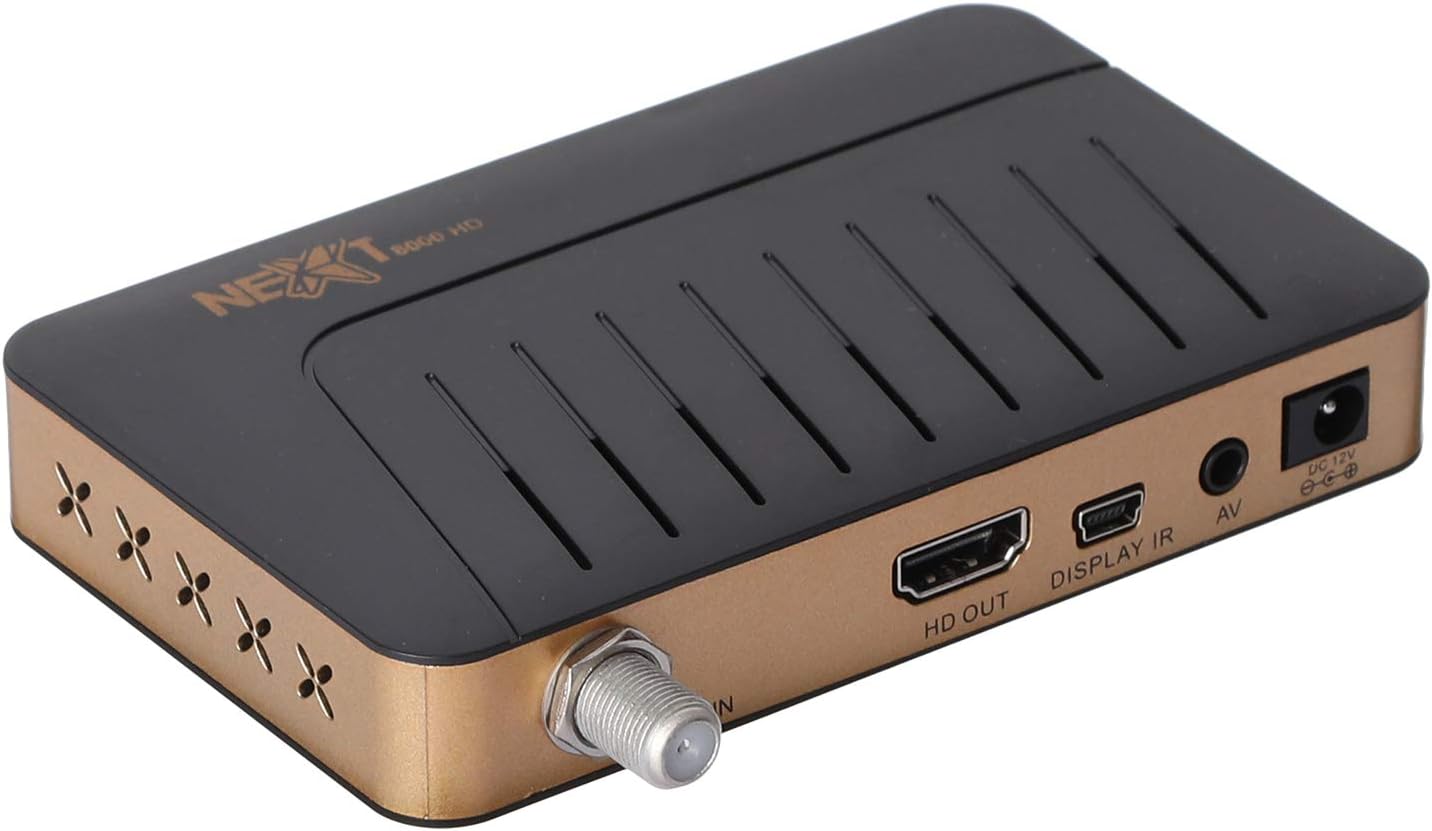
Изображение: сзади view of the NEXT 8000 receiver, highlighting the LNB IN, HD OUT (HDMI), AV, and DC 12V power input ports.
2. Первоначальное включение и настройка
После подключения всех кабелей:
- Turn on your television and select the correct HDMI or AV input source.
- The receiver will power on automatically. The initial setup wizard should appear on your screen.
- Follow the on-screen instructions to select your preferred language, time zone, and perform a channel scan. Refer to the 'Operating Instructions' section for details on channel scanning.
3. Дистанционное управлениеview
Ознакомьтесь с функциями пульта дистанционного управления:

Image: The remote control for the NEXT 8000 satellite receiver, showing various buttons for power, navigation, volume, channel, and special functions.
- Кнопка питания: Включает/выключает приемник или переводит его в режим ожидания.
- МЕНЮ: Доступ к главному меню настроек и функций.
- OK: Подтверждает выбор или отображает список каналов.
- Кнопки со стрелками (вверх/вниз/влево/вправо): Навигация по меню и опциям.
- EXIT: Возврат на предыдущий экран или выход из меню.
- ГРОМКОСТЬ +/-: Регулирует громкость.
- СН +/-: Меняет каналы.
- Электронный гид программ: Отображает электронную программу передач.
- СБ: Selects satellite.
- USB: Accesses USB media playback.
- Сдвиг по времени: Activates the Timeshift function (requires USB storage).
Инструкция по эксплуатации
1. Channel Search and Management
To find and organize channels:
- Нажмите МЕНЮ кнопку на пульте дистанционного управления.
- Navigate to 'Installation' or 'Channel Search' using the arrow buttons and press OK.
- Select 'Multi-satellite search' or 'Network search' based on your setup.
- Follow the on-screen prompts to initiate the scan. The receiver will automatically detect available channels.
- After the scan, you can access options to 'Program lock', 'Delete', 'Move', or 'Rename' channels within the channel management menu.
2. Воспроизведение мультимедиа через USB
The receiver supports media playback from a USB flash drive.
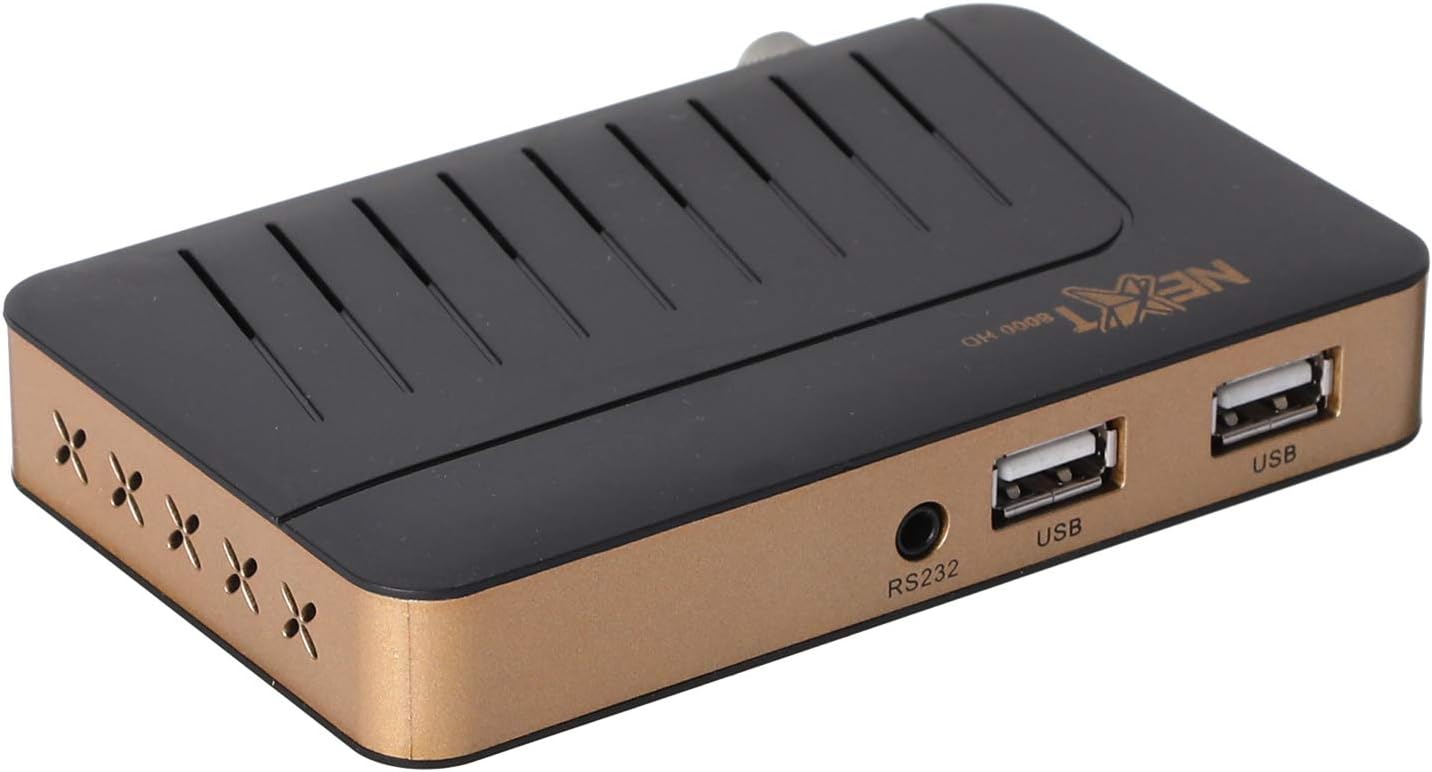
Изображение: Спереди view of the NEXT 8000 receiver, showing the two USB ports available for connecting external storage devices.
- Insert a USB flash drive into one of the USB ports on the receiver.
- Нажмите USB button on the remote control or navigate to the 'Media' menu.
- Выберите тип медиафайла, который вы хотите воспроизвести (например, видео, музыка, фото).
- Browse your USB drive content and select the desired file. The receiver supports AVI, MKV, TS, TP, TRP, MPG, and MP4 files.
3. Запись и сдвиг времени
To record programs or use the Timeshift function, a USB storage device must be connected.
- Запись: Во время просмотра программы нажмите Записывать button (usually a red circle) on the remote control to start recording. Press it again to stop. Recorded content will be saved to the connected USB drive.
- Сдвиг по времени: Нажмите Сдвиг во времени button on the remote control to pause live TV. You can then fast-forward or rewind within the buffered content.
4. Электронная программа передач (ЭПГ)
Нажмите ЭПГ кнопку на пульте дистанционного управления, чтобы view the 7-day electronic program guide. This allows you to see upcoming programs and set reminders or recordings.
5. Parental Lock
To restrict access to certain channels or menus, navigate to the 'System Settings' or 'Parental Control' menu. You can set a password to lock programs or specific functions.
Обслуживание
1. Software Upgrade via USB
To ensure your receiver has the latest features and bug fixes, you can upgrade its software:
- Загрузите последнюю версию программного обеспечения file from the official NEXT website to a USB flash drive. Ensure the file is placed in the root directory of the USB drive.
- Insert the USB flash drive into the receiver's USB port.
- Перейти к МЕНЮ > 'System Settings' > 'Software Upgrade' (or similar option).
- Select 'Upgrade by USB' and choose the software file.
- Confirm the upgrade. The receiver will restart automatically after the upgrade is complete. Do not power off the receiver during the upgrade process.
2. Уборка
To clean the receiver, disconnect it from the power supply. Use a soft, dry cloth to wipe the exterior surfaces. Do not use liquid cleaners or abrasive materials.
Поиск неисправностей
If you encounter issues with your NEXT 8000 receiver, refer to the following table:
| Проблема | Возможная причина | Решение |
|---|---|---|
| Нет изображения или звука | Incorrect TV input selected; Loose HDMI/AV cable; Receiver not powered on. | Select correct TV input; Check all cable connections; Ensure receiver is powered on. |
| Каналы не найдены | Satellite dish not aligned; Incorrect LNB settings; Channel scan not performed. | Check satellite dish alignment; Verify LNB settings in menu; Perform a channel scan. |
| Пульт дистанционного управления не работает | Разряженные батареи; Препятствие между пультом и приемником; Заблокирован датчик пульта. | Replace batteries; Remove obstructions; Ensure receiver's IR sensor is clear. |
| USB-носитель не воспроизводится | Неподдерживаемый file форматирование; USB-накопитель неправильно вставлен; Повреждено file. | Проверять file format compatibility; Re-insert USB drive; Try a different USB drive or file. |
Если проблема сохраняется после применения этих решений, обратитесь в службу поддержки клиентов.
Технические характеристики
Key technical specifications for the NEXT 8000 Full HD Satellite Receiver:
- Модель: 8000
- Разрешение видео выхода: 576i, 576p, 720p, 1080i, 1080p (50/60 Гц)
- Связь: HDMI, USB (2 ports), RS232, AV
- Поддерживаемые аудиоформаты: Dolby Digital, DTS, AAC, PCM
- Supported Video/Media Formats: AVI, MKV, TS, TP, TRP, MPG, MP4
- Память для хранения: 100 satellites, 4000 frequencies, 8000 channels
- Процессор: Санплюс
- Функции: Recording by USB flash, Screen enlargement, Multi-satellite search, Network search, Media playback, 7-day Electronic Program Guide (EPG), Teletex, Timeshift, Parental lock.
- Размеры: 19.6 х 17.4 х 6.6 см
- Масса: 396 г
Гарантия и поддержка
For warranty information and technical support, please refer to the documentation provided with your purchase or visit the official NEXT product support webСохраните чек о покупке в качестве подтверждения покупки для предъявления гарантийных претензий.


