1. Введение
This manual provides detailed instructions for the CaDA Pro HighSpeed Power System (Model S059-003). This system is designed to enhance your building block models with advanced motorization, lighting, and remote control capabilities. Please read this manual thoroughly before use to ensure proper operation and maintenance.
2. Продукт закончилсяview
The CaDA Pro HighSpeed Power System includes the following components:
- 3 High-Performance Motors (M-Motor, L-Motor, Servo Motor)
- 2.4 GHz Rechargeable Battery Box (500 mAh, 7.4 V)
- Набор светодиодных светильников
- Пульт дистанционного управления 2.4 ГГц
- Extension Cable (30 cm)
- Micro USB Charging Cable (75 cm)
- Components for Steering Wheel Control

Рисунок 2.1: Болееview of the CaDA Pro HighSpeed Power System components as packaged.

Рисунок 2.2: Крупный план view of the individual components including motors, battery box, remote control, and cables.
3. Настройка и установка
Follow these steps to set up your CaDA Pro HighSpeed Power System with your building block model.
- Charge the Battery Box: Connect the Micro USB charging cable to the battery box and a suitable USB power source. The indicator light will show charging status. A full charge is recommended before first use.
- Установите батареи в пульт дистанционного управления: Open the battery compartment on the 2.4 GHz remote control and insert 2 x 1.5V AA batteries (not included), ensuring correct polarity.
- Connect Motors and LEDs: Attach the M-Motor, L-Motor, Servo Motor, and LED Light Set to your building block model as per your model's instructions. Use the 30 cm extension cable if additional reach is needed.
- Connect to Battery Box: Plug the cables from the motors and LED lights into the appropriate ports on the rechargeable battery box.
- Сопряжение пульта дистанционного управления:
- Ensure the battery box is powered on.
- Включите пульт дистанционного управления. Индикатор на пульте начнет мигать.
- Press and hold the pairing button on the battery box until the indicator light on both the battery box and remote control become solid, indicating successful pairing.

Figure 3.1: The 2.4GHz rechargeable battery box, which powers the system components.
4. Инструкция по эксплуатации
Once the system is set up and paired, you can control your model using the 2.4 GHz remote control.
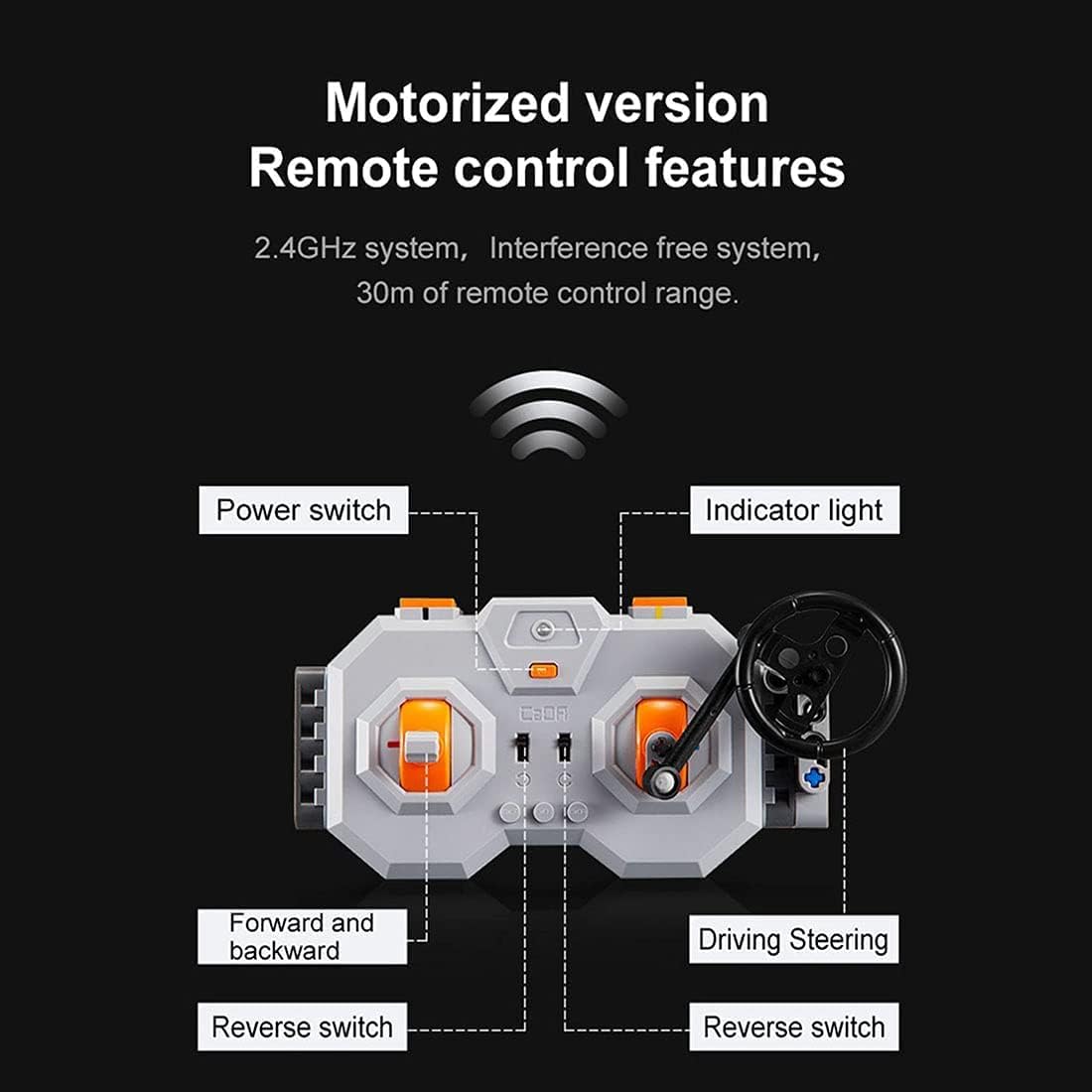
Figure 4.1: Diagram illustrating the features of the 2.4GHz remote control, including power switch, indicator light, forward/backward controls, and driving/steering controls.
- Выключатель: Located on the remote control, turn it on to activate the system.
- Световой индикатор: Shows the connection status. Solid light indicates successful pairing.
- Forward and Backward Controls: Use the left joystick/buttons to control the forward and backward movement of the model.
- Driving/Steering Controls: Use the right joystick/steering wheel to control the steering or other directional movements of the model.
- Реверсивные переключатели: Specific switches may be present for fine-tuning motor direction.
- Smooth Start Control: The motors feature a smooth start control, accelerating gradually over one second instead of abruptly.
The 2.4 GHz system provides an interference-free connection with a remote control range of up to 30 meters.
5. Техническое обслуживание
To ensure the longevity and optimal performance of your CaDA Pro HighSpeed Power System, follow these maintenance guidelines:
- Уборка: Use a dry, soft cloth to clean the components. Do not use water or chemical cleaners, as this can damage the electronic parts.
- Уход батареи:
- Recharge the lithium-ion battery box regularly, even if not in use, to maintain battery health.
- Не допускайте чрезмерной зарядки или глубокой разрядки аккумулятора.
- Remove AA batteries from the remote control if storing for extended periods to prevent leakage.
- Хранилище: Store the system components in a cool, dry place away from direct sunlight and extreme temperatures.
- Управление кабелями: Avoid bending or crimping cables excessively to prevent internal damage.
6. Поиск Неисправностей
If you encounter issues with your CaDA Pro HighSpeed Power System, refer to the following common problems and solutions:
| Проблема | Возможная причина | Решение |
|---|---|---|
| Система не включается. | Battery box is not charged or remote control batteries are dead. | Charge the battery box. Replace AA batteries in the remote control. |
| Пульт дистанционного управления не отвечает. | Не сопряжено, вне зоны действия или с помехами. | Re-pair the remote control and battery box. Ensure you are within 30m range. Move away from other 2.4GHz devices. |
| Motors not moving or moving slowly. | Low battery, incorrect connection, or motor obstruction. | Charge the battery box. Check all cable connections. Ensure no parts are blocking motor movement. |
| Светодиодные фонари не работают. | Loose connection or damaged LED set. | Check the connection of the LED light set to the battery box. |
If the problem persists after trying these solutions, please contact CaDA customer support.
7. Технические характеристики
| Особенность | Деталь |
|---|---|
| Номер модели | С059-003 |
| В комплект входят двигатели. | 1x M-Motor (up to 650 rpm), 1x L-Motor (up to 680 rpm), 1x Servo Motor |
| Ящик для аккумуляторов | Lithium-ion, 500 mAh, 7.4 V, Rechargeable via Micro USB |
| Дистанционное управление | 2.4 GHz, requires 2x 1.5V AA batteries |
| LED Light Set Cable Length | 53 см |
| Длина удлинительного кабеля | 30 см |
| Micro USB Charging Cable Length | 75 см |
| Совместимость | Universal for CaDA and Lego models (e.g., C61001W, C61003W, C61007W, etc.) |
| Рекомендуемый возраст | 12 года и старше |
| Основной материал | Акрилонитрилбутадиенстирол (АБС) |
8. Предупреждения о безопасности
WARNING: Contains toys. Adult supervision recommended.
- Изделие содержит мелкие детали и не подходит для детей младше 3 лет из-за опасности удушья.
- Do not disassemble or modify the components.
- Do not expose the battery box to water, fire, or extreme temperatures.
- Ensure proper battery polarity when inserting batteries into the remote control.
- Утилизируйте батареи ответственно, в соответствии с местными правилами.
9. Гарантия и поддержка
CaDA products are manufactured to high-quality standards. For warranty information or technical support, please refer to the official CaDA webсайте или обратитесь к продавцу.
Для получения дополнительной помощи вы можете посетить официальный сайт CaDA. webсайт: www.doubleeagle.cc


