JKING H2B Electric Skateboard Longboard User Manual
Model: H2B | Brand: JKING
1. Введение
Thank you for choosing the JKING H2B Electric Skateboard Longboard. This manual provides essential information for the safe operation, maintenance, and troubleshooting of your electric skateboard. Please read this manual thoroughly before your first ride to ensure optimal performance and safety.
Image: JKING H2B Electric Skateboard Longboard.
2. Информация по технике безопасности
Riding an electric skateboard can be dangerous. Always wear appropriate safety gear, including a helmet, knee pads, and elbow pads. Ride within your skill level and be aware of your surroundings. Do not ride in traffic, on wet surfaces, or at night without proper lighting. Always check your skateboard before each ride for any loose parts or damage.
Всегда надевайте шлем и защитное снаряжение.
Не садитесь за руль в состоянии алкогольного или наркотического опьянения.
Соблюдайте местные правила дорожного движения.
Избегайте езды по неровным поверхностям, выбоинам и препятствиям.
Ensure the remote control is fully charged and paired before riding.
Maximum load capacity: 210 lbs.
3. Содержимое упаковки
Upon unboxing, please verify that all items listed below are included:
JKING H2B Electric Skateboard Longboard
Беспроводной пульт дистанционного управления
Адаптер питания (зарядное устройство)
T-Tool (for maintenance)
Руководство пользователя
Image: JKING H2B Electric Skateboard and its accessories.
4. Продукт закончилсяview
Familiarize yourself with the main components of your JKING H2B Electric Skateboard:
Палуба: Constructed from two layers of bamboo and six layers of maple for durability and flexibility.
Hub Motors: Integrated into the rear wheels, providing power and a clean design.
Battery Enclosure: Houses the UL 2272 certified 29.4V 4000mAh lithium battery.
Порт зарядки: Located on the battery enclosure for recharging.
Кнопка питания: To turn the skateboard on/off.
Ручки: Integrated into the deck for easy carrying.
Image: Key components of the JKING H2B Electric Skateboard.
5. Настройка
5.1. Первоначальная зарядка
Locate the charging port on the side of the battery enclosure.
Подключите адаптер питания к порту зарядки.
Подключите адаптер питания к стандартной электрической розетке.
The battery indicator lights on the remote control (or skateboard, if available) will show charging progress.
A full charge takes approximately 4 hours. Disconnect the charger once fully charged.
5.2. Сопряжение с пультом дистанционного управления
Your remote control should be pre-paired with the skateboard. If re-pairing is necessary:
Ensure both the skateboard and remote control are turned off.
Turn on the skateboard by pressing and holding its power button for about 1 second.
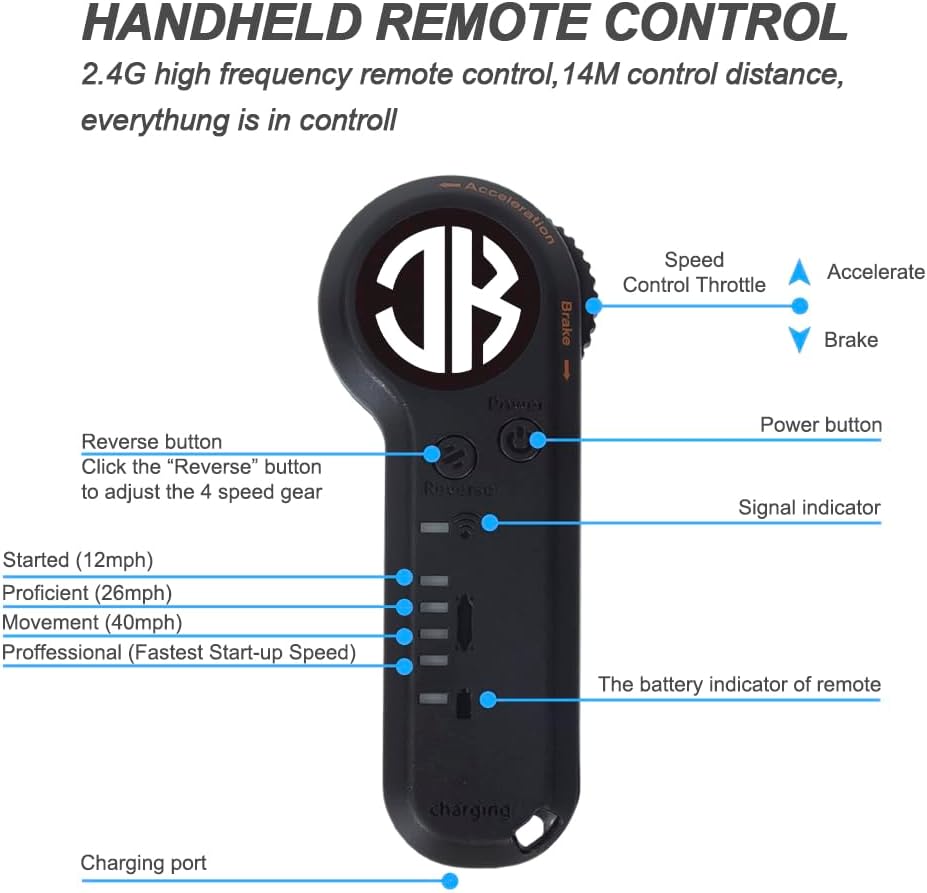
Включите пульт дистанционного управления, нажав кнопку питания.
The remote control display should show a connection status. If not, refer to the troubleshooting section.
Image: JKING Electric Skateboard Remote Control.
6. Инструкция по эксплуатации
6.1. Включение/выключение питания
To turn on the skateboard: Press and hold the power button on the battery enclosure for approximately 1 second.
To turn on the remote control: Press its power button.
To turn off the skateboard: Press and hold the power button on the battery enclosure until it powers down.
To turn off the remote control: Press and hold its power button until the display turns off.
6.2 Скоростные режимы
The JKING H2B offers 3 speed modes (Low, Medium, High) for different riding preferences and skill levels. Use the speed adjustment buttons on the remote control to switch between modes.
Низкая скорость: Ideal for beginners or crowded areas.
Средняя скорость: Balanced speed for general cruising.
Высокоскоростной: For experienced riders seeking maximum speed (up to 16.7 MPH).
6.3. Разгон и торможение
The remote control features a throttle wheel for precise control:
Ускорение: Gently push the throttle wheel forward to accelerate.
Торможение: Gently pull the throttle wheel backward to engage the brakes.
Practice accelerating and braking in a safe, open area before riding in public.
6.4. Советы по езде
Start in Low Speed mode to get accustomed to the board's response.
Maintain a balanced stance with feet shoulder-width apart.
Lean into turns to steer the board.
Be mindful of your speed, especially when turning or on downhill slopes.
Always be prepared to dismount safely if necessary.
7. Техническое обслуживание
Уборка: Wipe the board clean with a damp cloth. Avoid direct water spray on electronic components.
Уход батареи: Charge the battery regularly, even when not in use, to prolong its lifespan. Do not overcharge or completely drain the battery.
Проверка колес: Regularly check wheels for wear and tear. Replace worn wheels to maintain optimal performance and safety.
Затяните оборудование: Use the provided T-tool to periodically check and tighten all nuts and bolts, especially on the trucks and wheel axles.
Хранилище: Store the skateboard in a cool, dry place away from direct sunlight and extreme temperatures.
8. Поиск Неисправностей
Проблема
Возможная причина
Решение
Skateboard not turning on
Низкий заряд батареи; кнопка питания нажата неправильно
Charge the skateboard; Press and hold the power button for 1 second.
Пульт не подключается
Skateboard off; Remote battery low; Pairing issue
Ensure skateboard is on; Charge remote; Re-pair remote (see Section 5.2).
Уменьшенная дальность или скорость
Low battery; Riding uphill; Heavy load; Worn wheels
Fully charge battery; Ride on flatter terrain; Check load capacity; Inspect and replace wheels.
Необычные шумы
Loose hardware; Debris in wheels/motors
Tighten all bolts; Clean wheels and motor area.
Troubleshooting Video: Remote Connection
Video: Demonstrates how to troubleshoot remote connection issues with the JKING Electric Skateboard.
Материал палубы: Two layers of bamboo and six layers of maple
Длина палубы: 31.7 дюйма
Ширина палубы: 9.5 дюйма
Вес товара: 12.3 фунта
Максимальная нагрузка: 210 фунтов
Размер колеса: 83 мм
Материал колеса: Полиуретан
Угол подъема: Макс 12 °
10. Гарантия и поддержка
For warranty information, technical support, or service inquiries, please contact JKING customer service through the retailer where the product was purchased or visit the official JKING webсайт. Пожалуйста, сохраните доказательство покупки для гарантийных претензий.
11. Видеоролики о продуктах
JKING Electric Skateboard Longboard Overview
Видео: краткий обзорview of the JKING Electric Skateboard Longboard, highlighting its features and remote control.
JKING H2B Electric Skateboard Features
Видео: Showcasing the JKING H2B electric skateboard in action and its various features.
Riding the JKING Electric Skateboard
Video: A demonstration of the JKING Electric Skateboard being ridden, highlighting its smooth operation.
Связанные документы - H2B
H2B-02 Electric Skateboard User Manual Comprehensive user manual for the H2B-02 Electric Skateboard, covering preparation, parts identification, remote control operation, pairing instructions, technical specifications, charging information, and essential safety guidelines.
Инструкция по предоставлению подробной информации по HIBREW H2B 4w1 Познай экспресс-кавы HIBREW H2B 4w1. Ниже приведены инструкции по установке, подготовке, приготовлению горячих и зимних напитков, приготовлению или консервации капсул Nespresso, Dolce Gusto, K-cup или любого другого напитка.
CP PLUS CarKam Quick Start Guide - Model CP-AD-H2B-W Quick start guide for the CP PLUS CarKam (Model CP-AD-H2B-W), providing instructions on installation, setup, operation, and troubleshooting for this car dashcam.
Краткое руководство пользователя CP PLUS CarKam GPS CP-AD-H2B-PW Полное краткое руководство пользователя для GPS-навигатора CP PLUS CarKam, модель CP-AD-H2B-PW, охватывающее внешний вид изделия, установку, управление питанием, использование приложений, хранение видео, режимы записи и информацию о гарантии.