1. Введение
The SINOTIMER TM919B is a 30A 7-day programmable electronic timer switch designed for automatic control of various electrical equipment. It allows you to set specific ON/OFF times over a 24-hour or 7-day cycle, providing convenience and energy efficiency for applications such as streetlights, lamps, water heaters, air conditioners, and more.
Основные характеристики:
- Ideal for household use in DB Boards.
- High capacity: 5000 Watt / 30 Amps.
- Flexible programming: 24 Hours / 7 Days a Week Programmable.
- Автоматическая коррекция погрешности времени: +/- 30 секунд еженедельно.
- Multiple programs: Repeat programs with 16 ON/OFF settings.
- Ручное управление включением/выключением.
2. Продукт закончилсяview
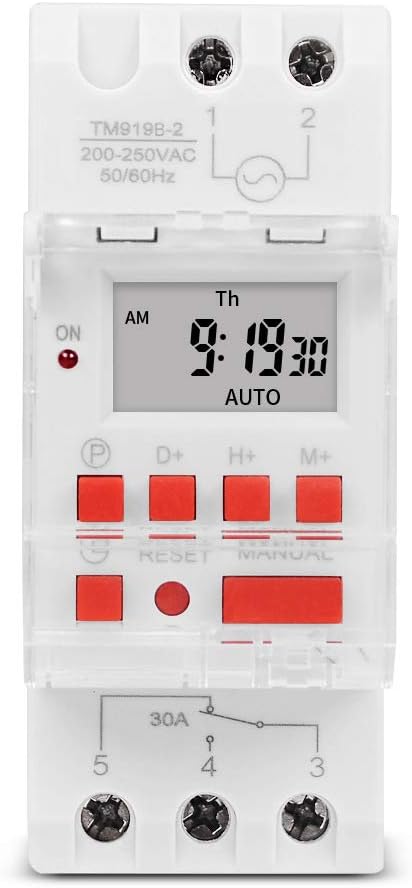
Рисунок 1: Передняя часть view of the TM919B timer switch, displaying the LCD screen with time and day, and the array of control buttons including P, D+, H+, M+, RESET, and MANUAL.

Рисунок 2: Наклонный view of the TM919B timer switch, showing its side profile and the clear protective cover over the buttons.

Рисунок 3: Сторона view of the TM919B timer switch, detailing the wiring terminals (L, N, 1, 2, 3, 4, 5) and product specifications like voltage и текущие рейтинги.
3. Технические характеристики
| Параметр | Ценить |
|---|---|
| Диапазон температур | -20°С до +50°С |
| Рабочий объемtagе (Ui) | 110В |
| Потребляемая мощность | 4.5 ВА (МАКС.) |
| Отображать | ЖК-дисплей |
| Переключающий контакт | 1 переключатель |
| Программы | 16 настроек ВКЛ/ВЫКЛ на день или неделю |
| Гистерезис | 2 сек/день (при 25°C) |
| Минимальный интервал | 1 минута |
| Емкость | 30A 250V AC |
| Потеря памяти | 60 дней |
| Диапазон таймера | от 1 минуты до 168 часов |
| Средняя ошибка | 1 секунда/24 часа (при 25°C) |
| Вес товара | 5.3 унции (0.2 кг) |
| Размеры упаковки | 3.95 x 3.2 x 2 дюйма |
| Размер экрана | 1.5 дюйма |
4. Установка и подключение
The TM919B timer switch is designed for DIN rail mounting, making it suitable for integration into electrical distribution boards. Ensure all power is disconnected before attempting installation.
Схема электропроводки:

Figure 4: Wiring diagram for the TM919B. Terminals 1 and 2 are for power input (L and N). Terminals 3, 4, and 5 are for the output, typically used for NO (Normally Open) and NC (Normally Closed) connections to control the load.
- Потребляемая мощность: Connect the live (L) and neutral (N) wires to terminals 1 and 2 respectively. Ensure the voltage matches the timer's specification (110V for this model).
- Подключение нагрузки: The timer has a single changeover switch.
- Terminal 3: Normally Closed (NC) contact.
- Terminal 4: Common (COM) contact.
- Terminal 5: Normally Open (NO) contact.
- Connect your load (e.g., lamp, motor) between the common terminal (4) and either the NO (5) or NC (3) terminal, depending on whether you want the load to be ON or OFF when the timer is in its default state.
- Securely fasten all wires to prevent loose connections.
- Once wiring is complete, restore power and proceed with programming.
5. Operating Instructions and Programming
The TM919B timer allows for up to 16 ON/OFF programs. Follow these steps to set the current time and program the timer.
Функции кнопок:
- П (Программа): Вход в режим программирования.
- Д+ (День): Изменяет день недели.
- H+ (час): Устанавливает час.
- М+ (минута): Устанавливает минуты.
- СБРОС: Сбрасывает все настройки до заводских значений. Для этого используйте заостренный предмет.
- РУКОВОДСТВО: Переключение между режимами ВКЛ, АВТО и ВЫКЛ.
Установка текущего времени:
- Нажмите D+ кнопку, чтобы установить текущий день недели.
- Нажмите H+ кнопку для установки текущего часа.
- Нажмите M+ кнопку для установки текущей минуты.
- The time will automatically save after a few seconds of inactivity.
Programming ON/OFF Times (Up to 16 Programs):
- Нажмите P button once. The display will show "1 ON". This is for setting the first ON time.
- Нажимать H+ и M+ to set the desired hour and minute for the first ON event.
- Нажимать D+ to select the days of the week for this program. Options include: every day, specific days (e.g., MO-FR, MO-SA, SA-SU), or individual days. If you want the same setting every day, you do not need to press D+.
- Нажмите P button again. The display will show "1 OFF". This is for setting the first OFF time.
- Нажимать H+ и M+ to set the desired hour and minute for the first OFF event.
- Нажимать D+ again if you need to specify different days for the OFF event, or leave it if it matches the ON event's days.
- Repeat steps 1-6 for programs 2 through 16 (e.g., "2 ON", "2 OFF", etc.).
- После установки всех желаемых программ нажмите кнопку РУКОВОДСТВО button repeatedly until "AUTO" is displayed. This ensures the timer operates according to your programmed schedule.
Ручное управление:
Нажмите РУКОВОДСТВО кнопка для переключения между режимами работы:
- НА: Выходное напряжение постоянно включено, игнорируя запрограммированные настройки.
- OFF: Выходное напряжение постоянно отключено, что отменяет запрограммированные настройки.
- АВТО: The timer operates according to the programmed ON/OFF schedules. Ensure the timer is in AUTO mode for automatic operation.
6. Техническое обслуживание
The TM919B timer switch requires minimal maintenance. Keep the device clean and free from dust. Do not expose it to excessive moisture or extreme temperatures. If the display becomes dim or unresponsive, check the power supply. The internal battery provides backup for settings during power outagсроком до 60 дней.
7. Поиск Неисправностей
| Проблема | Возможная причина | Решение |
|---|---|---|
| Таймер не включается/выключается в запрограммированное время. | Not in AUTO mode; incorrect programming; power issue. | Press MANUAL until "AUTO" is displayed. Review programming steps carefully. Check power supply to the timer. |
| Дисплей пустой или тусклый. | No power supply; internal battery low (unlikely for display). | Check power connections. Ensure the timer is receiving power. |
| Невозможно установить время или программы. | Buttons unresponsive; unit frozen. | Press the RESET button using a pointed object. This will clear all settings, so you will need to reprogram. |
| Нагрузка не переключается. | Incorrect wiring; faulty load; timer output issue. | Verify wiring according to the diagram. Test the load independently. If issues persist, contact support. |
8. Гарантия и поддержка
This SINOTIMER product is covered by a standard manufacturer's warranty against defects in materials and workmanship. For warranty claims or technical support, please contact your retailer or the manufacturer directly. Keep your purchase receipt as proof of purchase.
For further assistance, visit the official SINOTIMER store: Магазин SINOTIMER на Amazon


