1. Введение
This manual provides detailed instructions for the installation, operation, and maintenance of your xmartO DT3034 2K Wireless Security Camera. Please read this manual thoroughly before using the product to ensure proper functionality and safety. The xmartO DT3034 is an outdoor WiFi security camera featuring 2K Super HD resolution, auto-tracking, pan-tilt-zoom control, enhanced two-way audio, auto floodlights, and IP66 weatherproofing. It can operate standalone via the xmartO WallPixel App or integrate with an xmartO NVR system.
2. Содержимое упаковки
Проверьте наличие всех предметов в посылке:
- 1 x xmartO DT3034 WiFi Security Camera
- 2 х Wi-Fi-антенны
- 1 адаптер питания постоянного тока 12 В, 1 А
- 1 x Руководство пользователя (этот документ)
- 1 x Mounting Kits (screws and wall anchors)
3. Продукт закончилсяview
The xmartO DT3034 camera is designed for outdoor surveillance, offering a range of features for comprehensive security monitoring.


4. Настройка
4.1 Power and Connectivity Requirements
The camera requires a continuous power supply from a nearby electrical outlet. It can connect to your network wirelessly via WiFi or through a wired Ethernet connection.

4.2 Физическая установка
- Выберите местоположение: Выберите место установки, обеспечивающее желаемый результат. viewing angle and is within range of a power outlet and your WiFi network. Ensure the location offers good signal strength for wireless operation.
- Установите камеру: Используйте прилагаемый монтажный комплект, чтобы надежно закрепить камеру на стене или потолке.
- Подключите питание: Plug the 12V DC 1A power adapter into the camera and then into a power outlet.
4.3 Установка приложения и первоначальная настройка
- Загрузите приложение: Искать 'xmartO WallPixel' in your smartphone's app store (available on Google Play and Apple App Store) and install it.
- Завести аккаунт: Откройте приложение и следуйте инструкциям на экране, чтобы создать новую учетную запись пользователя.
- Добавить камеру: Follow the in-app guide to add your DT3034 camera. This typically involves scanning a QR code on the camera or manually entering its ID.
- Подключиться к сети: Configure the camera's network settings within the app. You can choose to connect via WiFi or a wired Ethernet cable.
- Обновление прошивки: It is important to perform an Over-The-Air (OTA) firmware upgrade to the latest version upon initial setup to enable features like Auto-Track and Home Point.
5. Инструкция по эксплуатации
5.1 Автоматическое отслеживание
The camera features automatic motion tracking. When movement is detected, the camera will automatically pan and tilt to follow the subject and record the activity. You can enable or disable this feature in the xmartO WallPixel app.

5.2 Night Vision and Auto Flood Lights
The DT3034 camera is equipped with both infrared (IR) LEDs and professional floodlights for night vision capabilities.
- ИК ночного видения: Six built-in IR LEDs provide clear black-and-white video in complete darkness.
- Auto Flood Lights & Color Night Vision: Four professional LED floodlights automatically activate upon motion detection at night, illuminating the area and enabling the camera to capture full-color night vision video. The floodlights can be configured to turn on or off based on your preferences.


5.3 Двусторонняя аудиосвязь
The camera includes a high-gain microphone and enhanced speakers, allowing for clear two-way communication through the xmartO WallPixel app. You can listen to the camera's surroundings and speak through the camera from your smartphone.

5.4 Deterrence Protection
With auto floodlights and an integrated siren, the camera can deter intruders. These features can be activated automatically upon motion detection or manually controlled via the app. You have the option to enable or disable the siren and floodlights independently.

5.5 Варианты хранения
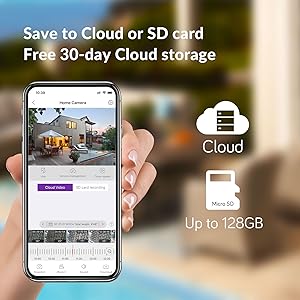
The xmartO DT3034 supports two primary storage methods for recorded video:
- Микро SD-карта: The camera supports up to a 128GB TF (Micro SD) card for local storage.
- Облачное хранилище: Encrypted AWS Cloud storage is available, often with a free trial period (e.g., 30 days).

5.6 Интеграция с Alexa
The xmartO DT3034 camera is compatible with Amazon Alexa. You can use voice commands to view the camera feed on compatible Alexa-enabled devices.

6. Техническое обслуживание
- Уборка: Периодически очищайте объектив и корпус камеры мягкой тряпкой.amp Протрите поверхность тканью, чтобы удалить пыль и мусор. Не используйте едкие химикаты.
- Обновления прошивки: Regularly check for and install firmware updates via the xmartO WallPixel app. Updates often include performance improvements, new features, and security enhancements.
- Цикл питания: Если в работе камеры возникли неполадки, попробуйте выключить и снова включить ее, отсоединив и снова подключив адаптер питания.
7. Поиск Неисправностей
If you encounter problems with your xmartO DT3034 camera, refer to the following common issues and solutions:
| Проблема | Возможная причина/решение |
|---|---|
| Camera is offline or disconnects frequently |
|
| Auto-tracking is not working or inaccurate |
|
| Ложные тревоги от обнаружения движения |
|
| Floodlights or siren do not activate |
|
| Camera rotation (Pan/Tilt) issues |
|
8. Технические характеристики
| Особенность | Спецификация |
|---|---|
| Номер модели | ДТ3034 |
| Разрешение видеозахвата | 3 MP (2K Super HD) |
| Технология связи | Беспроводная связь (Wi-Fi) |
| Источник питания | Электрический шнур (12 В постоянного тока) |
| Использование внутри и снаружи помещений | На открытом воздухе |
| Международный рейтинг защиты | IP66 от атмосферных воздействий |
| Диапазон ночного видения | 30 метра |
| Варианты хранения | Карта Micro SD (до 128 ГБ), облачное хранилище |
| Аудио особенности | Enhanced 2-Way Audio |
| Особые возможности | Auto-Track, Auto Flood Lights, Color Night Vision, Auto Siren, Motion Sensor, Alexa Integration |
| Размеры (Д x Ш x В) | 8.35 x 8.23 x 5.51 дюйма |
| Вес товара | 1 фунт |
9. Гарантия и поддержка
xmartO is committed to providing reliable products and customer support.
- 30-дневная гарантия возврата денег и бесплатный возврат товара: Если вы не удовлетворены своей покупкой, вы можете вернуть ее в течение 30 дней и получить полный возврат средств.
- Ограниченная гарантия сроком на 1 года: The xmartO DT3034 camera is covered by a 1-year limited warranty against manufacturing defects.
- 24/7 онлайн-поддержка: Access 1-on-1 online support for any technical assistance or inquiries.