1. Введение
The DJI Wireless Microphone Transmitter is an audio device designed to connect to an external microphone, enabling wireless audio signal transmission to a compatible receiver. This system eliminates the need for additional wiring, offering enhanced mobility and convenience during recording. It is specifically designed for use with the DJI Pocket 2 Do-It-All Handle.
The included DJI Wireless Microphone Windscreen helps to minimize noise caused by wind, ensuring clearer audio capture in outdoor environments. When paired with the DJI Pocket 2 Do-It-All Handle, the linking button on the transmitter can also function as a shutter control.
2. Что в коробке
При распаковке убедитесь, что все компоненты присутствуют:
- DJI Wireless Microphone Transmitter × 1
- DJI Wireless Microphone Windscreen × 1

Image: The DJI Wireless Microphone Transmitter shown alongside its furry windscreen accessory.
3. Настройка
3.1 Зарядка устройства
The DJI Wireless Microphone Transmitter comes with a charging case that also serves as a storage solution. Simply place the transmitter and receiver (if part of a kit) into their designated slots within the case to initiate charging. The case provides approximately 15 hours of recording time on a full charge.
3.2 Подключение к записывающим устройствам
The receiver unit features interchangeable adapters for broad compatibility:
- Адаптер молнии: For Apple iPhone devices.
- Адаптер USB-C: For Android smartphones and other devices with a USB-C port.
- Camera Adapter: A dedicated adapter for connecting to cameras via their hot shoe mount.
To attach an adapter, slide it into the port on the receiver until it clicks securely into place. Ensure the correct adapter is used for your specific recording device.
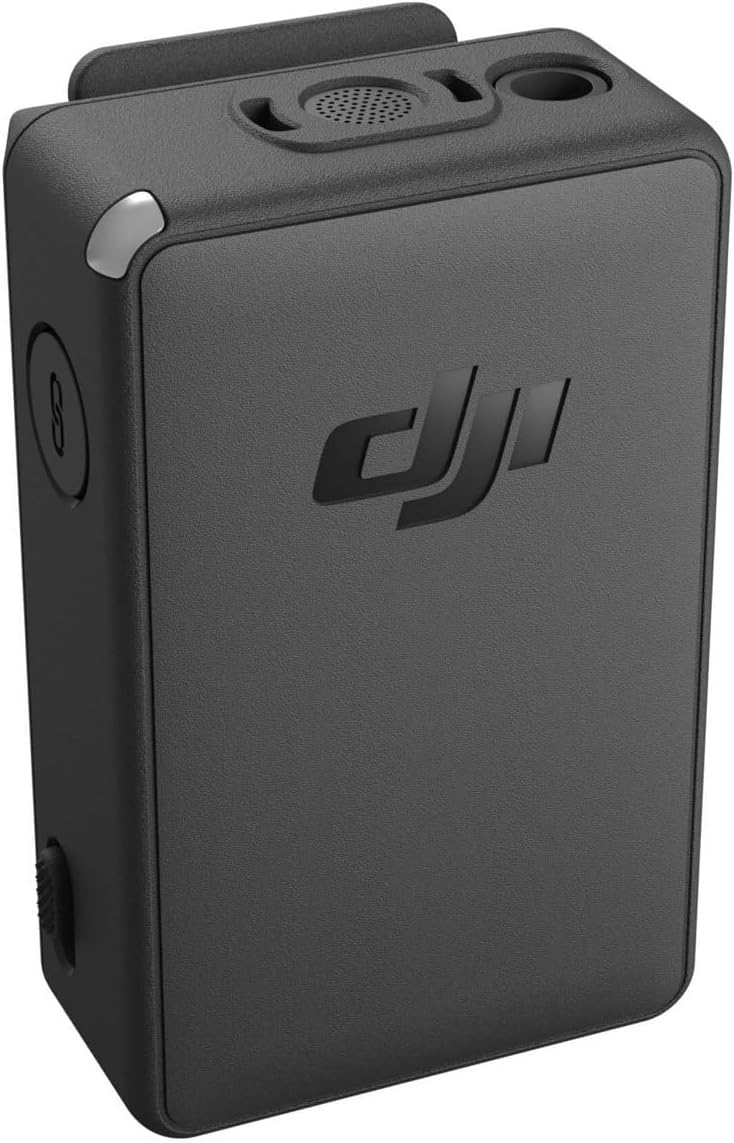
Image: The DJI Wireless Microphone Transmitter receiver with its interchangeable USB-C and Lightning adapters.
3.3 Сопряжение передатчика и приемника
For quick pairing, simply place both the transmitter and receiver in the charging case. They will automatically link. Alternatively, you can manually link them via the receiver's touchscreen menu by navigating to settings and selecting 'Link Device'.
Видео: Оверview of the DJI Wireless Microphone system, demonstrating its components and basic setup procedures.
4. Управление устройством
4.1 Power On/Off and Muting
Press and hold the power button on the transmitter to turn it on or off. To mute the microphone, double-tap the power button. This is useful when you need to temporarily silence your audio input without stopping the recording.
4.2 Recording and Internal Storage
The transmitter features a dedicated record button. Press it once to start or stop internal recording. The device has built-in storage, allowing it to capture primary or backup audio during recording. Files are separated every 30 minutes, creating new files for each segment. This prevents loss of all data if an issue occurs with one file. The maximum recording time is 14 hours. If the storage limit is reached, older recordings will be overwritten with new ones.
4.3 Auto-Record and Stop-Lock
With the latest firmware update, the transmitter includes an auto-record feature. When enabled, the microphone automatically begins recording as soon as it is powered on. This is ideal for capturing quick sound bites without delay. Additionally, the 'Stop-Lock' feature prevents accidental stopping of recordings. When activated, the record button on the transmitter will not stop the recording; it can only be stopped via the receiver's touchscreen.
4.4 Attaching the Transmitter
The transmitter can be attached to clothing using its integrated clip or a magnetic clip. The magnetic clip allows for discreet placement by securing the microphone through fabric, keeping it close to your chest for optimal audio quality.

Image: The DJI Wireless Microphone Transmitter attached to clothing using its clip.
4.5 Регулировка яркости светодиодов
The LED indicator on the microphone can be adjusted for brightness through the transmitter settings on the receiver's touchscreen. This helps reduce distraction during recording, especially in low-light conditions.
5. Техническое обслуживание
To ensure optimal performance and longevity of your DJI Wireless Microphone Transmitter, follow these maintenance guidelines:
- Уборка: Для очистки устройства используйте мягкую сухую ткань. Избегайте использования жидких чистящих средств или растворителей.
- Хранилище: Store the device in its charging case when not in use to protect it from dust and physical damage.
- Температура: Избегайте воздействия на устройство экстремальных температур или высокой влажности.
- Уход за ветровым стеклом: Gently clean the windscreen with a soft brush if it accumulates dust or debris.
6. Поиск Неисправностей
Ознакомьтесь со следующими распространенными проблемами и решениями:
- Совместимость: The DJI Wireless Microphone Transmitter is primarily designed for use with the DJI Pocket 2 Do-It-All Handle. Ensure your device is compatible.
- Пропадание звука: If audio drops out when moving far from the receiver, utilize the internal backup recording feature on the transmitter to ensure continuous audio capture.
- Шум ветра: Attach the DJI Wireless Microphone Windscreen to the transmitter to effectively reduce wind-generated noise during outdoor recordings.
- Accidental Recording Stops: Enable the 'Stop-Lock' feature via the receiver's touchscreen settings to prevent unintended interruptions to your recordings.
7. Технические характеристики
| Особенность | Деталь |
|---|---|
| Размеры продукта | 19.69 x 19.69 x 11.02 дюйма |
| Вес товара | 0.755 унции |
| ASIN | B08LG5JH1Y |
| Номер модели товара | КП.ОС.00000123.01 |
| Аккумуляторы | Требуется 1 литий-полимерные батареи |
| Дата первой доступности | 18 октября 2020 г. |
| Производитель | ДЖИ |
8. Гарантия и поддержка
The DJI Wireless Microphone Transmitter comes with an official manufacturer's warranty, ensuring one-stop technical support for any product-related issues. For detailed warranty terms and conditions, please refer to the documentation included with your product or visit the official DJI support webсайт.
Extended protection plans are also available for purchase, offering additional coverage beyond the standard warranty period. These plans typically cover accidental damage and extended malfunctions.


