Введение
Thank you for choosing the MEGATEK T8 Bluetooth Portable Speaker. This manual provides essential information for the proper setup, operation, and maintenance of your new speakers. The MEGATEK T8 speakers feature True Wireless Stereo (TWS) technology for an immersive audio experience, vibrant LED lighting, and a durable, waterproof design, making them ideal for various environments.
Содержимое упаковки
Проверьте комплектацию на наличие следующих предметов:
- 2 x MEGATEK T8 Bluetooth Portable Speakers
- 1 x USB Charging Cable (designed to charge both speakers simultaneously)
- 1 х Руководство пользователя
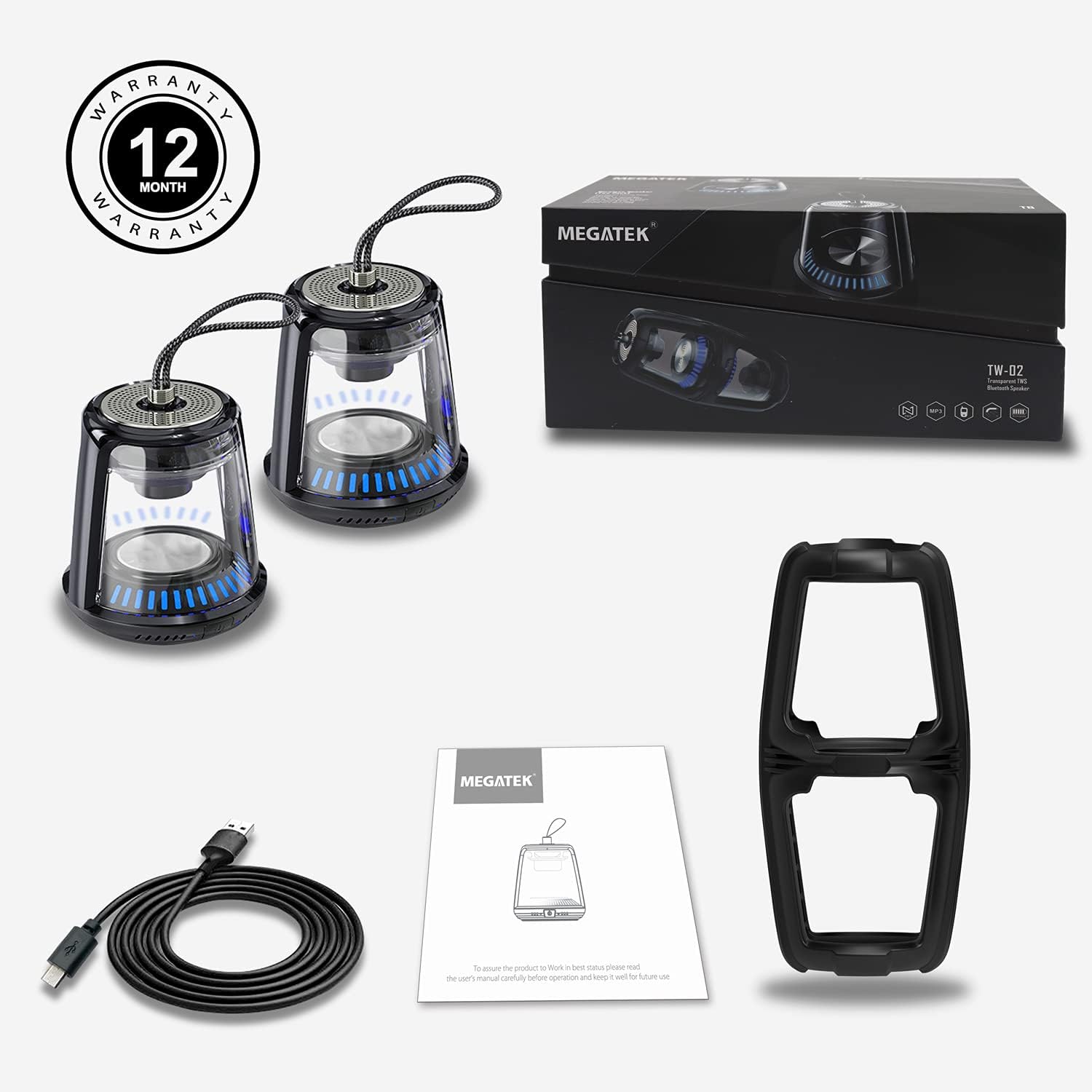
The package includes two MEGATEK T8 speakers, a USB charging cable for simultaneous charging, and this instruction manual.
Характеристики продукта
- Bluetooth-подключение: Бесперебойное беспроводное соединение с вашими устройствами.
- Настоящее беспроводное стерео (TWS): Pair two speakers for a synchronized stereo sound experience.
- Режимы светодиодного освещения: Dynamic LED lighting to enhance ambiance.
- Встроенный микрофон: Поддерживает звонки в режиме громкой связи.
- Класс водонепроницаемости IPX5: Protected against water splashes and light rain.
- Магнитное основание: Обеспечивает удобное крепление к металлическим поверхностям.
- Компактная и портативная конструкция: Easy to carry and place anywhere.
- Аккумуляторная батарея: Provides portable power for on-the-go use.
Настраивать
1. Зарядка колонок
Before initial use, fully charge both speakers. Connect the provided USB charging cable to the charging port on each speaker and then to a USB power adapter (not included) or a computer's USB port. The LED indicator will show charging status and turn off when fully charged.
2. Включение и выключение
To power on the speaker, press and hold the power button for approximately 3 seconds until you hear an audible prompt and the LED lights illuminate. To power off, press and hold the power button again for 3 seconds until you hear a power-off prompt and the LED lights turn off.
3. Сопряжение Bluetooth (один динамик)
- Убедитесь, что динамик заряжен и включен.
- Активируйте Bluetooth на вашем смартфоне, планшете или другом устройстве с поддержкой Bluetooth.
- Искать available devices and select "MEGATEK T8" from the list.
- После подключения вы услышите звук подтверждения из динамика.

The speaker connects easily to your device via Bluetooth for wireless music streaming.
4. Сопряжение по технологии True Wireless Stereo (TWS) (два динамика)
To enjoy true stereo sound, you can pair two MEGATEK T8 speakers together:
- Убедитесь, что оба динамика полностью заряжены и выключены.
- Включите оба динамика одновременно.
- On один of the speakers (this will become the primary speaker), quickly double-press the power button. The speakers will begin searching for each other.
- Once successfully paired, you will hear a confirmation sound, and the LED indicators on both speakers will synchronize.
- Now, connect your Bluetooth device to the primary speaker (the one you double-pressed the button on) as described in the "Bluetooth Pairing (Single Speaker)" section.

This image illustrates the True Wireless Stereo (TWS) functionality, allowing two speakers to connect for an enhanced stereo sound experience.
Операционная
1. Воспроизведение музыки
After successful Bluetooth pairing, you can play music from your connected device. Control playback (play/pause, next/previous track, volume) directly from your device.
2. Звонки без помощи рук
When connected to a smartphone, the built-in microphone allows for hands-free calling. Press the power button once to answer an incoming call, and press it again to end the call. Press and hold the power button to reject an incoming call.
3. Режимы светодиодного освещения
The speakers feature integrated LED lights. To cycle through different light modes or turn them off, short press the LED light button (if available, otherwise refer to the power button for multi-functionality). The lights can create a dynamic visual experience.

The speaker features multiple LED light modes to enhance your listening experience with visual effects.
4. Магнитное крепление
The base of the speaker is magnetic, allowing it to be securely attached to compatible metal surfaces. This provides versatile placement options.

The magnetic base allows for convenient placement on metal surfaces, such as a refrigerator.
Обслуживание
1. Уборка
Wipe the speakers with a soft, dry cloth. Do not use abrasive cleaners, alcohol, or chemical solvents, as these may damage the surface or internal components.
2. Водонепроницаемость (IPX5)
The MEGATEK T8 speakers are IPX5 waterproof, meaning they are protected against low-pressure water jets from any direction. They are suitable for use in environments where they might encounter splashes, such as by a pool or in a bathroom. Do not submerge the speakers in water. Убедитесь, что крышка зарядного порта надежно закрыта, чтобы обеспечить водонепроницаемость.

With an IPX5 waterproof rating, the speakers are protected against splashes, making them suitable for poolside or bathroom use.
3. Хранение
When not in use for extended periods, store the speakers in a cool, dry place away from direct sunlight and extreme temperatures. It is recommended to charge the speakers periodically to maintain battery health.
Поиск неисправностей
- Динамик не включается: Ensure the battery is charged. Connect the speaker to the charging cable and allow it to charge for at least 30 minutes before attempting to power on again.
- Невозможно подключиться через Bluetooth:
- Убедитесь, что на вашем устройстве включен Bluetooth.
- Make sure the speaker is in pairing mode (LED indicator blinking).
- Ensure your device is within the Bluetooth range (approximately 33 feet or 10 meters).
- Попробуйте отменить сопряжение и повторно подключить колонку через настройки Bluetooth вашего устройства.
- Нет звука или низкая громкость:
- Проверьте уровень громкости как на динамике, так и на подключенном устройстве.
- Убедитесь, что динамик правильно подключен по Bluetooth.
- Сбой сопряжения TWS:
- Ensure both speakers are powered off before initiating TWS pairing.
- Make sure both speakers are within close proximity to each other (within a few feet).
- Тщательно повторите шаги сопряжения TWS.
Технические характеристики
| Номер модели | T8 |
| Количество единиц | 2 спикера |
| Цвет | Черный |
| Размеры продукта | 4"Д x 4.7"Ш x 8.7"В |
| Вес товара | 0.6 фунтов (за динамик) |
| Уровень водонепроницаемости | Водонепроницаемость IPX5 |
| Технология связи | Bluetooth, USB |
| Режим аудиовыхода | Стерео, объемный звук |
| Тип крепления | Автономный, магнитный |
| Особые возможности | Stereo Pairing (TWS), Auto EQ, Auto Speaker Setup, LED Light |
| Производитель | Мегатек Электроника |
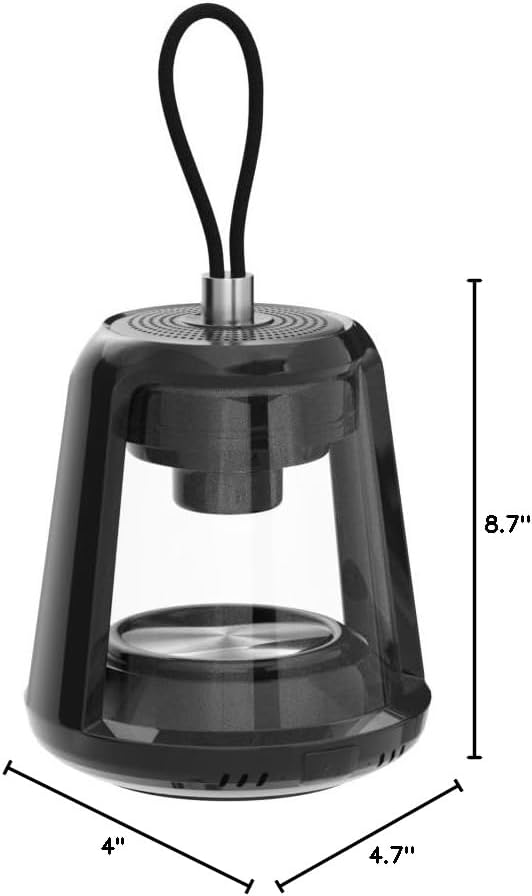
This image provides the physical dimensions of the MEGATEK T8 speaker: 4"D x 4.7"W x 8.7"H.
Гарантия и поддержка
1. Информация о гарантии
The MEGATEK T8 Bluetooth Portable Speakers come with a Гарантия 12 месяца с даты покупки. Данная гарантия распространяется на производственные дефекты и гарантирует отсутствие дефектов материалов и изготовления при нормальной эксплуатации изделия.
2. Поддержка клиентов
For any questions, technical assistance, or warranty claims, please contact MEGATEK customer support through the retailer where you purchased the product or visit the official MEGATEK website for contact information. Please have your purchase receipt and product model number (T8) ready when contacting support.


