1. Введение
This manual provides essential information for the installation, operation, and maintenance of the CAME ATS 8K01MP-023 Kit for swing gates. This kit is designed to automate swing gates up to 3 meters in length and 400 kg in weight per leaf. It features a 230V DC system and is supplied in a grey (RAL7024) finish. The system includes robust steel and aluminum construction, effective obstacle detection for enhanced safety, and an easy manual release mechanism for emergencies.
Please read these instructions carefully before proceeding with installation or operation to ensure safe and correct use of the product.
2. Информация по технике безопасности
- Профессиональная установка: Installation, electrical connections, and adjustments must be performed by qualified personnel in compliance with local regulations and safety standards.
- Источник питания: Ensure the main power supply is disconnected before performing any installation, maintenance, or repair work.
- Обнаружение препятствий: The system includes effective obstacle detection. Regularly test this feature to ensure proper functionality.
- Ручной выпуск: Familiarize yourself with the manual release system to operate the gate in case of power failure or malfunction.
- Движущиеся части: Keep hands, feet, and other body parts clear of moving gate components during operation.
- Дети и домашние животные: Do not allow children or pets to play near the gate or its operating mechanisms.
- Предупреждающие огни: The flashing light indicates gate movement. Ensure it is visible and functioning correctly.
3. Компоненты продукта
The CAME ATS 8K01MP-023 Kit includes the following components:
- 2 Irreversible Gearmotors: These motors provide the power to open and close the swing gates.
- 1 Панель управления: For single or double swing gates, featuring a programming display, separate terminals, integrated radio decoding, and self-diagnosis safety devices. (Cabling not included).
- 1 IP54 Wall-Mounted Box: Designed to house and protect the control panel.
- 1 4-Channel Remote Control: Black, with self-learning function for convenient operation.
- 1 Pair of Outdoor Photocell Sensors: 12-24V AC/DC, with a 10m range, for detecting obstacles in the gate's path. (Cabling not included).
- 1 Plug-in Radio Frequency Card: For wireless communication with the remote control.
- 1 LED Flashing Light: With metal partition support, including screws and bolts for motor installation, to signal gate movement.
- 1 Automation Information Plate: For displaying important system information.
4. Настройка и установка
Installation of the CAME ATS 8K01MP-023 kit requires technical expertise and should be performed by a qualified installer. The following steps outline the general process:
4.1. Проверки перед установкой
- Убедитесь, что конструкция ворот исправна и свободно перемещается без препятствий.
- Verify the gate dimensions and weight are within the system's specifications (max 3m length, 400kg weight per leaf).
- Confirm the maximum C-dimension (distance from hinge to motor mounting point) does not exceed 200 mm. Refer to the technical drawing for precise measurements.

Изображение: Technical drawing illustrating the dimensions of the CAME ATS gate opener, including overall length and mounting points. This diagram is crucial for correct installation planning.

Изображение: An illustration showing the 'C' dimension, which is the critical distance from the gate hinge to the motor's mounting bracket. This measurement must be within the specified limits for proper gate operation.
4.2. Установка двигателя
- Mount the two irreversible gearmotors securely to the gate posts and gate leaves using the provided screws and bolts. Ensure they are level and aligned according to the technical drawing.

Изображение: The CAME ATS 8K01MP-023 gate opener motor, a key component of the automation system. It is designed for robust and reliable operation of swing gates.

Изображение: A visual representation of the CAME ATS gate opener system installed on a swing gate, demonstrating how the motor integrates with the gate structure for automated movement.
4.3. Control Panel and Electrical Connections
- Install the IP54 wall-mounted box and secure the control panel inside.
- Perform all necessary electrical connections to the motors, power supply, photocells, and flashing light. Refer to the control panel's wiring diagram (not included in this kit, typically found in the control panel manual).
- Insert the plug-in radio frequency card into the designated slot on the control panel.
4.4. Photocell Installation
- Mount the outdoor photocells at appropriate heights on either side of the gate opening to create a safety beam. Ensure they are aligned correctly for optimal obstacle detection.

Изображение: A pair of CAME outdoor photocell sensors, essential safety devices that detect obstructions in the gate's path, preventing accidental closure.
4.5. Flashing Light Installation
- Install the LED flashing light in a visible location, typically on top of a gate post, using the metal partition support.

Изображение: The CAME LED flashing light, which signals when the gate is in motion, enhancing safety for pedestrians and vehicles.
4.6. Programming and Testing
- Power on the system. Use the control panel's display for initial programming and configuration of gate travel limits, operating modes, and safety features.
- Program the 4-channel remote control using its self-learning function to operate the gate.
- Thoroughly test all safety devices, including photocells and obstacle detection, to ensure they function correctly before regular use.
5. Инструкция по эксплуатации
5.1. Нормальная работа
- To open or close the gate, press the corresponding button on the 4-channel remote control.
- The flashing light will activate during gate movement.
- The system's obstacle detection will stop or reverse the gate if an obstruction is detected in its path.

Изображение: The CAME 4-channel remote control, used to wirelessly operate the swing gate system. Its self-learning function allows for easy programming.
5.2. Ручной сброс
В случае отключения электроэнергииtage or system malfunction, the gate can be operated manually using the release mechanism on the motor.
- Locate the manual release key or lever on the motor unit.
- Follow the instructions provided with the motor for engaging the manual release. This typically involves inserting a key and turning it, or pulling a lever.
- Once released, the gate can be pushed open or closed by hand.
- To re-engage automatic operation, reverse the manual release procedure.
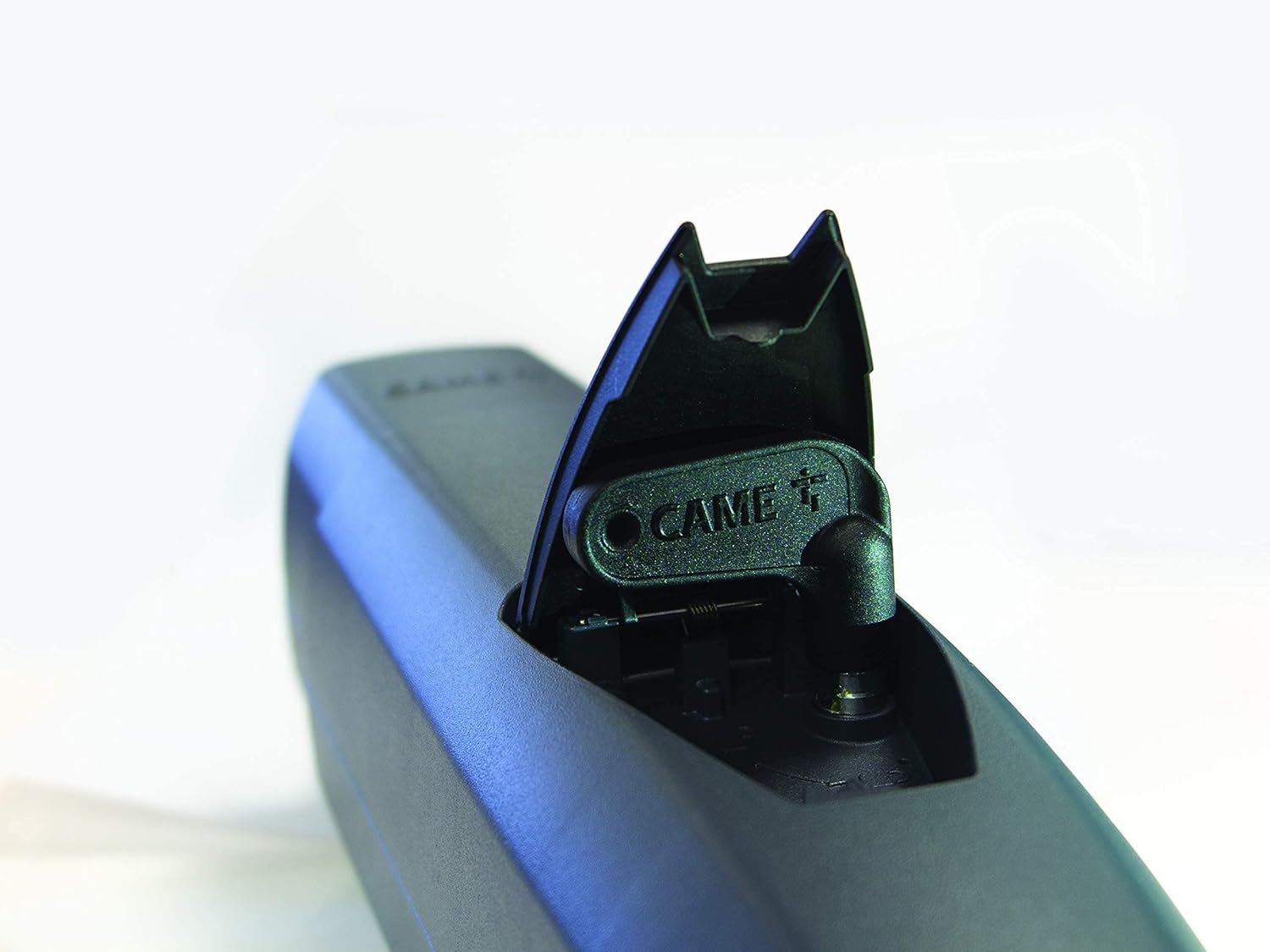
Изображение: крупный план view of the manual release mechanism on the CAME ATS motor. This feature allows for manual operation of the gate during power failures or system issues.
6. Техническое обслуживание
Regular maintenance ensures the longevity and safe operation of your CAME ATS gate automation system. It is recommended to have the system inspected by a qualified technician at least once a year.
- Визуальный осмотр: Periodically check all components (motors, hinges, photocells, flashing light, wiring) for signs of wear, damage, or corrosion.
- Чистота: Содержите линзы фотоэлементов в чистоте, без грязи, пыли и следов от пауков.webs to ensure proper functioning.
- Движение ворот: Ensure the gate moves freely and smoothly without excessive friction or noise. Lubricate hinges if necessary.
- Тестирование устройств безопасности: Regularly test the photocells and obstacle detection system by placing an object in the gate's path during operation. The gate should stop or reverse.
- Control Board Diagnostics: The control board features self-diagnosis safety devices. Consult the control panel manual for interpreting diagnostic codes or indicators.
7. Поиск Неисправностей
If you encounter issues with your CAME ATS gate automation system, refer to the following common troubleshooting steps. For complex problems, contact a qualified technician.
- Ворота не реагируют на удаленный доступ:
- Проверьте батарейки пульта дистанционного управления.
- Ensure the radio frequency card is correctly installed in the control panel.
- Verify the remote control is programmed correctly (refer to programming instructions).
- Ворота не открываются/не закрываются:
- Check if the system has power.
- Ensure the manual release is fully disengaged.
- Inspect photocells for obstructions or misalignment. Clean lenses if dirty.
- Check for physical obstructions preventing gate movement.
- Consult the control panel's display for any error codes or diagnostic messages.
- Gate Stops Mid-Movement:
- This may indicate obstacle detection activation. Check for obstructions.
- Verify photocell alignment and cleanliness.
- Check for excessive friction in gate hinges or rollers.
- Мигающий индикатор не работает:
- Check electrical connections to the flashing light.
- Inspect the bulb (if replaceable) or LED unit for damage.
8. Технические характеристики
| Спецификация | Деталь |
|---|---|
| Производитель | CAME SPA |
| Модель Ссылка | 8К01МП-023 |
| Тип ворот | Распашные ворота |
| Максимальная длина затвора (на один лист) | 3 метров |
| Максимальный вес затвора (на один лист) | 400 кг |
| Мотор Voltage | 230 В постоянного тока |
| Цвет | Grey (RAL7024) |
| Max C-Dimension | 200 мм |
| Строительные Материалы | Steel structure, Aluminum casing |
| Обнаружение препятствий | Effective, integrated |
| Функции панели управления | Programming display, separate terminals, integrated radio decoding, self-diagnosis safety devices |
| Диапазон фотоэлементов | 10 метров |
| Photocell Voltage | 12-24V AC / DC |
| Вес продукта | 17 Килограмма |
| Батарейки в комплекте | Нет |
| Требуются батареи | Да (для дистанционного управления) |
| Наличие запасных частей | Информация недоступна |
9. Информация о гарантии
For detailed warranty terms and conditions, please refer to the official CAME manufacturer's warranty policy provided at the time of purchase or available on the CAME official website. Warranty coverage typically applies to manufacturing defects and may require proof of professional installation.
10 Поддержка
If you require technical assistance, have questions regarding installation, operation, or maintenance, or need to report a malfunction, please contact:
- Your authorized CAME installer or dealer.
- CAME customer support through their official webсайт или контактные каналы.
When contacting support, please have your product model (8K01MP-023) and any relevant purchase information readily available.


