1. Введение
The ScopeAround MS450 Digital Otoscope Ear Camera is designed to provide a clear and detailed view of the ear canal and eardrum. This device features a 4.5-inch IPS screen, a high-definition camera with adjustable LED lights, and an intelligent gyroscope for image stabilization. It is intended for personal ear inspection and can assist in monitoring ear health. This manual provides essential information for the safe and effective use of your otoscope.
2. Информация по технике безопасности
- Do not insert the otoscope too deeply into the ear canal. Excessive insertion can cause injury to the eardrum or inner ear structures.
- Always use the provided ear specula to prevent over-insertion and protect the ear canal.
- Clean the camera lens and ear specula thoroughly before and after each use with alcohol wipes to prevent infection.
- This device is for observation and minor earwax removal only. For significant earwax impaction or ear infections, consult a medical professional.
- Храните устройство в недоступном для детей месте. При использовании на детях требуется присмотр взрослых.
- Avoid using the device if you experience pain, discomfort, or bleeding during examination. Seek medical attention immediately.
- Не пытайтесь разбирать или модифицировать устройство. Это может привести к аннулированию гарантии и создать угрозу безопасности.
3. Содержимое упаковки
Проверьте наличие всех предметов в упаковке:
- MS450 Otoscope Camera Unit
- Зарядный кабель (USB Type-C)
- Руководство пользователя
- 4 x Silicone Ear Spoons (various types)
- 3 x Ear Specula (protective cones)
- 1 Pack of Alcohol Prep Pads
- 32GB MicroSD Memory Card (pre-installed or included separately)

4. Продукт закончилсяview
The MS450 otoscope consists of a main display unit and a connected camera probe. Familiarize yourself with the components and controls:

- Дисплей: Features a 4.5-inch IPS screen for real-time viewинж.
- Зонд камеры: Equipped with an HD camera, 6 adjustable LED lights, and a gyroscope.
- Кнопки управления: Power, Photo/Video, Light Control, Mode Switch, Navigation (Up/Down), OK, and Settings.
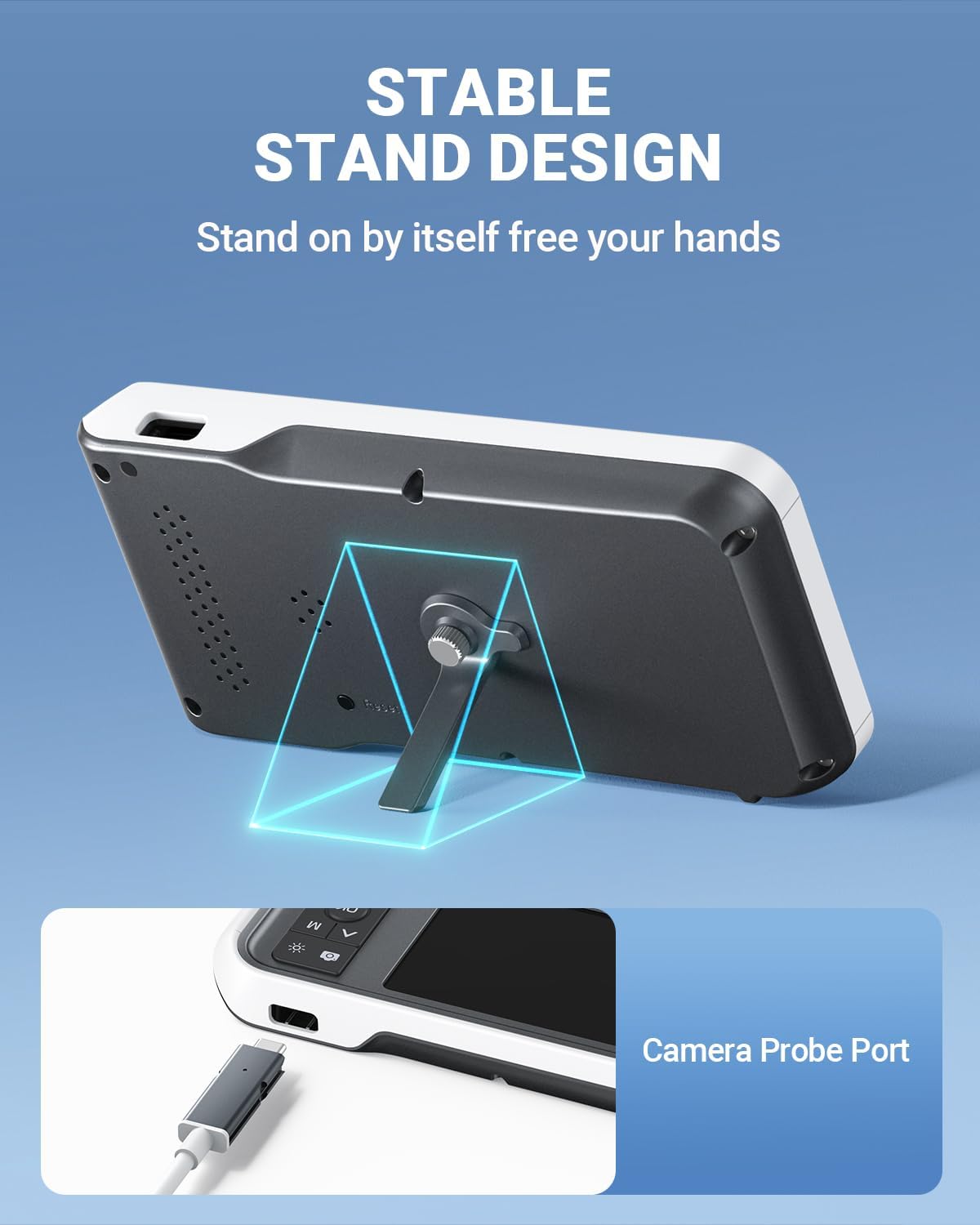
- Порты: USB Type-C Charging Port, TF Card Slot, Camera Probe Connector.
- Интегрированный стенд: Обеспечивает работу без использования рук.
5. Настройка
- Зарядите устройство: Before first use, fully charge the otoscope using the provided USB Type-C cable and a compatible power adapter (not included). The charging port is located on the side of the display unit. A full charge provides over 4 hours of continuous use.
- Вставьте карту MicroSD: Ensure the 32GB MicroSD card is properly inserted into the TF Card Slot. This card is used to store photos and videos.
- Прикрепите зонд камеры: Connect the camera probe cable securely to the Camera Probe Connector on the display unit.
- Select and Attach Specula/Ear Spoon: Choose an appropriate ear speculum (protective cone) or silicone ear spoon. Gently push it onto the tip of the camera probe until it is secure. Always use a speculum to protect the ear canal.


6. Инструкция по эксплуатации
- Включение питания: Press and hold the Power Button (blue button) for a few seconds until the screen turns on.
- Регулировка яркости светодиода: Use the Light Control Button (sun icon) to cycle through 3 levels of LED brightness to achieve optimal illumination for your ear canal.
- Позиционирование: Gently insert the camera probe into the ear canal. The 4.5-inch IPS screen will display a real-time view. The intelligent directional gyroscope helps stabilize the image, preventing disorientation.
- Управление без помощи рук: Utilize the integrated stand on the back of the display unit to position the device on a flat surface, allowing for hands-free viewing and easier manipulation of the probe.
- Фото- и видеосъемка:
- Press the Mode Switch Button (M) to switch between photo and video modes.
- In photo mode, press the Photo/Video Button (camera icon) once to take a picture.
- In video mode, press the Photo/Video Button once to start recording, and press again to stop.
- Review СМИ: Use the navigation buttons (Up/Down) to browse captured photos and videos. Press the OK button to view выбранный элемент.
- Данные передачи: Connect the device to a computer using the USB Type-C cable to transfer photos and videos from the MicroSD card. Alternatively, remove the MicroSD card and insert it into a card reader.
- Выключение: Нажмите и удерживайте кнопку питания, пока экран не выключится.

7. Техническое обслуживание
- Чистка объектива фотоаппарата: After each use, gently wipe the camera lens with an alcohol prep pad or a soft, dry cloth. Ensure no residue remains.
- Cleaning Ear Spoons/Specula: Wash reusable ear spoons and specula with soap and water, then sterilize with alcohol prep pads. Replace disposable specula after each use.
- Очистка устройства: Wipe the main unit with a soft, dry cloth. Do not immerse the main unit in water. The camera probe is waterproof and can be cleaned with water and alcohol.
- Хранилище: Store the otoscope in a clean, dry place at room temperature, away from direct sunlight and extreme temperatures.
- Уход батареи: Чтобы продлить срок службы аккумулятора, избегайте частой полной разрядки устройства. Регулярно заряжайте его, даже если вы не используете устройство в течение длительного времени.

8. Поиск Неисправностей
| Проблема | Возможная причина | Решение |
|---|---|---|
| Устройство не включается. | Низкий заряд батареи; устройство зависло. | Charge the device fully. If unresponsive, press the Reset button with a pin. |
| На экране нет изображения. | Camera probe not connected; faulty probe. | Ensure camera probe is securely connected. If problem persists, contact support. |
| Изображение размыто. | Dirty lens; incorrect focal distance. | Clean the camera lens. Ensure the probe is within the optimal focal distance (approx. 1 inch / 2.5 cm). |
| Невозможно делать фото/видео. | MicroSD card full or not inserted; incorrect mode. | Check MicroSD card status and ensure it is inserted. Verify device is in photo or video mode. |
| Светодиодные фонари не работают. | Свет выключен или установлен на минимальную яркость. | Press the Light Control Button to adjust brightness levels. |
9. Технические характеристики
- Модель: MS450
- Отображать: 4.5-дюймовый IPS-экран
- Разрешение камеры: Full HD (1080P for images, 720P for video)
- Источник света: 6 adjustable LED lights (3 brightness levels)
- Аккумулятор: Литий-полимерный аккумулятор емкостью 2500 мАч (перезаряжаемый)
- Срок службы батареи: Около 4 часов непрерывной работы
- Хранилище: Карта MicroSD 32 ГБ (в комплекте)
- Фокусное расстояние: Approximately 1 inch (2.5 cm)
- гироскоп: Intelligent directional gyroscope for image stabilization
- Связь: USB Type-C для зарядки и передачи данных
- Размеры продукта: 5.9 x 2.9 x 0.79 дюйма
- Вес товара: 12 унции
- Материал: Glass (lens), other components as specified by manufacturer
10. Гарантия
ScopeAround products are covered by a limited manufacturer's warranty against defects in materials and workmanship. Please refer to the warranty card included in your package or visit the official ScopeAround webПодробные условия гарантии можно найти на сайте. Сохраните чек о покупке для предъявления претензий по гарантии.
11 Поддержка
For technical assistance, troubleshooting, or product inquiries, please contact ScopeAround customer support:
- Webсайт: Visit the official ScopeAround webсайт для ответов на часто задаваемые вопросы и получения ресурсов поддержки.
- Электронная почта: Обратитесь к упаковке вашего продукта или к официальному webсайт для электронной почты службы поддержки клиентов.
- Телефон: Обратитесь к упаковке вашего продукта или к официальному webсайт для номера телефона службы поддержки клиентов.
Our US-based after-sales support team is available to assist you.


