Введение
The Optimate Lithium 8s 5A is an advanced 10-step battery saving charger and maintainer specifically engineered for 25.6V/26.4V Lithium Iron Phosphate (LiFePO4 / LiFe / LFP) batteries. This device ensures optimal battery performance, extends battery life, and provides comprehensive protection against common battery issues. Its intelligent design allows for automatic adjustment of charging parameters based on battery condition and ambient temperature.

Figure 1: Optimate Lithium 8s 5A Charger with included accessories.
Основные характеристики
- 10-Step Charging Program: Utilizes the most advanced charging and battery saving program for Lithium batteries.
- BMS Wake-up Mode: Safely wakes batteries with integrated Battery Management Systems (BMS) out of sleep mode.
- TUNE Mode: Provides stable battery support during ECU programming or vehicle diagnostics.
- Высокая производительность: Guarantees longer battery life and more battery power.
- Максимальная защита: Offers comprehensive protection for high-performance Lithium (LiFePO4 / LiFe / LFP) batteries.

Figure 2: Recommended battery types and voltagес.

Figure 3: Automatic charging and health testing.
Настраивать
Before connecting the Optimate Lithium 8s 5A, ensure your battery is a 25.6V/26.4V LiFePO4, LiFe, or LFP type. The charger comes with two connection options: a weatherproof battery lead with ringlets for permanent connection and a battery clip set for temporary connections.
Что в коробке:
- 1 x Optimate Lithium 8s 5A Charger & Maintainer
- 1 x Weatherproof Battery Lead (M8 / 5/16" - M10 / 3/8" ringlets)
- 1 x Battery Clip Set (custom designed for various terminals)

Рисунок 4: Компоненты, входящие в комплект поставки продукта.
Этапы подключения:
- Выберите способ подключения: Decide whether to use the permanent ringlet lead or the temporary battery clips.
- Подключение к аккумулятору:
- For ringlets: Securely attach the red (+) ringlet to the positive battery terminal and the black (-) ringlet to the negative battery terminal.
- For clips: Attach the red (+) clip to the positive battery terminal and the black (-) clip to the negative battery terminal. Ensure a secure connection.
- Подключите зарядное устройство к источнику питания: Plug the charger's AC cord into a suitable wall outlet (100-240V, 50-60Hz).
- Connect Charger to Battery Lead: Connect the charger's output cable to the chosen battery lead.
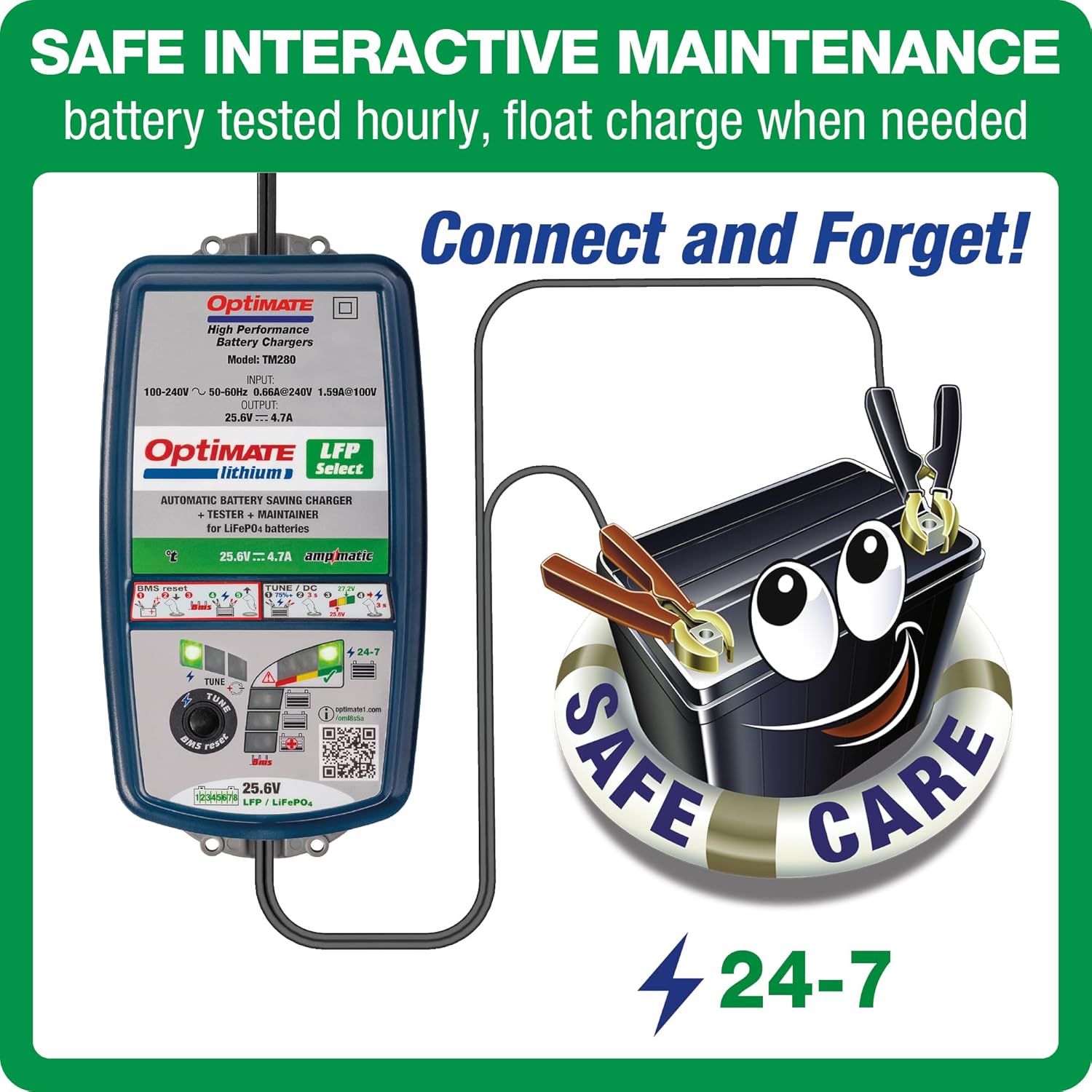
Рисунок 5: Example of connecting the charger to a battery.
Инструкция по эксплуатации
The Optimate Lithium 8s 5A operates automatically once connected. The 10-step program intelligently diagnoses, recovers, charges, and maintains your battery.
Процесс зарядки:
- Инициализация: Upon connection, the charger performs a quick diagnostic check of the battery's state.
- Recovery (if needed): If the battery is deeply discharged (as low as 0 volts), the charger will attempt to recover it safely.
- Массовая оплата: The charger delivers a controlled current to bring the battery to approximately 80% charge.
- Заряд абсорбции: Объемtage is held constant while the current decreases, bringing the battery to full charge.
- Оптимизация: A unique pulse charge ensures cell balancing and optimal performance.
- Обслуживание: Once fully charged, the charger enters a long-term maintenance mode, testing the battery hourly and delivering charge only when needed. This prevents overcharging and sulfation.

Figure 6: The charger's smart automatic control adapts to temperature and battery size.
Индикаторные лампы:
The charger features LED indicators to display the current charging status and battery health. Refer to the charger's label for a detailed legend of each light's meaning.
TUNE Mode:
To activate TUNE mode, press and hold the 'TUNE' button on the charger. This mode provides a stable power supply, ideal for tasks like ECU programming or updating vehicle software, preventing voltage drops that could disrupt sensitive electronics.

Figure 7: TUNE mode provides stable power for vehicle electronics.
Обслуживание
The Optimate Lithium 8s 5A is designed for safe, interactive long-term maintenance. Once the battery is fully charged, the charger automatically switches to a float charge mode, testing the battery hourly and delivering charge only when necessary. This 'Connect and Forget' feature ensures your battery remains optimally charged and healthy without risk of overcharging.

Figure 8: The 'Connect and Forget' feature for long-term battery care.
Поиск неисправностей
The Optimate Lithium 8s 5A is equipped with advanced features to address common battery issues.
Recovering 'Dead' or Flat Batteries:
If a LiFePO4 battery has discharged to a very low voltage (even as low as 0 volts), the Optimate charger can attempt to recover it. The charger will automatically initiate a low-voltage recovery sequence. If the battery has an integrated BMS that has shut down the battery, the charger can safely wake it up.

Figure 9: The charger's ability to save deeply discharged batteries.
Сброс BMS:
For advanced batteries with a BMS that has put the battery into sleep mode, the Optimate Lithium 8s 5A can reset the BMS. Press and hold the 'BMS Reset' button on the charger to initiate this function.

Figure 10: Resetting the Battery Management System.
Технические характеристики
| Особенность | Спецификация |
|---|---|
| Номер модели | TM-281-CA |
| Vol входtage | 100-240V, 50-60Hz |
| Выход Voltage | 25.6В / 26.4В |
| Выходной ток | 5A |
| Рекомендуемая емкость аккумулятора | 2Ач - 60Ач |
| Тип батареи | LiFePO4 / LiFe / LFP (8-cell in-series) |
| Размеры | 9.25 x 4.88 x 2.6 дюйма |
| Вес товара | 3.28 фунта (1.49 кг) |
Информация о гарантии
For detailed warranty information regarding your Optimate Lithium 8s 5A charger, please refer to the official Tecmate website or the warranty card included with your product. Protection plans may also be available for purchase separately.
Поддерживать
For further assistance, technical support, or additional product information, please use the following resources:
- Официальная страница продукта: https://www.optimate1.com/oml8s5a
- Руководство пользователя (PDF): Скачать руководство пользователя
- Tecmate Store on Amazon: Visit Tecmate Store
Примечание: Официальные видеоролики продавцов, соответствующие предоставленным критериям, не были доступны для встраивания.


