1. Заview
The Belkin BoostCharge USB-C to USB-C Fast Charging Cable is designed for efficient power delivery and data transfer between compatible USB-C devices. This 6.6ft (2M) cable supports fast charging up to 60W and data transfer speeds up to 480 Mbps, ensuring reliable performance for a wide range of electronics.
2. Особенности продукта
- Универсальная совместимость: Connects with a broad range of USB-C devices, including iPhone 17/16 Series, Samsung Galaxy S25/S24, Google Pixel 9, Nintendo Switch 2, iPad Pro, MacBook Pro, and more. Supports Apple Carplay and Android Auto.
- Быстрая зарядка: Delivers up to 60W Power Delivery, enabling fast charging of compatible USB-C smartphones from 0-50% in approximately 35 minutes when paired with an 18W or higher USB-C PD charger (not included).
- Превосходная долговечность: Engineered with a durable braided material, tested to withstand over 8,000 bends and 10,000 plugs, offering enhanced longevity compared to standard cables.
- Передача данных: Supports data transfer speeds up to 480 Mbps (USB 2.0 standard) for syncing music, photos, and other data.
- Сертифицировано по стандарту USB-IF: Ensures adherence to strict electrical, mechanical, and environmental standards for a safe and reliable user experience.
Image: Illustration of 60W fast charging capability.
Image: USB-IF certification for 60W power delivery.
Image: Durability testing results for bends and plugs.
3. Содержимое упаковки
В пакет входит:
- 1 x Belkin USB-C to USB-C Cable (2M/6.6ft)
4. Настройка
To set up your Belkin BoostCharge USB-C to USB-C cable:
- Ensure your charging adapter and device are compatible with USB-C and support the desired power delivery (e.g., 60W for fast charging).
- Connect one end of the Belkin USB-C cable to the USB-C port on your power adapter.
- Connect the other end of the Belkin USB-C cable to the USB-C port on your device (e.g., smartphone, tablet, laptop).
- Подключите адаптер питания к розетке.

Image: A Belkin USB-C to USB-C cable connected to a device.
5. Инструкция по эксплуатации
5.1 Зарядка вашего устройства
Once connected as described in the Setup section, your device should begin charging automatically. The cable supports fast charging for devices that are compatible with USB Power Delivery (PD) and are paired with an appropriate power adapter.
5.2 Передача данных
To transfer data between two USB-C compatible devices (e.g., a smartphone and a laptop):
- Connect one end of the Belkin USB-C cable to the USB-C port on the source device.
- Connect the other end of the Belkin USB-C cable to the USB-C port on the destination device.
- Follow the on-screen prompts on your devices to initiate data transfer. The cable supports USB 2.0 data transfer speeds up to 480 Mbps.
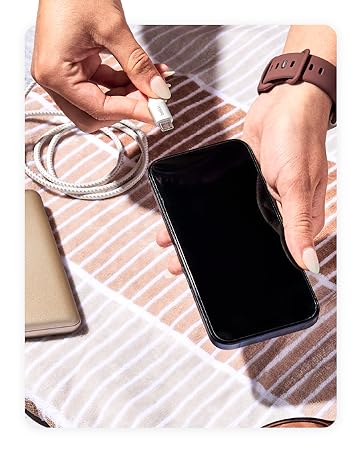
Image: Wide compatibility with various USB-C devices.
6. Техническое обслуживание
To ensure the longevity and optimal performance of your Belkin BoostCharge USB-C to USB-C cable:
- Хранилище: Храните кабель в прохладном, сухом месте, вдали от прямых солнечных лучей и экстремальных температур. Не скручивайте кабель в тугую бухту и не сгибайте его под острым углом во избежание внутренних повреждений.
- Уборка: Для протирки кабеля и разъемов используйте мягкую сухую ткань. Не используйте жидкие чистящие средства или абразивные материалы.
- Умение обращаться: При подключении и отключении кабеля всегда держитесь за головку разъема, а не тяните за сам кабель.
- Инспекция: Периодически осматривайте кабель на предмет износа, истирания или повреждения разъемов. Прекратите использование при обнаружении каких-либо повреждений.
7. Поиск Неисправностей
7.1 Устройство не заряжается
- Проверьте соединения: Убедитесь, что оба конца кабеля надежно подключены к устройству и адаптеру питания.
- Источник питания: Verify that the power adapter is plugged into a working wall outlet. Try a different outlet if necessary.
- Совместимость адаптера: Убедитесь, что ваш адаптер питания обеспечивает достаточное количество воды.tage for your device and supports USB Power Delivery (PD) for fast charging.
- Состояние кабеля: Inspect the cable for any visible damage. A damaged cable may not function correctly.
- Проблема с устройством: Test the cable with another compatible device or try a different cable with your device to isolate the problem.
7.2 Низкая скорость зарядки
- Адаптер питания: Ensure you are using an 18W or higher USB-C PD charger for optimal fast charging speeds.
- Поддержка устройств: Confirm that your device supports fast charging via USB-C PD.
- Фоновые приложения: Закройте все энергоемкие приложения, работающие в фоновом режиме на вашем устройстве.
- Длина кабеля: While this cable is 2M, longer cables can sometimes result in slightly slower charging. Ensure the cable is not excessively long for your needs.
7.3 Проблемы передачи данных
- Связь: Re-seat both ends of the cable to ensure a stable connection.
- Настройки устройства: Check your device's settings to ensure data transfer is enabled (e.g., USB preferences on Android devices).
- Проблемы с драйверами: Убедитесь, что на вашем компьютере установлены необходимые драйверы для подключенного устройства.
8. Технические характеристики
| Особенность | Описание |
|---|---|
| Название модели | BoostCharge USB-C to USB-C Cable |
| Номер модели | CAB003bt2M |
| Длина кабеля | 2M (6.6 фута) |
| Тип разъема | USB Type C (штекер-штекер) |
| Подача электроэнергии | До 60 Вт |
| Скорость передачи данных | До 480 Мбит/с (USB 2.0) |
| Прочность | Tested to 8,000+ bends, 10,000+ plugs |
| Сертификация | Сертифицировано USB-IF |
| Цвет | Черный |
| Материал | Durable braided material |
| Размеры продукта | 1 x 4 x 5.21 дюйма |
| Вес товара | 0.07 килограмма (2.39 унции) |
Image: Internal engineering for safety and performance.
9. Гарантия и поддержка
Белкин предоставляет 2-летняя гарантия for this BoostCharge USB-C to USB-C cable. For technical support, warranty claims, or further assistance, please visit the official Belkin support webсайт или свяжитесь с их службой поддержки.

Image: Belkin 2-Year Coverage and quality assurance.
10. Официальное видео о продукте
Video: Belkin Brand Overview. Это видео дает общее представлениеview of the Belkin brand and its commitment to quality and innovation.


