1. Введение
Спасибо за покупкуasing the ICON 12-inch Bluetooth Speaker. This manual provides detailed instructions for the safe and efficient operation of your new speaker. Please read this manual thoroughly before use and retain it for future reference.
2. Содержимое упаковки
- ICON 12-inch Bluetooth Speaker
- Силовой кабель
- Беспроводной микрофон
- Дистанционное управление
- Руководство пользователя

Image: The ICON Bluetooth speaker shown with its included wireless microphone and remote control, highlighting the complete package contents.
3. Продукт закончилсяview
The ICON 12-inch Bluetooth Speaker is a versatile audio system designed for various applications, offering powerful sound output and multiple connectivity options. It features a built-in rechargeable battery for portability and integrated wheels and a retractable handle for easy transport.

Изображение: Спереди view of the ICON 12-inch Bluetooth Speaker, showcasing its robust design and blue illuminated woofer.

Изображение: сзади view of the ICON 12-inch Bluetooth Speaker, displaying the main control panel and retractable handle.
Основные характеристики:
- Powerful 6000W PMPO Output
- Bluetooth Connectivity for Wireless Streaming
- USB and SD Card Playback
- Вход AUX 3.5 мм
- Встроенное FM-радио
- Входы для микрофона и гитары
- Rechargeable Battery for Extended Playtime
- Integrated Equalizer for Sound Customization
- TWS (True Wireless Stereo) Functionality for connecting multiple speakers
- Светодиодные световые эффекты

Image: Visual representation of the ICON Bluetooth Speaker's key features, including excellent sound quality, Bluetooth compatibility, AUX input, rechargeable battery, FM radio, and equalizer.
4. Настройка
4.1 Первоначальная зарядка
Before first use, fully charge the speaker's internal battery. Connect the power cable to the AC INPUT port on the rear panel and plug it into a standard wall outlet. The charging indicator will illuminate. Charging time may vary.
4.2 Панель управления оконченаview
Familiarize yourself with the control panel located on the rear of the speaker.
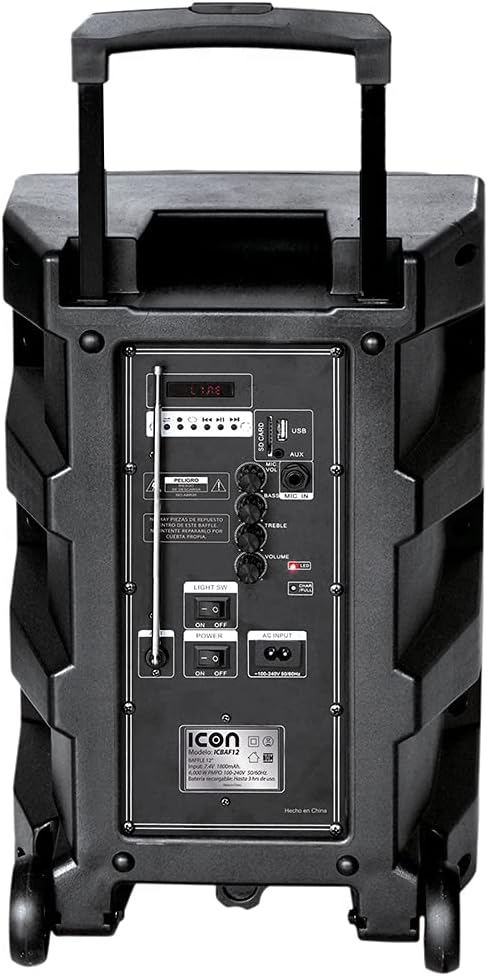
Изображение: подробное view of the ICON speaker's rear control panel, showing various inputs, volume, treble, and bass controls.
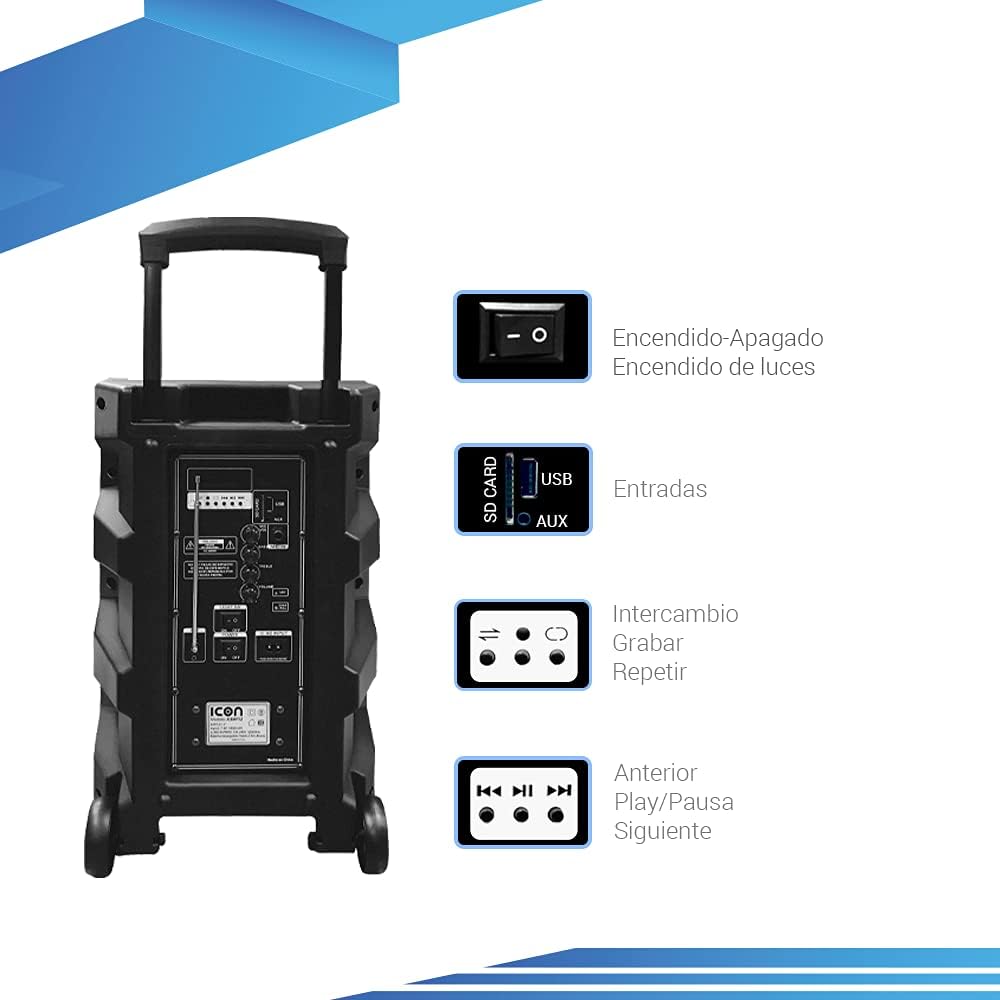
Image: Diagram illustrating key controls on the ICON speaker, including the power switch, light switch, input ports (SD Card, USB, AUX), and playback control buttons (Mode Switch, Record, Repeat, Previous, Play/Pause, Next).
- Выключатель: Turns the speaker On or Off.
- ПО СВЕТА: Toggles the LED light effects On or Off.
- SD CARD / USB / AUX Inputs: For connecting external media or devices.
- Переключатель РЕЖИМА: Циклическое переключение режимов входа (Bluetooth, USB, SD, AUX, FM).
- Кнопка ЗАПИСЬ: Initiates recording (e.g., microphone input to USB/SD).
- Кнопка REPEAT: Repeats the current track or playlist.
- PREVIOUS / PLAY/PAUSE / NEXT Buttons: Стандартные элементы управления воспроизведением мультимедиа.
- Ручка VOLUME: Регулирует общую громкость.
- TREBLE / BASS Knobs: Регулирует высокие и низкие частоты.
- MIC INPUT / GUITAR INPUT: For connecting microphones and guitars.
5. Инструкция по эксплуатации
5.1 Включение/выключение питания
To turn the speaker ON, flip the ВЛАСТЬ switch to the 'ON' position. To turn it OFF, flip the switch to 'OFF'.
5.2 Сопряжение по Bluetooth
- Включите колонку. Она автоматически перейдет в режим сопряжения Bluetooth, о чем будет свидетельствовать мигающий значок Bluetooth на дисплее.
- На мобильном устройстве (смартфоне, планшете, ноутбуке) включите Bluetooth и выполните поиск доступных устройств.
- Select "ICON Speaker" (or similar name) from the list of devices.
- Once paired, the speaker will emit a confirmation sound, and the Bluetooth icon will stop flashing. You can now play audio wirelessly from your device.
5.3 Воспроизведение с USB/SD-карты
- Вставьте USB-флешку или SD-карту (с аудиофайлом MP3). files) в соответствующий порт.
- The speaker will automatically switch to USB/SD mode and begin playing the first compatible track. If not, press the РЕЖИМ button to select USB/SD mode.
- Используйте ПРЕДЫДУЩИЙ, ВОСПРОИЗВЕДЕНИЕ/ПАУЗА, и СЛЕДУЮЩИЙ кнопки для управления воспроизведением.
5.4 Дополнительный вход
Подключите внешнее аудиоустройство (например, MP3-плеер, компьютер) к... AUX input using a 3.5mm audio cable. Press the РЕЖИМ нажимайте кнопку, пока не будет выбран режим AUX.
5.5 Работа FM-радио
- Нажмите РЕЖИМ Кнопка для переключения в режим FM-радио.
- Нажмите и удерживайте ВОСПРОИЗВЕДЕНИЕ/ПАУЗА кнопка для автоматического сканирования и сохранения доступных FM-станций.
- Используйте ПРЕДЫДУЩИЙ и СЛЕДУЮЩИЙ кнопки для навигации между сохраненными станциями.
5.6 Microphone and Guitar Usage
Plug your microphone or guitar into the respective MIC INPUT or ГИТАРНЫЙ ВХОД jacks. Adjust the volume using the main ОБЪЕМ knob and any dedicated microphone/guitar volume controls if present.
5.7 Функция TWS (настоящее беспроводное стерео)
The TWS function allows you to connect two ICON speakers wirelessly for a true stereo sound experience.
- Убедитесь, что оба динамика включены и не подключены ни к одному устройству Bluetooth.
- On one speaker (this will be the master), press and hold the TWS button (if available, or a combination of buttons as per specific model instructions, often the 'Mode' button or a dedicated TWS button).
- The speaker will search for another TWS-compatible speaker. Once connected, you will hear a confirmation sound.
- Now, connect your mobile device to the master speaker via Bluetooth as described in section 5.2. Audio will play through both speakers in stereo.
6. Техническое обслуживание
6.1 Очистка
Протрите внешнюю поверхность динамика мягкой сухой тканью. Не используйте абразивные чистящие средства, воск или растворители. Следите за тем, чтобы жидкости не попадали в отверстия динамика.
6.2 Уход за аккумулятором
- Чтобы продлить срок службы аккумулятора, избегайте его частой полной разрядки.
- Recharge the battery regularly, even if the speaker is not in use for extended periods (e.g., every 3 months).
- Храните динамик в прохладном сухом месте, когда он не используется.
6.3 Хранение
When storing the speaker for a long time, ensure it is turned off and disconnected from the power source. Store it in a clean, dry environment away from extreme temperatures and direct sunlight.
7. Поиск Неисправностей
| Проблема | Возможная причина | Решение |
|---|---|---|
| Динамик не включается. | Battery is depleted; Power cable not connected; Power switch is OFF. | Charge the speaker; Ensure power cable is securely connected; Flip POWER switch to ON. |
| Ни звука. | Слишком низкий уровень громкости; выбран неправильный режим ввода; устройство подключено неправильно. | Увеличьте громкость; Нажмите кнопку MODE для выбора нужного входа; Переподключите устройство/повторно выполните сопряжение Bluetooth. |
| Bluetooth-соединение не работает. | Динамик не находится в режиме сопряжения; Устройство слишком далеко; Помехи. | Убедитесь, что динамик находится в режиме сопряжения; поднесите устройство ближе; выключите другие устройства Bluetooth. |
| Искаженный звук. | Слишком высокая громкость; низкое качество звука. | Уменьшите громкость; попробуйте другой источник звука. |
| Микрофон не работает. | Microphone not plugged in correctly; Microphone volume too low; Microphone batteries dead (if wireless). | Ensure microphone is fully inserted; Adjust microphone volume; Replace microphone batteries. |
8. Технические характеристики
| Особенность | Спецификация |
|---|---|
| Номер модели | US-ICBAF12 |
| Выходная мощность | 6000 Вт ПМПО |
| Размер динамика | 12 дюймов |
| Технология связи | Bluetooth, USB, AUX, SD Card |
| Совместимые устройства | Ноутбук, Смартфон |
| Источник питания | Rechargeable Battery, AC Input |
| Размеры продукта (Д x Ш x В) | 38 х 36.5 х 54 см |
| Вес продукта | 7.62 кг |
| Особые возможности | Bluetooth, FM Radio, Microphone Input, Guitar Input, TWS Function, LED Lights |

Image: Packaging of the ICON Bluetooth Speaker, displaying key features and product dimensions (37.5 cm x 36 cm x 54 cm).
9. Гарантия и поддержка
This product is covered by a limited warranty. Please refer to the warranty card included in your package for specific terms and conditions. For technical support, troubleshooting assistance, or warranty claims, please contact your retailer or the manufacturer's customer service department. Keep your purchase receipt as proof of purchase.
For more information, visit the official ICON store on Amazon: ICON Store


