Введение
This manual provides essential instructions for the proper use, setup, and maintenance of your BYTECH Lightning Cable (Model: CLMFCBLASST). This cable is designed for charging and data transfer with compatible Apple iOS devices, including iPhones, iPads, and iPods, as well as connecting to laptops and personal computers.
Продукт болееview
The BYTECH Lightning Cable is a durable accessory for your Apple devices. It features a Lightning connector on one end and a USB-A connector on the other, facilitating both power delivery for charging and data exchange. The cable supports fast charging capabilities for compatible devices.
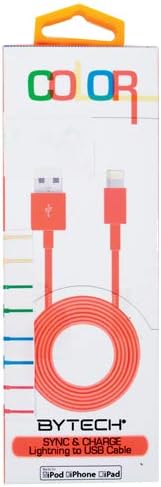
This image displays the retail packaging for the BYTECH Lightning to USB Cable. The packaging is white with 'COLOR' printed at the top in multi-colored letters. An orange Lightning to USB cable is visible through a clear window, coiled neatly. The bottom of the package indicates 'BYTECH SYNC & CHARGE Lightning to USB Cable' and compatibility with iPod, iPhone, and iPad.
Компоненты:
- Разъем Lightning: Connects to your Apple iOS device (iPhone, iPad, iPod).
- Разъем USB-A: Connects to a USB power adapter, computer USB port, or other USB charging source.
- Кабель: The flexible cord connecting the two connectors, designed for durability and efficient power/data transfer.
Настраивать
To begin using your BYTECH Lightning Cable, follow these steps:
- Определите соединители: Locate the Lightning connector (smaller, 8-pin) and the USB-A connector (larger, rectangular).
- Подключите к источнику питания или компьютеру:
- For charging, insert the USB-A connector into a compatible USB wall adapter or car charger.
- For charging and data transfer, insert the USB-A connector into an available USB port on your laptop or personal computer.
- Подключитесь к устройству iOS: Insert the Lightning connector into the charging port of your iPhone, iPad, or iPod. Ensure it is fully seated.
- Проверить соединение: Your device should indicate that it is charging or connected to a computer.
Инструкция по эксплуатации
Зарядка вашего устройства:
Once connected as described in the "Setup" section, your iOS device will begin charging automatically. The cable supports fast charging when paired with a compatible power adapter and device.
Передача данных:
When connected to a computer, the cable enables data transfer between your iOS device and the computer. This allows for syncing media, documents, and other files using iTunes or Finder (macOS Catalina and later).
- Connect your iOS device to your computer using the BYTECH Lightning Cable.
- Unlock your iOS device and respond to any "Trust This Computer?" prompts by tapping "Trust" and entering your passcode if required.
- Open iTunes (Windows/older macOS) or Finder (macOS Catalina and later) on your computer.
- Select your device within the application to manage and transfer data.
Обслуживание
Proper care extends the life of your cable:
- Хранилище: When not in use, coil the cable loosely. Avoid tight coiling or sharp bends, especially near the connectors, as this can damage the internal wires.
- Уборка: Для протирки кабеля и разъемов используйте мягкую сухую ткань. Не используйте жидкие чистящие средства или абразивные материалы.
- Умение обращаться: Always grasp the connector head when plugging or unplugging the cable. Avoid pulling directly on the cable itself.
- Среда: Берегите кабель от экстремальных температур, прямых солнечных лучей и влаги.
Поиск неисправностей
If you encounter issues with your BYTECH Lightning Cable, consider the following:
- Устройство не заряжается:
- Убедитесь, что оба конца кабеля надежно подключены.
- Попробуйте другой USB-адаптер питания или другой USB-порт компьютера.
- Check the charging port on your iOS device for debris or lint.
- Test the cable with a different compatible iOS device, if available.
- Проблемы с передачей данных:
- Ensure your iOS device is unlocked and you have tapped "Trust This Computer" when prompted.
- Restart both your iOS device and your computer.
- Update iTunes or Finder to the latest version.
- Попробуйте использовать другой порт USB на вашем компьютере.
- Повреждение кабеля: Inspect the cable for any visible signs of damage, such as fraying, cuts, or bent connectors. Discontinue use if damage is found.
Технические характеристики
| Атрибут | Деталь |
|---|---|
| Бренд | Байтек |
| Номер модели | CLMFCBLASST |
| СКП | 805112016938 |
| Тип разъема | Lightning (Male) to USB-A (Male) |
| Тип кабеля | Молния |
| Совместимые устройства | iPhone, iPad, iPod, Laptop, Personal Computer |
| Специальная характеристика | Быстрая зарядка |
| Рекомендуемое использование | Charging, data transfer for iOS devices |
| Количество штифтов | 8 (Lightning) |
| Вес товара | 1.76 унции |
| Размеры продукта | 1 x 1 x 1 дюйма (упаковка) |
Гарантия и поддержка
For warranty information or technical support regarding your BYTECH Lightning Cable, please refer to the official Bytech webили обратитесь в службу поддержки напрямую. Сохраните чек о покупке для предъявления гарантийных претензий.
Для получения общей информации вы можете посетить [ссылка]. Bytech brand page on Amazon.


