Введение
This manual provides essential instructions for the safe operation, installation, and maintenance of your Chicago Pneumatic Digital Timer for Lamps & Appliances. Please read this manual thoroughly before using the product and retain it for future reference. Proper use ensures optimal performance and extends the product's lifespan.
Инструкции по технике безопасности
Всегда соблюдайте следующие меры предосторожности, чтобы предотвратить травмы или повреждение изделия:
- Не погружайте таймер в воду и не подвергайте его воздействию чрезмерной влажности.
- Не превышайте максимальную допустимую нагрузку, указанную для таймера.
- Убедитесь, что таймер надежно подключен к заземленной розетке.
- Do not disassemble or attempt to repair the timer yourself. Contact qualified service personnel.
- Хранить в недоступном для детей месте.
- Перед чисткой отключите таймер от розетки.
Содержимое упаковки
Проверьте наличие всех предметов в упаковке:
- 1 x Chicago Pneumatic Digital Timer
- 1 x Руководство пользователя (этот документ)
Продукт болееview
Familiarize yourself with the components of your digital timer.
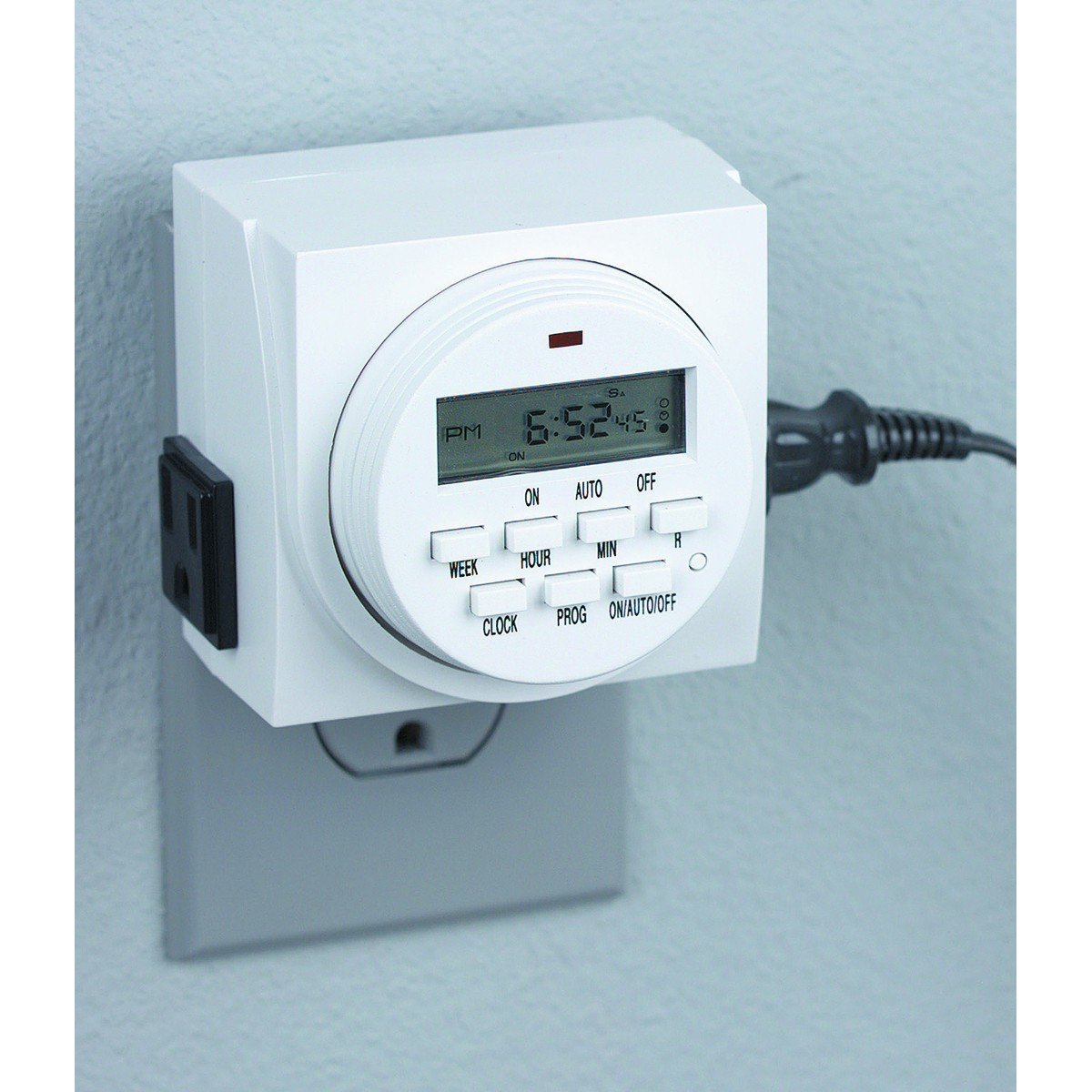
Рисунок 1: Передний view of the Chicago Pneumatic Digital Timer. This image displays the digital screen, which shows the current time and programming status, along with various control buttons for setting programs, adjusting time, and manual override.
The timer features a clear digital display, multiple programming buttons, and a power outlet for connecting appliances.
Настраивать
- Первоначальный сбор: Before first use, plug the timer into a live electrical outlet for at least 30 minutes to charge the internal battery. This battery retains settings during power outagес.
- Очистить все настройки: Press the "RESET" button (often a small recessed button requiring a pen tip) to clear all previous settings and restore factory defaults.
- Установить текущее время:
- Нажмите кнопку "ЧАСЫ".
- Use the "HOUR" and "MINUTE" buttons to set the current time.
- Use the "WEEK" button to set the current day of the week.
- Press "CLOCK" again to confirm and exit time setting mode.
Инструкция по эксплуатации
Программирование времени включения / выключения
Таймер позволяет задавать несколько программ включения/выключения. Для настройки программы выполните следующие действия:
- Press the "PROG" button. The display will show "1 ON".
- Use "WEEK" to select the day(s) for this program (e.g., MO, TU, WE, TH, FR, SA, SU, or combinations like MO-FR, SA-SU, MO-SU).
- Use "HOUR" and "MINUTE" to set the desired ON time.
- Нажмите кнопку "PROG" еще раз. На дисплее отобразится "1 OFF".
- Use "WEEK", "HOUR", and "MINUTE" to set the desired OFF time for the same program.
- Повторите шаги 1-5 для дополнительных программ (например, "2 ВКЛ", "2 ВЫКЛ" и т. д.).
- After setting all programs, press the "CLOCK" button to return to the current time display.
Ручное управление
To manually switch the timer's output ON or OFF, or to cycle through modes:
- Press the "MANUAL" or "ON/AUTO/OFF" button repeatedly.
- The display will cycle through "ON" (always on), "AUTO" (follows programs), and "OFF" (always off). Select "AUTO" for programmed operation.
Connecting an Appliance
Plug the appliance you wish to control into the outlet on the front of the digital timer. Ensure the appliance's power switch is in the ON position if it has one, so the timer can control its power supply.
Обслуживание
- Уборка: Отключите таймер от розетки. Протрите корпус мягкой сухой тканью. Не используйте абразивные чистящие средства или растворители.
- Хранилище: Храните таймер в сухом прохладном месте, когда он не используется.
- Аккумулятор: The internal battery is designed for long life and typically does not require replacement. If the display becomes dim or settings are frequently lost, ensure the timer is regularly plugged in to charge the battery.
Поиск неисправностей
| Проблема | Возможная причина | Решение |
|---|---|---|
| Таймер не включается/выключается в запрограммированное время. |
|
|
| Дисплей пустой или тусклый. |
|
|
| Настройки теряются после отключения питания.tage. | Внутренняя батарея недостаточно заряжена. | Подключите таймер к работающей розетке на несколько часов, чтобы полностью зарядить внутренний аккумулятор. |
Технические характеристики
| Модель | Цифровой Таймер |
| Бренд | Чикаго Пневматик |
| Материал | Пластик |
| Вес товара | 8.4 унции |
| Размеры упаковки | 7.68 x 7.44 x 3.86 дюйма |
| СКП | 367877920504 |
| ASIN | B082P3B3TY |
| Номинальная мощность | (Конкретный объем указан на этикетке продукта)tage/ampярость) |
Гарантия и поддержка
Chicago Pneumatic products are manufactured to high-quality standards. For warranty information, please refer to the warranty card included with your purchase or visit the official Chicago Pneumatic webСохраните чек в качестве подтверждения покупки.
For technical support, troubleshooting assistance beyond this manual, or to inquire about replacement parts, please contact Chicago Pneumatic customer service. Contact details can typically be found on the product packaging or the official brand webсайт.
Интернет-ресурсы: Для получения дополнительной поддержки и информации о продукте посетите официальный сайт. Чикаго Пневматик webсайт.


