1. Введение
This manual provides detailed instructions for the installation, operation, and maintenance of your BINIZE Android 13 Car Stereo. This 9-inch touchscreen head unit is designed for Toyota Camry models from 2006 to 2011, offering advanced features such as Wireless CarPlay, Android Auto, GPS navigation, WiFi connectivity, and support for a backup camera.
Пожалуйста, внимательно прочтите данное руководство перед использованием продукта, чтобы обеспечить его надлежащую функциональность и безопасность.
2. Настройка и установка
Правильная установка имеет решающее значение для оптимальной работы. Если вы не уверены в каком-либо шаге, рекомендуется обратиться за помощью к специалисту.
2.1 Содержимое упаковки
Убедитесь, что в упаковке присутствуют все компоненты:
- BINIZE Android 13 Car Stereo Head Unit (9-inch)
- Силовой кабель
- Кабели входа/выхода RCA
- 2 USB-кабеля
- GPS-антенна
- Руководство по эксплуатации (данный документ)
- Кабель входа камеры
- Резервная камера

Figure 2.1: Included components of the BINIZE Android 13 Car Stereo.
2.2 Совместимость с транспортными средствами
This head unit is specifically designed for Toyota Camry models manufactured between 2006 and 2011.

Figure 2.2: BINIZE Car Stereo installed in a compatible Toyota Camry dashboard.

Рисунок 2.3: До и после установки view of the BINIZE Car Stereo in a Toyota Camry.
2.3 Проводка и соединения
Connect the power harness, RCA cables, USB cables, GPS antenna, and backup camera input as per the wiring diagram provided with your unit. Ensure all connections are secure to prevent malfunctions.
Примечание: If the provided wiring harness is incompatible with your vehicle, contact customer service for an appropriate replacement.
2.4 Первоначальное включение питания
После установки включите зажигание автомобиля. Головное устройство должно включиться автоматически. Следуйте инструкциям на экране для первоначальной настройки.
3. Инструкция по эксплуатации
3.1 Главный экран и навигация
The home screen provides access to all main functions and applications. Swipe left or right to navigate through app pages. Tap on an icon to launch the corresponding application.

Figure 3.1: Main interface of the BINIZE Android 13 Car Stereo.
3.2 Беспроводной CarPlay и Android Auto
The unit supports both Wireless CarPlay and Wireless Android Auto for seamless smartphone integration. Connect your phone via Bluetooth and Wi-Fi to access navigation, music, calls, and messaging apps directly on the car stereo.

Рисунок 3.2: Функциональность беспроводных сервисов CarPlay и Android Auto.
3.3 Функция зеркальной ссылки
For apps not supported by CarPlay or Android Auto, use the Mirror Link function to display your smartphone screen (both iOS and Android) on the car stereo. This allows for viewвидео и другой контент.

Figure 3.3: Mirror Link feature in action.
Video 3.1: Demonstration of the Binize car stereo's features, including screen mirroring.
3.4 GPS-навигация
The unit features a built-in GPS receiver and antenna. You can use pre-installed navigation apps or download others from the Play Store. Both online and offline maps are supported.

Рисунок 3.4: Интерфейс GPS-навигации.
3.5 FM-радио
Access FM radio stations with a tuning range of 87.5-108 MHz. Save your favorite stations for quick access.
Рисунок 3.5: Интерфейс FM-радио.
3.6 Воспроизведение музыки и видео
Enjoy lossless music playback and high-definition video. The unit supports various audio and video formats. You can download media apps from the Play Store.
Figure 3.6: Music and Video playback interfaces.
3.7 Digital Signal Processor (DSP) and Equalizer
Customize your audio experience with the built-in DSP. Adjust multi-band EQ settings, equal loudness, and sound field to achieve true stereo surround sound through the 6-speaker output.

Рисунок 3.7: Настройки DSP и эквалайзера.
Видео 3.2: Оверview of the Binize 10 Inch Double Din Touchscreen Android Car Stereo features.
3.8 Функциональность камеры заднего вида
The unit supports AHD HD reversing cameras. When the vehicle is in reverse, the screen automatically displays the camera feed with reversing guidelines for safer parking.
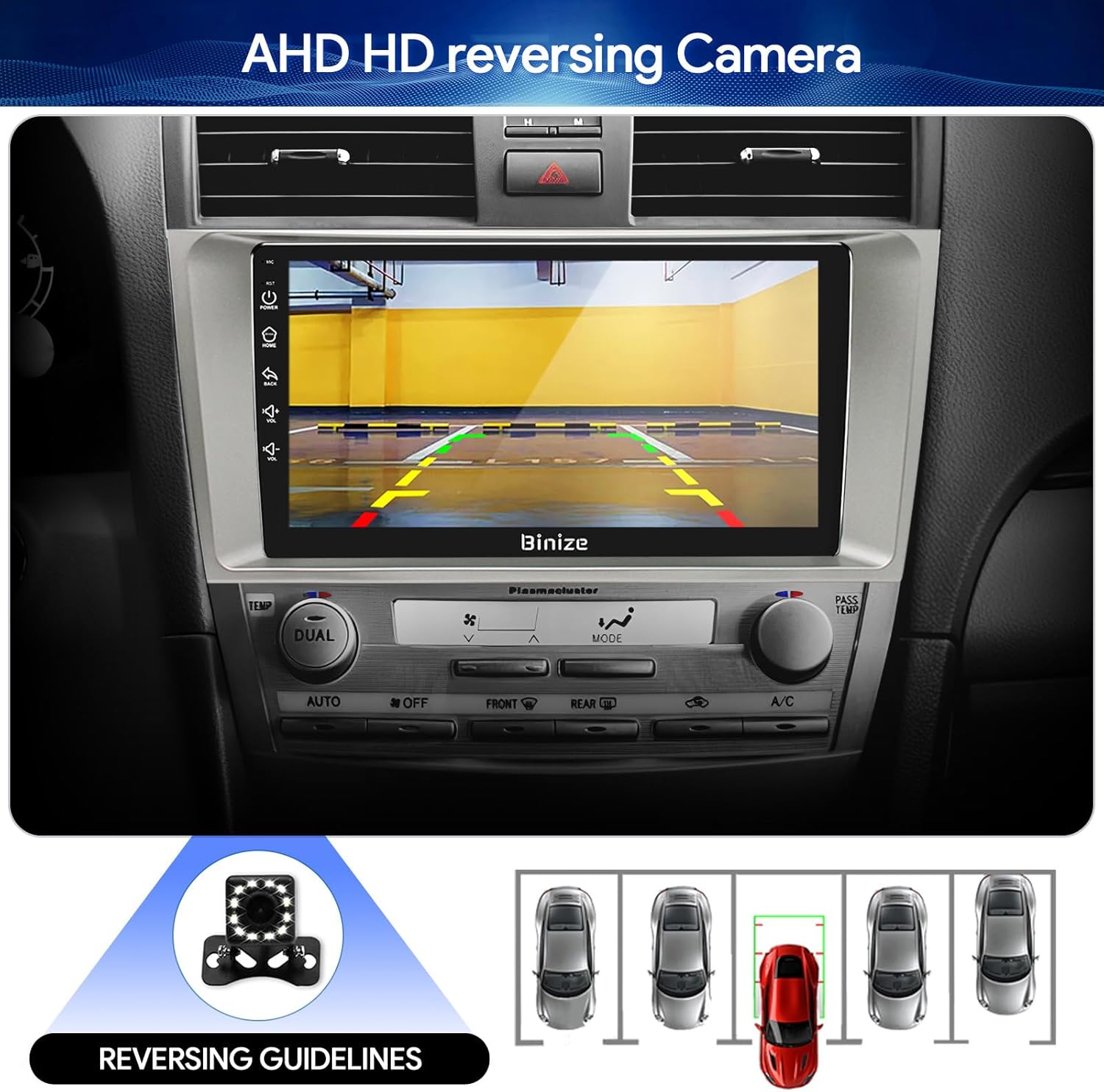
Figure 3.8: Backup camera display with reversing guidelines.
3.9 Bluetooth 5.0 for Hands-Free Calling
Connect your phone via Bluetooth 5.0 for faster network transmission and hands-free calling. Dial, answer, or receive calls directly from the head unit.
Рисунок 3.9: Интерфейс громкой связи Bluetooth.
4. Техническое обслуживание
4.1 Очистка экрана
Для протирки сенсорного экрана используйте мягкую безворсовую ткань. Избегайте абразивных чистящих средств или агрессивных химикатов, которые могут повредить дисплей.
4.2 Обновления программного обеспечения
Периодически проверяйте наличие обновлений программного обеспечения, чтобы обеспечить оптимальную производительность и доступ к новым функциям. Обновления обычно можно выполнить через Wi-Fi или USB.
5. Поиск Неисправностей
- Нет питания: Проверьте все силовые соединения и блок предохранителей автомобиля. Убедитесь, что зажигание включено.
- Нет звука: Verify speaker connections, volume levels, and EQ settings. Check if the unit is muted.
- Проблемы с сигналом GPS: Убедитесь, что антенна GPS установлена правильно и имеет свободное пространство. view неба.
- Проблемы с Bluetooth-соединением: Убедитесь, что Bluetooth включен как на головном устройстве, так и на вашем телефоне. Попробуйте отменить сопряжение устройств и выполнить его повторно.
- Управление на рулевом колесе не работает: Refer to the "SW Learning" or "Steering Wheel Setting" in the unit's settings menu to configure the controls.
- Screen Lag/Unresponsiveness: Restart the unit. If issues persist, consider a factory reset (note: this will erase personal data).
- Wiring Harness Incompatibility: If the provided wiring harness does not fit your vehicle, contact BINIZE customer service for assistance.
6. Технические характеристики
| Особенность | Спецификация |
|---|---|
| Вес товара | 2.84 фунта |
| Размеры упаковки | 11.2 x 7.2 x 3.7 дюйма |
| Размер дисплея | 10.1 дюйма |
| Голосовое управление | Кнопки, микрофон, сенсорный экран |
| Бренд | БИНИЗЕ |
| Тип обслуживания автомобиля | Машина |
| Специальная характеристика | Bluetooth, сенсорный экран |
| Технология связи | Bluetooth, USB, Wi-Fi |
| Тип карты | Online and Offline |
| Режим аудиовыхода | Стереодинамик |
| Тип крепления | Крепление на приборную панель |
| Разрешение | 1024 х 600 |
| Операционная система | андроид |
7. Гарантия и поддержка
BINIZE offers top-notch customer service. If you encounter any problems before or after sale, please contact the BINIZE customer service team via Amazon email. They are committed to assisting you with any issues and can provide support for online updates and warranty information.
For further assistance, please refer to the contact information provided with your purchase or visit the official BINIZE store on Amazon.