1. Введение
The LG OLED CX Series 65-inch 4K Smart TV (OLED65CXPUA) offers a premium viewing experience with its self-lit OLED pixels, delivering perfect blacks, intense colors, and stunning picture quality. This manual provides essential information for setting up, operating, maintaining, and troubleshooting your new television.
Equipped with the α9 Gen 3 AI Processor 4K, this TV intelligently enhances everything you see and hear, providing clearer, smoother, and more dynamic content. Its advanced features make it ideal for both cinematic viewing and high-performance gaming.

Image: The LG OLED CX Series 65-inch 4K Smart TV showcasing its vibrant display with various streaming application icons.
2. Что в коробке
Upon unboxing your LG OLED CX Series TV, please ensure all the following components are present:
- LG OLED CX Series 65-inch 4K Smart TV
- TV Stand (for tabletop placement)
- Силовой кабель
- Пульт дистанционного управления LG Magic
- 2 батарейки типа ААА (для пульта дистанционного управления)
- Руководство пользователя (этот документ)

Image: A visual representation of the LG OLED CX Series TV's dimensions and the items included in the box, such as the TV, stand, power cable, and Magic Remote.
Видео распаковки
Video: Official LG OLED Unboxing guide, demonstrating the safe and proper way to remove the TV from its packaging and prepare it for setup.
3. Настройка
3.1 Stand Assembly / Wall Mounting
Carefully place the TV screen-down on a soft, flat surface. Attach the stand to the TV using the provided screws, following the instructions in the separate stand assembly guide. If wall-mounting, ensure you use a compatible VESA mount and follow the mount manufacturer's instructions. Due to the TV's size and weight, it is recommended that two people handle the TV during assembly or mounting.
3.2 Подключение внешних устройств
Your LG OLED CX TV offers multiple connectivity options for various external devices. Locate the ports on the back and side of the TV.

Image: The back panel of the LG OLED CX TV, highlighting the main input/output ports for connecting devices.

Image: The side panel of the LG OLED CX TV, providing easy access to additional HDMI and USB ports.
- Порты HDMI: Connect gaming consoles, Blu-ray players, soundbars, and other HDMI-compatible devices. The LG OLED CX features 4 HDMI 2.1 ports, supporting advanced features like 4K@120Hz, VRR, and ALLM for optimal gaming performance.
- USB-порты: Подключайте USB-накопители для воспроизведения мультимедиа или обновления программного обеспечения.
- Порт Ethernet (LAN): Для стабильного проводного подключения к Интернету.
- Оптический цифровой аудиовыход: Подключите к звуковой панели или аудиоресиверу для улучшения звука.
- Вход антенны/кабеля: Подключите антенну или кабельное телевидение.
3.3 Подключение питания
Connect the power cable to the TV's power input and then to a wall outlet. Press the power button on the remote control or the TV to turn it on.
4. Управление телевизором
4.1 LG Magic Remote
The LG Magic Remote provides intuitive control over your TV with its point, click, scroll, and voice recognition features. It simplifies navigation through menus and content.

Image: The LG Magic Remote, featuring a central scroll wheel, directional buttons, and dedicated app buttons.

Изображение: под углом view of the LG Magic Remote, emphasizing its modern design and button accessibility.
Magic Remote Features Video
Video: An official LG video demonstrating the various features and functionalities of the LG Magic Remote, including point-and-click navigation and voice commands.
4.2 webОперационная система Smart TV Platform
The webOS platform provides a user-friendly interface for accessing streaming services, live TV, and connected devices. Navigate using the Magic Remote to explore apps like Netflix, Prime Video, Hulu, and more.

Изображение: LG webOS Smart TV home screen, displaying a selection of popular streaming applications and personalized content suggestions.
4.3 Picture Modes and AI Processing
Your LG OLED CX TV features various picture modes and AI processing to optimize content. The α9 Gen 3 AI Processor 4K uses AI Picture Pro and AI Sound Pro to automatically adjust settings for the best viewи опыт прослушивания.
- Режим кинорежиссера: Сохраняет оригинальное видение режиссера, отключая сглаживание движения и другие эффекты постобработки.
- Яркий: Enhances colors and brightness for a more dynamic picture.
- Стандарт: Provides a balanced picture suitable for most content.
- Кино: Optimizes settings for movie viewинж.
- Виды спорта: Enhances motion clarity for fast-paced sports.
OLED Self-Lit Pixels Video
Video: An LG Electronics video explaining the technology behind self-lit OLED pixels and how they contribute to superior picture quality with perfect blacks and vibrant colors.
4.4 Игровые возможности
The LG OLED CX is designed for an exceptional gaming experience, featuring a 120Hz refresh rate, NVIDIA G-SYNC, and FreeSync compatibility for smooth, tear-free gameplay. The Game Optimizer mode allows for quick adjustments to gaming settings.
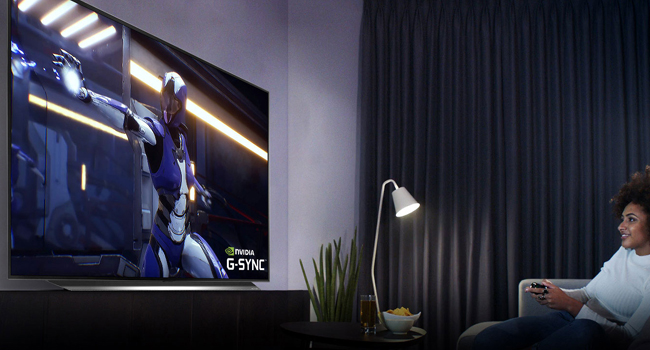
Image: A dynamic image of the LG OLED TV showcasing its 'OLED Gaming' features with vivid graphics.
LG OLED CX vs GX Series Video
Video: An LG Electronics video comparing the features and performance of the LG OLED CX and GX series TVs, providing insights into their differences and shared technologies.
5. Техническое обслуживание
5.1 Уход за экраном
Чтобы очистить экран, аккуратно протрите его мягкой сухой салфеткой из микрофибры. Для удаления стойких загрязнений слегка потрите.ampen the cloth with water or a screen-safe cleaner. Avoid harsh chemicals, abrasive materials, or excessive pressure, as these can damage the OLED panel.
5.2 Burn-in Prevention
LG OLED TVs incorporate features to minimize the risk of burn-in, such as Pixel Refresher and Screen Shift. To further protect your screen:
- Avoid displaying static images or logos for extended periods.
- Utilize the TV's built-in screen saver and power-saving modes.
- Выключайте телевизор, когда он не используется.
5.3 Генеральная уборка
Wipe the TV's frame and stand with a soft, dry cloth. Ensure the TV is unplugged before cleaning.
6. Поиск Неисправностей
If you encounter issues with your LG OLED CX TV, try the following basic troubleshooting steps:
- Нет питания: Проверьте, надёжно ли подключён кабель питания к телевизору и розетке. Попробуйте использовать другую розетку.
- Нет изображения/звука: Ensure all external devices are properly connected and powered on. Verify the correct input source is selected on the TV.
- Пульт дистанционного управления не работает: Замените батарейки в пульте дистанционного управления Magic Remote. Убедитесь, что между пультом и телевизором нет препятствий.
- Плохое качество изображения: Check the picture mode settings. Ensure the content source is high-quality (e.g., 4K HDR).
- Проблемы с подключением к Интернету: Проверьте подключение вашего Wi-Fi роутера или кабеля Ethernet. Попробуйте перезагрузить роутер.
- Сброс к заводским настройкам: As a last resort, you can perform a factory reset through the TV's settings menu. This will erase all personalized settings and data.
For more detailed troubleshooting, refer to the TV's on-screen help guide or the LG support webсайт.
7. Технические характеристики
| Особенность | Спецификация |
|---|---|
| Бренд | LG |
| Номер модели | OLED65CXPUA |
| Размер экрана | 65 дюйма |
| Технология отображения | OLED |
| Разрешение | 4К (3840 x 2160) |
| Частота обновления | 120 Гц |
| Процессор | AI-процессор α9 Gen 3 4K |
| Технология связи | Bluetooth, Ethernet, HDMI (4x 2.1), USB, Wireless |
| Поддерживаемые интернет-сервисы | Google TV, Hulu, Netflix, Prime Video, Vudu (webОС) |
| Вес товара | 71.9 фунта |
| Размеры изделия (с подставкой) | 9.9 x 57 x 33.9 дюйма |
| Включенные компоненты | Кабель питания, пульт дистанционного управления, подставка |
8. Гарантия и поддержка
Your LG OLED CX Series TV comes with a manufacturer's warranty. Please refer to the warranty card included in your product packaging for specific terms and conditions, including coverage duration and claim procedures.
For technical support, product registration, or to download the full electronic manual, please visit the official LG Electronics support webили свяжитесь со службой поддержки клиентов LG напрямую. Контактная информация обычно находится на сайте LG. webсайте или в документации к вашему продукту.
Онлайн поддержка: Поддержка LG Webсайт