1. Продукт закончилсяview
The Schneider SC600SND is a versatile 2.0 channel soundbar designed to enhance your audio experience. It offers a total output power of 30W (15W x 2) and supports multiple connectivity options including Bluetooth, HDMI (ARC), Optical, and Aux. A unique feature of this soundbar is its convertible design, allowing it to be used as a single horizontal unit or split into two vertical speaker columns.

Image 1.1: The Schneider SC600SND Soundbar in its standard monoblock configuration.
2. Настройка
2.1 Распаковка и размещение
Carefully remove all components from the packaging. Ensure you have the soundbar unit, remote control, and 3.5mm Jack cable.
The SC600SND soundbar offers two primary placement options:
- Monoblock Configuration: Use the soundbar as a single horizontal unit, ideal for placing below your television.
- Split Column Configuration: The soundbar can be separated into two vertical speaker columns. This allows for flexible placement on either side of your television or entertainment unit. To split, gently twist and pull the two halves apart at the central connection point. Attach the provided bases to each column for stability.

Image 2.1: Detail of the central connection point, allowing the soundbar to be split into two columns.
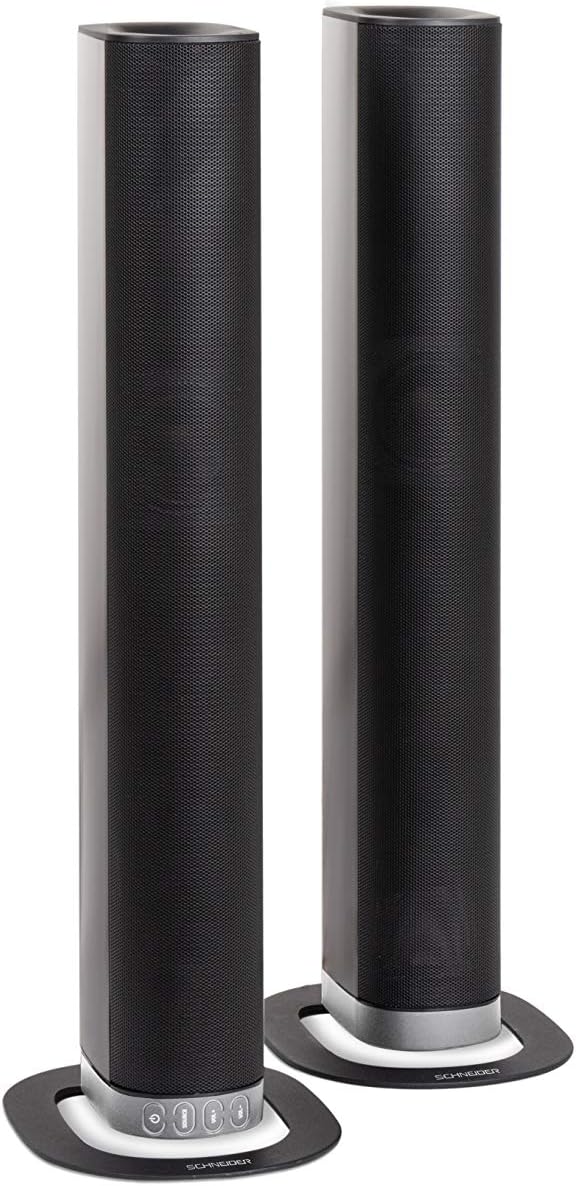
Image 2.2: The soundbar configured as two independent vertical speaker columns.
2.2 Подключение к источнику питания
Connect the power cable to the soundbar's power input and then to a suitable wall outlet. The soundbar will enter standby mode.
2.3 Аудиоподключения
Выберите один из следующих способов подключения источника звука:
- HDMI (АРК): For optimal audio quality and control, connect an HDMI cable from the soundbar's HDMI ARC port to your TV's HDMI ARC port. This allows your TV remote to control the soundbar's volume.
- Оптический: Connect an optical cable from the soundbar's OPTICAL input to your TV's optical output.
- ВСПОМОГАТЕЛЬНЫЙ: Use the included 3.5mm Jack cable to connect the soundbar's AUX input to the headphone jack or audio output of your device (e.g., TV, smartphone, MP3 player).
- Bluetooth: For wireless connection, refer to the Bluetooth pairing instructions in the Operating section.
3. Инструкция по эксплуатации
3.1 Включение/выключение питания
Нажмите Власть Кнопка на саундбаре или пульте дистанционного управления для включения и выключения устройства.
3.2 Выбор источника
Нажмите ИСТОЧНИК button on the soundbar or the remote control to cycle through the available input sources: Bluetooth (BT), HDMI (ARC), Optical, and AUX.

Image 3.1: On-unit control buttons for power, source selection, and volume adjustment.
3.3 Регулятор громкости
Используйте ГРОМКОСТЬ+ и VOL- Нажмите кнопки на саундбаре или пульте дистанционного управления, чтобы отрегулировать громкость. MUTE Кнопка на пульте дистанционного управления для временного отключения звука.
3.4 Сопряжение по Bluetooth
- Select Bluetooth as the source input. The soundbar will enter pairing mode, indicated by a flashing LED.
- На мобильном устройстве (смартфоне, планшете и т. д.) включите Bluetooth и выполните поиск доступных устройств.
- Select "SC600SND" from the list of devices.
- Once paired, the LED indicator on the soundbar will stop flashing and remain solid. You can now play audio wirelessly from your device.
3.5 звуковых режима
The remote control includes dedicated buttons for different sound modes to optimize your listening experience:
- НОВОСТИ: Enhances vocal clarity for news broadcasts and dialogue.
- КИНО: Обеспечивает более захватывающее звучание.tage for films.
- МУЗЫКА: Оптимизирует звук для воспроизведения музыки.

Image 3.2: The included remote control with dedicated buttons for power, source, volume, mute, and sound modes.
4. Техническое обслуживание
Чтобы обеспечить долговечность и оптимальную работу вашей звуковой панели, следуйте следующим рекомендациям по обслуживанию:
- Уборка: Use a soft, dry cloth to clean the exterior surfaces of the soundbar. Do not use liquid cleaners, aerosols, or abrasive materials, as these can damage the finish or internal components.
- Вентиляция: Ensure that the soundbar's ventilation openings are not blocked. Proper airflow prevents overheating.
- Хранилище: При длительном хранении звуковой панели отключите ее от питания и храните в прохладном, сухом месте, вдали от прямых солнечных лучей и экстремальных температур.
- Умение обращаться: Не допускайте падений и сильных ударов звуковой панели.
5. Поиск Неисправностей
If you encounter issues with your SC600SND soundbar, refer to the following common problems and solutions:
- Нет питания:
- Ensure the power cable is securely connected to both the soundbar and a working power outlet.
- Проверьте работоспособность розетки, подключив к ней другое устройство.
- Нет звука:
- Verify that the correct input source (HDMI, Optical, AUX, Bluetooth) is selected on the soundbar.
- Increase the volume on both the soundbar and your connected audio source (e.g., TV, smartphone).
- Убедитесь, что саундбар не отключен.
- Check all audio cables for secure connections and damage. Try a different cable if possible.
- If using HDMI ARC, ensure your TV's HDMI ARC function is enabled in its settings.
- Poor Sound Quality / Distorted Audio:
- Отрегулируйте уровень громкости, чтобы избежать искажений.
- Try switching between the different sound modes (NEWS, MOVIE, MUSIC) to see if one improves the audio for your content.
- Ensure the soundbar is placed on a stable surface and not vibrating excessively.
- При использовании Bluetooth убедитесь, что ваше устройство находится в зоне действия и нет препятствий, создающих помехи.
- Проблемы с сопряжением Bluetooth:
- Убедитесь, что саундбар находится в режиме сопряжения Bluetooth (мигает светодиод).
- Make sure your device's Bluetooth is enabled and it is searching for new devices.
- Переместите устройство ближе к звуковой панели.
- Если устройство ранее было сопряжено, попробуйте разорвать сопряжение и заново подключить его.
- Пульт дистанционного управления не работает:
- Проверьте и замените батарейки в пульте дистанционного управления.
- Убедитесь, что между пультом дистанционного управления и датчиком саундбара нет никаких препятствий.
- Направьте пульт непосредственно на звуковую панель.
6. Технические характеристики
| Особенность | Спецификация |
|---|---|
| Номер модели | SC600SND |
| Каналы | 2.0 |
| Выходная мощность | 30 Вт (15 Вт x 2) |
| Технология связи | Bluetooth, HDMI (ARC), Optical, Aux |
| Беспроводная связь | Bluetooth |
| Метод контроля | Дистанционное управление |
| Тип динамика | Саундбар |
| Размер динамика | 2 дюйма |
| Источник питания | Кабель Электрический |
| Product Dimensions (Monoblock) | 80.5 х 6.2 х 9 см |
| Вес продукта | 2.5 Килограмма |
| Включенные компоненты | Remote Control, 3.5mm Jack Cable |
| Цвет | Черный |
7. Гарантия и поддержка
7.1 Ограниченная гарантия
This Schneider SC600SND Soundbar is covered by a Limited Warranty. Please refer to the warranty card included with your product or contact your retailer for specific terms and conditions regarding warranty coverage and duration.
7.2 Поддержка клиентов
For technical assistance, troubleshooting beyond this manual, or warranty claims, please contact the retailer where you purchased the product or visit the official Schneider webсайт для получения информации о поддержке.


