Введение
This user manual provides detailed instructions for the proper use and maintenance of your AUTOPHIX OM123 OBD2 Scanner. The OM123 is a universal automotive diagnostic scan tool designed to read and clear engine fault codes, view live data, and retrieve vehicle information for OBDII/EOBD+CAN compliant vehicles. Please read this manual thoroughly before operating the device.
Продукт болееview
The AUTOPHIX OM123 OBD2 Scanner is a compact and user-friendly diagnostic tool. It features a large LCD display with backlight for clear readability and intuitive navigation buttons.
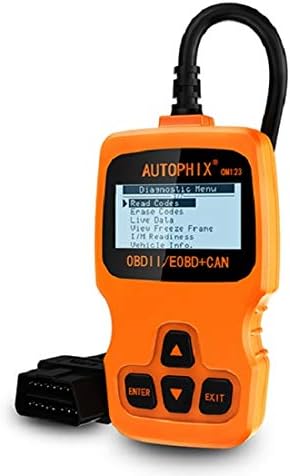
Рисунок 1: Передний view of the AUTOPHIX OM123 OBD2 Scanner, showing the display and control buttons.
Основные характеристики:
- Диагностические функции: Считывает и очищает диагностические коды неисправностей (DTC), выключает индикатор неисправности Lamp (MIL), views live data streams, and displays freeze frame data.
- I / M Готовность: Checks the status of emission-related monitors to ensure vehicle readiness for emissions testing.
- Получение информации об автомобиле: Accesses Vehicle Identification Number (VIN), Calibration ID (CIN), and Calibration Verification Number (CVN).
- Широкая совместимость: Supports all OBDII protocols, including CAN, J1850 PWM, J1850 VPW, ISO9141, and KWP2000. Compatible with most vehicles manufactured from 1996 onwards.
- Удобный интерфейс: Features a large 128 x 64 pixel LCD display with white backlight and contrast adjustment. Built-in OBD2 fault code definitions eliminate the need for external lookup.
- Батарейки не требуются: Powered directly via the detachable OBDII cable from the vehicle's OBDII port.
- Поддержка нескольких языков: Available in English, French, German, Spanish, Dutch, Finnish, Portuguese, and Russian.

Рисунок 2: The OM123 scanner's display showing the main diagnostic menu options: Read Codes, Erase Codes, Live Data, View Freeze Frame, I/M Readiness, and Vehicle Info.
Размеры устройства:

Рисунок 3: Dimensions of the AUTOPHIX OM123 scanner: approximately 125mm (height), 70mm (width), and 22mm (thickness).
Настраивать
- Найдите порт OBDII: Разъем OBDII обычно расположен под приборной панелью со стороны водителя. Точное местоположение указано в руководстве по эксплуатации вашего автомобиля.
- Подключите сканер: With the vehicle's ignition off, firmly plug the OM123 scanner's OBDII connector into the vehicle's OBDII port.
- Включение питания: Поверните ключ зажигания автомобиля в положение «ВКЛ» (не запускайте двигатель). Сканер автоматически включится и отобразит главное меню.
- Выбор языка (при необходимости): If the device is not in your preferred language, navigate to the "Settings" or "System Setup" menu (if available) to select the desired language.
Инструкция по эксплуатации
Once the scanner is connected and powered on, use the UP и ВНИЗ arrow buttons to navigate through the menu options, the ВХОДИТЬ кнопка для подтверждения выбора, и ВЫХОД кнопку для возврата к предыдущему экрану.
1. Чтение кодов
Эта функция считывает диагностические коды неисправностей (DTC) из бортового компьютера автомобиля. Эти коды указывают на конкретные проблемы, обнаруженные бортовой диагностической системой автомобиля.
- В главном меню выберите «Считывание кодов» и нажмите ВХОДИТЬ.
- Сканер будет взаимодействовать с автомобилем и отображать все сохраненные коды неисправностей (DTC).
- Используйте UP и ВНИЗ buttons to scroll through multiple codes if present. The built-in DTC library provides definitions for common codes.
2. Стереть коды
This function clears all Diagnostic Trouble Codes (DTCs) from the vehicle's computer and turns off the Malfunction Indicator Lamp (MIL), also known as the "Check Engine" light. Ensure any underlying issues are resolved before clearing codes, as they may reappear if the problem persists.
- В главном меню выберите «Стереть коды» и нажмите ВХОДИТЬ.
- Подтвердите свой выбор при появлении запроса.
- The scanner will clear the codes and the MIL should turn off.
3. Живые данные
This function displays real-time operational parameters from the vehicle's sensors and modules. This data can be useful for diagnosing intermittent problems or verifying repairs.
- В главном меню выберите «Живые данные» и нажмите ВХОДИТЬ.
- Сканер отобразит список доступных параметров данных.
- Используйте UP и ВНИЗ buttons to scroll through the data.
4. View Стоп-кадр
When an emission-related fault occurs, the vehicle's computer stores a "freeze frame" of data, capturing the engine conditions at the moment the fault was detected. This snapshot can help in diagnosing the cause of the problem.
- В главном меню выберите "View Freeze Frame" и нажмите ВХОДИТЬ.
- The scanner will display the stored freeze frame data.
5. Готовность I/M
I/M Readiness (Inspection/Maintenance Readiness) indicates whether the various emission-related systems on the vehicle are functioning correctly and have completed their self-tests. This is crucial for emissions testing.
- В главном меню выберите «Готовность к ИМ» и нажмите ВХОДИТЬ.
- The scanner will display the status of various monitors (e.g., Catalyst Monitor, O2 Sensor Monitor). "OK" or "Complete" indicates the test has passed; "INC" or "Not Complete" indicates the test has not yet run or failed.
6. Информация об автомобиле
Эта функция позволяет получить важную идентификационную информацию о транспортном средстве.
- В главном меню выберите "Vehicle Info." и нажмите ВХОДИТЬ.
- The scanner will display information such as VIN (Vehicle Identification Number), CIN (Calibration Identification Number), and CVN (Calibration Verification Number).
Обслуживание
- Уборка: Для очистки сканера используйте мягкую сухую ткань.asing и экран. Избегайте использования абразивных чистящих средств или растворителей.
- Хранилище: Храните устройство в чистом, сухом месте, вдали от экстремальных температур и прямых солнечных лучей.
- Уход за кабелем: Ensure the OBDII cable is not kinked or damaged. Always grasp the connector when plugging or unplugging, not the cable itself.
- Обновления программного обеспечения: Проверьте производителя webпериодически проверяйте сайт на наличие доступных обновлений программного обеспечения для обеспечения оптимальной производительности и совместимости.
Поиск неисправностей
| Проблема | Возможная причина | Решение |
|---|---|---|
| Scanner does not power on or screen is blank. |
|
|
| Ошибка связи с транспортным средством. |
|
|
| Коды не могут быть очищены. |
|
|
Технические характеристики
| Особенность | Деталь |
|---|---|
| Номер модели | ОМ123 |
| Отображать | 128 x 64 pixel LCD with white backlight and contrast adjustment |
| Рабочий объемtage | 9-16 В (через порт OBDII) |
| Поддерживаемые протоколы | CAN, J1850 ШИМ, J1850 VPW, ISO9141, KWP2000 |
| Рабочая температура | от 0°C до 60°C (от 32°F до 140°F) |
| Температура хранения | -20°C до 70°C (-4°F до 158°F) |
| Размеры | Прибл. 125mm х 70mm х 22mm |
| Масса | Приблизительно 10.4 унции (295 граммов) |
| Сертификаты | FCC, CE, RoHS |
Гарантия и поддержка
The AUTOPHIX OM123 OBD2 Scanner comes with a one-year warranty from the date of purchase, covering manufacturing defects. For technical support, warranty claims, or further assistance, please contact AUTOPHIX customer service through their official webсайт или розничный продавец, где был приобретен товар.
Для получения более подробной информации посетите официальный сайт AUTOPHIX Store.


