1. Введение
This manual provides detailed instructions for the installation, operation, and maintenance of your ESX VN715-E39-DAB In-Car Navigation and Multimedia System. Please read this manual thoroughly before using the device to ensure proper functionality and to prevent damage. Keep this manual for future reference.
2. Продукт закончилсяview и особенности
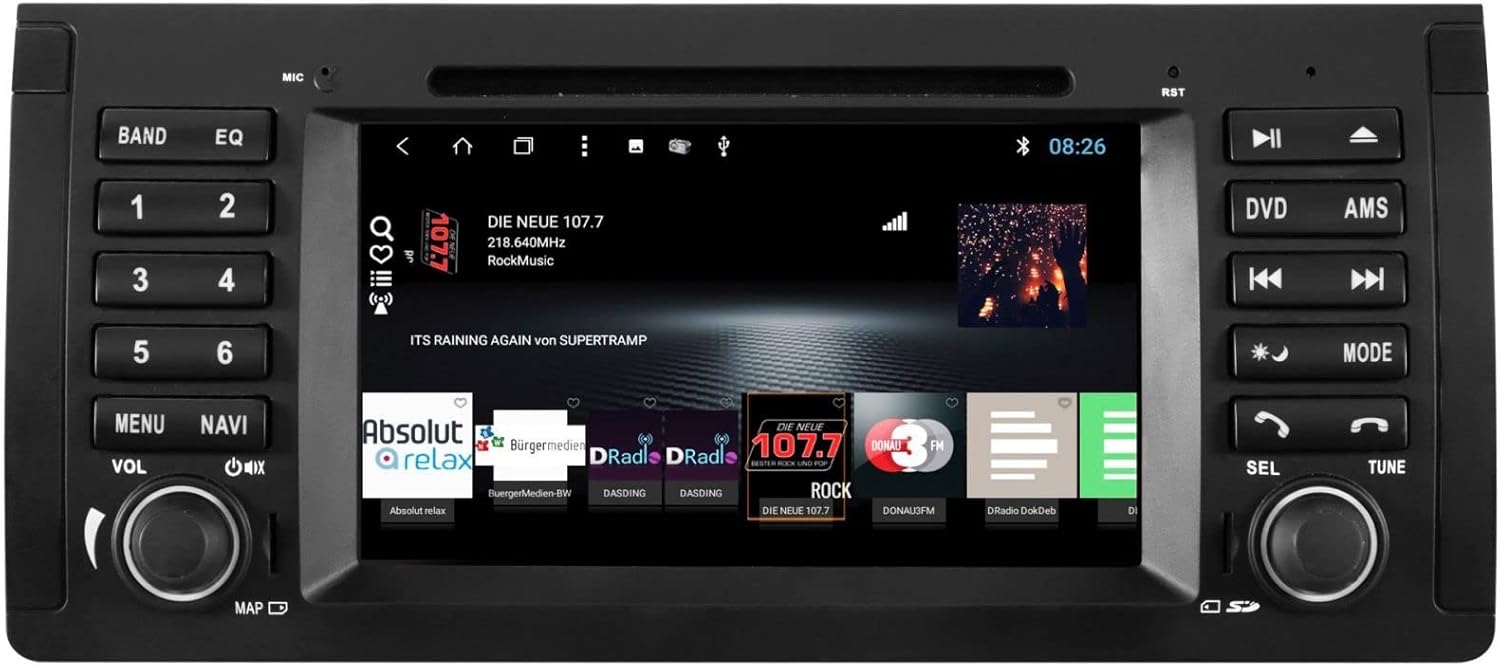
The ESX VN715-E39-DAB is an advanced in-car multimedia system designed to enhance your driving experience with navigation, entertainment, and connectivity features. It integrates seamlessly into compatible BMW vehicles.
Основные характеристики:
- High-Resolution 8-inch Touchscreen: Обеспечивает четкое визуальное отображение и интуитивно понятное управление.
- Advanced Android i15 Operating System: Offers a familiar and customizable user interface.
- Google Maps Navigation: Supports both online and offline navigation for reliable route guidance.
- Mobile Internet Connectivity: Connects via Wi-Fi hotspot for online services.
- Цифровое радио DAB+: Includes a DAB antenna for high-quality digital radio reception with station logos.
- AM/FM-радио с RDS: Standard analog radio reception with Radio Data System functionality.
- Multi-format DVD Player: Supports DVD, DVD-R/RW, DVD+R/RW, VCD, CD, CD Text, CD-R/RW, and MP3 formats.
- Bluetooth Hands-Free Kit: Enables safe phone calls and audio streaming with an internal microphone and optional external microphone connection.
- Интеграция со смартфоном: Connect iPhone or Android smartphones via USB for various functions.
- Голосовое управление: Utilize voice commands through a connected smartphone.
- Аудио выходы: Предварительноamplifier outputs for front, rear, subwoofer, and center channels.
- Вход камеры: One adjustable camera input for reverse cameras.
- Вспомогательные входы/выходы: One AUX video input, two audio/video outputs, and one AUX audio input.
- USB-порты: Two USB ports for media and connectivity.
- Слот для карты Micro SD: Dedicated slot for navigation data and media files.
- Настройка: Personalize with customizable logos and wallpapers.
- Authenticity Certificate: Included with the product.
3. Настройка и установка
Installation of the ESX VN715-E39-DAB system requires technical knowledge and should ideally be performed by a qualified professional. Incorrect installation can lead to damage to the device or vehicle electrical system.
Совместимость:
This unit is compatible with specific BMW models and connector types:
- BMW 5 Series E39 (1996-2001) with 17-pin system connector.
- BMW 5 Series E39 (2002-2003) with 40-pin system connector.
- BMW X5 E53 (2000-2001) with 17-pin system connector.
- BMW X5 E53 (2002-2007) with 40-pin system connector.
- BMW M5 (1996-2003) with 17/40-pin system connector.
Общие этапы установки (рекомендуется профессиональная установка):
- Отключить аккумулятор: Перед началом любых электромонтажных работ всегда отключайте аккумулятор автомобиля.
- Демонтаж существующего блока: Carefully remove the factory radio or navigation system from the dashboard.
- Подключите жгут проводов: Connect the appropriate wiring harness (17-pin or 40-pin) to the vehicle's electrical system and the ESX unit. Ensure all connections are secure.
- Подключите антенны: Connect the GPS antenna, DAB antenna, and radio antenna to their respective ports on the unit. Position the antennas for optimal reception.
- Подключите периферийные устройства: Connect any optional accessories such as a reverse camera, external microphone, USB devices, or auxiliary inputs/outputs.
- Установите устройство: Securely mount the ESX unit into the dashboard opening.
- Подсоедините батарею: Подключите аккумулятор автомобиля и проверьте работу системы.

4. Инструкция по эксплуатации
Familiarize yourself with the touchscreen interface and physical buttons for optimal use.
4.1 Основные операции
- Включение/выключение питания: Press and hold the power button (usually the VOL knob) to turn the unit on or off. A short press typically mutes or unmutes the audio.
- Регулятор громкости: Поверните регулятор VOL, чтобы отрегулировать громкость звука.
- Интерфейс сенсорного экрана: Перемещайтесь по меню и приложениям, касаясь, проводя пальцем и сжимая экран 8-дюймового сенсорного экрана.

4.2 Навигация
Access the navigation application (e.g., Google Maps) from the home screen. Input your destination, and the system will provide turn-by-turn directions. Ensure GPS antenna is properly connected for accurate positioning.

4.3 Radio (DAB+/AM/FM)
- Выберите режим: Tap the 'Radio' or 'DAB+' icon on the home screen or press the 'BAND' button.
- Станции сканирования: Use the 'AMS' (Auto Memory Store) button or on-screen controls to scan and save available stations.
- Мелодия: Manually tune using the 'TUNE' knob or on-screen frequency controls.
- Предварительные настройки: Save your favorite stations to preset buttons (1-6) for quick access.

4.4. Bluetooth-подключение
- Сочетание: Go to the Bluetooth settings on the unit and your smartphone. Искать available devices and select 'ESX VN715-E39-DAB'. Enter the PIN if prompted (usually '0000' or '1234').
- Звонки в режиме громкой связи: После сопряжения вы сможете совершать и принимать звонки непосредственно через устройство.
- Потоковое аудио: Play music from your smartphone via Bluetooth A2DP.
4.5 Воспроизведение мультимедиа (DVD/USB/SD)
- ДВД: Insert a DVD into the disc slot. The system will automatically switch to DVD mode or prompt you to select it.
- USB/SD-накопитель: Insert a USB drive into a USB port or an SD card into the Micro SD slot. Access media files through the 'Media' or 'File Explorer' application.
5. Техническое обслуживание
Regular maintenance ensures the longevity and optimal performance of your ESX VN715-E39-DAB system.
- Очистка экрана: Аккуратно протрите сенсорный экран мягкой безворсовой тканью. Для удаления стойких загрязнений слегка потрите.ampСмочите ткань водой или безопасным чистящим средством для экранов. Избегайте использования агрессивных химикатов.
- Обновления программного обеспечения: Периодически проверяйте наличие обновлений программного обеспечения на официальном сайте производителя. website or through the unit's system settings (if available) to ensure you have the latest features and bug fixes.
- Disc Drive Care: Keep the DVD slot free of dust and debris. Avoid inserting damaged or non-standard discs.
6. Поиск Неисправностей
Если у вас возникли проблемы с устройством, воспользуйтесь следующими распространенными шагами по устранению неполадок:
| Проблема | Возможная причина | Решение |
|---|---|---|
| Нет питания | Ненадежное соединение электропитания, перегоревший предохранитель, проблема с аккумулятором транспортного средства. | Check power cables and fuse. Ensure vehicle battery is charged. Consult a professional if issues persist. |
| Нет звука | Volume muted, speaker wires disconnected, incorrect audio source. | Check volume level and mute status. Verify speaker connections. Select the correct audio source. |
| Потерян сигнал GPS | GPS antenna improperly connected or obstructed, unit in an area with poor satellite reception. | Убедитесь, что GPS-антенна надежно подключена и имеет свободное пространство. view неба. Выйдите на открытое пространство. |
| Ошибка сопряжения Bluetooth | Bluetooth not enabled on device, incorrect PIN, device out of range. | Ensure Bluetooth is active on both devices. Re-enter PIN. Bring devices closer. Restart both devices. |
| Сенсорный экран не отвечает | Система зависла, грязь на экране. | Perform a soft reset (refer to device settings or power cycle). Clean the screen. |
Если эти действия не помогли устранить проблему, обратитесь в службу поддержки клиентов или к квалифицированному специалисту по обслуживанию.
7. Технические характеристики
Detailed technical specifications for the ESX VN715-E39-DAB unit:
- Бренд: Расширение ESX
- Модель: VN715-E39-DAB
- Размер экрана: 8 дюйма
- Тип дисплея: ЖК-дисплей
- Операционная система: Android i15
- Технологии подключения: Bluetooth, USB, Wi-Fi (via hotspot)
- Тип носителя: DVD, DVD-R/RW, DVD+R/RW, VCD, CD, CD Text, CD-R/RW, MP3, USB, Micro SD
- Радиотюнер: DAB+, AM/FM with RDS
- Навигация: Google Maps (online/offline)
- Совместимость: BMW 5 Series E39 (1996-2003), BMW X5 E53 (2000-2007), BMW M5 (1996-2003)
- Источник: Китай
8. Гарантия и поддержка
For warranty information, please refer to the documentation provided with your purchase or contact your retailer. For technical support, please visit the official ESX website or contact their customer service department. Ensure you have your model number (VN715-E39-DAB) and proof of purchase available when seeking support.


