Введение
This manual provides detailed instructions for the installation, operation, and maintenance of your XTRONS IN79A4AP Android 9.0 Car Stereo. This unit is designed to enhance your in-car entertainment and navigation experience with its advanced features, including a 7-inch touch screen, GPS navigation, Bluetooth 5.0, and Wi-Fi connectivity.
Please read this manual thoroughly before installation and use to ensure proper operation and to prevent damage.
Совместимость и размеры
The XTRONS IN79A4AP is compatible with the following vehicle models and years:
- For Audi A4 B6 (8E / 8H): 2000-2006
- For Audi A4 B7 (8E / 8H): 2004-2008
- For Audi S4 B7 (8E / 8H): 2005-2008
- For Audi S4 B6 (8E / 8H): 2003-2005
- For Audi RS4: 2002-2008
- For Audi RS4 B7 (8E): 2006-2008
- For SEAT Exeo: 2008-2012
Before installation, verify the face panel dimensions of your vehicle's console to ensure a proper fit. The unit's face panel measures (Top: 235mm * Bottom: 226mm) * 130mm.

Рисунок 1: Compatible vehicle models and face panel dimensions for the XTRONS IN79A4AP car stereo.
Настройка и установка
The XTRONS IN79A4AP features a professional plug-and-play design for simplified installation. No cutting or modification of existing wiring is typically required, as customized connectors are provided for your vehicle.
Включенные аксессуары
Убедитесь, что в комплект поставки входят все перечисленные ниже аксессуары:
- 1 x жгут проводов ISO
- 1 кабеля RCA
- 1 х GPS-антенна
- 1 х микрофон
- Кабели 3 x USB
- 4 x Fitting Keys
- 1 x Руководство пользователя (этот документ)
- 1 антенны Wi-Fi
- 1 х Подарочная коробка (упаковка)
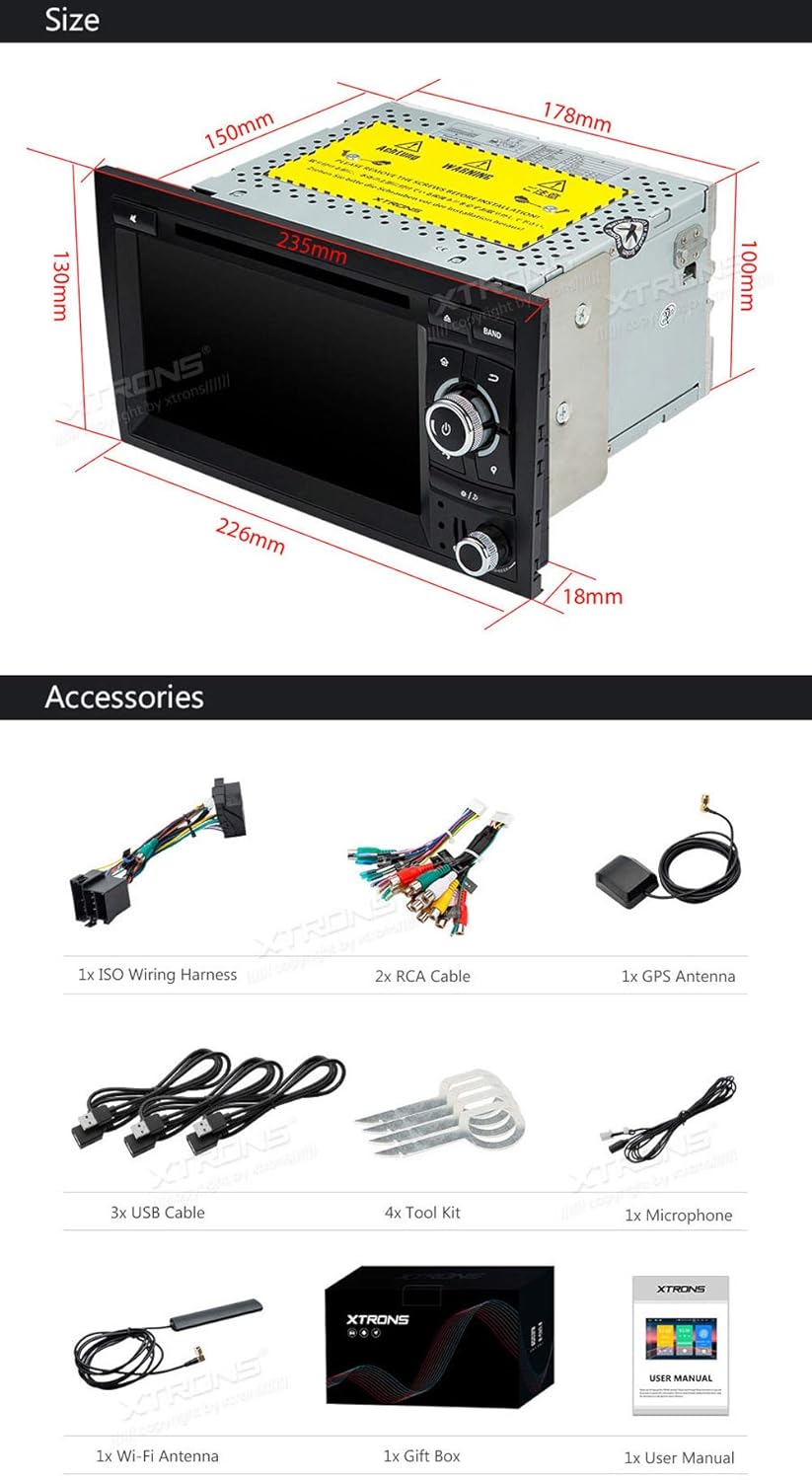
Рисунок 2: Contents of the XTRONS IN79A4AP package.
Этапы установки (общие)
- Подготовка: Перед началом установки убедитесь, что зажигание автомобиля выключено, а аккумулятор отсоединен.
- Демонтаж существующего блока: Carefully remove your vehicle's factory stereo unit using appropriate tools.
- Подключите жгут проводов: Connect the provided ISO Wiring Harness to your vehicle's factory wiring harness. The plug-and-play design ensures a secure and correct connection.
- Подключите антенны: Connect the GPS antenna and Wi-Fi antenna to their respective ports on the XTRONS unit. Position the GPS antenna in a location with a clear view неба для оптимального приема сигнала.
- Подключите USB- и RCA-кабели: Connect any necessary USB cables for external devices or RCA cables for audio/video output/input.
- Установить микрофон: Connect and position the external microphone for hands-free calling.
- Установите устройство: Securely mount the XTRONS unit into the dashboard opening using the provided fitting keys or your vehicle's mounting brackets.
- Подсоедините батарею: Подключите аккумулятор автомобиля и включите зажигание, чтобы проверить работу устройства.
- Начальная настройка: Follow the on-screen prompts for initial system setup, including language, time, and network configuration.

Рисунок 3: XTRONS Plug-and-Play design for simplified installation.
Инструкция по эксплуатации
The XTRONS IN79A4AP runs on Android 9.0, offering a user-friendly interface and access to various applications.
Основные функции
- Сенсорный экран: Navigate the system using the responsive 7-inch multi-touch display.
- Включение/выключение питания: Устройство обычно включается при зажигании автомобиля. Для ручного управления обычно имеется кнопка питания.
- Регулятор громкости: Adjust audio volume using the physical knobs or on-screen controls.
- Главный экран: Получайте доступ к различным приложениям и настройкам с настраиваемого главного экрана.
Связность
- Bluetooth 5.0: Pair your smartphone or other Bluetooth devices for hands-free calling and audio streaming. Access your phone's contacts and call history directly from the unit.
- Wi-Fi: Connect to a Wi-Fi hotspot (e.g., from your smartphone) to access online features, download apps, and use online navigation.
- USB Port & SD Slot: Play media fileс USB-накопителей или SD-карт.

Рисунок 4: Bluetooth Internet Sharing and online media access.
Навигация
The unit supports various Android GPS navigation applications. You can download and use both offline and online map services such as Google Maps, Sygic, or Waze.
Расширенные функции
- Зеркалирование экрана: Mirror the screen of your Android or iOS smartphone onto the head unit's display. (Compatibility may vary with some phone models).
- Режим разделенного экрана: Запустите одновременно на экране два приложения, например, навигацию и медиаплеер.
- Dual Channel CANbus: Integrated CANbus system for seamless communication with your vehicle's electronics, supporting features like steering wheel controls and displaying vehicle information.
- Vibrant Button Color Schemes: Customize the color of the unit's physical buttons to match your vehicle's interior lighting.

Рисунок 5: Split-Screen Mode in operation.

Рисунок 6: Надview ключевых характеристик.
Дополнительные аксессуары
The XTRONS IN79A4AP supports various optional accessories to expand its functionality. These accessories are sold separately.
- DAB+ тюнер: Для улучшения качества приема цифрового аудиовещания.
- 3G/4G Dongle: For mobile internet connectivity.
- OBD2 Adapter: To access vehicle diagnostic information.
- Камера видеорегистратора: Для записи процесса вожденияtage.
- Front/Reversing Camera: For parking assistance and improved visibility.
- Внешняя клавиатура: Для упрощения ввода текста.
- TPMS (система контроля давления в шинах): To monitor tire pressure and temperature.
- CarAutoPlay Dongle: For Apple CarPlay and Android Auto integration.

Рисунок 7: Optional accessories for the XTRONS IN79A4AP.
Обслуживание
To ensure the longevity and optimal performance of your XTRONS IN79A4AP car stereo, follow these maintenance guidelines:
- Очистка экрана: Используйте мягкую, безворсовую ткань, слегкаampened with water or a screen-cleaning solution. Avoid harsh chemicals or abrasive materials that can damage the touch screen.
- Удаление пыли: Regularly wipe down the unit's exterior to prevent dust buildup, especially around buttons and vents.
- Обновления программного обеспечения: Periodically check for and install available software updates to ensure system stability and access to new features.
- Избегайте экстремальных температур: Не подвергайте устройство воздействию экстремальных температур (жары или холода) в течение длительного времени, так как это может повредить его электронные компоненты.
- Кабельные соединения: Убедитесь, что все кабели надежно подключены. Ненадежные соединения могут привести к периодическим проблемам.
Поиск неисправностей
If you encounter issues with your XTRONS IN79A4AP, refer to the following common troubleshooting steps:
| Проблема | Возможная причина | Решение |
|---|---|---|
| Блок не включается. | Ненадежное соединение электропитания, перегоревший предохранитель, проблема с аккумулятором транспортного средства. | Check power wiring harness connections. Inspect vehicle fuses. Ensure vehicle battery is charged. |
| Ни звука. | Слишком низкая громкость, неправильный источник звука, ослабленные провода колонок. | Увеличьте громкость. Выберите правильный источник звука. Проверьте соединения проводов динамиков. |
| Сигнал GPS потерян или неточен. | GPS antenna obstructed or improperly placed, outdated maps. | Убедитесь, что антенна GPS имеет чистое пространство. view of the sky. Update navigation maps. |
| Проблемы с подключением Bluetooth. | Устройство не находится в режиме сопряжения, возникают помехи, Bluetooth на устройстве выключен. | Ensure both devices are in pairing mode. Restart Bluetooth on both devices. Check for interference. |
| Система работает медленно или не реагирует. | Too many apps running, low storage, software glitch. | Close unnecessary applications. Clear cache. Perform a system restart. Check for software updates. |
| SD card or USB not recognized. | Incompatible format, damaged card/drive, improper insertion. | Ensure media is formatted correctly (e.g., FAT32). Reinsert the card/drive. Try a different card/drive. |
If the problem persists after attempting these solutions, please contact XTRONS customer support.
Технические характеристики
| Особенность | Деталь |
|---|---|
| Номер модели | IN79A4AP |
| Операционная система | Андроид 9.0 |
| Процессор | Cortex-A35 Quad Core |
| БАРАН | 2 ГБ |
| ПЗУ (внутреннее хранилище) | 16 ГБ |
| Размер экрана | 7 дюйма |
| Тип дисплея | Digital Multi-Touch Display |
| Версия Bluetooth | 5.0 |
| Связность | Bluetooth, RCA, USB, Wi-Fi |
| Поддержка типов носителей | SD, USB |
| Поддержка формата видео | 1080P |
| Вес товара | 16 Grams (unit only, without accessories) |

Рисунок 8: Core features and specifications overview.
Рисунок 9: Physical dimensions of the XTRONS IN79A4AP unit.
Гарантия и поддержка
Компания XTRONS предоставляет Гарантия 1 год for the IN79A4AP car stereo unit. This warranty covers manufacturing defects and ensures reliable operation under normal use.
For technical support, warranty claims, or further assistance, please contact XTRONS customer service through their official website or the retailer where the product was purchased. Please have your model number (IN79A4AP) and purchase details ready when contacting support.