1. Введение
The LAUNCH CR319 is a handheld On-Board Diagnostics II (OBD2) code reader designed to assist in diagnosing vehicle engine issues. It provides access to various diagnostic functions to help users identify and clear trouble codes, monitor vehicle performance data, and check emission readiness status. This manual provides detailed instructions for the proper use and maintenance of your CR319 device.
2. Продукт закончилсяview
2.1 Основные характеристики
- Полные функции OBD2: Supports all 10 OBD2 test modes.
- Библиотека поиска DTC: Built-in database with over 3000 code definitions.
- Многоязычная поддержка: Available in English, Portuguese, Russian, Italian, Spanish, French, and German.
- Подключи и работай: No batteries or charger required; powered directly from the vehicle's OBD2 port.
- Компактный дизайн: Легко обращаться и хранить.
2.2 Компоненты устройства
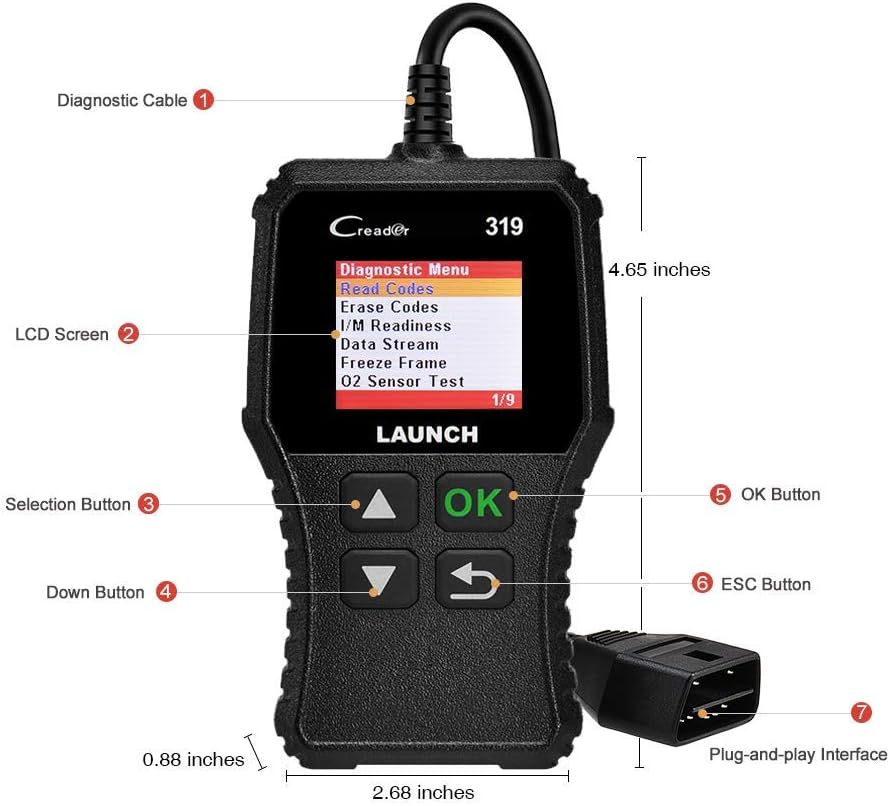
The image above illustrates the main components of the LAUNCH CR319 OBD2 Scanner. Key parts include the Diagnostic Cable (1) for connecting to the vehicle, the LCD Screen (2) for displaying information, Selection Buttons (3) for navigation, the Down Button (4), the OK Button (5) for confirmation, the ESC Button (6) to return to the previous screen, and the Plug-and-Play Interface (7) which is the OBD2 connector.
3. Настройка
- Найдите порт OBD2: The OBD2 port is typically located under the dashboard on the driver's side of the vehicle. Refer to your vehicle's owner's manual if you cannot locate it.
- Подключите сканер: Plug the CR319's diagnostic cable connector firmly into the vehicle's OBD2 port. The device will power on automatically.
- Запустите автомобиль: Turn the vehicle's ignition to the 'ON' position (engine off) or start the engine, depending on the diagnostic function you intend to perform.
4. Инструкция по эксплуатации
After connecting the CR319 to your vehicle, the main menu will appear. Use the Up/Down selection buttons to navigate through the options and the OK button to confirm a selection. The ESC button returns to the previous screen.
4.1 Чтение кодов
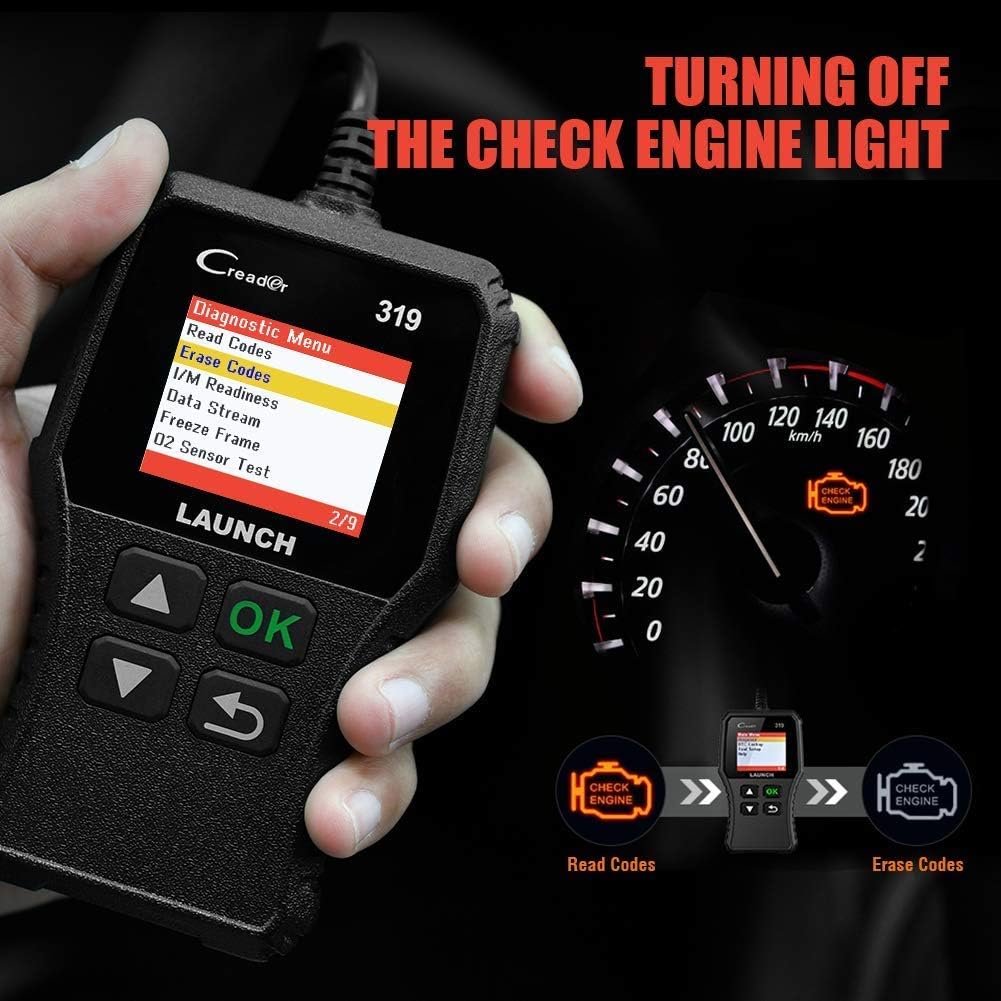
This function retrieves Diagnostic Trouble Codes (DTCs) from the vehicle's computer. These codes indicate specific issues detected by the vehicle's self-diagnostic system.
- В главном меню выберите 'Diagnose'.
- Выбирать 'Read Codes'.
- The scanner will display any stored, pending, or permanent codes along with their descriptions.
4.2 Очистить коды
This function erases DTCs from the vehicle's computer and turns off the Check Engine Light (MIL). Ensure any underlying issues are resolved before clearing codes, as they may reappear.
- В главном меню выберите 'Diagnose'.
- Выбирать 'Erase Codes'.
- Подтвердите действие, когда появится соответствующий запрос. Индикатор неисправности двигателя должен погаснуть.
4.3 I / M Готовность
Эта функция проверяет состояние систем контроля выбросов автомобиля, чтобы определить, готовы ли они к проверке на соответствие экологическим нормам.
- В главном меню выберите 'Diagnose'.
- Выбирать 'I/M Readiness'.
- The screen will display the status of various monitors (e.g., Misfire Monitor, Fuel System Monitor). 'OK' or 'Complete' indicates the monitor has run and passed; 'INC' or 'Incomplete' means the monitor has not yet run or completed its diagnostic cycle.
4.4 Поток данных (данные в реальном времени)

This function displays real-time operational data from the vehicle's engine control unit (ECU). This data can include engine RPM, vehicle speed, oxygen sensor readings, coolant temperature, and more.
- В главном меню выберите 'Diagnose'.
- Выбирать 'Data Stream'.
- Use the Up/Down buttons to scroll through the various data parameters.
4.5 Стоп-кадр
When an emission-related fault occurs, the vehicle's computer records a snapshot of operating conditions at the time of the fault. This data is called Freeze Frame data.
- В главном меню выберите 'Diagnose'.
- Выбирать 'Freeze Frame'.
- Review the recorded parameters to understand the conditions under which the fault occurred.
4.6 Поиск DTC

This feature allows you to manually enter a Diagnostic Trouble Code and view its definition from the scanner's internal database.
- В главном меню выберите 'DTC Lookup'.
- Use the navigation buttons to input the desired DTC.
- Нажимать 'ХОРОШО' к view the code definition.
4.7 Other OBD2 Functions
The CR319 also supports the following OBD2 functions, accessible through the 'Diagnose' menu:
- Тест датчика кислорода: Получает результаты тестирования датчика кислорода за последние проведенные тесты.
- Тест системы EVAP (режим 8): Начинает проверку системы контроля выбросов испарений.
- Тест бортового монитора (режим 6): Получает результаты испытаний компонентов и систем силовой установки, связанных с выбросами, которые не контролируются постоянно.
- Информация об автомобиле: Отображает идентификационный номер транспортного средства (VIN), идентификатор калибровки (CALID) и номер проверки калибровки (CVN).
5. Совместимость

The LAUNCH CR319 OBD2 Scanner is compatible with most American, European, and Asian vehicles manufactured from 1996 and newer that are OBDII-compliant. It supports all standard OBDII protocols, including KWP2000, ISO9141, J1850 VPW, J1850 PWM, and CAN (Controller Area Network).
5.1 Поддерживаемые транспортные средства
- 12V Gasoline cars.
- Vehicles compliant with OBDII standards (1996 US-based, 2000 EU-based, and newer Asian cars).
5.2 Not Supported Vehicles
- Diesel cars.
- 24V Heavy duty vehicles.
- Hybrid vehicles.
- Electric vehicles.
6. Технические характеристики
| Особенность | Спецификация |
|---|---|
| Модель | CR319 |
| Отображать | Цветной ЖК-дисплей |
| Рабочий объемtage | 9-18 В (через порт OBD2) |
| Поддерживаемые протоколы | KWP2000, ISO9141, J1850 VPW, J1850 PWM, CAN |
| Размеры (Д x Ш x В) | 1.5 x 6 x 10.8 дюйма |
| Масса | 7.4 унции |
| Рабочая температура | от 0°C до 50°C (от 32°F до 122°F) |
| Температура хранения | -20°C до 70°C (-4°F до 158°F) |
| Поддерживаемые языки | English, Portuguese, Russian, Italian, Spanish, French, German |
7. Поиск Неисправностей
7.1 Устройство не включается
- Ensure the diagnostic cable is securely connected to the vehicle's OBD2 port.
- Убедитесь, что зажигание автомобиля находится в положении «ВКЛ» или двигатель работает.
- Проверьте предохранитель разъема OBD2 в автомобиле (обратитесь к руководству по эксплуатации вашего автомобиля).
7.2 Ошибка связи с транспортным средством
- Confirm the vehicle is OBDII-compliant (generally 1996 and newer for gasoline vehicles).
- Ensure the diagnostic cable is properly connected.
- Turn off the ignition, wait 10 seconds, then turn it back to 'ON' and try again.
- If possible, test the scanner on another compatible vehicle to rule out a device malfunction.
7.3 Codes Cannot Be Cleared
- Ensure the vehicle's ignition is in the 'ON' position (engine off).
- If the underlying fault that triggered the code is still present, the code may not clear or will reappear immediately. Address the vehicle's issue first.
8. Техническое обслуживание
- Уборка: Для чистки устройства используйте мягкую сухую ткань. Избегайте использования абразивных чистящих средств и растворителей.
- Хранилище: Храните сканер в чистом, сухом месте, вдали от экстремальных температур и прямых солнечных лучей.
- Уход за кабелем: Do not pull the cable forcefully or bend it sharply. Inspect the cable for damage before each use.
9. Гарантия и поддержка
For warranty information, technical support, or service inquiries, please contact LAUNCH customer support. Refer to the product packaging or the official LAUNCH webсайт для получения самых актуальных контактных данных.


