1. Введение
This manual provides essential information for the safe and efficient operation of your Muse M-1990 DJ Bluetooth Party Speaker. Please read these instructions thoroughly before using the device and retain them for future reference.
The Muse M-1990 DJ is a powerful party speaker designed to deliver high-quality audio with dynamic light effects. It features multiple connectivity options including Bluetooth, CD player, USB, and AUX inputs, making it versatile for various audio sources.

Image 1.1: The Muse M-1990 DJ Bluetooth Party Speaker showcasing its integrated light effects.
2. Информация по технике безопасности
Для предотвращения поражения электрическим током, возгорания или повреждения устройства необходимо соблюдать следующие меры предосторожности:
- Не подвергайте устройство воздействию дождя или влаги.
- Не открывайте сasinг. По всем вопросам обслуживания обращайтесь к квалифицированному персоналу.
- Убедитесь, что источник питания vol.tage соответствует номинальным характеристикам, указанным на устройстве.
- Держите устройство вдали от прямых солнечных лучей, источников тепла и чрезмерного количества пыли.
- Обеспечьте достаточную вентиляцию вокруг устройства.
- Не ставьте тяжелые предметы на устройство.
- Отключайте устройство от сети во время грозы или если оно не используется в течение длительного времени.
3. Содержимое упаковки
Проверьте наличие всех предметов в упаковке:
- Muse M-1990 DJ Party Speaker Unit
- Пульт дистанционного управления (требуются 2 батарейки типа АА, входят в комплект)
- Проводной микрофон
- AUX IN Cable (3.5mm jack)
- Кабель питания (100-240 В переменного тока, 50/60 Гц)

Image 3.1: Included accessories: remote control, wired microphone, and AUX cable.
4. Продукт закончилсяview
Familiarize yourself with the main components and controls of your M-1990 DJ speaker.
4.1 Верхняя панель управления
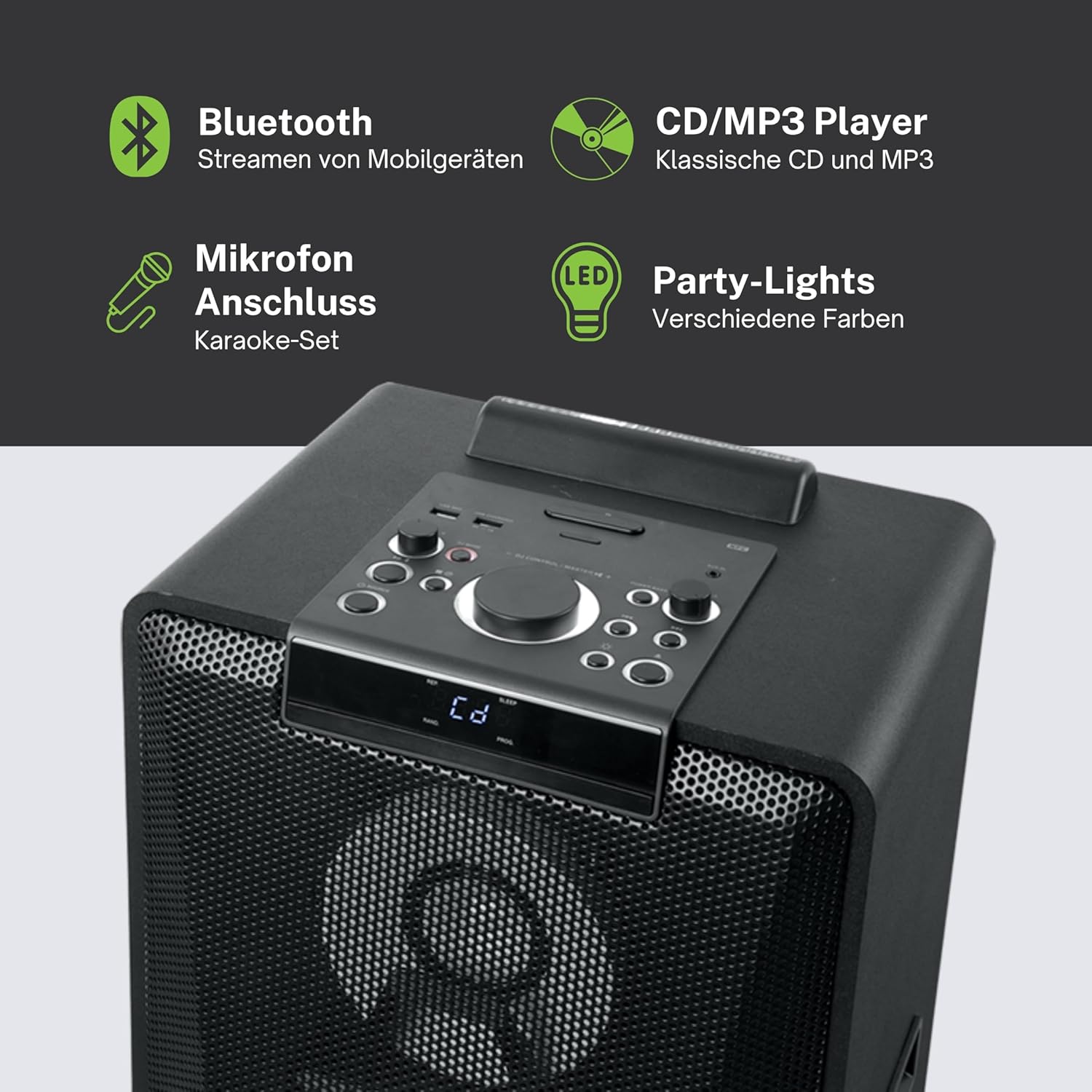
Изображение 4.1: Подробно view of the top control panel, showing various buttons and the LED display.
The top panel features controls for power, volume, source selection, playback, light effects, and a white LED display. It also includes a built-in cradle for a tablet or smartphone.
4.2 Rear Connectivity Ports
На задней панели предусмотрены различные варианты входов и выходов:
- USB 2.0 Port (for MP3 playback and charging)
- AUX IN 1 (2 x RCA jacks)
- AUX IN 2 (3.5mm jack)
- Microphone Inputs (2 jacks)
- Guitar Input (1 jack)
- AC Power Input (100-240V, 50/60Hz)
5. Настройка
5.1 Размещение
Place the speaker on a stable, flat surface. Ensure there is adequate space around the unit for ventilation. The unit is designed for floor mounting.
5.2 Подключение питания
- Connect the supplied power cable to the AC power input on the rear of the speaker.
- Plug the other end of the power cable into a standard wall outlet (AC 100-240V, 50/60Hz).
- The unit does not contain a rechargeable battery and must be connected to a power source for operation.
6. Инструкция по эксплуатации
6.1 Включение/выключение питания
Press the Power button on the top control panel or the remote control to turn the unit on or off.
6.2 Сопряжение по Bluetooth
- Press the Source button to select Bluetooth mode. The LED display will show 'BT' and the Bluetooth indicator will flash.
- Включите Bluetooth на вашем смартфоне, планшете или другом совместимом устройстве.
- Искать 'M-1990 DJ' in your device's Bluetooth list and select it to pair.
- Once paired, the Bluetooth indicator will stop flashing, and you can begin streaming audio.
- For NFC-enabled devices, simply tap your device on the NFC area of the speaker for automatic pairing.
6.3 Воспроизведение компакт-дисков
- Нажмите кнопку Source, чтобы выбрать режим CD.
- Open the CD tray and place a CD (CD, CD-R/RW, MP3 compatible) with the label side up.
- Close the CD tray. Playback will start automatically or can be initiated using the Play/Pause button.
6.4 Воспроизведение через USB
- Вставьте флэш-накопитель USB с MP3 files into the USB 2.0 port.
- Press the Source button to select USB mode.
- Playback will start automatically or can be controlled using the playback buttons.
- The USB port also functions as a charging port for external devices.
6.5 Дополнительный вход
- Connect your external audio device to either the AUX IN 1 (RCA jacks) or AUX IN 2 (3.5mm jack) using the appropriate cable.
- Press the Source button to select the corresponding AUX input.
- Управляйте воспроизведением с подключенного устройства.
6.6 Входы для микрофона и гитары
- Plug your microphone(s) into the Microphone input jacks.
- Plug your guitar into the Guitar input jack.
- Adjust the microphone/guitar volume using the dedicated controls on the top panel.
6.7 Световые эффекты
The M-1990 DJ features color-changing lights and strobe effects. Use the dedicated Light Effects button on the control panel or remote to cycle through different modes or turn the lights off.
6.8 Stereo Pairing (Dual Bluetooth)
If you have two M-1990 DJ units, you can pair them wirelessly for a stereo sound experience. Refer to the specific instructions for stereo pairing in the full manual (if provided by manufacturer) or on the manufacturer's webсайт.
7. Техническое обслуживание
7.1 Очистка
- Перед очисткой всегда отключайте устройство от электрической розетки.
- Для очистки внешних поверхностей используйте мягкую сухую ткань.
- Не используйте абразивные чистящие средства, воски или растворители, так как они могут повредить отделку.
7.2 Хранение
Если динамик не используется в течение длительного времени, храните его в прохладном, сухом месте, вдали от прямых солнечных лучей и экстремальных температур.
8. Поиск Неисправностей
If you encounter issues with your M-1990 DJ speaker, refer to the following common problems and solutions:
| Проблема | Возможная причина | Решение |
|---|---|---|
| Нет электричества | Кабель питания не подключен; Розетка питания неактивна. | Убедитесь, что кабель питания надежно подключен; попробуйте другую розетку. |
| Нет звука | Volume too low; Incorrect source selected; Audio cable not connected | Increase volume; Select correct input source; Check audio cable connections |
| Bluetooth не сопряжен | Speaker not in pairing mode; Device Bluetooth off; Device too far | Ensure speaker is in BT mode and flashing; Enable Bluetooth on device; Move device closer (within 10m) |
| CD не воспроизводится | CD inserted incorrectly; CD scratched/dirty; Incorrect format | Reinsert CD correctly; Clean CD; Ensure CD is audio CD or MP3 compatible |
| USB не воспроизводится | USB-накопитель вставлен неправильно; Files not MP3 format; USB drive corrupted | Вставьте USB-накопитель обратно; Убедитесь files are MP3; Try a different USB drive |
Если проблема сохраняется после попытки устранения этих неполадок, обратитесь в службу поддержки клиентов.
9. Технические характеристики
Detailed technical specifications for the Muse M-1990 DJ Party Speaker:
- Номер модели: М-1990 Диджей
- Бренд: МУЗА
- Выходная мощность: 1000 Вт
- Количество каналов: 2
- Технологии подключения: Bluetooth V4.2
- Совместимые устройства: Смартфон, Планшет
- Аудио входы: 2 x Microphone jacks, 1 x Guitar jack, 2 x RCA AUX IN, 1 x 3.5mm AUX IN
- USB-порт: 1 x USB 2.0 (for MP3 playback and charging)
- CD-плеер: CD, CD-R/RW, MP3 compatible
- Световые эффекты: Color changing lights, Strobe effects, Light projection
- Источник питания: AC 100-240V, 50/60Hz (Electric Cable)
- Аккумуляторная батарея: Нет
- Материал: Дерево (шкаф)
- Цвет: Черный
- Вес товара: 17.9 Килограмма
- Размеры (Д x Ш x В): 35.6 x 34.8 x 105.7 см
- Рекомендуемое применение: Party and entertainment
- Тип крепления: Напольное покрытие
- Включенные батареи: 2 AA (for remote control)

Image 9.1: Dimensional drawing of the Muse M-1990 DJ speaker.
10. Гарантия и поддержка
10.1 Информация о гарантии
Warranty terms and conditions for the Muse M-1990 DJ speaker are typically provided with the product packaging or can be found on the official Muse webСохраните чек о покупке для предъявления гарантийных претензий.
10.2 Поддержка клиентов
For further assistance, technical support, or service inquiries, please refer to the contact information provided in your product documentation or visit the official Muse customer support webсайт.


