1. Введение
Thank you for choosing the Optonica Solar LED Projector. This manual provides essential information for the safe and efficient use of your solar-powered lighting system. Please read these instructions carefully before installation and operation, and retain them for future reference.
2. Инструкции по технике безопасности
- Убедитесь, что все соединения надежны и надлежащим образом изолированы, чтобы предотвратить опасность поражения электрическим током.
- Не пытайтесь разбирать или модифицировать изделие. Несанкционированные модификации могут привести к аннулированию гарантии и создать угрозу безопасности.
- Keep the solar panel and projector away from flammable materials.
- Avoid direct eye exposure to the LED light when it is active, as it can be very bright.
- Install the solar panel in a location that receives maximum direct sunlight for optimal charging performance.
- This product is waterproof; however, avoid submerging it in water.
3. Содержимое упаковки
Пожалуйста, проверьте наличие всех компонентов в упаковке:

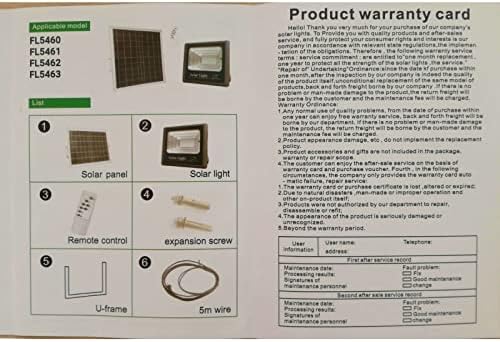
This image shows the product warranty card and a diagram illustrating the package contents, including the solar panel, solar light, remote control, expansion screws, U-frame, and 5m wire.
- Солнечная панель
- Solar Light (LED Projector)
- Дистанционное управление
- Expansion Screws (for mounting)
- U-frame (for mounting)
- 5-meter Connection Wire
4. Продукт закончилсяview
The Optonica Solar LED Projector system consists of a high-efficiency solar panel, a powerful LED projector, and a convenient remote control for various lighting modes.
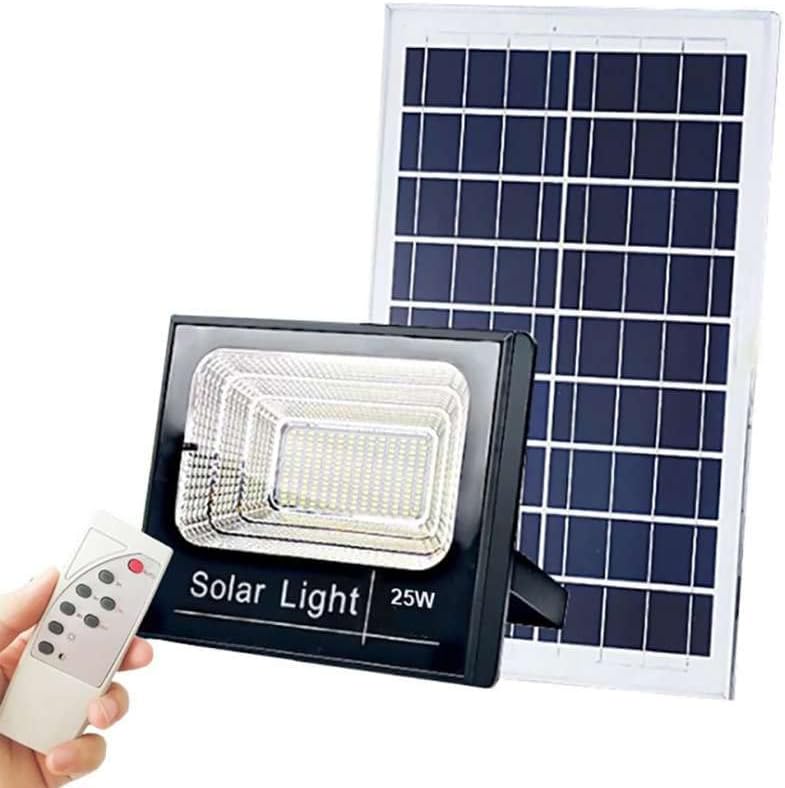
This image displays the Optonica Solar LED Projector, its accompanying solar panel, and the remote control. The projector is a black rectangular unit with an LED array, and the solar panel is a larger rectangular panel designed to capture sunlight.
4.1 солнечная панель
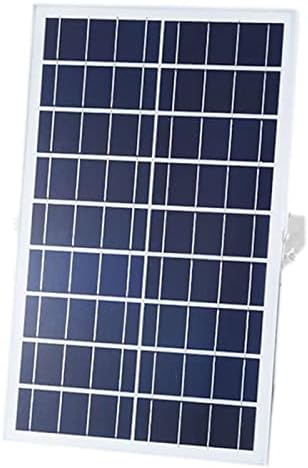
крупный план view of the solar panel component, showing its photovoltaic cells designed to convert sunlight into electrical energy.
The solar panel converts sunlight into electrical energy, which is stored in the projector's internal battery. It is designed for outdoor use and should be positioned to receive maximum direct sunlight.
4.2 светодиодных проекторов
The projector houses the LED light source and the rechargeable battery. It is designed to be waterproof and durable for outdoor environments, providing bright illumination.
Пульт дистанционного управления 4.3
Подробный view of the remote control for the Optonica Solar LED Projector, with labels indicating the functions of each button, such as AUTO, 3H, 5H, 8H, ON, OFF, and brightness adjustment.
The remote control allows you to manage the projector's functions, including power, automatic mode, timer settings, and brightness levels.
5. Настройка и установка
Для правильной установки выполните следующие действия:
- Выберите местоположение: Select a mounting location for the solar panel that receives at least 6-8 hours of direct sunlight daily. The projector can be mounted separately in the desired lighting area.
- Установите солнечную панель: Use the U-frame and expansion screws to securely mount the solar panel. Adjust its angle to face the sun directly for maximum efficiency.
- Mount the Projector: Install the LED projector in your chosen location using appropriate mounting hardware (e.g., on a wall). Ensure it is stable and directed as desired.
- Соедините компоненты: Connect the 5-meter wire from the solar panel to the input port on the LED projector. Ensure the connection is firm.
- Первоначальный сбор: Allow the solar panel to charge the projector's battery for at least 8-10 hours in direct sunlight before first use.
6. Инструкция по эксплуатации
Use the remote control to operate the projector:
- Кнопка АВТО: Activates the automatic mode. The projector will turn on automatically at dusk and turn off at dawn.
- Кнопка включения: Manually turns the projector ON.
- Кнопка ВЫКЛ: Manually turns the projector OFF.
- 3H / 5H / 8H Buttons: Sets the projector to turn off automatically after 3, 5, or 8 hours of operation, respectively. This function is typically used in conjunction with the ON button.
- Brightness Adjustment Buttons (☀ / ☾): Adjusts the brightness level of the LED light. Use ☀ увеличить яркость и ☾ для уменьшения яркости.
7. Техническое обслуживание
- Уборка: Регулярно очищайте поверхность солнечной панели мягкой тряпкой.amp cloth to remove dust, dirt, or debris. A clean panel ensures optimal charging efficiency.
- Инспекция: Periodically check all cables and connections for any signs of wear or damage. Ensure they remain securely connected.
- Уход батареи: For optimal battery life, ensure the product receives sufficient sunlight for charging. Avoid prolonged periods of discharge.
8. Поиск Неисправностей
- Projector does not turn on:
- Ensure the solar panel is receiving adequate direct sunlight for charging.
- Check if the connection cable between the solar panel and projector is securely plugged in.
- Verify that the remote control battery is functional.
- Allow for an initial charge of 8-10 hours if it's the first use or after prolonged storage.
- Light is dim or short-lived:
- The solar panel may not be receiving enough sunlight. Relocate or clear any obstructions.
- Clean the solar panel surface to remove dirt or dust.
- Battery capacity might be reduced due to insufficient charging or aging.
- Пульт не работает:
- Проверьте и при необходимости замените батарею пульта дистанционного управления.
- Убедитесь, что между пультом ДУ и датчиком проектора нет препятствий.
9. Технические характеристики
| Особенность | Спецификация |
|---|---|
| Бренд | Оптоника |
| Номер модели | FL5462 (also FL5460, FL5461, FL5463) |
| Власть | 20 Вт |
| Световой поток | 1800 люмен |
| Цветовая температура | 6000K (дневной белый) |
| Томtage | 6.4 Вольт |
| Емкость аккумулятора | 11Ач |
| Материал | Алюминий |
| Специальная характеристика | Водонепроницаемый |
| Источник питания | Battery Powered (Solar Charged) |
| Метод контроля | Дистанционное управление |
| Тип установки | Настенное крепление |
10. Гарантия и поддержка
This product comes with a warranty period. Please refer to the warranty card included in your package for specific terms and conditions. Generally, the warranty covers manufacturing defects for a specified period from the date of purchase.
Условия гарантии:
- Any normal use quality problems within one year from the purchase date are covered.
- Product appearance damage is not covered.
- Product accessories and gifts are not included in the warranty.
- The warranty card or purchase certificate must be presented for service.
- Damage due to natural disasters, improper operation, or unauthorized disassembly is not covered.
- The warranty is void if the product is seriously damaged or unrecognized.
For technical support or warranty claims, please contact your retailer or the manufacturer's customer service with your purchase details and model number (FL5462).


