Руководство пользователя универсального интеллектуального термометра SINOTIMER MC901-611
Бренд: СИНОТИМЕР
Модель: MC901-611
1. Введение
The SINOTIMER MC901-611 is a universal intelligent temperature control meter designed for precise temperature regulation in various industrial and laboratory applications. This device features a clear LCD display, multiple input types, and reliable output options, making it suitable for a wide range of temperature control needs. This manual provides essential information for the safe and effective operation, installation, and maintenance of your MC901-611 temperature controller.
2. Информация по технике безопасности
Please read this manual thoroughly before operating the device to ensure safe and correct usage. Keep this manual for future reference.
Общие меры безопасности:
- Убедитесь, что источник питания vol.tage matches the specifications of the device (100-240V AC, 50/60Hz).
- Do not operate the device in environments with excessive dust, humidity, corrosive gases, or strong vibrations.
- Disconnect power before performing any wiring, maintenance, or inspection.
- Установку и подключение должен выполнять только квалифицированный персонал.
- Избегайте прикосновения к внутренним компонентам, когда устройство включено.
- Обеспечьте правильное заземление во избежание поражения электрическим током.
- Не разбирайте и не модифицируйте устройство. Несанкционированные модификации могут привести к аннулированию гарантии и создать угрозу безопасности.
3. Продукт закончилсяview
The MC901-611 temperature controller features a compact design with a clear digital display and intuitive control buttons.

Рисунок 3.1: Передняя панель
This image displays the front panel of the MC901-611. It features two digital displays: PV (Process Value) in red, showing the current temperature, and SV (Set Value) in green, showing the target temperature. Below the displays are indicator lights for OUT (Output), AT (Auto-tuning), ALM1 (Alarm 1), and ALM2 (Alarm 2). The control buttons include SET, R/S (Run/Stop), Down arrow, and Up arrow.
Ключевые компоненты:
- Отображение фотоэлектрических систем: Shows the current measured temperature (Process Value).
- Дисплей SV: Shows the set target temperature (Set Value).
- Индикаторные лампы: OUT (Output status), AT (Auto-tuning status), ALM1 (Alarm 1 status), ALM2 (Alarm 2 status).
- Кнопки управления: SET (Enter/Confirm settings), R/S (Run/Stop), Up/Down arrows (Adjust values).
- Терминальный блок: Located at the rear for electrical connections.
- Монтажные кронштейны: Для надежной установки панели.

Figure 3.2: Side Panel with Specifications Label
This image shows the side of the MC901-611, highlighting the product label. The label provides crucial information such as Model (MC901-611), Input type (K, default setting), Temperature Range (0-1300°C), Temperature Unit (Celsius/Fahrenheit), Output type (Relay/SSR), Alarm (ALM1), Accuracy Class (0.5), and Power Supply (100-240V AC, 50/60Hz).
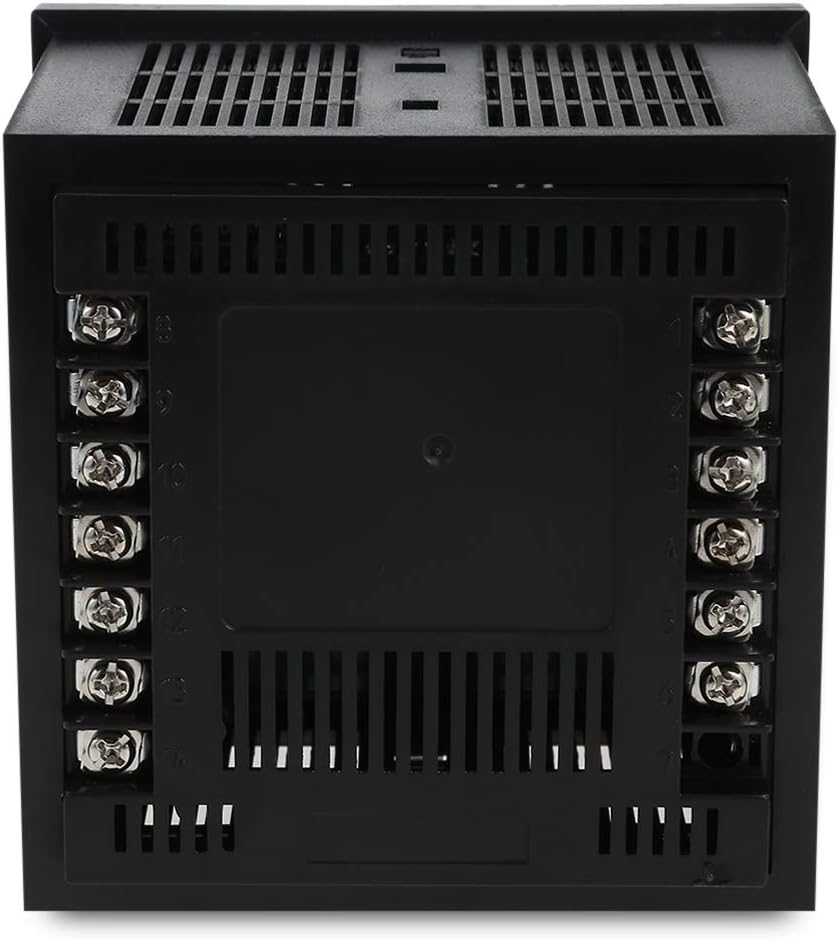
Figure 3.3: Rear Panel with Terminal Block
This image displays the rear of the MC901-611, featuring the terminal block for electrical connections. The terminals are clearly numbered, indicating where to connect power, sensor inputs, and control outputs. Proper wiring according to the provided diagram is essential for safe and correct operation.
4. Настройка и установка
4.1 Panel Mounting:
The MC901-611 is designed for panel mounting. Ensure the cutout dimensions in your panel match the device's specifications.
- Cut an opening in your panel according to the specified dimensions (refer to specifications section for exact size).
- Insert the MC901-611 into the panel cutout from the front.
- Attach the provided mounting brackets to the sides of the controller from the rear of the panel.
- Tighten the screws on the mounting brackets to secure the controller firmly in place. Do not overtighten.
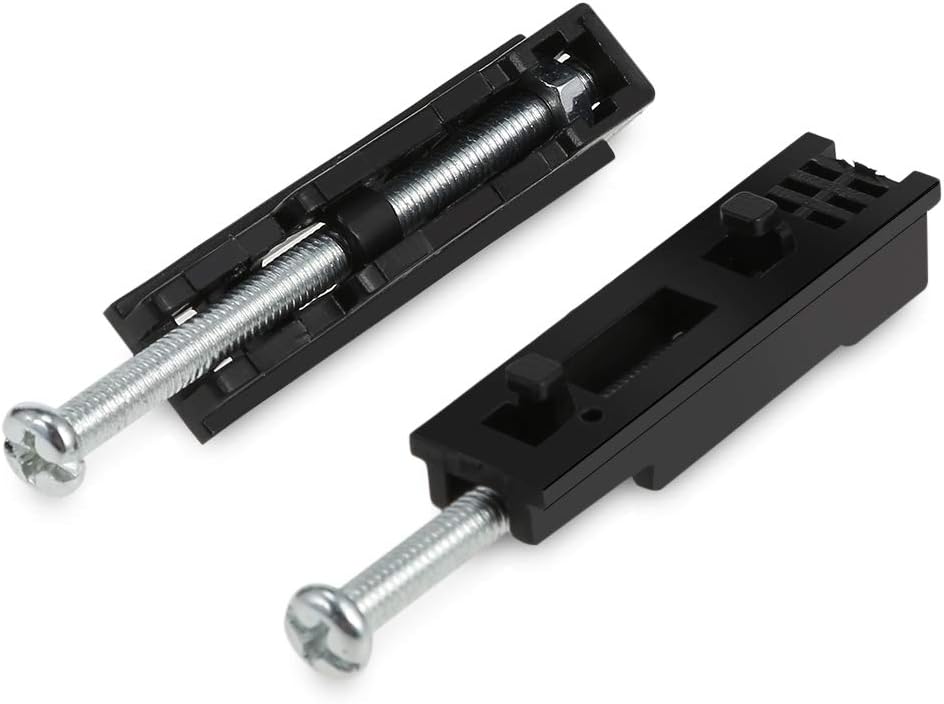
Рисунок 4.1. Монтажные кронштейны
This image shows the two mounting brackets included with the MC901-611. These brackets are used to secure the temperature controller firmly within a panel cutout, ensuring stable installation.
4.2 Схема подключения:
Refer to the wiring diagram on the side of the unit or in the detailed manual for correct connections. Ensure all connections are secure and insulated.
- Источник питания: Connect the main power supply (100-240V AC, 50/60Hz) to the designated terminals.
- Вход датчика: Connect your temperature sensor (e.g., K-type thermocouple) to the sensor input terminals. Ensure correct polarity for thermocouples.
- Управляющий выход: Connect your heating/cooling element or SSR to the control output terminals.
- Выходной сигнал тревоги (опционально): If using alarm functions, connect external alarm devices to the alarm output terminals.
Note: A detailed wiring diagram is typically provided on the physical unit or in a separate wiring guide. Always consult the specific diagram for your model.
5. Инструкция по эксплуатации
5.1 Включение:
Once wired correctly, apply power to the unit. The PV display will show the current temperature, and the SV display will show the last set temperature.
5.2 Setting the Target Temperature (SV):
- Нажмите НАБОР Нажмите кнопку один раз. Индикатор SV начнет мигать.
- Используйте Up (▲) и Вниз (▼) arrow buttons to adjust the target temperature.
- Нажмите НАБОР button again to confirm the new SV and exit the setting mode. The SV display will stop flashing.
5.3 Настройки параметров:
To access advanced parameter settings (e.g., input type, control mode, alarm settings):
- Нажмите и удерживайте НАБОР button for approximately 3-5 seconds until the first parameter code appears on the PV display.
- Используйте Up (▲) и Вниз (▼) стрелочные кнопки для навигации по различным кодам параметров.
- Нажимать НАБОР к view the value of the currently displayed parameter.
- Используйте Up (▲) и Вниз (▼) arrow buttons to change the parameter value.
- Нажимать НАБОР to confirm the new value and return to the parameter code display.
- Для выхода из режима настройки параметров нажмите и удерживайте кнопку. НАБОР button again for 3-5 seconds, or wait for the device to automatically exit after a period of inactivity.
Consult the full product manual for a complete list of parameter codes and their functions.
5.4 Auto-tuning (AT):
Auto-tuning helps the controller optimize its PID parameters for stable and accurate temperature control. This process is recommended after initial setup or if control performance is unsatisfactory.
- Set the desired target temperature (SV).
- Нажмите и удерживайте Р/С button for approximately 3-5 seconds. The AT indicator light will illuminate, and the controller will begin the auto-tuning process.
- Allow the auto-tuning process to complete. This may take some time as the controller cycles the output to learn the system's characteristics. The AT light will turn off once tuning is complete.
- Do not interrupt the auto-tuning process.
6. Техническое обслуживание
Regular maintenance ensures the longevity and optimal performance of your MC901-611 temperature controller.
- Уборка: Disconnect power before cleaning. Use a soft, dry cloth to wipe the surface of the unit. Do not use abrasive cleaners, solvents, or water, as these can damage the display or internal components.
- Инспекция: Periodically check all wiring connections for looseness or damage. Ensure the terminal screws are tight.
- Среда: Во избежание повреждений следите за тем, чтобы температура и влажность рабочей среды оставались в пределах указанных диапазонов.
- Проверка датчика: If temperature readings appear inaccurate, check the sensor and its wiring for damage or corrosion.
7. Поиск Неисправностей
This section addresses common issues you might encounter with your MC901-611 temperature controller.
| Проблема | Возможная причина | Решение |
|---|---|---|
| Нет дисплея/питание выключено | Отсутствие питания; ослабленная проводка; перегоревший предохранитель. | Check power connection; Verify wiring; Replace fuse if necessary (by qualified personnel). |
| На дисплее PV отображается "HHHH" или "LLLL". | Sensor open circuit (HHHH); Sensor short circuit or reverse connection (LLLL); Sensor type mismatch. | Check sensor wiring and connections; Ensure correct sensor type is selected in parameters. |
| Temperature not controlled accurately | Incorrect PID parameters; Sensor not properly installed; Load capacity mismatch. | Perform auto-tuning; Ensure sensor is in good thermal contact with the process; Verify output capacity matches load. |
| Output indicator (OUT) not lighting up | SV is equal to PV (no control action needed); Output wiring issue; Internal fault. | Check SV and PV values; Inspect output wiring; If problem persists, contact support. |
Если проблема сохраняется после попытки устранения этих неполадок, обратитесь в службу поддержки клиентов.
8. Технические характеристики
Technical specifications for the SINOTIMER MC901-611 Universal Intelligent Temperature Control Meter.
| Особенность | Спецификация |
|---|---|
| Модель | MC901-611 |
| Тип ввода | K (default setting), Universal Input |
| Диапазон температур | 0-1300°C (depending on sensor type) |
| Единица измерения температуры | Celsius/Fahrenheit selectable |
| Тип вывода | Реле/ТТР |
| Тревога | АЛМ1 |
| Класс точности | 0.5 |
| Источник питания | 100-240 В переменного тока, 50/60 Гц |
| Тип дисплея | ЖК-дисплей |
| Вес товара | 8.8 унции |
| Размеры упаковки | 4.3 x 4.3 x 3.6 дюйма |
9. Гарантия и поддержка
Информация о гарантии:
SINOTIMER products are typically covered by a limited warranty against defects in materials and workmanship. Please refer to the warranty card included with your product or contact SINOTIMER customer service for specific warranty terms and conditions.
Служба поддержки клиентов:
For technical assistance, troubleshooting beyond this manual, or warranty claims, please contact SINOTIMER customer support. Have your product model number (MC901-611) and purchase information ready when contacting support.
Contact information for SINOTIMER can usually be found on their official webсайте или на упаковке продукта.


