1. Введение
This manual provides detailed instructions for the Retro-Bit Official Sega Genesis USB Controller 8-Button Arcade Pad. This controller is designed to offer a classic gaming experience with modern compatibility, featuring a familiar design and additional functionality for various platforms. Please read this manual thoroughly to ensure proper setup and operation of your device.
2. Продукт закончилсяview
The Retro-Bit Official Sega Genesis USB Controller is an officially licensed replica of the classic Sega Genesis controller, enhanced with modern features for broad compatibility.
Основные характеристики:
- Official SEGA Licensed Controller (Original Grade Quality)
- Classic 6-button layout with repositioned Mode button
- New L/R Shoulder Buttons for extra configuration options
- 10-foot cable length for flexible gameplay
- Compatible with Sega Genesis Mini, Nintendo Switch/Switch 2, PC, Mac, Steam, RetroPie, Raspberry Pi
- Supports both D-Input and X-Input modes
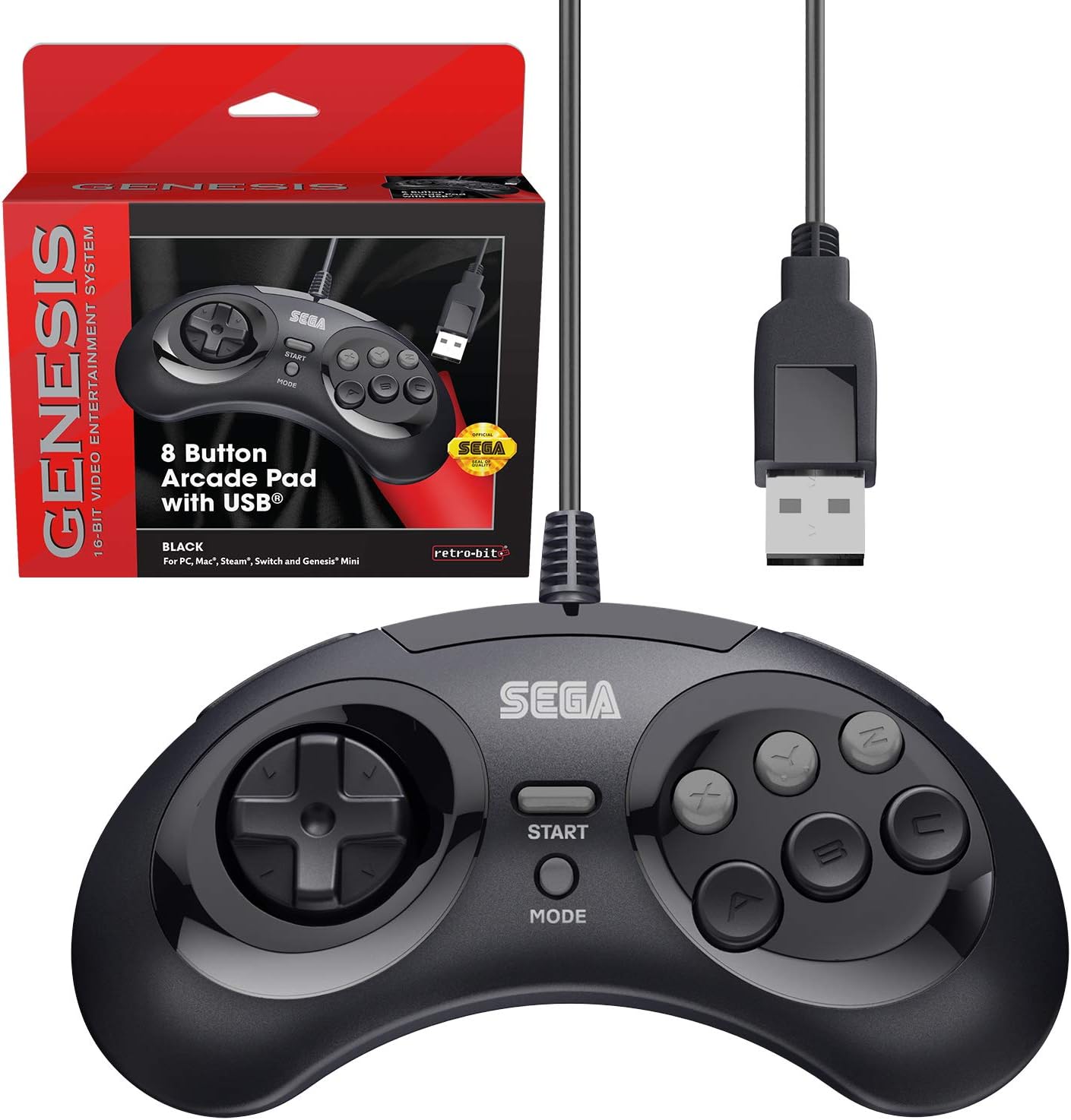
Figure 2.1: The Retro-Bit Official Sega Genesis USB Controller 8-Button Arcade Pad and its packaging.
3. Настройка
Setting up your Retro-Bit Sega Genesis USB Controller is a straightforward process. The controller is designed for plug-and-play functionality on most supported systems.
3.1 Подключение контроллера
- Locate an available USB port on your desired gaming device (PC, Mac, Nintendo Switch, Sega Genesis Mini, RetroPie, Raspberry Pi).
- Plug the USB-A connector of the controller's 10-foot cable into the USB port.
- The system should automatically detect and install the necessary drivers. No additional software installation is typically required.
- For Nintendo Switch handheld mode, a USB-C adapter (not included) may be required to connect the USB-A cable.

Рисунок 3.1: Крупный план view of the controller's face buttons and D-pad.
Video 3.1: An unboxing of the Retro-Bit Official Sega Genesis USB Controller, demonstrating the physical product and its packaging. This video shows the controller being removed from its box and highlights its wired USB connection.
4. Инструкция по эксплуатации
The controller features a classic 6-button layout with additional shoulder buttons and a Mode button for enhanced functionality.
4.1 кнопок
- Крестовина: Направленный ввод для движения.
- Кнопки A, B, C, X, Y, Z: Основные кнопки действий.
- Кнопка «Пуск»: Обычно используется для приостановки игр или подтверждения выбора.
- Кнопка режима: Can be used for specific game functions or system navigation.
- Кнопки на левом и правом плечах: New additions for expanded control options in modern games or emulators.

Рисунок 4.1: Сторона view of the controller, highlighting the newly added L and R shoulder buttons.
4.2 Switching Input Modes (D-Input / X-Input)
The controller supports both D-Input (DirectInput) and X-Input (XInput) modes. X-Input is commonly used for modern PC games, while D-Input is often used for older games and some emulation platforms.
- To swap between D-Input and X-Input, hold the НАЧИНАТЬ button for 5 seconds. The controller will switch modes.
- Note: The controller defaults to D-Input mode upon connection and does not retain settings between sessions. You may need to switch modes each time you connect the controller.
4.3 Switch Macros (Nintendo Switch Specific)
For Nintendo Switch, specific button combinations can be used to change D-Pad input or swap button layouts:
- Hold START for 5 seconds: Режим включен
- Up + START: D-Pad input (Left Joystick)
- Left + START: Левый джойстик
- Right + START: Правый джойстик
- Down + START: Swap A, B, X, Y buttons
Видео 4.2: Подробное описаниеview of the Retro-Bit Official Sega Genesis USB Controller, including demonstrations of its features, button feel, and compatibility with various systems. This video also explains the D-Input/X-Input switching and button mapping.
5. Совместимость
The Retro-Bit Official Sega Genesis USB Controller offers broad compatibility with various modern and retro gaming platforms:
- Sega Genesis Mini
- Nintendo Switch / Switch 2
- ПК (Windows)
- Мак (macOS)
- Steam (PC/Mac)
- RetroPie
- Малиновый Пи
- PS3 (as indicated in manual, though not on box)

Figure 5.1: A compatibility chart showing various Retro-Bit controller types and their supported platforms. This wired USB model is compatible with many systems.

Figure 5.2: The controller is fully compatible with the Sega Genesis Mini console, providing an authentic retro gaming experience.
6. Default Button Mapping
The following table illustrates the default button mapping across different input modes and platforms. Please refer to this table for optimal configuration.
| Управление | Бытие | D-вход | X-вход | PS3* | Мак* | Выключатель |
|---|---|---|---|---|---|---|
| Up | Up ↑ | Up ↑ | Ось Y ↑ | Up ↑ | Up ↑ | Up ↑ |
| Верно | Right → | Right → | X-Axis → | Right → | Right → | Right → |
| Вниз | Down ↓ | Down ↓ | Y-Axis ↓ | Down ↓ | Down ↓ | Down ↓ |
| Левый | Left ← | Left ← | X-Axis ← | Left ← | Left ← | Left ← |
| A | A | 1 | A | 2 | 1 | B |
| B | B | 2 | B | 1 | 2 | A |
| C | C | 3 | X | 3 | 3 | Y |
| X | X | 4 | Y | 4 | 4 | X |
| Y | Y | 5 | LB | L1 | 5 | L |
| Z | Z | 6 | RB | R1 | 6 | R |
| L | L | 7 | LT | L2 | 7 | ZL |
| R | R | 8 | RT | R2 | 8 | ZR |
| Режим | Выбирать | 9 | Назад | Выбирать | 9 | - |
| Начинать | Начинать | 10 | Начинать | Начинать | 10 | + |
| Старт + А | Гид | 11 | Гид | Дом | 11 | Дом |
*PS3 and Mac compatibility may vary or require specific settings.
7. Техническое обслуживание
Чтобы обеспечить долговечность и оптимальную производительность вашего контроллера, следуйте следующим рекомендациям по техническому обслуживанию:
- Уборка: Протрите контроллер мягкой сухой тканью. Для удаления стойких загрязнений слегка потрите.ampСмочите ткань водой. Избегайте использования агрессивных химикатов и абразивных чистящих средств.
- Хранилище: Храните контроллер в прохладном, сухом месте, вдали от прямых солнечных лучей и экстремальных температур. Избегайте слишком тугого наматывания кабеля, чтобы предотвратить его повреждение.
- Умение обращаться: Do not drop the controller or expose it to excessive force. Avoid pulling the cable forcefully from the USB port.
8. Поиск Неисправностей
If you encounter issues with your controller, please refer to the following common troubleshooting steps:
- Контроллер не обнаружен:
- Ensure the USB cable is securely plugged into an active USB port.
- Try plugging the controller into a different USB port on your device.
- Перезагрузите игровое устройство или компьютер.
- Verify that your operating system or gaming platform supports the controller (refer to Section 5: Compatibility).
- Buttons Not Responding Correctly:
- Check the input mode (D-Input vs. X-Input) by holding the НАЧИНАТЬ button for 5 seconds. Some games or emulators require a specific mode.
- For Nintendo Switch, try the Switch Macros (Section 4.3) to adjust D-Pad input or swap buttons if needed.
- Ensure the game or emulator's control settings are configured correctly for a 6-button or 8-button controller.
- Задержка или входной сигнал:
- Ensure the controller is directly connected to a USB port and not through an unpowered USB hub.
- Minimize background applications on your PC/Mac that might consume system resources.
- For optimal performance, ensure your display device (monitor/TV) is set to a low-latency "Game Mode" if available.
9. Технические характеристики
| Особенность | Деталь |
|---|---|
| Бренд | Retro-Bit |
| Ряд | SEGA Genesis 8-button Arcade Pad |
| Номер модели | 849172010239 |
| Технология связи | USB (проводной) |
| Длина кабеля | 10 футов (приблизительно 3 метра) |
| Тип контроллера | Геймпад |
| Совместимые устройства | SEGA Genesis Mini, PC, Mac, Steam, RetroPie, Raspberry Pi, Nintendo Switch |
| Режимы ввода | D-Input, X-Input (switchable) |
| Вес товара | 9.7 унции |
| Размеры упаковки | 7.09 x 5.75 x 2.48 дюйма |
10. Гарантия и поддержка
For warranty information and customer support, please refer to the official Retro-Bit webПосетите их сайт или свяжитесь напрямую со службой поддержки клиентов. Подробная информация обычно предоставляется на упаковке продукта или на сайте производителя. webсайт.
If you have questions, comments, or if this product did not turn out the way it was intended, please contact Retro-Bit customer service at info@retro-bit.com.


