1. Введение
Thank you for choosing the Cuddeback G-5086 CuddeLink Double Barrel 20MP Trail Camera. This manual provides essential information for the proper setup, operation, and maintenance of your camera. Please read it thoroughly before using the device to ensure optimal performance and longevity.
2. Особенности продукта
The Cuddeback G-5086 trail camera is designed for reliable outdoor surveillance and wildlife monitoring, offering advanced features for high-quality image capture.
- 20-мегапиксельная камера: Делает снимки высокого разрешения.
- Скорость срабатывания 0.25 секунды: Обеспечивает быструю съемку движущихся объектов.
- CuddeLink Compatibility: Integrates with CuddeLink and CuddeLink Cell networks for remote image transmission.
- Double Barrel Flash Strobe: Utilizes two 1-inch xenon flash tubes for powerful illumination up to 100 feet.
- Picture Recovery Time: Fast 1 to 2 second recovery for subsequent shots.
- Режим серийной съемки: Capable of capturing 1 to 5 images per trigger event.
- Источник питания: Работает от 4 батареек типа D (в комплект не входят).
3. Содержимое упаковки
Проверьте наличие всех предметов в посылке:
- Cuddeback G-5086 Trail Camera
- Антенна
- Mounting Strap (may vary by package)
- Руководство пользователя (этот документ)
4. Настройка
4.1. Установка аккумулятора
The G-5086 camera requires 4 D-cell batteries for operation. For best performance, use high-quality alkaline or lithium batteries.
- Откройте дверцу батарейного отсека, расположенную сбоку или снизу камеры.
- Insert 4 D-cell batteries, ensuring correct polarity (+/-) as indicated inside the compartment.
- Close the battery compartment door securely to maintain the weather seal.

Figure 4.1: Battery compartment with D-cell batteries installed.
4.2. Установка SD-карты
A Class 10 or higher SD card (up to 32GB recommended) is required to store images and videos.
- Locate the SD card slot, typically found under a protective cover on the camera's side or bottom.
- Insert the SD card with the metal contacts facing down (or as indicated by the slot diagram) until it clicks into place.
- To remove, push the card in gently until it springs out.

Figure 4.2: SD card slot and external ports.
4.3. Установка антенны
The antenna is crucial for CuddeLink network communication.
- Screw the provided antenna clockwise into the antenna port located on the top or side of the camera until it is finger-tight.
- Ensure the antenna is oriented vertically for optimal signal reception.
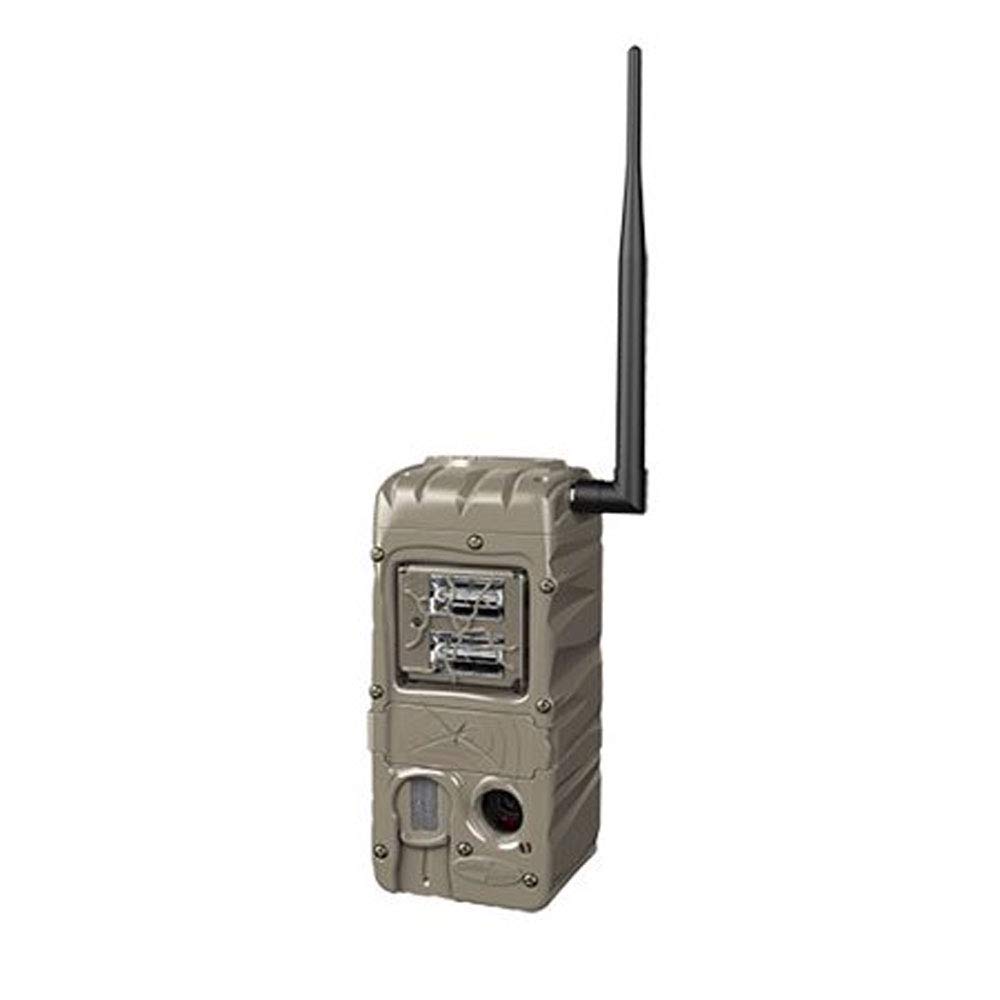
Figure 4.3: Cuddeback G-5086 Trail Camera with antenna.
4.4. Установка камеры
Mount the camera to a tree or post using the provided strap or a compatible mounting accessory.
- Position the camera approximately 3-6 feet (1-2 meters) off the ground.
- Aim the camera towards the desired monitoring area, avoiding direct sunlight if possible to prevent overexposure.
- Ensure the camera is stable and secure to prevent movement from wind or animals.
5. Инструкция по эксплуатации
5.1. Включение и выключение
Locate the power switch inside the camera housing. Slide it to the 'ON' position to power on the camera. Slide to 'OFF' to power down.
5.2. Базовые настройки
Access the camera's menu via the internal display and control buttons to configure settings:
- Режим: Select between Photo, Video, or Time-Lapse.
- Разрешение: Set image (e.g., 20MP) or video resolution (e.g., 720p).
- Задержка срабатывания: Adjust the time interval before the camera triggers again after an event.
- Лопаться: Configure the number of photos taken per trigger (1-5 images).
- Дата/Время: Установите текущую дату и время для точного отображения времени.amps на захватах.
5.3. CuddeLink Network Setup
The G-5086 is CuddeLink compatible, allowing it to send images to a CuddeLink Home camera or Cell camera. Refer to the CuddeLink system manual for detailed instructions on network configuration, pairing, and data transmission settings.
5.4. Извлечение данных
Images and videos are stored on the SD card. To retrieve them:
- Выключите камеру.
- Извлеките SD-карту.
- Insert the SD card into a computer's card reader or a compatible device to view и передача files.
6. Техническое обслуживание
6.1. Уборка
Regularly clean the camera lens, flash, and PIR sensor window with a soft, lint-free cloth. Avoid abrasive materials or harsh chemicals.
6.2. Замена батареи
Заменяйте батареи, когда загорается индикатор низкого заряда батареи или когда снижается производительность. Всегда заменяйте все батареи одновременно на новые того же типа.
6.3. Управление SD-картой
Periodically format the SD card using the camera's menu option to ensure optimal performance and prevent data corruption. Back up important files перед форматированием.
7. Поиск Неисправностей
- Камера не включается: Проверьте правильность установки батарей и убедитесь, что они новые. Убедитесь, что выключатель питания находится в положении «ВКЛ».
- Плохое качество изображения: Clean the lens and flash window. Ensure the camera is not aimed directly into strong light sources. Check settings for appropriate resolution.
- No images captured: Ensure the SD card is properly inserted and has sufficient free space. Check trigger delay and sensitivity settings. Verify the camera is in an active mode.
- Короткое время автономной работы: This can be influenced by extreme temperatures, frequent triggers, or extensive CuddeLink activity. Use high-quality batteries.
- CuddeLink connectivity issues: Ensure the antenna is securely attached. Check the distance between cameras and any obstructions. Refer to the CuddeLink system manual for network diagnostics.
8. Технические характеристики
| Название модели | Г-5086 |
| Эффективное разрешение неподвижного изображения | 20 МП |
| Скорость триггера | 0.25 секунд |
| Диапазон вспышки | 100 Feet (Double Barrel Flash Strobe) |
| Время восстановления изображения | 1–2 секунды |
| Burst Images | 1 to 5 images |
| Технология связи | Wireless (CuddeLink compatible) |
| Источник питания | 4 D Batteries (not included) |
| Использование внутри и снаружи помещений | На открытом воздухе |
| Материал | Пластик |
| Размеры (Д x Ш x В) | 10.05 x 4.35 x 7.4 дюйма |
| Вес товара | 2.4 унции |
9. Гарантия и поддержка
For warranty information and technical support, please refer to the official Cuddeback webили обратитесь в службу поддержки напрямую. Сохраните чек в качестве подтверждения покупки.