1. Введение
Thank you for choosing the XTUGA A4 4-Channel Audio Mixer. This compact and versatile mixing console is designed for various audio applications, including home music production, webcasting, and live sound. It features 4 channels, Bluetooth connectivity, USB recording and playback, 48V phantom power for condenser microphones, and built-in effects. This manual provides detailed instructions for setup, operation, maintenance, and troubleshooting to ensure optimal performance and longevity of your device.
2. Информация по технике безопасности
- Источник питания: Use only the specified power adapter or a reliable USB power source that meets the voltage and current requirements (greater than 5V and 1.5A). Incorrect power can damage the device or cause noise.
- Вода и влага: Do not expose the unit to rain, moisture, or extreme humidity. Avoid placing liquid containers on or near the mixer.
- Вентиляция: Обеспечьте достаточную вентиляцию вокруг устройства. Не закрывайте вентиляционные отверстия.
- Нагревать: Располагайте устройство вдали от источников тепла, таких как радиаторы, обогреватели, печи и другие приборы, выделяющие тепло.
- Уборка: Перед чисткой отключите питание. Используйте сухую мягкую ткань. Не используйте жидкие чистящие средства или аэрозоли.
- Обслуживание: Не пытайтесь ремонтировать это устройство самостоятельно. По всем вопросам обслуживания обращайтесь к квалифицированному специалисту.
3. Содержимое упаковки
Пожалуйста, проверьте комплектность после распаковки, чтобы убедиться в наличии всех предметов:
- XTUGA A4 4-Channel Audio Mixer
- Кабель питания USB
- USB Power Adapter

Image: The XTUGA A4 Audio Mixer shown with its included USB power cable and USB power adapter.
4. Продукт закончилсяview
The XTUGA A4 mixer features a compact design with essential controls for audio mixing. Key features include:
- 4 входных каналов: Two MIC/LINE (XLR/TRS combo) inputs with 48V phantom power and two stereo LINE (RCA) inputs.
- Bluetooth-подключение: Передавайте аудио по беспроводной сети со своего смартфона или других устройств с поддержкой Bluetooth.
- USB-аудиоинтерфейс: Connect to a computer for recording and playback. Supports U-Disk (USB drive) for MP3/WAV/WMA/FLAC playback and direct recording.
- Встроенные эффекты: Adjustable DELAY and REPEAT effects for vocal enhancement.
- Мониторинг: Dedicated PHONES output for headphone monitoring.
- Управление эквалайзером: HIGH and LOW equalization for each input channel.

Изображение: Спереди view of the XTUGA A4 Audio Mixer, illustrating its Bluetooth connectivity feature with a smartphone icon.
5. Настройка
5.1 Включение микшера
The A4 mixer can be powered via USB. For stable performance and to avoid noise, ensure your power source provides at least 5V and 1.5A.
- Адаптер питания USB: Connect the provided USB cable to the mixer's USB port and the USB power adapter, then plug into a wall outlet. This is the recommended method for optimal performance.
- USB-порт компьютера: Connect the USB cable directly to a computer's USB port. Note that some computer USB ports may not provide sufficient power, potentially leading to noise or unstable operation.
- Внешний аккумулятор: For portable use, connect the USB cable to a power bank with sufficient output.

Image: Illustration of three ways to power the XTUGA A4 mixer: via a computer's USB port, a wall power adapter, or a portable power bank. A note emphasizes the requirement for a USB power supply of at least 5V and 1.5A.
5.2 Подключение аудиоустройств
Refer to the diagram below for a general connection overview.

Image: A comprehensive diagram illustrating how to connect various audio equipment to the XTUGA A4 mixer, including condenser microphones, dynamic microphones, wireless microphones, a computer, a power ampусилитель, пассивные колонки и наушники.
5.2.1 Входные соединения
- Microphones (Channels 1 & 2): Connect XLR or 1/4" TRS cables from your microphones to the MIC/LINE inputs. For condenser microphones requiring phantom power, ensure the +48V switch is engaged.
- Line-Level Devices (Channels 3 & 4): Connect devices like CD players, media players, or other line-level sources using RCA cables to the LEFT and RIGHT LINE inputs.

Изображение: крупный план view of the mixer's input section, demonstrating the connection of both a 1/4-inch TRS cable and an XLR cable into the MIC/LINE combo jacks.
5.2.2 Выходные соединения
- Основной выход: Connect the L/R MAIN RCA outputs to your power amplifier, active speakers, or recording device.
- Наушники: Connect your headphones to the PHONES 1/4" TRS output for monitoring.
6. Инструкция по эксплуатации
6.1 Основные принципы смешивания
- Взять под контроль: Adjust the input sensitivity for each MIC/LINE channel. Set it so the PEAK LED flashes only occasionally during the loudest parts of the signal.
- HIGH/LOW EQ: Use these knobs to adjust the treble (HIGH) and bass (LOW) frequencies for each channel.
- EFX Send: Controls the amount of signal sent from each channel to the built-in effects processor.
- Основной вывод: Adjusts the overall volume of the main mix.
- ТЕЛЕФОНЫ Выход: Регулирует громкость выхода для наушников.
- Фантомное питание +48 В: Activate this switch for condenser microphones that require phantom power. Ensure microphones are connected before activating.
6.2 Работа Bluetooth
Чтобы подключить Bluetooth-устройство:
- Press the MODE/BT button on the USB/Bluetooth section until the display shows "BT".
- On your smartphone or Bluetooth device, search for available devices and select "XTUGA A4" (or similar name).
- Once paired, audio from your device will play through channels 3/4. Adjust the volume using the 3-4/USB knob.
6.3 USB Playback (U-Disk)
Для воспроизведения аудио fileс USB-флешки:
- Insert a USB flash drive (U-Disk) containing MP3/WAV/WMA/FLAC files в порт USB.
- The mixer will automatically detect and begin playing files. Используйте элементы управления воспроизведением (воспроизведение/пауза, следующий/предыдущий) на микшере.
- Adjust the volume using the 3-4/USB knob.

Image: The XTUGA A4 mixer with a USB flash drive inserted into its USB port, highlighting its U-Disk functionality for playing MP3/WAV/WMA/FLAC fileи запись звука.
6.4 USB Recording to Computer
The mixer can send its main stereo mix to a computer for recording.
- Connect the mixer to your computer via the USB cable.
- Your computer should recognize the mixer as an audio input device. Select it in your recording software (e.g., Audacity, GarageBand, OBS).
- Adjust input levels on the mixer and in your software. The mixer will send a stereo mix of all active channels to the computer.

Image: A diagram illustrating the connection for recording. A computer sends background music to the audio mixer, and the audio mixer's output is recorded by a computer program.
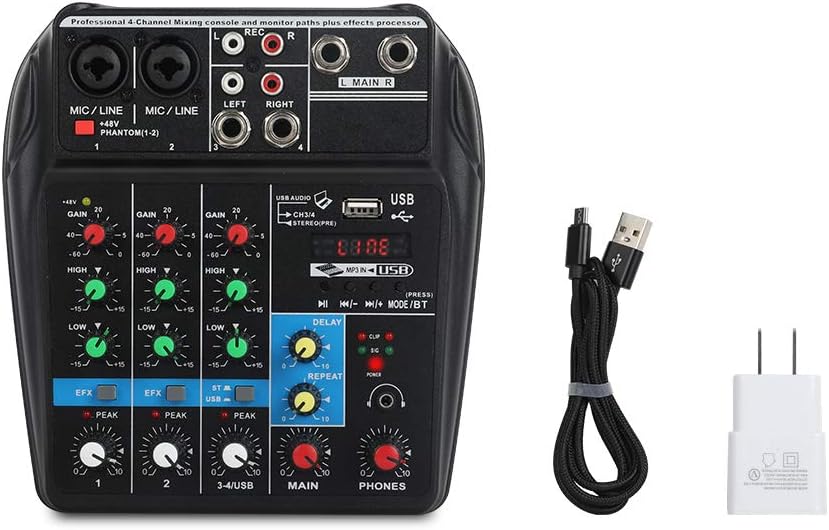
Image: A visual guide detailing the process of recording audio to a computer. Steps include connecting the USB cable, setting the mixer to 'Record' status, pressing record in a computer program (like GoldWave), and then playing back the recorded audio.
6.5 Effects (DELAY & REPEAT)
The mixer includes built-in delay and repeat effects:
- ЗАДЕРЖИВАТЬ: Adjusts the delay time of the effect.
- ПОВТОРИТЬ: Controls the number of repetitions for the delay effect.
- Use the EFX send knobs on individual channels to control how much of that channel's signal is sent to the effects processor.
6.6 Видеодемонстрация продукта
Watch this video for a visual demonstration of the XTUGA A4 Audio Mixer's features and operation.
Video: A demonstration of the XTUGA A4 4-Channel Audio Mixer, showcasing its various features, connections, and operational aspects. This video provides a visual guide to understanding the product's capabilities.
7. Техническое обслуживание
- Уборка: Регулярно протирайте поверхность миксера мягкой сухой тканью. Избегайте использования абразивных чистящих средств или растворителей.
- Хранилище: Когда миксер не используется, храните его в чистом, сухом месте, вдали от прямых солнечных лучей и экстремальных температур.
- Уход за кабелем: Handle cables carefully. Avoid sharp bends or excessive pulling, which can damage connectors or internal wiring.
8. Поиск Неисправностей
| Проблема | Возможная причина | Решение |
|---|---|---|
| Нет электричества | Incorrect or insufficient USB power supply. | Ensure the USB power adapter is properly connected to a wall outlet. If using a computer USB, try a different port or a dedicated USB power adapter (recommended). Verify the power source provides at least 5V and 1.5A. |
| Нет звука или низкая громкость | Incorrect connections, low gain/volume settings, phantom power off for condenser mics. | Check all input and output cable connections. Increase GAIN for input channels, MAIN volume, and PHONES volume. Ensure +48V phantom power is engaged for condenser microphones. |
| Жужжание или статический шум | Ground loop, insufficient power, poor quality cables, interference. | Use the provided USB power adapter plugged into a wall outlet instead of a computer USB port. Ensure all cables are good quality and properly shielded. Try isolating the mixer from other electronic devices. |
| USB recording/playback issues (disconnects, not recognized) | Faulty USB cable, computer port issues, driver conflicts. | Try a different USB cable and a different USB port on your computer. Restart your computer. Ensure your operating system has the latest audio drivers. |
| Cannot record multiple microphones to separate tracks | The mixer outputs a stereo mix, not individual tracks. | This mixer is designed to output a combined stereo mix to your computer. It does not support multi-track recording of individual inputs. For multi-track recording, a dedicated multi-channel audio interface is required. |
9. Технические характеристики
- Номер модели товара: A4
- Вес товара: 1.5 фунта
- Размеры продукта: 3.15 x 9.45 x 9.45 дюйма
- Количество каналов: 4
- Аппаратный интерфейс: Bluetooth, USB
- Технологии подключения: Bluetooth
- Источник питания: Проводной электрический (USB)
- Томtage: 48 Вольт (для фантомного питания)
- Тип выходного разъема: XLR (implied for mic inputs), RCA (Main Out), TRS (Phones Out)
10. Гарантия и поддержка
Для получения информации о гарантии, технической поддержке или сервисном обслуживании, пожалуйста, свяжитесь напрямую с продавцом или производителем через платформу, где был приобретен товар. Сохраните чек о покупке в качестве подтверждения приобретения.


