1. Введение
The Romoss QS10 is a 10000mAh portable power bank designed to provide convenient charging for a wide range of mobile devices. It features an integrated Micro USB cable and includes adapters for Lightning and Type-C connections, eliminating the need to carry multiple charging cables. This manual provides essential information for the safe and efficient operation of your power bank.
2. Продукт закончилсяview
The QS10 power bank offers a versatile charging solution with its built-in cable and adapter system. Its compact design makes it suitable for travel and daily use.
Основные характеристики:
- Integrated Cable System: Includes a built-in Micro USB cable with detachable Lightning and Type-C adapters for broad device compatibility.
- Несколько вариантов ввода: Recharge the power bank using Micro USB, Lightning, or Type-C cables.
- Высокая емкость: 10000mAh capacity provides multiple charges for smartphones and tablets.
- Компактный дизайн: Approximately the size of an iPhone X, designed for portability.
Содержимое упаковки:
- Romoss QS10 Power Bank
- Integrated Micro USB Cable
- Lightning Adapter (detachable)
- Type-C Adapter (detachable)
- Руководство пользователя (этот документ)
3. Настройка и первое использование
Before initial use, fully charge your Romoss QS10 Power Bank.
Retrieving the Integrated Cable and Adapters:
- Locate the integrated Micro USB cable on the side of the power bank.
- Gently click out the Micro USB connector from its storage slot.
- Pull the Micro USB cable to extend it.
- To access the Lightning or Type-C adapters, insert the Micro USB connector into the designated slot on the power bank and press lightly. The desired adapter will emerge connected to the Micro USB cable.

Image: Steps for retrieving the integrated Micro USB cable and adapters. This image illustrates how to pull out the Micro USB connector, extend the cable, and then attach or retrieve the Lightning/Type-C adapters from their storage.
4. Инструкция по эксплуатации
4.1. Зарядка Power Bank
The Romoss QS10 can be recharged using a Micro USB, Lightning, or Type-C cable. A charging cable is not included for recharging the power bank itself.
- Connect a compatible charging cable (Micro USB, Lightning, or Type-C) to the corresponding input port on the power bank.
- Подключите другой конец зарядного кабеля к источнику питания USB (например, к сетевому адаптеру, USB-порту компьютера).
- Светодиодные индикаторы на внешнем аккумуляторе загорятся, показывая состояние зарядки. Полная зарядка отображается, когда все светодиоды горят постоянно.

Image: Flexible recharge options. This image displays the three different input ports (Micro USB, Lightning, Type-C) available on the Romoss QS10 power bank for recharging the unit.
4.2. Зарядка ваших устройств
Use the integrated cable and appropriate adapter to charge your smartphone or tablet.
- Retrieve the integrated Micro USB cable and the necessary adapter (Lightning or Type-C) as described in the Setup section.
- Connect the appropriate adapter to the Micro USB cable, then plug it into your device's charging port.
- Внешний аккумулятор автоматически начнет зарядку вашего устройства. Светодиодные индикаторы покажут оставшийся уровень заряда аккумулятора.

Image: Charging a Micro USB device. This image shows the Romoss QS10 power bank connected to and charging a smartphone via its integrated Micro USB cable.
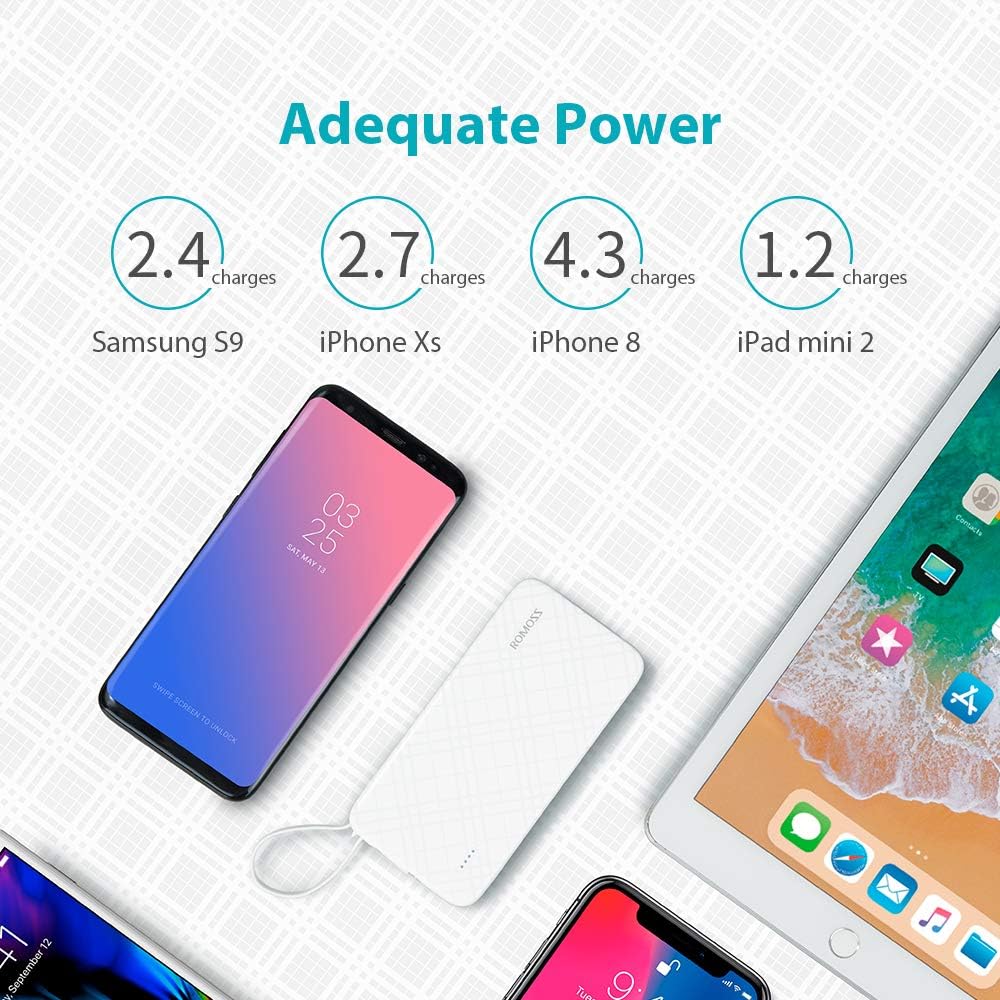
Image: Charging an iPhone or iPad. This image demonstrates the Romoss QS10 power bank charging an iPhone, utilizing the integrated cable with the detachable Lightning adapter.

Image: Charging a Type-C device. This image shows the Romoss QS10 power bank connected to and charging a Samsung S9+ (or similar Type-C device) using the integrated cable with the detachable Type-C adapter.
Estimated Charging Capacity:
The 10000mAh capacity can provide approximately:
- 4 full charges for an iPhone 8
- 2 full charges for a Samsung Galaxy S9
- 1 full charge for an iPad mini 2

Image: Adequate Power. This diagram illustrates the approximate number of charges the 10000mAh power bank can provide for different devices, such as Samsung S9, iPhone Xs, iPhone 8, and iPad mini 2.
5. Техническое обслуживание
- Храните внешний аккумулятор вдали от экстремальных температур, прямых солнечных лучей и влаги.
- Не роняйте аккумулятор и не подвергайте его сильным ударам.
- Протирайте устройство мягкой сухой тканью. Не используйте едкие химикаты или абразивные материалы.
- Store the power bank in a cool, dry place when not in use. For prolonged storage, charge the power bank to about 50% every three months to maintain battery health.
6. Поиск Неисправностей
| Проблема | Возможная причина | Решение |
|---|---|---|
| Повербанк не заряжается | Charging cable or adapter is faulty; Power source is insufficient; Power bank is fully charged. | Try a different charging cable or adapter. Ensure the power source is active. Check LED indicators for full charge. |
| Устройство не заряжается от повербанка | Power bank is depleted; Integrated cable or adapter is not properly connected or faulty; Device is incompatible. | Recharge the power bank. Ensure the integrated cable and adapter are securely connected to both the power bank and your device. Test with another device if possible. |
| Lightning/Type-C adapter not working or showing 'not compatible' message | Adapter is damaged or not fully seated; Device firmware issue. | Ensure the adapter is firmly connected to the Micro USB cable and your device. Inspect the adapter for any visible damage. If issues persist, consider replacing the adapter. |
| Внешний аккумулятор нагревается во время использования | Нормальная работа во время зарядки/разрядки. | This is normal. If it becomes excessively hot, disconnect immediately and contact customer support. |
7. Технические характеристики
| Особенность | Деталь |
|---|---|
| Номер модели | QS10-301-01-UK-Update |
| Емкость | 10000мАч |
| Тип батареи | Литий-полимерный |
| Вход | 5V/2.1A (Micro USB, Lightning, Type-C) |
| Выход | 5В/2.1А |
| Размеры (Д x Ш x В) | 14.99 х 7.37 х 1.27 см |
| Масса | 238 г |
| Рекомендуемое использование | Планшет, телефон |
8. Гарантия и поддержка
The Romoss QS10 Power Bank comes with a Гарантия 12 месяца с даты покупки. Данная гарантия распространяется на производственные дефекты и гарантирует работоспособность изделия в соответствии с его назначением при нормальном использовании.
For technical support, warranty claims, or any inquiries regarding your Romoss product, please contact Romoss customer service. Refer to the contact information provided on the product packaging or the official Romoss webсайт для получения самых актуальных каналов поддержки.


