1. Введение
The Denver MRD-51 is a versatile multi-function music system designed to play various audio formats. It integrates a record player, DAB+ and FM/AM radio tuner, CD player, and cassette deck into a single unit. Additionally, it features a USB port for digitizing audio from CDs, records, or cassettes, and an AUX input for connecting external devices. The system includes two integrated stereo speakers for a complete audio experience.
2. Инструкции по технике безопасности
- Перед эксплуатацией устройства внимательно прочтите все инструкции.
- Сохраните это руководство для дальнейшего использования.
- Не подвергайте устройство воздействию дождя или влаги во избежание возгорания или поражения электрическим током.
- Обеспечьте надлежащую вентиляцию; не блокируйте вентиляционные отверстия.
- Установите устройство на устойчивую ровную поверхность.
- Disconnect the power plug from the wall outlet if the unit is not in use for a long period.
- Не пытайтесь ремонтировать устройство самостоятельно. По всем вопросам обслуживания обращайтесь к квалифицированному специалисту.
3. Содержимое упаковки
При распаковке убедитесь в наличии всех предметов:
- Denver MRD-51 Multi-Function Music System
- Силовой кабель
- Дистанционное управление
- Руководство пользователя
4. Продукт закончилсяview

Рисунок 4.1: Denver MRD-51 Multi-Function Music System with turntable open. This image displays the Denver MRD-51 music system from a front-top perspective, with the turntable lid open and a vinyl record placed on the platter. The control panel, including the LCD display, knobs, and buttons, is visible below the turntable.

Рисунок 4.2: Denver MRD-51 Multi-Function Music System, front view. A front view of the Denver MRD-51 music system with the turntable lid closed. This image highlights the integrated stereo speakers on the sides and the central control panel, emphasizing its classic design.
4.1 Органы управления на передней панели
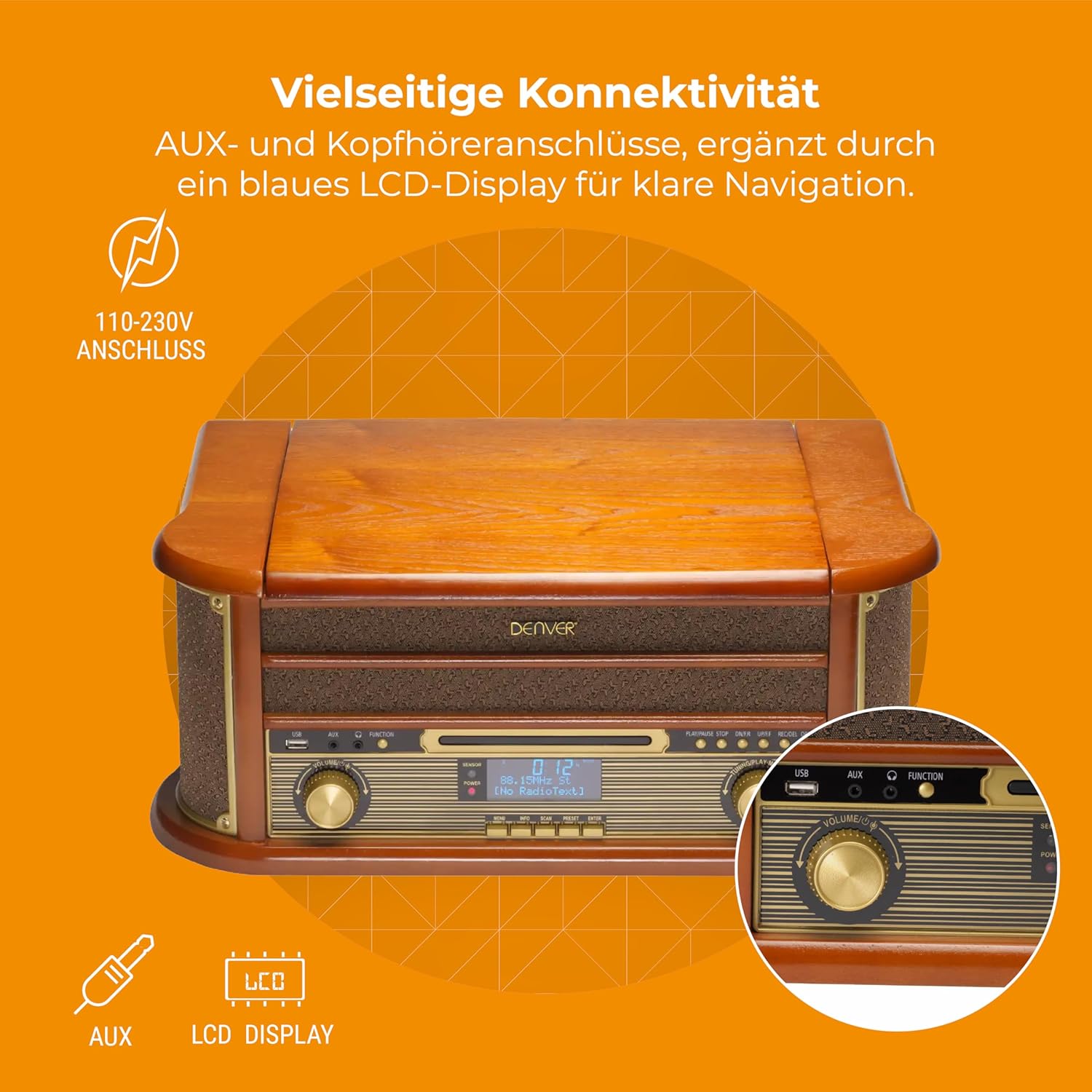
Рисунок 4.3: Denver MRD-51 front panel with USB, AUX, and LCD display. A close-up of the Denver MRD-51's front control panel, showcasing the USB port, AUX input, and the blue LCD display for clear navigation. This view details the various connectivity options available.
- Кнопка питания: Включает и выключает устройство.
- Кнопка ФУНКЦИЯ: Selects between Turntable, CD, Cassette, DAB+, FM, AM, AUX, and USB modes.
- USB-порт: For connecting USB storage devices for playback or recording.
- Вход AUX: Разъем 3.5 мм для подключения внешних источников звука.
- ЖК-дисплей: Shows current mode, track information, radio frequency, and other system status.
- Кнопка ВОСПРОИЗВЕДЕНИЕ / ПАУЗА: Starts or pauses playback for CD, Cassette, or USB.
- Кнопка СТОП: Останавливает воспроизведение.
- Кнопки ПРОПУСК (◀◀ / ▶▶): Пропускает треки или позволяет быстро перематывать вперед/назад.
- Кнопка ЗАПИСЬ: Инициирует запись на USB-накопитель.
- Ручка VOLUME: Регулирует общую громкость выходного сигнала.
- Ручка настройки: Adjusts radio frequency in FM/AM mode or navigates menus in DAB+ mode.
4.2 Turntable and Cassette Deck

Рисунок 4.4: Denver MRD-51 showing open turntable and cassette deck. This image illustrates the versatility of the Denver MRD-51, featuring the open turntable with a record and an arrow pointing to the cassette deck slot on the side, indicating its multi-format playback capabilities.
- Поднос поворотного стола: Для проигрывания виниловых пластинок.
- Tone Arm with Stylus: Reads the grooves of vinyl records.
- Селектор скорости: Allows selection of 33, 45, or 78 RPM.
- Cassette Deck Slot: For inserting audio cassettes.
4.3 Проигрыватель компакт-дисков

Рисунок 4.5: Denver MRD-51 with CD tray open and remote control. This image shows the Denver MRD-51 with its CD tray open, ready for disc insertion. A remote control is also pictured, indicating convenient operation of the system's functions.
- Лоток для компакт-дисков: For inserting compact discs.
- Кнопка ОТКРЫТЬ/ЗАКРЫТЬ: Открывает и закрывает лоток для компакт-дисков.
5. Настройка
5.1 Распаковка и размещение
- Аккуратно извлеките устройство из упаковки.
- Place the unit on a flat, stable surface away from direct sunlight, heat sources, and excessive dust or moisture.
- Обеспечьте достаточное пространство вокруг устройства для вентиляции.
5.2 Подключение питания
- Connect the power cable to the AC IN socket on the rear of the unit.
- Plug the other end of the power cable into a standard wall outlet (110-230V).
5.3 Подключение антенны
For optimal radio reception, extend the telescopic antenna fully for FM/DAB+ or adjust its position for AM.
6. Инструкция по эксплуатации
6.1 Общие принципы работы
- Нажмите ВЛАСТЬ кнопку включения устройства.
- Нажмите ФУНКЦИЯ button repeatedly to cycle through available modes: Turntable, CD, Cassette, DAB+, FM, AM, AUX, USB.
- Отрегулируйте ОБЪЕМ поверните ручку на желаемый уровень прослушивания.
6.2 Эксплуатация поворотного стола
- Select the 'Turntable' function.
- Откройте крышку проигрывателя.
- Положите виниловую пластинку на диск.
- Set the speed selector to match the record's speed (33, 45, or 78 RPM). For 45 RPM records, use the included adapter if necessary.
- Осторожно поднимите тонарм и расположите иглу над нужной дорожкой на пластинке.
- Lower the tone arm slowly onto the record. Playback will begin.
- At the end of the record, the tone arm may automatically return to its rest, or you may need to manually lift and return it.
6.3 Эксплуатация CD-плеера
- Select the 'CD' function.
- Нажмите ОТКРЫТЬ/ЗАКРЫТЬ кнопку, чтобы открыть лоток для компакт-дисков.
- Place a CD (CD/CD-R/CD-RW compatible) with the label side facing up into the tray.
- Нажмите ОТКРЫТЬ/ЗАКРЫТЬ Нажмите кнопку еще раз, чтобы закрыть лоток. Устройство прочитает диск.
- Нажимать ВОСПРОИЗВЕДЕНИЕ/ПАУЗА чтобы начать воспроизведение.
- Используйте ПРОПУСКАТЬ кнопки (◀◀ / ▶▶) для навигации между треками.
- Нажимать ОСТАНАВЛИВАТЬСЯ для завершения воспроизведения.
6.4 Эксплуатация кассетного проигрывателя
- Select the 'Cassette' function.
- Insert an audio cassette into the cassette deck slot until it clicks into place.
- Нажмите ИГРАТЬ button (often integrated with the cassette mechanism) to start playback.
- Используйте ОСТАНАВЛИВАТЬСЯ button to end playback. Fast forward and rewind functions are typically available via dedicated buttons on the cassette deck.
6.5 Radio Operation (DAB+/FM/AM)
- Select the desired radio function (DAB+, FM, or AM).
- For DAB+ Radio: The unit will typically perform an automatic scan for available stations upon first use. Use the ТЮНИНГ ручка или ПРОПУСКАТЬ buttons to navigate through the list of stations.
- For FM/AM Radio: Используйте ТЮНИНГ knob to manually tune to a station. The frequency will be displayed on the LCD.
6.6 USB-запись
The MRD-51 allows you to digitize audio from your records, CDs, or cassettes directly to a USB storage device.
- Вставьте USB-накопитель в USB-порт.
- Select the source function you wish to record from (Turntable, CD, or Cassette).
- Start playback of the audio source (e.g., play a record, CD, or cassette).
- Нажмите ЗАПИСЫВАТЬ button. The recording indicator on the display will illuminate, and recording will begin.
- Нажмите ЗАПИСЫВАТЬ кнопку еще раз или ОСТАНАВЛИВАТЬСЯ button to end the recording. The recorded file будет сохранен на USB-накопителе.
6.7 Дополнительный вход
- Подключите внешнее аудиоустройство (например, смартфон, MP3-плеер) к Вход AUX с помощью аудиокабеля 3.5 мм.
- Select the 'AUX' function.
- Start playback on your external device. The audio will be played through the MRD-51's speakers.
7. Техническое обслуживание
7.1 Чистка устройства
- Перед очисткой всегда отключайте устройство от электрической розетки.
- Для протирки внешних поверхностей используйте мягкую сухую ткань.
- Не используйте абразивные чистящие средства, воски или растворители.
7.2 Turntable Stylus Care
- Gently clean the stylus regularly with a soft brush, brushing from back to front.
- Не прикасайтесь к стилусу пальцами.
- Replace the stylus when sound quality deteriorates or if it is visibly damaged.
7.3 CD/Cassette Player Care
- Handle CDs and cassettes by their edges to avoid fingerprints and scratches.
- Keep the CD tray and cassette deck free of dust and debris.
8. Поиск Неисправностей
| Проблема | Возможная причина | Решение |
|---|---|---|
| Нет электричества | Кабель питания не подключен; Розетка неактивна. | Ensure power cable is securely connected; Try a different outlet |
| Нет звука | Volume too low; Incorrect function selected; External device not playing | Increase volume; Select correct function; Ensure external device is playing and connected properly |
| Turntable not spinning or poor sound | Speed setting incorrect; Stylus dirty or damaged; Record dirty | Adjust speed selector; Clean or replace stylus; Clean record |
| CD не воспроизводится | CD inserted incorrectly; CD scratched or dirty; CD format not supported | Reinsert CD correctly; Clean or replace CD; Ensure CD is CD/CD-R/CD-RW format |
| Плохой прием радиосигнала | Antenna not extended/positioned correctly; Weak signal | Вытяните и отрегулируйте антенну. Попробуйте изменить положение устройства. |
| Запись на USB-накопитель не работает. | USB drive full or incompatible; Source not playing | Use a different USB drive or clear space; Ensure audio source is playing during recording |
9. Технические характеристики
| Особенность | Спецификация |
|---|---|
| Размеры продукта | 20.08 x 13.39 x 8.46 дюйма |
| Вес товара | 15.18 фунта (6.9 килограмма) |
| Номер модели | MRD-51 (Internal: 111201210000) |
| Бренд | Денвер |
| Максимальная скорость вращения | 78 об/мин (поддерживает 33, 45, 78 об/мин) |
| Включенные компоненты | MRD-51 unit |
| Особые возможности | Adjustable Speed, Digital Recorder, Integrated Speakers |
| Материал | Aluminum (internal components), Wood (housing) |
| Цвет | Древесина |
| Совместимые устройства | Personal Computer (for USB transfer) |
| Радио тюнер | DAB+, FM, AM |
| CD-плеер | Supports CD/CD-R/CD-RW |
| Аудиовыход | 2 стереодинамика мощностью 2.5 Вт |
10. Гарантия и поддержка
For warranty information and technical support, please refer to the documentation provided with your purchase or contact Denver customer service through their official webСохраните чек о покупке для предъявления гарантийных претензий.


