Введение
This manual provides essential information for the safe and efficient operation of your Behringer EUROPORT MPA200BT portable PA system. Please read these instructions thoroughly before using the device to ensure proper setup, usage, and maintenance. Retain this manual for future reference.
The Behringer EUROPORT MPA200BT is an all-in-one portable PA system designed for various applications, featuring 200 watts of power, Bluetooth connectivity for audio streaming, and a wireless microphone for vocal performances or presentations. Its battery operation allows for use in locations without direct power access.
Важные инструкции по технике безопасности
Всегда соблюдайте следующие основные меры предосторожности при использовании электрооборудования:
- Прочтите все инструкции перед использованием продукта.
- Do not use this product near water or in wet environments.
- Чистить только сухой тканью.
- Не закрывайте вентиляционные отверстия. Устанавливайте в соответствии с инструкциями производителя.
- Не устанавливайте вблизи источников тепла, таких как радиаторы, обогреватели, печи или другие приборы (включая amp(жирообразующие вещества), которые вырабатывают тепло.
- Не нарушайте безопасность поляризованной или заземляющей вилки. Поляризованная вилка имеет два контакта, один из которых шире другого. Заземляющая вилка имеет два контакта и третий заземляющий штырь. Широкий контакт или третий штырь предусмотрены для вашей безопасности. Если предоставленная вилка не подходит к вашей розетке, обратитесь к электрику для замены устаревшей розетки.
- Не допускайте, чтобы на шнур питания наступали или защемляли его, особенно в местах расположения вилок, розеток и в местах выхода из устройства.
- Используйте только те насадки/аксессуары, которые указаны производителем.
- Отключайте устройство от сети во время грозы или если оно не используется в течение длительного времени.
- По всем вопросам обслуживания обращайтесь к квалифицированному обслуживающему персоналу. Обслуживание необходимо, если устройство было каким-либо образом повреждено, например, поврежден шнур питания или вилка, пролита жидкость или в устройство попали предметы, устройство подверглось воздействию дождя или влаги, не работает нормально или его уронили.
Содержимое упаковки
Upon unpacking your Behringer EUROPORT MPA200BT, please verify that all components are present and in good condition:
- Behringer EUROPORT MPA200BT Portable PA System
- Wireless Microphone (ULM300M)
- USB Receiver for Wireless Microphone (ULM300USB)
- Силовой кабель
- Руководство пользователя (этот документ)

Image: The Behringer EUROPORT MPA200BT portable PA system shown with its accompanying wireless microphone.
Продукт болееview: Органы управления и соединения
Familiarize yourself with the various controls and connection points on your MPA200BT unit.

Image: Rear panel of the MPA200BT, highlighting the main control interface, inputs, and outputs.

Изображение: подробное view of the MPA200BT's control panel, including display, rotary encoder, and buttons.
Функции панели управления:
- Экран дисплея: Shows current settings, input levels, and Bluetooth status.
- Поворотный энкодер: Used to navigate menus and adjust parameters. Press to confirm selections.
- Кнопка ПРОЦЕСС: Activates or deactivates sound processing effects.
- Кнопка НАСТРОЙКА: Открывает меню настройки системы.
- Кнопка ВЫХОД: Выход из текущего меню или настроек.
- Кнопка ENTER: Подтверждает выбор пунктов в меню.
- Кнопка Bluetooth: Запускает режим сопряжения Bluetooth.
Входные/выходные соединения:
- INPUT 1 & 2 (XLR/TRS Combo Jacks): Для подключения микрофонов или линейных измерительных приборов.
- WIRELESS SYSTEM (USB Port): For connecting the ULM300USB wireless microphone receiver.
- MP3 Input (3.5mm Stereo Jack): Для подключения внешних аудиоплееров.
- Выход микширования (XLR): For sending the mixed audio signal to another PA system or recording device.
- Вход питания переменного тока: Для подключения кабеля питания.
Настраивать
- Подключение питания:
Connect the supplied power cable to the AC Power Inlet on the rear of the MPA200BT and then to a suitable power outlet. The unit can also operate on its internal battery.
- Первоначальное включение:
Press the power switch to turn on the unit. The display will illuminate.
- Позиционирование:
Place the MPA200BT on a stable, flat surface or mount it on a speaker stand (sold separately). Ensure proper ventilation around the unit.
- Подключение входов:
- Проводные микрофоны/инструменты: Connect to INPUT 1 or INPUT 2 using XLR or 1/4" TRS cables.
- Внешние аудиоплееры: Connect to the MP3 Input using a 3.5mm stereo cable.
Инструкция по эксплуатации
Потоковое аудио Bluetooth

Image: The Bluetooth logo, representing wireless audio streaming capability.
- Ensure the MPA200BT is powered on.
- Нажмите Bluetooth button on the control panel. The Bluetooth icon on the display will flash, indicating pairing mode.
- On your smartphone or Bluetooth-enabled device, navigate to the Bluetooth settings and select "BEHRINGER MPA200BT" from the list of available devices.
- Once paired, the Bluetooth icon on the MPA200BT display will stop flashing and remain solid.
- You can now stream audio from your device to the MPA200BT. Adjust the volume using your device's controls and the MPA200BT's master volume.
Wireless Microphone Usage (ULM300M/ULM300USB)
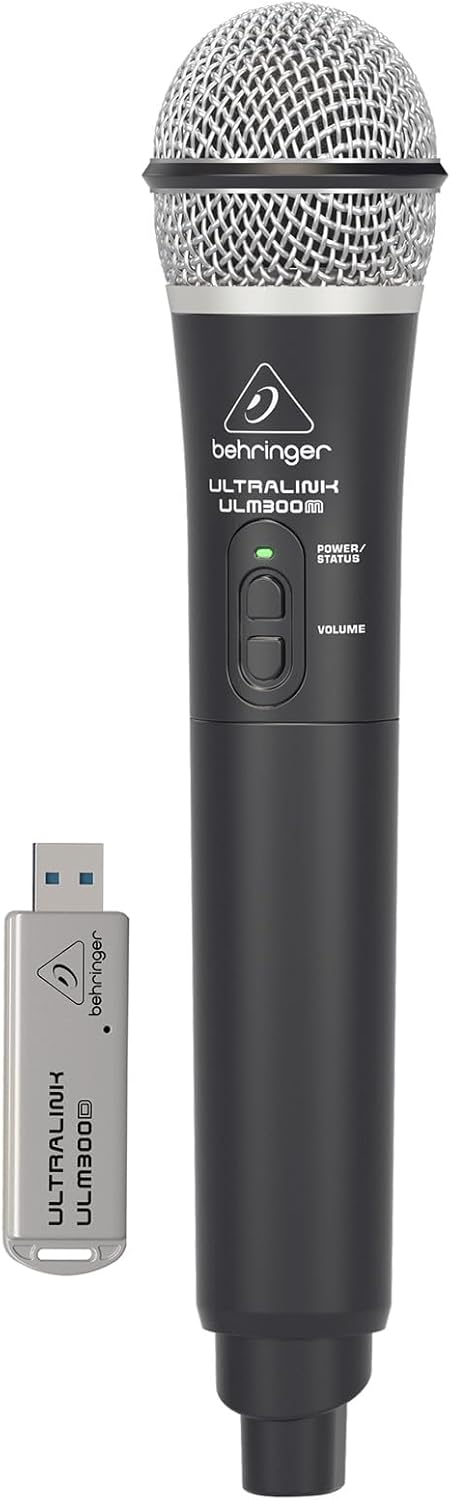
Image: The Behringer ULM300M wireless microphone shown with its USB receiver, the ULM300USB.
- Insert the ULM300USB receiver into the БЕСПРОВОДНАЯ СИСТЕМА USB port on the MPA200BT.
- Ensure the ULM300M wireless microphone has fresh batteries installed.
- Power on the wireless microphone. The status LED on both the microphone and the receiver should indicate a successful connection (usually a solid green light).
- Adjust the microphone's volume using the controls on the microphone itself and the MPA200BT's input gain settings.
Дистанционное управление через приложение для смартфона

Image: A smartphone screen showing the graphical user interface of the Behringer remote control application, used to manage the PA system settings.
The MPA200BT can be controlled remotely using a dedicated smartphone application. This allows for adjustments to volume, EQ, and effects from a distance.
- Download the official Behringer MPA200BT control app from your device's app store (iOS/Android).
- Ensure your smartphone is connected to the MPA200BT via Bluetooth (as described in the "Bluetooth Audio Streaming" section).
- Open the app. It should automatically detect and connect to your MPA200BT unit.
- Use the app's interface to control various parameters of the PA system.
Работа от батареи
The MPA200BT features an internal rechargeable battery for portable use.
- The battery charges automatically when the unit is connected to AC power.
- A battery level indicator on the display shows the remaining charge.
- For optimal battery life, fully charge the unit before its first use and periodically when not in use for extended periods.
Обслуживание
- Уборка: Для очистки внешней поверхности устройства используйте мягкую сухую ткань. Не используйте абразивные чистящие средства или растворители.
- Хранилище: When not in use, store the MPA200BT in a cool, dry place, away from direct sunlight and extreme temperatures.
- Уход батареи: If storing for extended periods, ensure the battery is partially charged (around 50%) and recharge it every few months to prevent deep discharge.
- Вентиляция: Во избежание перегрева убедитесь, что вентиляционные отверстия не заблокированы во время работы.
Поиск неисправностей
| Проблема | Возможная причина | Решение |
|---|---|---|
| Нет электричества | Power cable not connected; unit not switched on; battery depleted. | Check power cable connection; ensure power switch is ON; charge battery. |
| Нет звука | Volume too low; input source not connected or selected; faulty cable; microphone off. | Increase master volume and input gain; check input connections; test cables; ensure microphone is powered on and paired. |
| Сбой сопряжения Bluetooth | MPA200BT not in pairing mode; device too far; interference. | Press Bluetooth button to enter pairing mode; move device closer; restart both devices. |
| Беспроводной микрофон не работает | USB receiver not connected; microphone off; depleted batteries in microphone; interference. | Ensure ULM300USB is fully inserted; power on microphone; replace microphone batteries; ensure clear line of sight. |
| Squealing/Feedback | Microphone too close to speaker; microphone gain too high. | Move microphone further from speaker; reduce microphone input gain. |
Технические характеристики
| Особенность | Деталь |
|---|---|
| Модель | ЕВРОПОРТ MPA200BT |
| Выход Втtage | 200 Вт |
| Источник питания | Питание от батарей / от сети переменного тока |
| Технология связи | Bluetooth |
| Количество каналов | 2 |
| Вес товара | 12.1 кг (26.6 фунта) |
| Размеры продукта (Д x Ш x В) | 11.02 x 10.11 x 16.53 дюйма |
| Тип крепления | Настольный |
| Совместимые устройства | Смартфон |
| Производитель | Music Tribe US |
Гарантия и поддержка
Подробную информацию о гарантии и технической поддержке можно получить на официальном сайте Behringer. webили обратитесь в службу поддержки клиентов. Сохраните чек в качестве подтверждения покупки.
Интернет-ресурсы: www.behringer.com
Производитель: Music Tribe US
Официальные видеоролики о продуктах
No relevant official product videos from the seller were found in the provided data for embedding.


