1. Введение
Thank you for choosing the Baseus Encok S06 Magnetic Bluetooth In-Ear Earphones. This manual provides essential information for the proper setup, operation, maintenance, and troubleshooting of your new earphones. Please read this manual thoroughly before use to ensure optimal performance and longevity of the product.
The Baseus Encok S06 features a dual battery design for extended playback, Bluetooth 4.1 for stable connectivity, and a magnetic design for convenient storage. It includes an in-built microphone with CVC Noise Suppression and a 3-button remote for easy control of music and calls.

Изображение 1.1: оконченоview of the Baseus Encok S06 Earphones.
This image displays the complete Baseus Encok S06 earphones, highlighting their in-ear design, magnetic earbuds, and the inline control module. The black color and sleek design are visible.
2. Что в коробке
Upon unboxing your Baseus Encok S06 earphones, please verify that all the following components are present:
- Baseus Encok S06 Earphones
- Ear-hooks (various sizes)
- Ear-muffs (small and big sizes)
- Кабель для зарядки (Micro USB)

Изображение 2.1: Содержимое упаковки продукта.
This image shows all items included in the Baseus Encok S06 package: the earphones themselves, two pairs of ear-hooks, two pairs of ear-muffs (small and large), and a Micro USB charging cable.
3. Настройка
3.1 Зарядка наушников
Перед первым использованием полностью зарядите наушники.
- Locate the charging port on the inline control module.
- Подключите прилагаемый кабель Micro USB для зарядки к соответствующему порту.
- Другой конец кабеля подключите к источнику питания USB (например, к порту USB компьютера, сетевому адаптеру).
- The indicator light will show charging status (refer to product specific LED behavior, typically red for charging, blue/off for fully charged).
- Для полной зарядки обычно требуется от 1 до 2 часов.
3.2 Сопряжение с Bluetooth-устройством
To connect your earphones to a smartphone, tablet, or other Bluetooth-enabled device:
- Убедитесь, что наушники выключены.
- Press and hold the multi-function button (usually the center button on the inline remote) for approximately 5-7 seconds until the indicator light flashes red and blue alternately. This indicates pairing mode.
- На вашем устройстве включите Bluetooth и выполните поиск новых устройств.
- Select "Baseus Encok S06" (or similar name) from the list of available devices.
- После подключения индикатор на наушниках обычно медленно мигает синим цветом или гаснет.
- При запросе пароля введите «0000».
The earphones will automatically attempt to reconnect to the last paired device when turned on.
4. Инструкция по эксплуатации
The Baseus Encok S06 features an intuitive 3-button inline remote for easy control.
| Кнопка/Действие | Функция |
|---|---|
| Многофункциональная кнопка (по центру) |
|
| Кнопка увеличения громкости (+) |
|
| Кнопка уменьшения громкости (-) |
|
The magnetic design allows the earbuds to snap together when not in use, preventing tangles and making them easy to wear around your neck.
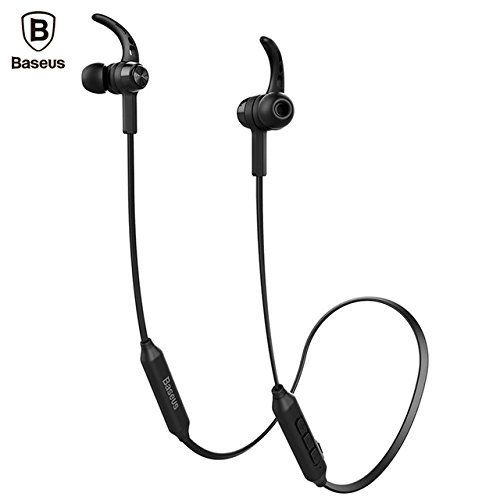
Image 4.1: Close-up of the inline control module.
Это изображение обеспечивает детальное представление view of the Baseus Encok S06 earphones, specifically highlighting the inline control module with its three buttons and the magnetic earbuds.
5. Техническое обслуживание
Правильный уход гарантирует долговечность и оптимальную работу ваших наушников.
- Уборка: Use a soft, dry, lint-free cloth to clean the earphones. Do not use harsh chemicals, cleaning solvents, or strong detergents. For ear tips, remove them and clean with a mild soap solution, then rinse thoroughly and dry completely before reattaching.
- Хранилище: When not in use, store the earphones in a cool, dry place, away from direct sunlight and extreme temperatures. The magnetic design helps keep the cables tangle-free.
- Избегайте попадания влаги: Do not expose the earphones to water or excessive moisture. While designed for daily use, they are not waterproof.
- Обращаться с осторожностью: Avoid dropping the earphones or subjecting them to strong impacts. Do not pull on the cable excessively.
6. Поиск Неисправностей
If you encounter issues with your Baseus Encok S06 earphones, refer to the following common solutions:
| Проблема | Возможная причина/решение |
|---|---|
| Наушники не включаются. |
|
| Невозможно выполнить сопряжение с устройством. |
|
| Нет звука или низкая громкость. |
|
| Качество связи плохое. |
|
7. Технические характеристики
| Особенность | Деталь |
|---|---|
| Название модели | ENCKS6 |
| Бренд | Базеус |
| Технология связи | Беспроводная связь (Bluetooth) |
| Технология беспроводной связи | Блютус 4.1 |
| Расположение ушей | В ухо |
| Форм-фактор | В ухо |
| Метод контроля | Button (3-button inline remote) |
| Особые возможности | Magnetic design, Built-in microphone with CVC Noise Suppression, Dual Battery |
| Вес товара | 60 грамм |
8. Гарантия и поддержка
8.1 Информация о гарантии
Этот продукт поставляется с Гарантия 6 месяца provided by the manufacturer from the date of purchase. Please retain your proof of purchase for warranty claims. The warranty covers manufacturing defects and malfunctions under normal use. It does not cover damage caused by misuse, accidents, unauthorized modifications, or normal wear and tear.
8.2 Поддержка клиентов
For further assistance, technical support, or warranty inquiries, please contact Baseus customer service through their official webсайт или продавец, у которого вы приобрели товар.
Важный: Не пытайтесь разбирать или ремонтировать наушники самостоятельно, так как это аннулирует гарантию.


