Введение
The D'Addario NS Micro Headstock Tuner offers discreet and accurate tuning for a variety of stringed instruments. Its compact design and versatile mounting options ensure it remains unobtrusive while providing clear, precise tuning feedback.

Изображение: Спереди view of the D'Addario NS Micro Headstock Tuner, showing its compact size and control buttons.
Что в коробке?
- NS Micro Headstock Tuner
- Clip-free mount
- Крепежные винты
- CR2032 battery (pre-installed or included)
Основные характеристики
- Сдержанный дизайн: The tuner's compact size allows it to remain hidden behind the instrument's headstock, blending seamlessly with its aesthetics.
- Clip-Free Mounting: Designed to screw directly into a tuning machine screw hole for a secure and permanent attachment. Necessary screws are included.
- Высокая точность: Utilizes a piezo transducer to detect instrument vibrations, ensuring precise tuning even in noisy environments. Features a wide calibration range (410-480Hz).
- Легко читаемый дисплей: A tri-color backlit screen indicates tuning status: red for out of tune, yellow for close, and green for in tune.
- Универсальный Viewing: A 360-degree swivel mechanism and adjustable padded clamp обеспечить оптимальное viewing angles and flexible positioning for various instruments.
- Broad Instrument Compatibility: Suitable for acoustic guitars, electric guitars, bass guitars, mandolins, banjos, and ukuleles.
- Функция автоматического отключения: Extends battery life by automatically turning off when not in use.
Настройка и установка
The NS Micro Headstock Tuner is designed for a secure, clip-free installation directly onto your instrument's tuning machine. This method ensures the tuner is always available and discreet.
Инструкции по монтажу:
- Определите точку крепления: Locate a suitable tuning machine screw hole on the back of your instrument's headstock. No additional holes are needed.
- Attach Clip-Free Mount: Align the tuner's clip-free mount with the chosen screw hole. Use the provided screw to securely fasten the mount to the headstock. Ensure it is tight enough to prevent movement but do not overtighten.
- Insert Tuner: Slide the tuner unit onto the mounted clip. The tuner is designed to fit snugly.
- Регулировать ViewУгол входа: The tuner body can rotate 360 degrees. Adjust its position for optimal visibility while playing.

Image: The D'Addario NS Micro Headstock Tuner securely mounted on the back of a guitar headstock, showing its discreet placement.
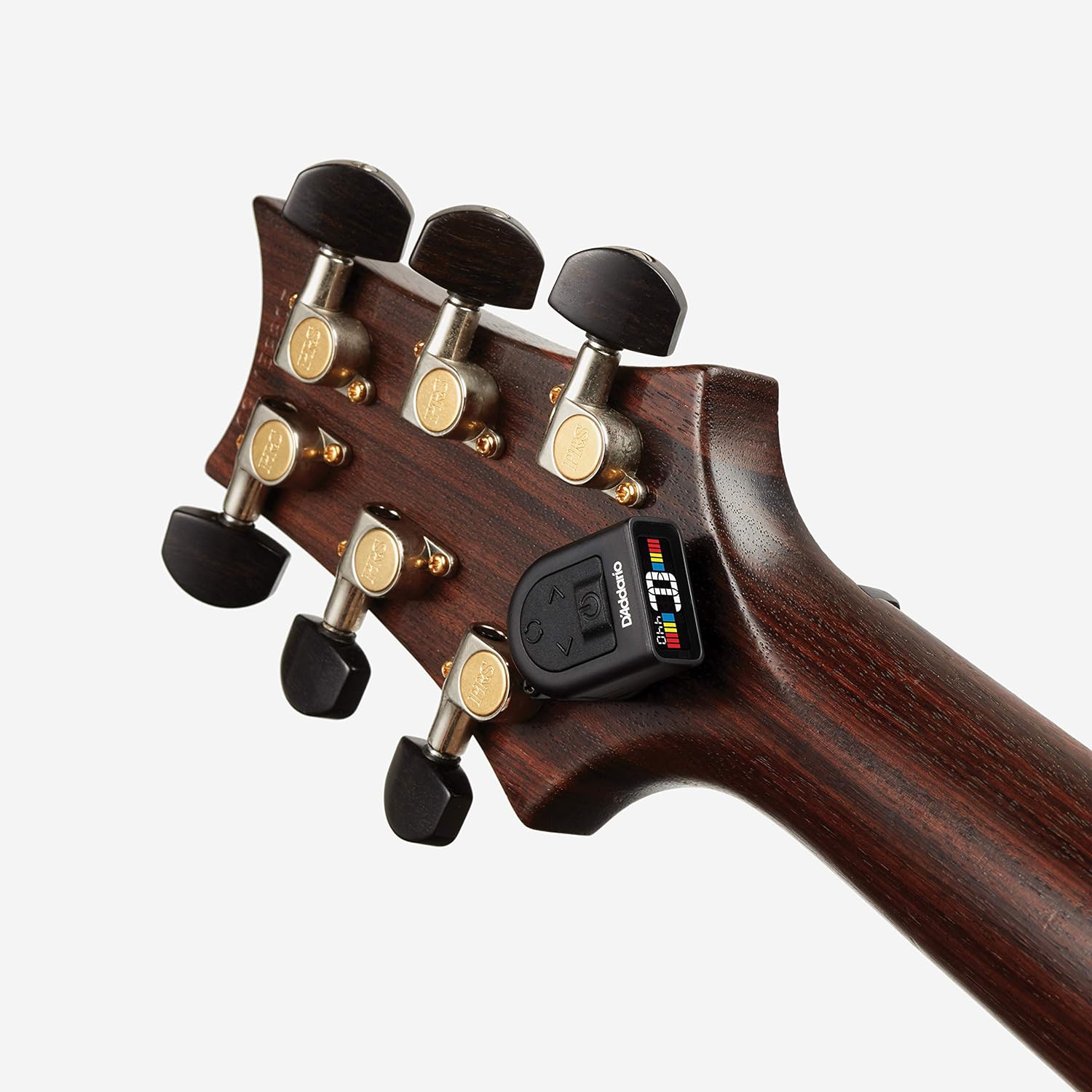
Image: The D'Addario NS Micro Headstock Tuner mounted on a bass guitar headstock, demonstrating its versatility across different instruments.
Инструкция по эксплуатации
Включение/выключение:
Press and hold the power button (usually located on the front or top of the tuner) for a few seconds to turn the tuner on or off.
Настройка инструмента:
- Активировать тюнер: Turn on the NS Micro Headstock Tuner.
- Дёрнуть струну: Щипните по одной струне вашего инструмента. Тюнер уловит вибрацию и отобразит ноту.
- Прочтите дисплей:
- Красный: The note is significantly out of tune.
- Желтый: The note is close to being in tune.
- Зеленый: The note is perfectly in tune.
- Регулировка высоты тона: Turn your instrument's tuning peg until the display shows a green light, indicating the string is in tune.

Image: Close-up of the tuner's display showing a note in tune with green indicators.
Adjusting Calibration (Hz):
The tuner's calibration can be adjusted from 410Hz to 480Hz. Refer to your instrument's specific tuning requirements or personal preference for the correct Hz setting.
- Use the arrow buttons (left/right) on the tuner to increase or decrease the Hz value.
- The default setting is typically 440Hz.
Changing Display Orientation:
The display can be rotated to accommodate different mounting positions and user preferences. Press the rotation button (circular arrow icon) to cycle through the available display orientations.
Видеодемонстрация:
Video: Official D'Addario NS Micro Universal Tuner demonstration, showing its features and how to use it.
Обслуживание
Замена батареи:
The NS Micro Headstock Tuner is powered by a CR2032 coin cell battery. When the display dims or the tuner becomes unresponsive, it's time to replace the battery.
- Carefully open the battery compartment, usually located on the back or side of the tuner.
- Удалите старую батарею CR2032.
- Вставьте новую батарею CR2032 положительным (+) полюсом вверх.
- Надежно закройте батарейный отсек.
Уборка:
Wipe the tuner with a soft, dry cloth to remove dust or smudges. Do not use liquid cleaners or abrasive materials.
Поиск неисправностей
- Тюнер не включается: Убедитесь, что батарейка CR2032 правильно установлена и имеет достаточный заряд. При необходимости замените её.
- Неточные показания:
- Ensure the tuner is securely attached to the instrument's headstock to pick up vibrations effectively.
- Check the calibration (Hz) setting. The standard is 440Hz, but some instruments or preferences may require a different setting.
- Pluck strings clearly and individually, avoiding sympathetic vibrations from other strings.
- Дисплей тусклый: Замените батарею CR2032.
- Tuner falls off: Ensure the clip-free mount is securely fastened with the screw and the tuner unit is properly slid onto the mount.
Технические характеристики
| Вес товара | 1.13 унции |
| Размеры продукта | 3 x 1.13 x 4.63 дюйма |
| Номер модели | 19UKE02 |
| Аккумуляторы | 1 C battery required (CR2032 type) |
| Материал корпуса | Резина |
| Цвет | Черный |
| Тип материала | Резина |
| Диапазон настройки | 410-480Hz (Calibration) |
| Отображать | Tri-color backlit screen |
Гарантия и поддержка
For warranty information, technical support, or to register your product, please visit the official D'Addario webили обратитесь в службу поддержки клиентов. Сохраните чек о покупке для предъявления гарантийных претензий.


