1. Введение
This manual provides detailed instructions for the installation, operation, and maintenance of the Novastar MCTRL300 Synchronous LED Sender Box. Please read this manual thoroughly before using the device to ensure proper functionality and to prevent damage.
The Novastar MCTRL300 is a high-performance LED display controller designed for full-color LED screens, offering reliable and stable operation for various indoor and outdoor applications.
2. Продукт закончилсяview и особенности
The Novastar MCTRL300 is a full-color sending card and LED display accessory. It is engineered to manage LED displays with high efficiency and precision.
Основные характеристики:
- DVI-вход: One (1) DVI input for video signal connection.
- Аудиовход: Supports external audio input.
- Вывод данных: Two (2) RJ45 ports for data output, supporting hot backup functionality for enhanced reliability.
- Интерфейс управления: USB control interface, allowing for cascading multiple units.
- Емкость пикселей: Поддерживает до 1.3 миллионов пикселей.
- Поддерживаемые резолюции: Includes 1280×1024, 1024×1200, 1600×848, 1920×712, 2048×668, and custom resolutions.
- Light Sensor Interface: One (1) interface for automatic brightness adjustment based on ambient light conditions.
- Приложение: Suitable for both indoor and outdoor full-color RGB LED display control.
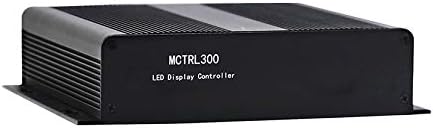
Рисунок 2.1: Передняя часть view of the Novastar MCTRL300 LED Sender Box, showing the model name.
3. Настройка и подключение
This section details the physical connections required to set up your Novastar MCTRL300 LED Sender Box.
3.1 Задняя панельview

Figure 3.1: Rear panel of the MCTRL300, illustrating power input, DVI, USB, audio, UART, and RJ45 data output ports.
- Power Input (AC 100-240V ~ 50/60Hz): Connect the provided power cable to this port and to a suitable power outlet. The power switch is located next to this port.
- DVI-вход: Connect your video source (e.g., PC graphics card) to this port using a DVI cable.
- USB-порт: Connect a USB cable from your control PC to this port for device configuration and control.
- Аудиовход: Connect an external audio source if audio transmission is required.
- RJ45 Data Output (OUT1, OUT2): Connect standard Ethernet cables from these ports to the receiving cards of your LED display. OUT1 and OUT2 support hot backup.
- UART IN/OUT: Used for cascading multiple sender boxes or for specific control scenarios.
- Датчик освещенности: Connect an external light sensor for automatic brightness adjustment.
3.2 Схема подключения
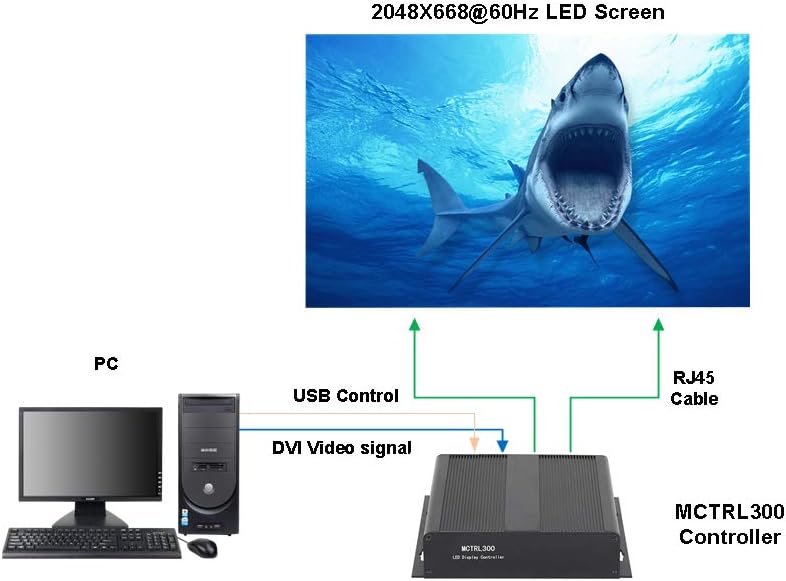
Figure 3.2: Typical connection setup for the MCTRL300, illustrating DVI video signal, USB control, and RJ45 data output to an LED screen.
- Connect the DVI output from your PC's graphics card to the DVI input port on the MCTRL300.
- Connect a USB cable from your PC to the USB port on the MCTRL300. This enables software control and configuration.
- Connect one or more RJ45 Ethernet cables from the MCTRL300's OUT1/OUT2 ports to the input ports of the first receiving card in your LED display panel chain. Ensure proper cabling for the entire LED screen.
- Connect the power cable to the MCTRL300 and a power source.
- Turn on the power switch on the rear panel of the MCTRL300. The "RUN" and "STATUS" indicators will illuminate.
4. Инструкция по эксплуатации
After completing the physical connections, the MCTRL300 is ready for operation. Configuration and content management are typically performed using dedicated software on the connected PC.
- Включение питания: Ensure all connections are secure, then switch on the power to the MCTRL300 using the rear panel switch.
- Конфигурация программного обеспечения: Use the Novastar control software on your PC to detect the MCTRL300. Configure the LED display parameters, including resolution, screen mapping, and brightness settings. Refer to the software's user guide for detailed instructions.
- Воспроизведение контента: Once configured, the MCTRL300 will transmit the video signal from your PC to the LED display. Ensure your PC's display settings match the configured resolution for optimal output.
- Регулировка яркости: If a light sensor is connected, the display brightness can be automatically adjusted. Manual adjustment is also possible via the control software.
5. Техническое обслуживание
Proper maintenance ensures the longevity and reliable performance of your MCTRL300 LED Sender Box.
- Уборка: Регулярно протирайте внешнюю поверхность устройства мягкой сухой тканью. Избегайте использования жидких чистящих средств или растворителей. Убедитесь, что вентиляционные отверстия очищены от пыли и мусора.
- Условия окружающей среды: Operate the device within its specified temperature and humidity ranges. Avoid exposure to extreme temperatures, direct sunlight, or high moisture environments.
- Управление кабелями: Ensure all cables are securely connected and not under strain. Periodically check for any signs of wear or damage to cables.
- Обновления программного обеспечения: Keep the Novastar control software and device firmware updated to the latest versions for optimal performance and compatibility.
6. Поиск Неисправностей
This section provides solutions to common issues you might encounter with the MCTRL300.
| Проблема | Возможная причина | Решение |
|---|---|---|
| No display on LED screen. |
|
|
| "RUN" or "STATUS" indicator not lit. |
|
|
| Display shows abnormal colors or flickering. |
|
|
If the problem persists after attempting these solutions, please contact Novastar technical support.
7. Технические характеристики
Technical specifications for the Novastar MCTRL300 LED Sender Box.
| Особенность | Деталь |
|---|---|
| Бренд | Новастар |
| Модель | MCTRL300 |
| Входной интерфейс | 1 x DVI, External Audio |
| Интерфейс вывода | 2 x RJ45 (Data Output, Hot Backup), UART OUT |
| Интерфейс управления | 1 x USB, UART IN |
| Емкость пикселей | 1.3 миллиона пикселей |
| Поддерживаемые резолюции | 1280×1024, 1024×1200, 1600×848, 1920×712, 2048×668, or custom |
| Особые возможности | Light Sensor Interface for auto brightness adjustment, Cascading support via USB |
| Источник питания | 100-240 В переменного тока ~ 50/60 Гц |
| Вес товара | 3.88 фунта (приблизительно 1.76 кг) |
| Размеры упаковки | 11.1 x 8.54 x 4.57 дюйма (прибл. 28.2 x 21.7 x 11.6 см) |

Figure 7.1: MCTRL300 package contents, including the sender box and necessary cables.
8 Поддержка
For further assistance, technical support, or warranty inquiries, please refer to the official Novastar webсайт или обратитесь к авторизованному дилеру.
Always ensure you have your product model number (MCTRL300) and purchase details available when contacting support.


