1. Введение
Спасибо за покупкуasing the Capello Play it All Bluetooth Wireless Home Stereo Speaker CI302. This device offers versatile audio playback options including Bluetooth wireless streaming, CD player functionality, and FM digital radio. This manual provides detailed instructions for setup, operation, maintenance, and troubleshooting to ensure optimal performance and longevity of your speaker system.
2 Важная информация по безопасности
- Перед началом работы с устройством прочтите все инструкции.
- Сохраните это руководство для дальнейшего использования.
- Не подвергайте устройство воздействию дождя или влаги во избежание пожара или поражения электрическим током.
- Обеспечьте надлежащую вентиляцию; не блокируйте вентиляционные отверстия.
- Установите устройство на устойчивую ровную поверхность.
- Используйте только те насадки/аксессуары, которые указаны производителем.
- Отключайте устройство от сети во время грозы или если оно не используется в течение длительного времени.
- По всем вопросам обслуживания обращайтесь к квалифицированному персоналу.
3. Содержимое упаковки
Пожалуйста, проверьте наличие всех предметов:
- Capello Play it All Bluetooth Wireless Home Stereo Speaker CI302
- Дистанционное управление
- Адаптер переменного тока
- Руководство пользователя (этот документ)
4. Продукт закончилсяview
Familiarize yourself with the main components and controls of your Capello Play it All speaker.
Передний View

Рисунок 4.1: Передний view of the Capello Play it All speaker, showing the speaker grille, digital clock display, and subtle branding.
Элементы управления верхней панели

Рисунок 4.2: Top panel of the Capello Play it All speaker, illustrating the CD compartment, 'capello' logo, and various control buttons including PRESET, MODE, PAIRING, PROGRAM/CLOCK SET, SKIP, PLAY/PAUSE, STOP, REPEAT, and VOLUME.
- PRESET +/-: Navigate through saved FM radio stations.
- РЕЖИМ: Switch between Bluetooth, CD, FM Radio, and Line-In modes.
- СОПРЯЖЕНИЕ: Initiate Bluetooth pairing mode.
- PROGRAM/CLOCK SET: Program CD tracks or set the clock.
- SKIP ◀◀ / ▶▶: Skip tracks on CD or adjust FM frequency.
- PLAY/PAUSE ▶▶: Play or pause CD playback.
- STOP ■: Stop CD playback.
- ПОВТОРИТЬ: Repeat current track or all tracks on CD.
- ГРОМКОСТЬ +/-: Отрегулируйте уровень громкости.
- ОТКРЫТО ЗАКРЫТО: Откройте или закройте отсек для компакт-дисков.
- ОЖИДАТЬ: Power on/off the unit.
Rear Panel (Typical)
The rear panel typically includes the AC power input, FM antenna connection, and Line-In jack.
5. Настройка
5.1 Подключение питания
- Connect the AC power adapter to the DC IN jack on the rear of the speaker.
- Вставьте другой конец адаптера в стандартную настенную розетку.
- The unit will enter standby mode, and the digital clock display will illuminate.
5.2 FM Antenna Setup
For optimal FM radio reception, extend the FM wire antenna fully and position it for the best signal. Avoid placing it near other electronic devices that may cause interference.
5.3 Установка часов
- В режиме ожидания нажмите и удерживайте PROGRAM/CLOCK SET кнопка.
- The hour digits will begin to flash. Use the SKIP ◀◀ / ▶▶ кнопки для настройки часов.
- Нажимать PROGRAM/CLOCK SET again to confirm the hour.
- Минутные цифры будут мигать. Используйте SKIP ◀◀ / ▶▶ кнопки для настройки минут.
- Нажимать PROGRAM/CLOCK SET one last time to save the setting.
6. Инструкция по эксплуатации
6.1 Включение/выключение питания и выбор режима
- Нажмите STANDBY button on the unit or the remote control to turn the speaker on or off.
- Нажмите РЕЖИМ button repeatedly to cycle through available modes: Bluetooth, CD, FM Radio, and Line-In.
6.2 Беспроводная потоковая передача по Bluetooth
- Turn on the speaker and select Bluetooth mode using the РЕЖИМ button. The display will show 'BT' and flash, indicating it's in pairing mode.
- На устройстве с поддержкой Bluetooth (смартфон, планшет, компьютер) включите Bluetooth и выполните поиск доступных устройств.
- Select 'Capello CI302' (or similar) from the list of devices.
- Once paired, the speaker will emit a confirmation tone, and 'BT' on the display will stop flashing.
- You can now play audio from your device through the speaker. Use your device or the speaker's controls for volume and track navigation.
6.3 Воспроизведение компакт-дисков
- Нажмите ОТКРЫТЬ/ЗАКРЫТЬ кнопка для открытия отсека для компакт-дисков.
- Carefully place an audio CD (CD, CD-R/-RW) with the label side facing up into the compartment.
- Close the CD compartment. The unit will read the disc.
- If not already in CD mode, press the РЕЖИМ кнопку, чтобы выбрать режим компакт-диска.
- Нажмите ВОСПРОИЗВЕДЕНИЕ/ПАУЗА кнопку, чтобы начать воспроизведение.
- Использовать SKIP ◀◀ / ▶▶ to skip tracks, СТОП ■ to stop, and ПОВТОРИТЬ to cycle through repeat options.
6.4 FM Digital Radio
- Нажмите РЕЖИМ button to select FM radio mode. The current frequency will be displayed.
- Автоматическое сканирование: Нажмите и удерживайте ВОСПРОИЗВЕДЕНИЕ/ПАУЗА button to automatically scan and save available FM stations as presets.
- Ручная настройка: Нажимать SKIP ◀◀ / ▶▶ briefly to fine-tune the frequency. Press and hold to scan for the next strong station.
- Accessing Presets: Используйте ПРЕДУСТАНОВКА +/- кнопки для переключения между сохраненными станциями.
6.5 Line-In Operation
- Connect an audio cable (not included) from the headphone jack or line-out of an external audio device to the ЛИНЕЙНЫЙ ВХОД jack on the speaker.
- Нажмите РЕЖИМ button to select Line-In mode.
- Play audio from your connected device. Volume can be controlled via the speaker or the external device.
6.6 USB-зарядка
The speaker features a USB port for charging compatible devices (e.g., smartphones, tablets). Connect your device's USB charging cable (not included) to the USB port on the speaker. The speaker does not need to be in a specific mode for USB charging to function.
6.7 Использование дистанционного управления
The included remote control provides convenient access to all functions. Ensure the remote has working batteries and is pointed towards the front of the speaker.
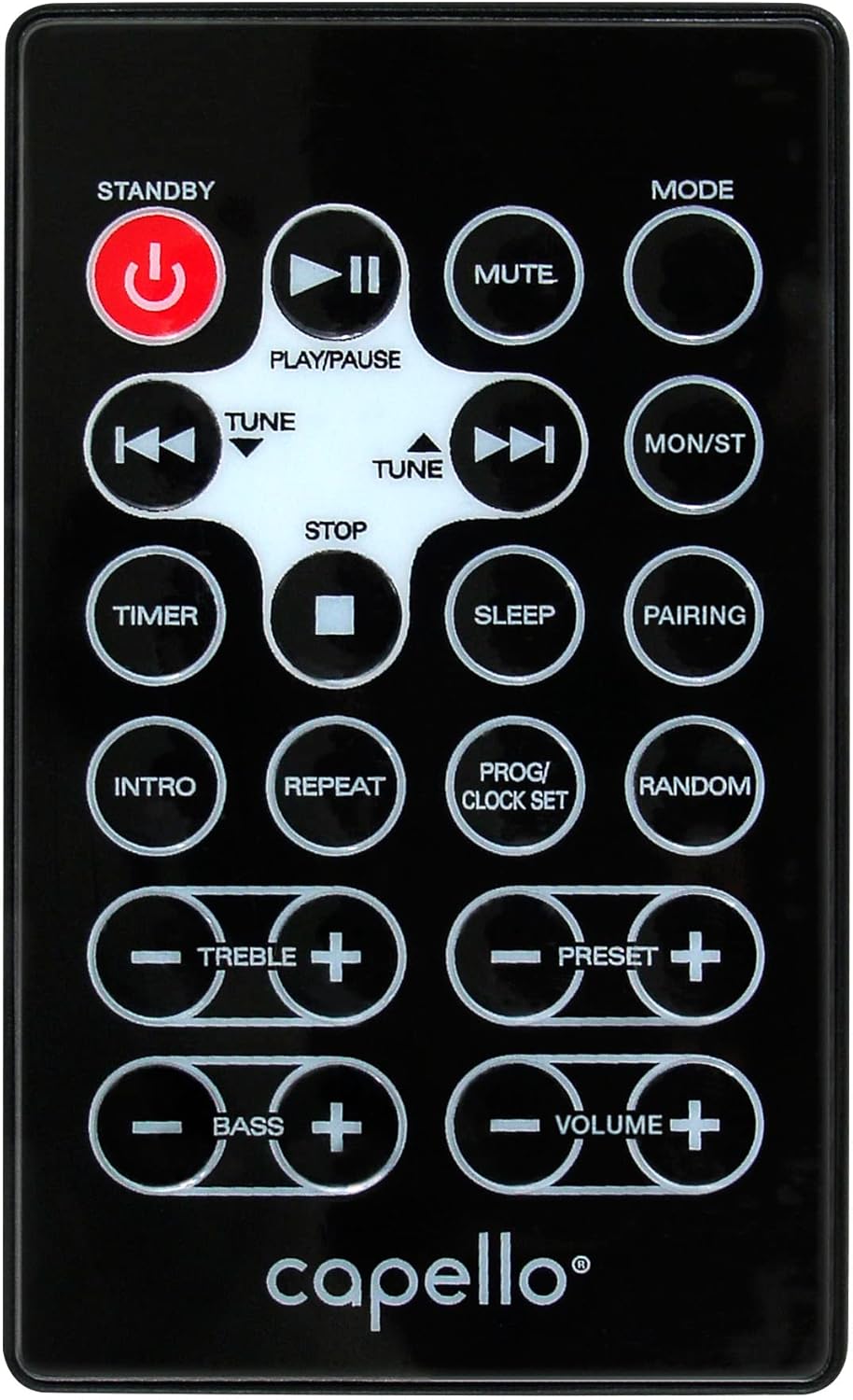
Рисунок 6.1: Layout of the remote control for the Capello Play it All speaker, showing buttons for Standby, Play/Pause, Mute, Mode, Skip/Tune, Stop, Timer, Sleep, Pairing, Intro, Repeat, Program/Clock Set, Random, Treble, Bass, and Volume controls.
- ОЖИДАТЬ: Включение / выключение питания.
- ВОСПРОИЗВЕДЕНИЕ/ПАУЗА: Воспроизвести или приостановить звук.
- НЕМОЙ: Отключить или включить звук.
- РЕЖИМ: Переключайтесь между режимами ввода.
- SKIP/TUNE ◀◀ / ▶▶: Skip tracks or tune radio frequency.
- ОСТАНАВЛИВАТЬСЯ: Остановите воспроизведение.
- ТАЙМЕР: Установите таймер сна.
- СПАТЬ: Activate sleep function.
- СОПРЯЖЕНИЕ: Инициировать сопряжение по Bluetooth.
- ВВЕДЕНИЕ: Play the first few seconds of each CD track.
- ПОВТОРИТЬ: Повторить текущий трек или все треки.
- PROG/CLOCK SET: Program CD tracks or set clock.
- СЛУЧАЙНЫЙ: Play CD tracks in random order.
- ВЫСОКИЕ +/-: Отрегулируйте уровень высоких частот.
- БАС +/-: Отрегулируйте уровень басов.
- ГРОМКОСТЬ +/-: Отрегулируйте общую громкость.
7. Техническое обслуживание
7.1 Очистка
- Перед очисткой всегда отключайте устройство от электрической розетки.
- Для протирки внешних поверхностей используйте мягкую сухую ткань.
- Не используйте абразивные чистящие средства, воски или растворители, так как они могут повредить отделку.
- Для чистки линз CD используйте специальный диск для чистки линз CD.
7.2 Хранение
If storing the unit for an extended period, unplug it from the power source and store it in a cool, dry place away from direct sunlight and extreme temperatures.
8. Поиск Неисправностей
| Проблема | Возможная причина | Решение |
|---|---|---|
| Нет электричества | Шнур питания не подключен; розетка неактивна. | Ensure power cord is securely plugged in; try a different outlet. |
| Нет звука | Volume too low; incorrect mode selected; external device muted. | Increase volume; select correct input mode; check external device volume/mute. |
| CD-диск пропускает воспроизведение или не воспроизводится. | Dirty or scratched CD; CD inserted incorrectly; dirty CD lens. | Clean or replace CD; insert CD label-side up; use a CD lens cleaner. |
| Сбой сопряжения Bluetooth | Device too far; Bluetooth not enabled on device; speaker not in pairing mode. | Move device closer; enable Bluetooth; ensure speaker is in BT pairing mode. |
| Плохой прием FM | Антенна не выдвинута; помехи. | Fully extend and reposition FM antenna; move away from other electronics. |
| Пульт дистанционного управления не работает | Batteries depleted; obstruction; not pointed at sensor. | Replace batteries; remove obstructions; point remote directly at the unit. |
9. Технические характеристики
| Особенность | Спецификация |
|---|---|
| Бренд | Капелло |
| Номер модели | CI302 |
| Технология связи | Bluetooth |
| Тип динамика | Стерео |
| Режим аудиовыхода | Стерео |
| Поддерживаемые аудиоформаты | компакт-диск, MP3 |
| Номинальная выходная мощность динамиков | 10 Вт |
| Максимальная выходная мощность динамиков | 10 Вт |
| Конфигурация каналов объемного звучания динамиков | 2.0 |
| Тип источника питания | Проводной электрический |
| Совместимые устройства | Ноутбук, смартфон, планшет |
| Особые возможности | Digital Display, Portable, USB Port |
| Тип материала | Пластик |
| Тип крепления | Столешница |
| Вес товара | 2.57 Килограмма |
| Размеры упаковки | 38.3 х 24.2 х 18.5 см |
| Батарейки в комплекте | Нет |
| Требуются батареи | Нет |
10. Гарантия и поддержка
This product is covered by a limited warranty. Please refer to the warranty card included in your package for specific terms and conditions. For technical support or customer service inquiries, please contact Capello customer support through their official webсайт или контактную информацию, указанную в документации о покупке.


